Touchscreen future?

I think anyone who’s played with an iPhone will agree that it’s a great toy, and has the “I want one” factor. Unsurprisingly, all the major mobile manufacturers are following suit and churning out touchscreen phones.

There’s no doubt that being able to browse the web wherever you are is useful, and a touchscreen is a good interface for this, but I’m not convinced it makes a good phone. Without a physical keypad of some sort you can no longer SMS by touch, whether they have haptic (vibrating) touch features or not. There is no way that a touchscreen keyboard will be as easy to use as a physical one: it will require human evolution for that to be the case. We shouldn’t have to wait for human evolution to catch up with touchscreens

My other criticism of this current generation of touch phones is size – I still don’t carry a ‘man bag’, so my phone goes in my pocket. Blackberry or iPhone – they’re too big. It’s surprising that the smallest phone I had (a Nokia 6210, if I remember correctly) was in 2003. They have been growing ever since. Do I have to start wearing clown trousers?

Looking through user reviews on Amazon, touch screens seem to get pretty average scores. The iPhone gets 3 or 4/5, and the Samsung Omnia and Blackberry Storm both manage 3 to 3.5/5. Maybe 3/5 isn’t a total disaster, but there are plenty of “old school” phones that get 5/5 reviews.

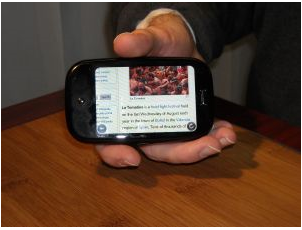
I’m not against touch screens particularly, but I think there’s some way to go before they are done right. The Android ‘Magic’ phone’s keyboard is OK, but I think a better compromise would be a touchscreen keyboard with a physical traditional keypad. Maybe the Palm Pre will be an improvement – though things are rarely perfect on a first generation machine. Until touchscreen technology can give some tactile responses so your fingers can feel their way around, I’m going to want a physical keypad.


Friday timewaster: Neverending Light

For anyone afraid of the dark, stop reading now! OK, just don’t play Neverending Light. This is a Flash based browser game which although it can be a cheesy at times, is also a little bit scary due to its good use of light and dark. You begin the game as part of a group on a tourist tour of a mine, then the lights go out…

It’s very linear, but an enjoyable few minutes (unfortunately there’s no pause). You’ll need Flash 10 installed, and be warned – it’s a bit grisly.

OnSoftware Daily Digest

Microsoft working on a new web browser called Gazelle [readwriteweb]

Facebook opens a way for user feedback regarding the site’s policies [facebook]

Neat collection of WordPress tutorials to create themes, plug-ins and more [tutsplus]

President Obama signaling the end of the Twitter trend? [New York Times]

Can anyone escape from Sagrario’s Room? [Sagrario’s Room]

Queue for Quake!

Quake is arguably the best 3D shoot em up engine ever built. While there have been plenty of pretenders since, nothing really matches the fun of Quake multiplayer games. The announcement of Quake Live, ID Software’s ad supported free online service, has got lots of people excited. It has just been released as an open beta. Using a downloadable plugin, Quake Live actually plays from your browser (not if you use Chrome, though).

After some queuing, as they are suffering from too many users on day one, I got in..blah blah blah. I was going to explain more, but it’s Quake. It’s still the fastest, and best balanced multiplayer shooter you could hope for. I can’t recommend it highly enough.

4 great tiny applications

Sometimes we come across little applications that improve day to day PC life in small but excellent ways. Here are a few recent ones you might like to try:

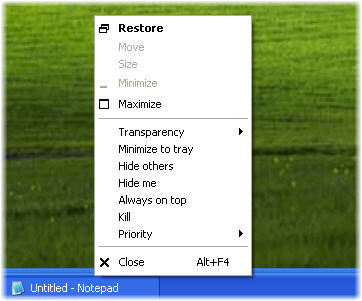
  • Process Manager For Windows adds some great functions to the right click menu, like kill, and minimize to system tray, and is a great way to speed up and simplify your deskspace usage.
  • WakeupOnStandBy lets you automatically wake up your PC start applications and execute tasks while you are away (or asleep)
  • UrlbarExt is a fantastic Firefox extension that adds a toolbox of nice functions to the address bar of the uber-browser.
  • Finally, for now, is DiskDigger which is a very lightweight application that can help you find deleted files on any disk. The results can be surprising!

Save Game

A few months back, a National Videogame Archive was launched in Britain, aiming to preserve videogames that might otherwise be lost. I’ve been playing games of one sort or another since I was a little kid, and I have no idea what’s happened to most of them. Games are an important part of our social fabric, and it would be a great loss if elements of gaming history disappeared.

With that in mind, I thought I’d ask our team what games they would like to see preserved for future generations to enjoy:

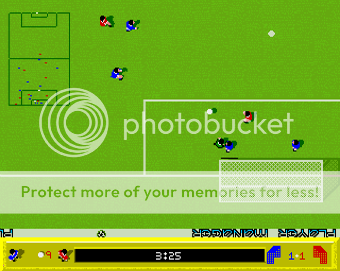
Nick and James both proposed early 90s football games, Kick Off 2 and Sensible Soccer respectively (both on the Commodore Amiga). At the time people argued over which was best, though the years have been kinder to Sensible Soccer, which is currently available on XBox Live Arcade.

Nick also asked for Amiga games Speedball 2, the ultraviolent sport of the future, and Stunt Car Racer, a futuristic racing game that can be seen as a gentle precursor to PlayStation´s Wipeout series.

Elena took us even further back into gaming history, requesting Atic Atac, a ZX Spectrum game from 1983, which she says she remembers playing most as a child. Apparently it was voted 79th best ever Spectrum game in 1990! High praise indeed. She also suggested the daddy of first person shooters, Wolfenstein 3D from 1992. This can now be found as an online flash game, and having looked at it again, I’m glad I’m around to play modern first person shooters! Continue reading “Save Game”

Time Waster (for when you’re alone in the dark): Closure

While winter still has some legs, Closure is a fantastic way to while away dark evenings. This browser-based black and white puzzle game cleverly utilizes the movement of light sources to help guide your silent character to the exit of each level. Control is from the keyboard, and the start of the game is a comprehensive tutorial, so you’ll have no problem picking it up. You can only stand on what you can see, so for example if the ground you are on loses its light source, you’ll fall to your doom (and begin the level again).

The hand drawn flickering graphics alongside the spooky sound effects make this a really atmospheric little game. It’s not scary, just spooky, with the light occasionally revealing strange messages scrawled on the background as your stooped protagonist travels silently onward. There are 30 levels to complete, and it’s a nice challenge worth completing. There are very few games with this ethereal and quiet atmosphere, and I highly recommend you waste some of your time getting to know Closure.

Bear in mind you need to have Flash 10 installed to run this, which is available here for Firefox, Safari and Opera users, and here for IE users.

Free point and click action!

Telltale Games are currently the biggest proponent of the once almost dead ‘point and click adventure’ genre.  During the 1990s, when computers got powerful enough to handle good 3D graphics, all of a sudden the genre went in a spiral of decline, leaving a generation of gamers pining for the likes of Monkey Island, Indiana Jones and the Last Crusade: The Graphic Adventure (as James mentioned recently) and Broken Sword.

Bringing the popular Sam and Max series back was a great move by Telltale, who have now released 11 episodes of the comedic graphic adventure. More recently they’ve started a series of Strong Bad’s Cool Game for Attractive People, which again mixes humour and adventure in short episodes.

So it’s great news that for the price of an email registration, you can  have a free copy of either Sam & Max: Ice Station or Strong Bad’s Cool Game for Attractive People: Dangeresque 3. My tip? Register twice with two email addresses, and you can get both! Here’s the link to the registration page

IBM’s new fastest ever super computer

IBM is building a super computer, Sequoia, for the US government that is expected to break current processing speed records by a huge margin. It won’t be ready until 2012, but should run at 20 Petaflops. I know, it doesn’t mean much to me either, but that’s 20 quadrillion calculations a second. Yeah, I wasn’t sure what a quadrillion was either (it’s 1,000,000,000,000,000, if that helps). Most news sites are saying it’s equivalent to over 2million laptops.

It’s not, unfortunately, going to be used to develop the next Grand Theft Auto games, but to model  nuclear tests and explosions. No one has said when we can expect something like this in our homes, but don’t hold your breath, as Sequoia will need a building the size of a large house! There are some miniaturization issues to solve, as you can see. The very first Apple Macintosh made a good point at its unveiling, which was, ‘never trust a computer you can’t pick up.’

“Experts”, mysterious as always, predict that by 2030 we might have a computer running at a Zetaflop (1,000,000,000,000,000,000,000 calculations per second) , which would be able to fully model Earth’s weather patterns for two week periods.  Whether it will be able to load Windows in under 30 seconds is anyone’s guess.

Webmail never stops

With Yahoo Mail and Hotmail having been revamped recently, and while Gmail continues to develop, I thought it might be a good moment to step back and look at their relative benefits. I’ve had active Yahoo and Hotmail accounts for a decade, but over the past couple of years Gmail has become my emailing home – so if anyone wants to accuse me of a Gmail bias, it’s true, I have one!

So, Gmail stole me away from Yahoo and Hotmail. Have they pulled off any developmental tricks to bring me back?

The biggest functional difference between the three is the reader pane. Both Yahoo and Hotmail utilize this, so you can read messages while still having your inbox open. Those two also let you drag and drop mail into folders, which makes organizing your mail really easy. Running Firefox, Yahoo! Mail was noticeably faster than Hotmail, which still suffers from a bit of lag. A split second makes all the difference today. Yahoo and Gmail are comparable, with messages appearing without noticeable loading times.

While it lacks the reader pane, Gmail shows mail in a ‘conversation’, which is much easier to use than the ever-lengthening emails in Hotmail and Yahoo, when you’re exchanging a string of messages. Where Gmail really differentiates itself is with its Beta status, which I personally think is a conceit on Google’s part to allow constant development with user feedback. And we all know it’s cooler to be using a beta product than a final version, right?

My cynicism aside, Gmail features Gmail Labs, which allows users to use interesting developmental apps for Gmail, and customize it to their needs. Neither Yahoo or Hotmail are anywhere near this flexible.

All three offer color changes, Hotmail and Yahoo have a miserly selection, and Gmail has a much larger ‘themes’ selection. Of course, color is all down to personal taste, but I think the majority of these aesthetic customizations are pretty nasty! Of the original designs, Gmail is the clearest and most neutral, and its text more readable. The inbox text in Yahoo is a little small, but the page layout is good. I can’t recommend Hotmail, as it’s page in any configuration is claustrophobic.

Despite niggling fears that Google wants to own my soul, it’s impossible to ignore that Gmail is the faster, more flexible and aesthetically friendly webmail option.