No connection? Here’s Gmail Offline.

New this week from Gmail Labs is “Offline”. As the name suggests, this allows you to access your Gmail when you can’t get connected to the web. It requires installation of Gears, which is a Google plug-in for Firefox and IE that allows them to store certain information so it can be accessed offline.

Initial installation is pretty lengthy (a few MINUTES!), but after the first time you’ll never notice it. You can put a Gmail shortcut on your desktop, which will The result is you can navigate around Gmail as usual, your attachments are still accessible and you can write mail. As soon as you get a connection, messages are automatically dispatched, and your installed mail synchronizes

In your Gmail account, click Settings, then Labs and you should see a link to”Offline”, which will take you through the installation process. It’s an especially useful tool to have on a laptop or netbook, meaning you can write and send messages on a plane or train without using an additional email client like Thunderbird.

With Google’s cloud/browser based apps becoming viable alternatives to traditional computer based programs,  are we seeing the death of the PC as we know it? I don’t think hardware developers will be having sleepless nights yet, as we’ll still need our machines: ‘the cloud’ is all very well, but it so far can’t be accessed through mind waves!

CintaNotes: Help for cluttered desktops

Spending much of my day at a computer, my daily routine leaves my desktop in a mess: A ton of browser tabs open, various documents and more. It’s like a chaotic to do list – it’s easier to leave a tab open than find it again later, I say to myself. It’s probably not great for my terminal’s performance.

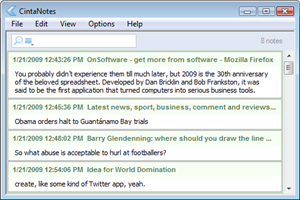
I’ve been using a great little application called CintaNotes recently (here’s what I said in my review), and have found it to be a solution to my desktop clutter. There are other note taking apps out there, but I have always found they are just “yet another thing” to do, instead of making my life easier. My desktop maybe chaotic, but it works. CintaNotes however, feels natural and sits in the system tray ready to spring into action whenever you need it: highlight text, hot key, you’re done. Easy.

What’s cool about it is your note is recorded with meta info – so it keeps a record of the web address where you took the text from, for example.  That means I can stick anything interesting in CintaNotes, find it again without problems (did I mention the search is great?), and work with a more manageable number of browser tabs and windows! Once my morning delving is done, I just put it all in CintaNotes. Now my desktop has a zen-like calm about it.

Puzzle Quest Sequel to drain your free-time

Back in 2007 I got dangerously hooked on Puzzle Quest, then on my DS. Despite being a mix of two things I wasn’t that keen on – puzzles and fantasy RPGs – I found I couldn’t put it down. The story was pretty basic, but gaining abilities and the feeling of relief at beating the generic fantasy opponents was palpable, while defeat was crushing.

Worryingly, the sequel Galactrix is on its way. Worse still, Infinite Interactive have put a flash demo up for you to try. The new game features the same mix of puzzle and role playing, but has a slightly different puzzle dynamic and a new futuristic setting.

The demo is only one level, and shouldn’t take too much effort to beat, but it gives you a good idea of the game. Swap blocks around to create lines of three or more to destroy them. Different colors give you different abilities – a row of mines will damage your opponent, or red blocks charge your laser – to help you attack and defend during the puzzle powered battles.

I think this sequel looks even better than the original – the new gravity affected mechanics haven’t diminished its addictive qualities at all. There’s no release date yet for the game, which is coming out on all major format, but it’s expected in the next couple of months. You can kiss your free-time goodbye now…

30 Years of spreadsheets

You probably didn’t experience them till much later, but 2009 is the 30th anniversary of the beloved spreadsheet. Developed by Dan Bricklin and Bob Frankston, it was said to be the first application that turned computers into serious business tools.

Amazingly, these pioneers didn’t patent their program, and the idea was copied by Lotus 1-2-3 and of course the behemoth that is Microsoft Excel. Business people immediately saw how such an application could speed up bureaucracy and make financial modeling much faster. John C. Dvorak angrily writes that, ‘society as a whole has deteriorated ever since its invention,’ which is quite a statement! That may be an exaggeration, but it’s true that things like the Enron financial scandal may not have happened without spreadsheets.

My immediate reaction to spreadsheets was intimidation. For such a common tool, the programs are still really complex, and you need a degree of expertise before you begin to feel comfortable using them. Despite this they are inescapable, whether you like it or not.

If you start to imagine doing what spreadsheets do manually, you can see how much easier office life has become. The hours of tedious calculation that humans have been liberated from is probably reason enough to celebrate.

Enter the world of indie gaming

Explore the digital world of MultiwiniaThe rise of game download portals such as XBLA, Virtual Console and PlayStation has presented a flurry of retro games and weirdly innovative titles. PC users needn’t feel left though because there’s a thriving indie scene producing tons of games, many which are free. While these are not the 3D, high production value epics we pay for, they do provide some unique experiences. They represent great time wasters with some fiendishly hard and addictive gaming – perfect for these difficult economic times. Here are a few of my recent stand-out indie experiences:

For relaxed ambient games, give chilled out real time strategy game Dyson a spin, or the demo of the hypnotic Osmos. Both of these manage to be addictive and relatively peaceful experiences. These are great if you have a spare ten minutes, but don’t mind losing an hour or two.

Equally stylish, but more traditional, is the wonderful Multiwinia. Download the demo here to check out one of the coolest looking action/strategy games from last year.

skull2.jpgIf you need more action, there’s fast paced 8-bit zombie gore-fest 10800 Zombies, or the slightly more cerebral The Manipulator, both of which are totally free and great examples of not-quite-retro indie productions.

I also recently looked at the cute platformer The Kiwi’s Tale, which is a great throwback to early-90s gaming. For a desktop high score challenge, check out Skull Pogo. I loved the simple controls and macabre comic-style graphics, and spent far too much time trying to beat my last score. It has an online scoreboard too, so keep clear if you’re super competitive!

Limewire makes sharing sociable

Sharing music is something I’ve always done, but I have to admit that the internet has made the experience a bit cold. It’s easy, sure, but not as personal as in the past when it was all about giving each other cassettes. P2P file sharing is impersonal at best, and obviously has legal “issues” when it comes to copyrighted stuff.

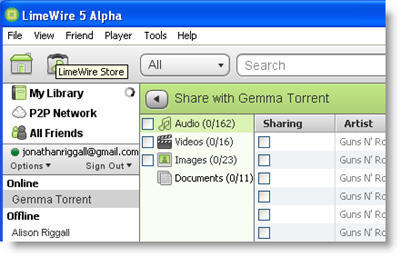
For the past few weeks I’ve been playing with the alpha version of Limewire 5, and I’m really impressed. Firstly, it’s been completely redesigned, and now looks ultra modern, sleek and attractive. While you still have the “Upgrade to Pro” pop-up every time you start, it looks and feels much friendlier.

All the features we’re used to are present and correct – there’s nothing that current users will find difficult to do in version 5 – and there’s something new too. If you have friends with Limewire and Gmail, Jabber or LiveJournal accounts, you can share file directly with them without sharing them publicly. Connecting Limewire to Gmail friend lists is genius – you don’t have to even think about IP addresses or any complicated connecting, just pick the files you want to share and that’s it.

Unlike older file sharing communities, you can’t search and add friends from the Limewire network, just use ones from you own friend lists. This is quite a change, and means two things – firstly, that you can have a really neat sharing community of your actual friends, and secondly that you can be sure no one is spying on what you’re sharing. I have read that Limewire is considering adding Facebook contacts to the app in a future release. Considering how many people are connected with each other through Facebook, utilizing that for easy file-sharing has wonderful potential. Not only can I get that warm community feeling when sharing music again, but sharing anything, from pictures to documents, is finally as easy as you want it to be.

Make Songbird sing your tunes

Start using Songbird if you haven’t alreadyYou should be used to being told not to use Internet Explorer anymore – it may be the default for the majority of users, but the existence of three better competing browsers means there are no excuses anymore. We all get used to programs, and don’t always notice if our traditional choice has stopped being the sensible one. Is it time iTunes went the same way as Microsoft’s mess of a browsing application?

But what, I hear you say, could possibly be wrong with iTunes? Aren’t we supposed to love Apple? Well, maybe we are, but I for one feel iTunes is turning into a behemoth – excess feature fat without functionality. Take the Genius Bar – it slows down iTunes a ton, and it’s rubbish. Cover flow may be pretty, but it’s hardly the easiest way to browse your library.

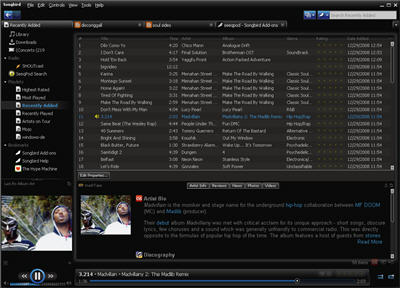
This year saw the first proper release of the open source media player Songbird, which is starting to look like it could be to iTunes what Firefox is to IE. Like Firefox, songbird is highly customizable with lots of add-ons available, so you can make it work the way you want it to.

A bunch of add-ons are bundled with the installation, giving you iPod support, a concert search tool, a Last.fm scrobbler and more. Adding more is easy and can be done from within Songbird – it has a browser (and any time you visit a page that has MP3s, they’ll be listed in a pane at the bottom so you can easily listen to or download them). From the add-ons page you’ll find a host of interesting tools. Here are a few cool ones:

The Exorcist is something iTunes is seriously missing. Anyone with a big library is likely to have listings which no longer exist and duplicate files. As your library grows, sorting out this mess can become an insurmountable task of epic proportions. Luckily, The Exorcist will just list both for you, making cleaning your library a breeze.

Last.fm is a great resource for music info, so why not take advantage? Music Recommendations lifts similar artist ideas based on what you’re listening to, and if like me you don’t have much album art saved with your music, Last.fm Album Art will find the artwork for your albums as you play them and display them where you’d see them in iTunes. Incidentally, if you really do miss iTunes, you can download an iTunes style skin. Feel better?

You can integrate a lyrics bar with LyricMaster, which will find lyrics from the web and show them in the right-hand side bar. Now there’s no excuse not to entertain your workmates with your vocal talents. There is also a seeqpod add-on so you can easily search for tunes to download if you’re not too worried about the legal side of things…

There are some reasons to keep iTunes – it does integrate better with your iPod for instance, but give Songbird a try and you might find you migrate there for everyday listening purposes.

Create a seamless mixtape with Audacity

/* Style Definitions */ table.MsoNormalTable {mso-style-name:”Tabla normal”; mso-tstyle-rowband-size:0; mso-tstyle-colband-size:0; mso-style-noshow:yes; mso-style-parent:””; mso-padding-alt:0cm 5.4pt 0cm 5.4pt; mso-para-margin:0cm; mso-para-margin-bottom:.0001pt; mso-pagination:widow-orphan; font-size:10.0pt; font-family:”Times New Roman”; mso-ansi-language:#0400; mso-fareast-language:#0400; mso-bidi-language:#0400;} I used to love making tapes for friends, but the onset of mp3s has made it a lost art form. Playlists just aren’t the same to me. I’m going to show you how to make an mp3 “mixtape” using a freeware audio editing program called Audacity. I used Audacity 1.3.6, which is a beta release, although using the older 1.2 version is the same as far as I can tell.
First, choose the mp3s you want on your mix. I recommend copying them all into a special folder, just to make sure you don’t mess up your originals! The next thing is choosing the order of play. You could do this in Audacity, but I find it easier to play about with the order in an iTunes playlist. Once you think your playlist looks good, it’s time to stick it together.


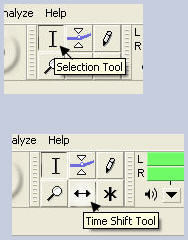
Open Audacity, close the welcome message, then from your special folder, drag and drop your first two tracks into Audacity. Choose the time shift tool, and drag the second track to around the end of the first. It should look something like this.
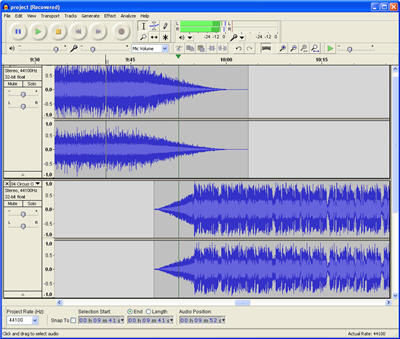
 

With my tracks, usefully, the first track faded out, and the next faded in, so I experimented with it until it sounded good. Usually you can get a nice effect just by choosing the right point to start the following track, but if it doesn’t work, you can create fade ins and outs by highlighting part of the track then going to ‘Effects’, ‘Utilities’ then choosing your fade.

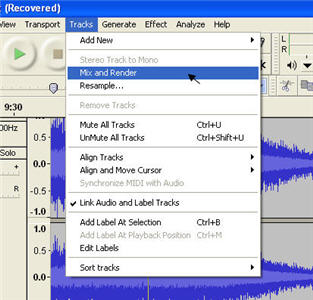
Once you’re happy with the join between tracks, highlight both with the selection tool, go to ‘Tracks’, then click ‘Mix and Render’, which will blend the two tracks as you decided.


Now you have your first mix, you can continue to add more tracks repeating the above method. For my mix, the next track I chose was a much quieter recording than the first two, so it needed amplifying. To do this, simply highlight the whole track, go to ‘Effect’ again, then choose amplify. This tool isn’t great, as you can’t preview your results, but from experience, you’re unlikely to want to amplify more than 3.0db. Check the ‘allow clipping’ box, if you can’t then click the ‘OK’ button. You might need to experiment a bit to get the loudness of your tracks the same.
 

Eventually, you’ll be left with one long track (see left picture). Now you can export the mix as an MP3, which requires a tiny add-on to be downloaded, but Audacity will prompt you and take you through it. Unfortunately you can’t burn to CD with Audacity, though you can easily do that in iTunes and most media players, assuming your mix isn’t over 80 minutes long.


Using this cut and past method to stitch tracks together is surprisingly easy once you’re used to it, and there are some interesting effects you can add, and you could also add snippets of spoke word from films and TV easily, or even your own voice, as Audacity will record any external sound source you plug into your computer (like a microphone), and once recorded you can treat the snippet like any other file.

 

Unity means amazing online games

Unity is a cool plugin for playing online games.  I’ve never seen 3D graphics this good in my browser before, so here are a few games and toys that will undoubtedly impress.

For relaxation purposes, point yourself towards Jetpack Brontosaurus.  This is pretty abstract and really attractive: who hasn’t dreamed of flying a brontosaurus around with a jetpack? There are five levels to play, each with a series of missions to complete, like collecting fruit and flying through rings. It reminds me of Thrust, but much slower, in 3D, and with a Brontosaurus, rather than a spaceship. PilotWings, the old SuperNintendo game, is probably a better reference point for this, as both games share a similar pace.

Also gentle and fun, and even cuter than a brontosaurus, is the 20 level TumbleDrop. This is a 2d physics based puzzle game, where you have to remove objects under your star carefully so it lands on a platform instead of tumbling into the sea.  Don’t try this at work; you won’t be able to stop!

There are a few cool action games too. My favorite at the moment is Downhill Bowling. Why in the world no one thought of this before is incredible, because this is a really great idea with a ton of of replay value, as you’ll want to keep improving your strike rate down the courses. If you register, you can leave your score on the online scoreboards, making this a very competitive game.

For a dose of mindless violence,  try another game I feel I’ve been waiting to play my whole life – Off-Road Velociraptor Safari. Take control of a velociraptor driving a 4×4, then chase down other raptors and run them over. It’s a silly concept but very satisfying, with excellent physics, nice graphics and good crunchy sound effects.

I also found a very retro-futuristic 3d Tron-like game called Traces of Illumination, and a space shooter called Manta, so it looks like Unity is taking browser games to the next level

unity01.jpg

Making Email more useful

Email is essential for most of us today, but like the phone and snail mail before, it comes with its own set of drawbacks. Luckily, developers never sit still, and there are a number of interesting and free email solutions around.

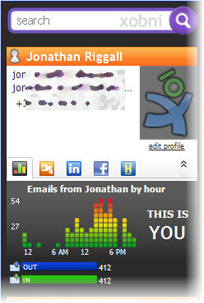
If you’re unlucky enough to use Outlook, I can sympathize. It’s search is awful, it looks cluttered and losing important messages is easy if you’re not careful. A great way to vastly improve Outlook so it’s almost enjoyable, is to install xobni. With no effort from you, you’ll have a fantastic, intuitive and helpful search, instantly find your contacts in LinkedIn or Facebook and get fun statistics (I know that sounds unlikely, just try it out!).

One way we fill up our inboxes with rubbish is by giving out our email address to sign up for stuff like activation codes, posting occasional comments in forums etc. For this we get unwanted newsletters, updates and ads sent to us. A great way to beat this is to use a service like Melt Mail. This gives you a temporary email address, which will melt after 3, 6, 12 or 24 hours, during which time any messages to the address will be forwarded to your ‘real’ address. I used to use an old Hotmail address for this purpose (Hotmail’s not much use for anything else), but temporary addresses feel like a safer solution.

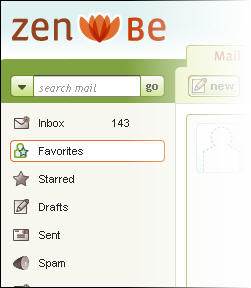
Another trend with apps, online and off is aggregating your web-life in one place. Two cool examples of this recently are the Firefox add-on Yoono, and web app Zenbe. Yoono brings your Yahoo and Gmail together in a sidebar, and also syncs with Facebook, Twitter and other social sites. If you constantly have your web-life opened in Firefox tabs, this can be a real space saver, and the pop up notices are cool too. ZenBe does a similar thing, but online. You can set up multiple POP emails to be forwarded into it, and read everything there. With a calendar and Facebook and Twitter integration, this is another neat way to streamline your internet use. I should add that ZenBe seem a bit overwhelmed with registrations at the moment, and took a few days to get back to me, but I do think it was worth the wait.