Skip to content

Softonic English

Just another Softonic Sites site

Author: Juan Carlos Saloz

{ "de-DE": "", "en-US": "Cultural journalist specialized in film, series, comics, video games, and everything your parents tried to keep you away from during your childhood. Also an aspiring film director, screenwriter, and professional troublemaker.", "es-ES": "Periodista cultural especializado en cine, series, cómics, videojuegos y todo lo que tus padres intentaban que evitaras en tu infancia. También director de cine en ciernes, guionista y liante profesional.", "fr-FR": "Journaliste culturel spécialisé en cinéma, séries, bandes dessinées, jeux vidéo et tout ce que tes parents essayaient de te faire éviter dans ton enfance. Également réalisateur de cinéma en devenir, scénariste et fauteur de troubles professionnel.", "it-IT": "", "ja-JP": "", "nl-NL": "", "pl-PL": "", "pt-BR": "", "social": { "email": "", "facebook": "", "twitter": "", "linkedin": "" } }

Thanks to Adobe's AI, filing the tax return has never been easier

Filing the Income Tax return remains one of the biggest headaches for taxpayers and businesses around the world. When the time of year comes to declare all payments and expenses, many still find themselves pulling their hair out over the complexities that arise along the way. Furthermore, now that all these processes have been digitized, it has become even more difficult to perfectly manage all the necessary data. It has become essential to optimize the management of documents and tax processes to ensure both efficiency in […]

Filing income tax returns remains one of the biggest headaches for taxpayers and businesses around the world. When the time of year comes to declare all payments and expenses, many still find themselves pulling their hair out over the complexities that arise along the way.

Adobe Acrobat
Adobe Acrobat Download

Moreover, now that all these processes have been digitized, it has become even more difficult to perfect all the necessary data. Optimizing document management and tax processes has become a fundamental task to ensure both efficiency and regulatory compliance in each specific location. However, there is a tool that can make your life much easier and help you survive this chaos: Adobe Acrobat AI Assistant.

Artificial Intelligence in the Adobe Environment

Adobe has strongly bet on Artificial Intelligence in its programs for several years. What once seemed like a dream is now a reality. What used to take hours or even days can now be done instantly. AI has made a strong entrance into Adobe software like Premiere, Photoshop, or Illustrator, but its use goes far beyond that.

Adobe Acrobat, the ultimate PDF manager, has also integrated artificial intelligence in ways that are both creative and useful. Now, thanks to the AI Assistant, you can have a loyal ally in many burdensome processes such as Tax Declaration.

All the challenges of the digital Tax Campaign

Although it has also served to organize processes that were done manually until recently, the digitization of tax procedures has brought with it all kinds of challenges for taxpayers and businesses. Some of the main new challenges we have to face are:

  • Management of large volumes of documentation. To carry out our Income Tax Declaration, we first need to review, classify, and organize invoices, contracts, and even tax forms. This may seem overwhelming, but Adobe Acrobat AI Assistant makes this task easier by allowing smart searches and automated summaries that can clarify all kinds of doubts at the moment.
  • Interpretation of complex regulations: Changes in tax legislation can be challenging to understand, and unfortunately, they are very common. With the ability to extract key information and answer questions in natural language, Adobe Acrobat AI Assistant helps users better understand their tax obligations.
  • Reduction of human errors: Manual data entry and document verification can lead to inaccuracies. Adobe’s automation reduces these errors by comparing documents and converting scanned files to editable text.
  • Optimization of work time: Accountants and business owners spend many hours preparing tax reports. However, thanks to the automation of repetitive tasks, AI Assistant allows focus on strategic decision-making instead of manual data processing.

What can you do with Adobe Acrobat AI Assistant?

Adobe Acrobat’s Artificial Intelligence gives rise to all kinds of options, but it is really useful when working with official documents or those related, in this case, to the Income Tax Declaration. It is your first defense against the tax authorities, as it allows you to carry out tasks such as…

  1. Automation of document review

Adobe Acrobat AI Assistant allows you to quickly analyze contracts, tax statements, and receipts, extracting key information and significantly reducing the time of previously manual processes.

  1. Generation of automatic summaries

Tax documents often contain extensive and technical information. They seem to be deliberately made so you don’t understand them, but that ordeal is over. Adobe Acrobat’s AI allows you to summarize the key points without complications, making them easier to understand.

  1. Smart search in documents

Instead of reviewing page by page, you can ask what you want to the Acrobat AI. In a few seconds, it will respond with accurate answers based on the document’s content.

  1. Document comparison

AI also makes it easier to detect differences between different versions of tax forms or contracts, ensuring consistency and avoiding human errors that can be very costly later on.

  1. Conversion of scanned documents to editable text

Adobe Acrobat AI Assistant allows you to digitize all those documents that only exist in physical or image format instantly. You will be able to edit them from your device in no time.

How does Adobe Acrobat AI Assistant benefit you when filing your Tax Return?

Anything that optimizes processes is a very significant advantage compared to the old times when we had to manually review hundreds of documents. However, the benefits of Adobe Acrobat AI Assistant are far superior.

For taxpayers

  • Reduces the time spent on reviewing tax documents.
  • Improves the understanding of tax terms and clauses.
  • Decreases human errors in tax filing.

For businesses and accountants

  • Optimizes efficiency in the review of contracts and tax receipts.
  • Automates repetitive and burdensome tasks.
  • Reduces the risk of penalties due to possible administrative errors.

The future of tax digitalization has already arrived

Technology is transforming the way we manage our tax responsibilities, and tools like Adobe Acrobat AI Assistant are paving the way for simpler and more effective tax administration. Until now, tax filing was synonymous with nightmares and sleepless nights, but that era has finally come to an end.

Adobe Acrobat
Adobe Acrobat Download

Instead of spending hours reviewing documents, doing manual calculations, and making sure we don’t make mistakes until we practically drive ourselves crazy, we now have an artificial intelligence capable of organizing, analyzing, and summarizing information quickly and accurately. As we advance in digitalization, we may see an even greater integration of these technologies with the tax systems of each country. Surely, AI will take care of everything and we will be able to forget about all these burdensome tasks. However, for now, we can already count ourselves lucky thanks to the Adobe Acrobat AI Assistant application, which makes the tax declaration process more accessible, faster, and less stressful.

Author Juan Carlos SalozPosted on March 17, 2025July 1, 2025Categories News

What is Malvertising, and how can you stay safe?

Despite the incredible opportunities the internet has brought, it has also become an increasingly dangerous place. Threats lurk on every website, app, and social network we visit. Even if we believe we’re smart enough to avoid scams, some are so well-disguised that they’re difficult to detect.

Avast Free Antivirus
Avast Free Antivirus Download

One of the biggest dangers in this landscape is Malvertising, a tactic that has become highly popular among cybercriminals. But what is Malvertising? Simply put, it’s a method of spreading viruses, spyware, and other types of malware through seemingly legitimate online ads.

The most alarming aspect of Malvertising is that these ads don’t just appear on suspicious websites. They can be found on all types of pages and, more frequently, on social media platforms. Even if you think you’re safe while browsing well-known platforms like Facebook, X, or Instagram, these are prime targets for cybercriminals using this technique. That’s why having a strong digital shield, like Avast Free Antivirus, is crucial.

How Does Malvertising Work?

Malvertising exploits online advertising systems to insert malicious code into ads. As a result, clicking on what appears to be a legitimate ad—especially on social media—could end up infecting your device with malware. The most common strategies cybercriminals use in Malvertising include:

1. Ads That Lead to Fraudulent Downloads

One of the most common tactics is directing users to a website that prompts them to download a file. These ads often use celebrities to generate engagement. However, the downloaded file is infected, and once installed, it spreads malware on the device.

2. Automatic Downloads (Drive-by Download)

This is the most dangerous type of Malvertising because it doesn’t even require a click. Simply loading a fraudulent webpage can exploit vulnerabilities in your browser or operating system, installing malware without your consent.

3. Data Theft Through Fake Forms

Another hidden tactic in these scams is tricking users into filling out forms with personal data. These might claim to offer a free app download or entry into a fake contest. In reality, they are designed to steal passwords, banking details, or other sensitive information.

How to Spot Malvertising

Although cybercriminals constantly develop new methods to disguise their scams, there are some telltale signs to help you recognize Malvertising. Here are some key indicators:

  • Offers That Seem Too Good to Be True: Many of these ads play on emotions to lure users. From “Get a Free iPhone!” to “Travel for Free!”, such headlines often conceal scams.
  • Poorly Written Text and Low-Quality Images: Many scammers operate from different countries, leading to ads with spelling mistakes and unpolished designs.
  • Random Celebrity Appearances: Using images of well-known figures—often in a fake news format—is a common tactic to disguise scams.
  • Fake Virus Alerts: If you see an ad claiming that your device is infected and urging an urgent download, close the page immediately.
  • Pages That Open Automatically: If clicking on an ad redirects you to an unexpected site, be cautious immediately.

How Can You Protect Yourself from Malvertising?

Beyond relying on intuition, the best way to safeguard against these scams is by using a reliable antivirus that automatically detects and blocks fraudulent links and files. This ensures a much safer and worry-free browsing experience.

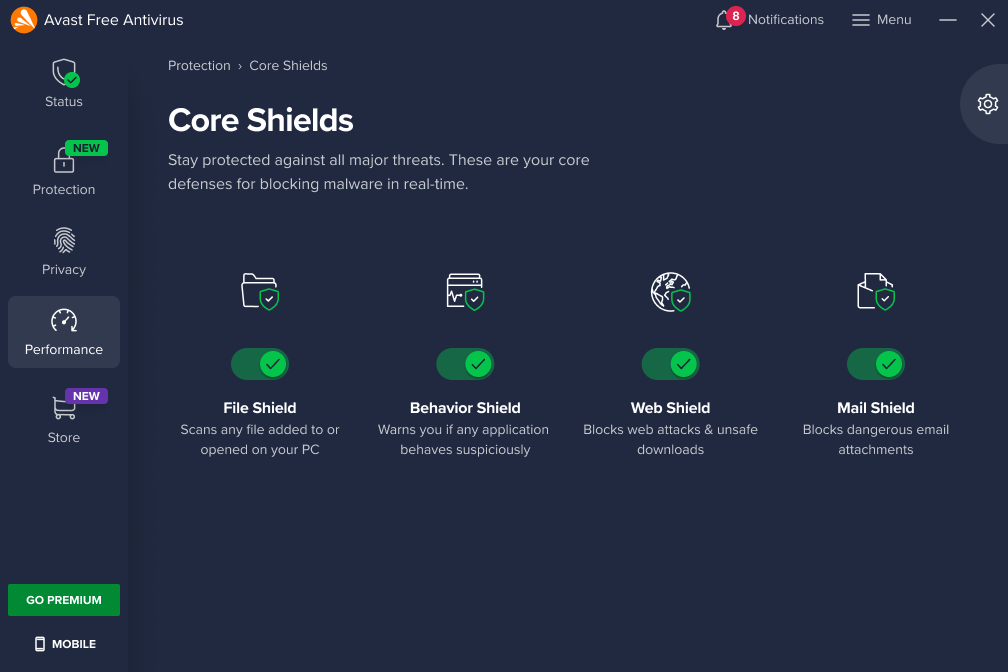
One of the best options for protection is Avast Free Antivirus. This free software helps shield you from these scams without requiring any payments. It also uses advanced technologies like artificial intelligence and cloud-based analysis to detect and block threats in real-time, staying ahead of cybercriminals.

With Avast Free Antivirus, your browser will alert you if you’re about to access a fraudulent link. Additionally, if you accidentally download a malicious file, you can run a system scan to remove it immediately. The program also includes a firewall that acts as a barrier between your computer and the internet, preventing suspicious connections.

Besides using an antivirus, it’s also wise to install an ad blocker like uBlock Origin or AdBlock Plus to avoid seeing these scam ads in the first place. Keeping your software up to date is equally important, as outdated programs can leave vulnerabilities for cybercriminals to exploit.

Avast Free Antivirus
Avast Free Antivirus Download

Browse Safely Without Fear of Scammers

In recent years, the internet has become flooded with scams, including Malvertising. However, you don’t have to browse in fear. With caution and the right protection, you can continue enjoying your favorite social networks without worrying about scammers or malicious ads.To eliminate these risks, Avast Free Antivirus provides advanced defense against threats, blocking suspicious ads, detecting fraudulent websites, and keeping your device malware-free. This way, you can focus on what really matters—without interruptions or unnecessary risks.

Author Juan Carlos SalozPosted on March 6, 2025July 1, 2025Categories News

Translate subtitles to any language in just a few seconds thanks to Adobe Premiere Pro

Video editing is not just about cutting shots, color correcting, and giving a narrative sense to what you are telling. More and more, editors are asked to add subtitles and even translate them into other languages. But how can this arduous process be carried out without resorting to professional translators and subtitlers? The answer lies in Adobe Premiere Pro. Among the multiple Artificial Intelligence features that Adobe has added to its environment, there is a unique function that will save the lives of all those who have to carry […]

Video editing is not just about cutting shots, color correction, and giving a narrative sense to what you are telling. More and more, editors are being asked to add subtitles and even translate them into other languages. But how can this arduous process be carried out without resorting to professional translators and subtitlers?

Adobe Premiere Pro
Adobe Premiere Pro DOWNLOAD

The answer lies in Adobe Premiere Pro. Among the multiple Artificial Intelligence features that Adobe has added to its environment, there is a unique function that will save the lives of everyone who has to carry out these processes: instant translation (or Caption Translation). But what does it consist of exactly?

AI Breaks Down Language Barriers

As its name suggests, instant translation is a new feature in Premiere Pro that allows you to automatically translate your video’s subtitles into the language of your choice. In addition to recognizing audio and automatically transcribing it, something the program has been doing since its latest versions, it now also allows you, with just one more click, to translate it into any language you want: from English to Mandarin Chinese and anything you can imagine.

Without a doubt, this feature will greatly assist editors who need quick and effective translations of their videos, and it will allow reaching a much more global audience. Furthermore, once the subtitles in the corresponding language are added, it allows you to make any adjustments you see necessary, although we warn that not too many will be needed, as this new AI tool from Adobe works like a charm.

Adobe Premiere Pro
Adobe Premiere Pro DOWNLOAD

How can I use instant translation?

To use automatic translation, follow these four simple steps:

  1. Open the subtitles panel within the software.
  2. Upload the automatic transcription or add the subtitles manually if you already have them prepared.
  3. Select the automatic translation option and choose the target language.
  4. Adjust the subtitles as necessary and export the video.

In a moment, you will be able to reach an audience that goes far beyond your country of origin.

Author Juan Carlos SalozPosted on February 27, 2025July 1, 2025Categories News

AI-Powered Distraction Removal: The new Photoshop tool that will make your life much easier

Since Adobe integrated Artificial Intelligence into its programs, the processes of designers and editors have become much simpler and more practical. This is something that stands out especially in Photoshop, where photographers find it easier and easier to get their images perfect in just a few seconds. Beyond tools like Generative Fill, which allows you to add any element you can imagine to the images you are editing, Adobe has also recently added an incredible feature to its software. Called AI-Powered Distraction Removal, it promises to revolutionize the workflow of photographers […]

Since Adobe has integrated Artificial Intelligence into its programs, the processes for designers and editors have become much simpler and more practical. This is something that stands out especially in Photoshop, where photographers are finding it easier and easier to get their images perfect in just a few seconds.

Adobe Photoshop
Adobe Photoshop DOWNLOAD

Beyond tools like Generative Fill, which allows you to add any element you can imagine to the images you are editing, Adobe has recently added an incredible feature to its software. Called AI-Powered Distraction Removal, it promises to revolutionize the workflow of photographers and editors like never before. But what exactly does the tool do?

Eliminate distractions and create your perfect image

Something very, very common in photography, especially when capturing large cities or working in photojournalism, is the inclusion of elements that we don’t want to be in our images. Editors, until today, have had to spend hours and hours removing people who don’t belong in the image, cables that clutter the photo, or backgrounds that make it much less appealing.

However, thanks to AI-Powered Distraction Removal, in just a few clicks you can eliminate any distraction that causes the focus of your image to be misplaced. The new tool uses Adobe Sensei’s artificial intelligence to detect and remove distractions, always without compromising image quality, and its results are incredible.

Adobe Photoshop
Adobe Photoshop DOWNLOAD

Using this tool couldn’t be easier. You just need to access the editing menu of Photoshop and select the tool of the same name from the AI-powered options. From there, just click on the elements to remove and let the AI do its job. Afterwards, of course, you can make any adjustments you want, although the truth is that the results are usually outstanding.

Author Juan Carlos SalozPosted on February 25, 2025July 1, 2025Categories News

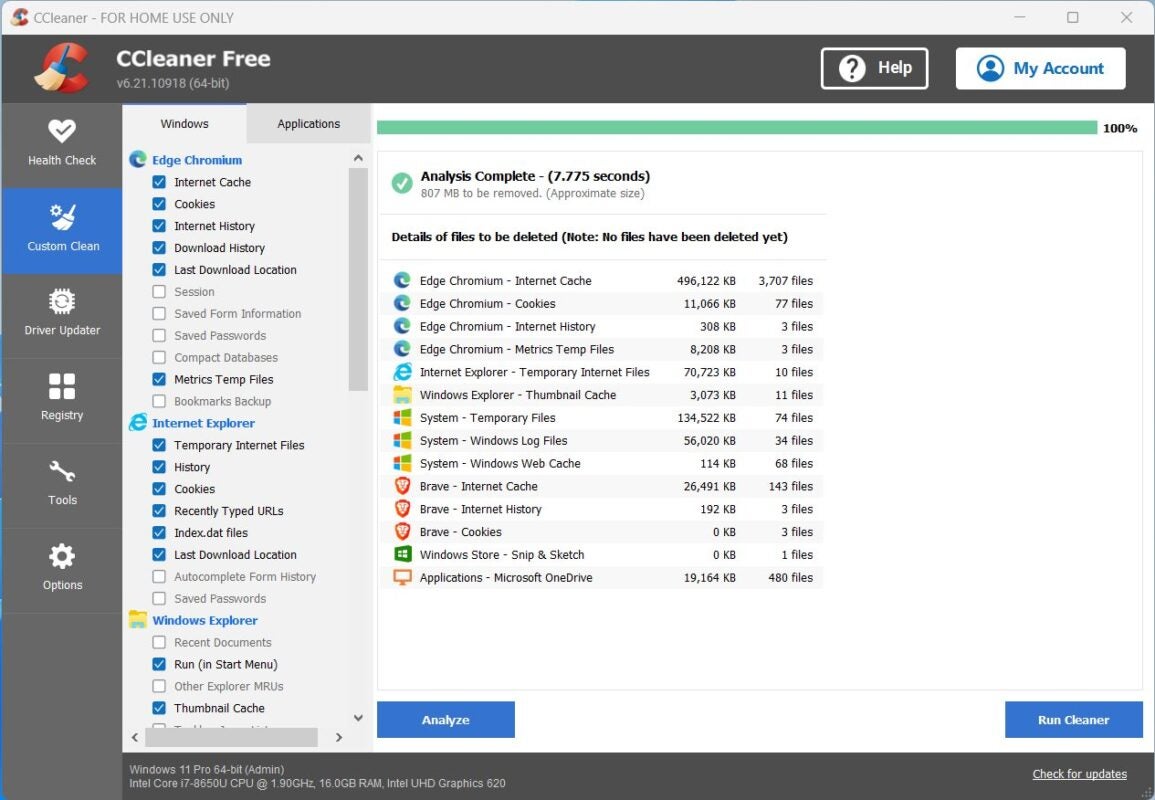
‘Clean Your Computer Day’ Arrives, and There’s No Better Way to Celebrate than with CCleaner Free

Did You Know About National Clean Your Computer Day?

This quirky day is celebrated every year on the second Monday of February. And while it might seem like one of those unnecessary “world days,” like Zombie Pride Day or Bald World Day, it’s a fantastic way to promote cybersecurity and digital organization.

What is CCleaner Free, and Why is it Your Best Ally for Device Cleaning?

Developed by Piriform, CCleaner Free is the leading PC optimization software.

A Trusted Tool Since 2003

Active since 2003, CCleaner Free has millions of users worldwide and is available in 58 languages. It’s a one-of-a-kind tool designed to improve system performance, protect your privacy, and free up disk space by removing unnecessary files and outdated settings.

The Problem of Digital Clutter

Every time you use your computer, you generate a significant amount of temporary data, cookies, cache, and log files that weigh down your PC. These elements slow down your device’s performance and take up valuable space. CCleaner Free is a cleaner that safely and efficiently removes all this digital clutter, helping you extend your device’s lifespan.

CCleaner Free
CCleaner Free Download

The Benefits of Keeping Your Devices Clean

In an era where we rely so heavily on technology, keeping our devices in top condition not only prolongs their lifespan but also improves our daily productivity.

Why Now is the Perfect Time

While any time is a good time for a thorough cleanup to remove useless files, Clean Your Computer Day is the perfect occasion to stop procrastinating and get started.

Cleaning Made Easy

Though this task might seem tedious, it’s now easier than ever to keep your devices clean and organized. CCleaner Free is your best ally—a free digital cleaning tool that optimizes your device in an instant.

The Most Useful Features of CCleaner Free

Despite being free software, CCleaner Free offers a variety of useful features to help you maintain a clean and organized digital environment.

1. Removal of Useless Files

Believe it or not, your PC is filled with temporary files, system cache, and data that you no longer need. CCleaner Free scans your system for these elements and safely removes them, freeing up disk space and improving overall performance.

2. Windows Registry Cleaning

PCs running Windows accumulate all kinds of obsolete, corrupt, or unnecessary entries in the registry over time, significantly slowing down the system. CCleaner Free’s registry cleaning tool detects and eliminates these entries in seconds.

3. Startup Program Management

One of the most significant issues Windows users face over time is the extended startup time. This is mainly due to programs automatically launching when you start your PC. CCleaner Free allows you to manage these programs directly from its interface, reducing boot times and improving initial performance.

4. Privacy Protection in Web Browsers

In addition to cleaning your PC, CCleaner Free removes browsing history, cookies, and temporary files from your web browsers. This not only frees up space but also protects your privacy—a critical feature in a world where cybersecurity is a growing concern.

A User-Friendly Interface

All of these features require only a couple of clicks to work. The software offers an intuitive and user-friendly interface, making it accessible to both tech experts and beginners.

Celebrate National Clean Your Computer Day and Be More Efficient Than Ever

While it may seem like just another trivial national day, in a time when online security and digitalization are more important than ever, celebrating a day like Clean Your Computer Day is highly relevant.

The Benefits of a Clean PC

Just like you regularly clean your house, your computer must also be swept clean of accumulated digital junk.

Here are just a few of the benefits of an optimal PC cleanup:

  • Faster speed and performance.
  • Shorter startup times.
  • Increased available storage space.
  • Enhanced privacy protection.
  • Smoother user experience.

CCleaner: An Essential Ally for Your PC

On Clean Your Computer Day, give your PC a complete cleanup with CCleaner Free.

CCleaner Free
CCleaner Free Download

Your computer will thank you with a longer lifespan and better performance. Download the program from its official website, follow the installation steps, click “Analyze,” and enjoy a browsing experience that feels like your computer is brand new.

Author Juan Carlos SalozPosted on February 19, 2025July 1, 2025Categories News

On Safer Internet Day, Avast Free Antivirus Is Your Best Ally

Saying we live in a hyperconnected world is stating the obvious, but in recent years, this connection to the digital realm has left users increasingly vulnerable. Cybercriminals have exploited trends to infiltrate every possible corner of our lives—from financial activities to social media accounts.

Avast Free Antivirus
Avast Free Antivirus Download

In just the last quarter of 2024, cyberattacks increased by 75% globally, according to Check Point Research, and the trend continues to grow. This is why, for over two decades, the second Tuesday of every February has been celebrated as “Safer Internet Day,” a day dedicated to promoting responsible, respectful, critical, and creative internet use while celebrating advances in cybersecurity and digital ethics.

This day not only encourages us to reflect on how we navigate the internet but also serves as a moment to evaluate our protection against ever-growing cyber threats. So, as users, what can we do to be better protected and browse the internet without fear?

The Importance of Protection in a Hyperconnected World

Safer Internet Day aims to raise awareness about the importance of being protected in an era of maximum vulnerability. You never know what might be lurking behind a link, a Wi-Fi connection, or a download. That’s why it’s essential to protect yourself—and those around you—since cyber risks affect users of all ages and backgrounds. A reliable antivirus acts as your digital shield.

And it’s not just about computers anymore! Malware and phishing scams target smartphones and all kinds of digital devices—even smartwatches. That’s why it’s increasingly important to stay vigilant and use an antivirus that’s up to the task.

Avast Free Antivirus: A Leading Example

In this context, Avast Free Antivirus stands out as your best ally. Active since the early 1990s, the company has been working on cybersecurity since the dawn of the internet and has consistently adapted to new challenges with remarkable speed.

Moreover, with its commitment to digital ethics, Avast Free Antivirus offers a one-of-a-kind free version that protects against threats without requiring a single payment. It employs cutting-edge technologies like artificial intelligence and cloud-based analysis to stay one step ahead of any danger. Here are just a few reasons why Avast is an indispensable tool and a global leader in cybersecurity:

  1. Real-Time Protection: Once installed, Avast Free Antivirus continuously scans your device, identifying and helping neutralize any potential threat before it infiltrates your system. This includes everything from hidden malware in downloads to phishing attempts.
  2. User-Friendly Design: Avast Free Antivirus intuitive interface makes it accessible for users of all ages, including those less familiar with technology. It adapts seamlessly to your needs and your device’s uses.
  3. Cybersecurity for Everyone: With its free version, Avast Free Antivirus democratizes access to digital protection, offering advanced features at no cost and giving everyone the peace of mind to browse safely.
  4. Advanced Technology: Avast Free Antivirus incorporates state-of-the-art innovations, such as a behavior shield that monitors active applications for suspicious activity in real time and CyberCapture, which automatically sends suspicious files to the cloud for analysis to ensure their safety.
  5. Comprehensive Protection: From your computer to your smartphone, Avast Free Antivirus helps ensure all your devices are protected against various threats.

Beyond Malware

While the classic image of digital threats might be computer viruses attacking your system, increased digitalization has led to an exponential rise in diverse cyberthreats. Phishing and ransomware attacks have reached record numbers, affecting both individual users and large organizations.

This is why following robust digital security practices is essential—beyond the basics. These include regularly changing passwords, enabling two-factor authentication on all accounts, and keeping your devices updated. Avast Free Antivirus complements these measures by identifying potential threats before they reach you.

Avast Free Antivirus
Avast Free Antivirus Download

How to Install Avast Free Antivirus Easily

Take advantage of Safer Internet Day to maximize your protection against potential threats. Start by installing Avast Free Antivirus—it couldn’t be easier. Simply visit their official website and click on the “Download Free” button. The installation software will appear, and within a few clicks, you’ll be ready to browse securely on any of your devices.

Author Juan Carlos SalozPosted on February 10, 2025July 1, 2025Categories News

Discover the Adobe Lightroom tool that saves photographers the most time

Every photographer knows that capturing a good image is just the beginning. The real challenge comes afterward, when selecting the best shots and transforming them into finished works through editing. Adobe Lightroom, aware of this challenge, incorporates a tool that has completely changed the rules of the game: Photo Culling. Powered by Adobe Sensei’s artificial intelligence, this advanced feature allows photographers to save time by automatically selecting the most outstanding images from a session. How does it achieve this? The AI, trained through millions of professional images, analyzes key criteria such as focus, composition […]

Every photographer knows that capturing a good image is just the beginning. The real challenge comes afterward when selecting the best shots and transforming them into finished works through editing. Adobe Lightroom, aware of this challenge, incorporates a tool that has completely changed the rules of the game: Photo Culling.

Adobe Lightroom
Adobe Lightroom DOWNLOAD

Powered by Adobe Sensei’s artificial intelligence, this advanced feature allows photographers to save time by automatically selecting the most outstanding images from a session. How does it achieve this? The AI, trained through millions of professional images, analyzes key criteria such as focus, composition, and facial expressions. Then, it provides you with the best options so you don’t have to waste time selecting from the “mud” and can focus on editing, which is truly important.

An Essential AI for Professional Photography

The magic of Photo Culling lies in its ability to evaluate large volumes of images quickly and accurately. An intuitive interface suggests photographs with the best technical and visual quality, allowing photographers to focus on what really matters. Additionally, it allows adjustments to be made by the editor, so AI does not have to decide everything.

Among its main advantages are time optimization, as it eliminates the need to spend hours manually reviewing hundreds of photos; stress reduction by delegating this tedious task to the robust Adobe Sensei algorithm; and the ability to focus on what matters without wasting time or dealing with frustrations.

Focus on What Matters

Using this tool is as simple as opening your photo collection in Lightroom. Access the Photo Culling option from the Library tab and let the artificial intelligence work its magic. Once the selection is complete, you can review the results and adjust as you see fit.

Adobe Lightroom
Adobe Lightroom DOWNLOAD

However, this tool is not limited to choosing the best shots. By integrating seamlessly with the Adobe ecosystem, Photo Culling complements your workflow by making the transition between selection and editing smooth and efficient.

Author Juan Carlos SalozPosted on January 28, 2025July 1, 2025Categories News

Create 3D elements in Adobe Illustrator and Photoshop and generate unique designs

The world of graphic design is advancing by leaps and bounds, and nowadays practically no one can consider themselves a designer if they do not master 3D tools. However, we have good news for you: through the usual tools you use, like Adobe Photoshop and Illustrator, you can also become an expert in 3D. The power of 3D in Adobe Illustrator Adobe Illustrator, known for its mastery in creating vector graphics, offers advanced tools for working with three-dimensional designs. The Extrusion and Revolution functions allow you to transform simple paths into detailed three-dimensional models. This means that, with just […]

The world of graphic design is advancing by leaps and bounds, and today practically no one can consider themselves a designer if they do not master 3D tools. However, we have good news for you: through the usual tools you use, such as Adobe Photoshop and Illustrator, you can also become an expert in 3D.

Adobe Illustrator
Adobe Illustrator DOWNLOAD

The Power of 3D in Adobe Illustrator

Adobe Illustrator, known for its dominance in creating vector graphics, offers advanced tools for working with three-dimensional designs. The Extrusion and Revolution functions allow you to transform simple paths into detailed three-dimensional models. This means that with just a few clicks, you can add depth and volume to your illustrations.

Additionally, Adobe has integrated its AI-based technology into these tools. This facilitates the automatic generation of textures that perfectly fit your models, saving time and ensuring impressive results.

Photoshop: Taking 3D to Another Level

Photoshop has also expanded its three-dimensional capabilities in recent years, offering a variety of options for working with 3D objects. From adjusting lighting and shading to importing three-dimensional models, this software allows designers to explore new creative possibilities.

Adobe Photoshop
Adobe Photoshop DOWNLOAD

Among the most notable tools are the smart filters and advanced effects that elevate any composition. Again, artificial intelligence also plays a fundamental role here: Adobe Sensei allows for automatic background filling and design optimization with a single click, reducing manual effort and optimizing results.

Adobe After Effects: Animate Your Creations

But there’s more. For those looking to add motion to their 3D designs, Adobe After Effects is the ultimate tool. Its integrated 3D workspace allows for smooth and professional animation of three-dimensional elements and motion graphics.

Adobe Illustrator
Adobe Illustrator DOWNLOAD

With tools like Rotobrush 2, it is possible to cut out objects precisely thanks to AI, simplifying tasks that were previously complex. Additionally, the control options over cameras, lights, and materials open up endless creative possibilities. What are you waiting for to try it?

Author Juan Carlos SalozPosted on January 20, 2025July 1, 2025Categories News

How can you identify a financial scam on social media?

How can you identify a financial scam on social media?

Social networks have transformed the way we communicate, relate to each other, learn, and entertain ourselves. These days, almost all of us have our personal data on platforms like Facebook, Instagram, TikTok, Twitter, or BlueSky, which means there are plenty of potential entry points for scammers and hackers.

With global internet access now ubiquitous, cybercriminals have found the perfect environment to pull off increasingly elaborate scams. Anyone can be contacted through their social media profiles, so we have to be extra cautious about tactics that can catch us off guard.

From the classic “You’ve won a million-dollar prize!” traps to private messages threatening to post sensitive material about you, there are all kinds of scams that can result in huge losses—both financial and in terms of personal information. But which are the most common tactics? Let’s take a look.

AVG AntiVirus Free
AVG AntiVirus Free Download

Quick or Easy Money Promises

It’s a classic—and it still works even today. You’ll see a message or post from someone you don’t know (or sometimes even someone you do know—remember, their account could be hacked) promising to make a lot of money in no time. Typically, these scams feature generic phrases like “Earn €10,000 in one week!” or “Get rich by investing only €100!” This type of fraud has also surged with the popularity of cryptocurrencies.

We need to be especially wary of these scams. If you click on the links provided or disclose any personal information to the cybercriminals behind them, you could find yourself in serious trouble with potentially severe consequences.

A “Life or Death” Plea for Money From Someone You Know

Another common technique involves taking over someone’s account and then asking their contacts for money via direct messages with a fabricated emergency story. Often, the money is requested through PayPal, Bizum, or other third-party payment methods. If you fall for it, you might never get your money back, so make sure you’re always talking to the actual person behind the account.

A Celebrity Starts Following You

Fake profiles pretending to be famous people are also frequent on social media. Scammers impersonate actors, musicians, or sports figures, and—once you’re excited about interacting with someone like that—they ask you for money or to click on a suspicious link. This scam plays on your hopes, but recognizing it early is crucial.

An Offer That Doesn’t Match Market Value

On classified sites for real estate rentals and sales, as well as job postings, cybercriminals also operate frequently. They lure you into applying for fake job offers via fraudulent links or trick you into sending private information such as ID documents, emails, or passwords. Then, they can do whatever they want with that information.

Some Tips to Avoid Falling for These Traps

Here are a few quick tricks to help you identify a digital scam:

  1. Profiles Tend to Be Suspicious: Scammers usually use fake profiles. Look out for signs like stolen or generic profile photos, minimal activity on the social network (few posts, followers, or genuine interactions), and frequent username changes to hide past activities.
  2. Pressure to Act Quickly: Scammers use urgency tactics, such as “limited-time offers” or threats about “losing the opportunity.” These strategies rush you into decisions without weighing the risks, so keep a clear head before responding.
  3. Communication Outside the Platform: If they ask you to move the conversation off the social network—especially to Telegram (a hotbed for cybercriminals) or WhatsApp—be cautious. Scammers prefer less regulated platforms to avoid being traced.
  4. Lack of Verifiable Information: A legitimate business will have a professional website, precise contact details, and registration with relevant authorities. If you can’t verify the authenticity of a company or individual behind an offer, do not proceed.

Let a Good Antivirus Help You Out

Today’s antivirus software does more than protect you from malware; it also helps guard against these types of scams. That’s why we always recommend having solid antivirus protection. Specifically, AVG AntiVirus Free offers a comprehensive system to help combat spyware, ransomware, trojans, and other harmful programs.

AVG AntiVirus Free
AVG AntiVirus Free Download

What Can I Do if I Suspect Someone Wants to Scam Me?

In addition to following the tips above, remember never to share personal information—bank details, passwords, or sensitive documents—digitally unless you can verify the authenticity of the offer or profile.

It’s also vital to consult financial advisors or cybersecurity experts. And, of course, report any suspicious profile with these characteristics. If it’s already too late and you’ve fallen into the trap, contact the police immediately. Scams like these are so common that law enforcement has established procedures for handling them.In any case, prevention is always better than cure, so to avoid these problems as much as possible, it’s best to have quality antivirus protection like AVG AntiVirus Free so you can browse with peace of mind.

Author Juan Carlos SalozPosted on January 13, 2025July 25, 2025Categories News

Color grading in Adobe Premiere Pro: become a master of color

Do your videos look flat and lack significant visual impact despite having a great camera? Don’t worry, with a bit of professional color grading, you can completely transform them. Color grading, also known as color correction and grading, is the key step to give coherence and a cinematic style to your audiovisual projects. And although it may seem difficult to handle, it really isn’t that hard. Adobe Premiere Pro is the perfect tool to learn how to correct color and take your videos to the next level. This software not only allows you to adjust aspects […]

Do your videos look flat and lack significant visual impact despite having a great camera? Don’t worry, with a bit of professional color grading, you can completely transform them. Color grading, also known as color correction and grading, is the key step to give coherence and a cinematic style to your audiovisual projects. And although it may seem difficult to handle, it really isn’t that much.

Adobe Premiere Pro is the perfect tool to learn color correction and take your videos to the next level. This software not only allows you to adjust basic aspects like temperature and exposure but also provides access to LUTs (Look-Up Tables), which let you explore new aesthetics and enhance visual storytelling.

Adobe Premiere Pro
Adobe Premiere Pro Download

Lumetri Color: a Fantasy Universe

Through the Lumetri Color panel, color adjustments are more intuitive than ever. You can make fine adjustments ranging from basic correction to balance lighting and tones to applying stylized looks that turn your footage into a visually striking piece. This tool is perfect for adjusting parameters such as saturation, contrast, and color intensity, ensuring that your video conveys precisely what you envisioned.

LUTs, on the other hand, are an indispensable option if you want to save time and maintain consistency in your style. With preconfigured LUTs, you can adapt the color of your videos to different cameras or visual genres, taking your editing to a much more professional level.

But, as if that weren’t enough, Adobe Premiere Pro incorporates Adobe Sensei artificial intelligence, a tool designed to streamline processes and expand creative possibilities. With features like Auto Tone, the AI can make automatic adjustments to the base colors, allowing you to focus on the details that really matter.

Adobe Premiere Pro
Adobe Premiere Pro Download

Thanks to these tools, your videos will go from flat and lacking impact to becoming true visual gems. Whether you’re working on a short film, a music video, or social media content, Premiere Pro has everything you need to make your work stand out.

Author Juan Carlos SalozPosted on December 31, 2024July 1, 2025Categories News

Posts pagination

Previous page Page 1 … Page 3 Page 4 Page 5 … Page 208 Next page

Recent Posts

  • OpenAI unveils Jalapeño: its first custom chip with Broadcom
  • GTA 6 is now a “single-player experience”: new GTA Online questions
  • God of War Laufey reportedly targets early 2027: February or March instead of Sony’s holiday slot
  • GTA 6 is now on the PlayStation Store: PS5 Pro support, price and release date
  • PlayStation Plus gets a Costco discount: save in the US and Canada through June 26

Archives

  • June 2026
  • May 2026
  • April 2026
  • March 2026
  • February 2026
  • January 2026
  • December 2025
  • November 2025
  • October 2025
  • September 2025
  • August 2025
  • July 2025
  • June 2025
  • May 2025
  • April 2025
  • March 2025
  • February 2025
  • January 2025
  • December 2024
  • November 2024
  • October 2024
  • September 2024
  • August 2024
  • July 2024
  • June 2024
  • May 2024
  • April 2024
  • March 2024
  • February 2024
  • January 2024
  • December 2023
  • November 2023
  • October 2023
  • September 2023
  • August 2023
  • July 2023
  • June 2023
  • May 2023
  • April 2023
  • March 2023
  • February 2023
  • January 2023
  • December 2022
  • November 2022
  • October 2022
  • September 2022
  • August 2022
  • July 2022
  • June 2022
  • May 2022
  • April 2022
  • March 2022
  • February 2022
  • January 2022
  • December 2021
  • November 2021
  • October 2021
  • September 2021
  • August 2021
  • July 2021
  • June 2021
  • May 2021
  • April 2021
  • March 2021
  • February 2021
  • January 2021
  • December 2020
  • November 2020
  • October 2020
  • September 2020
  • August 2020
  • July 2020
  • June 2020
  • May 2020
  • April 2020
  • March 2020
  • February 2020
  • January 2020
  • December 2019
  • November 2019
  • October 2019
  • September 2019
  • August 2019
  • July 2019
  • June 2019
  • May 2019
  • April 2019
  • March 2019
  • February 2019
  • January 2019
  • December 2018
  • November 2018
  • October 2018
  • September 2018
  • August 2018
  • July 2018
  • June 2018
  • May 2018
  • April 2018
  • March 2018
  • February 2018
  • January 2018
  • December 2017
  • November 2017
  • October 2017
  • September 2017
  • August 2017
  • July 2017
  • June 2017
  • May 2017
  • April 2017
  • March 2017
  • February 2017
  • January 2017
  • December 2016
  • November 2016
  • October 2016
  • September 2016
  • August 2016
  • July 2016
  • June 2016
  • May 2016
  • April 2016
  • March 2016
  • February 2016
  • January 2016
  • December 2015
  • November 2015
  • October 2015
  • September 2015
  • August 2015
  • July 2015
  • June 2015
  • May 2015
  • April 2015
  • March 2015
  • February 2015
  • January 2015
  • December 2014
  • November 2014
  • October 2014
  • September 2014
  • August 2014
  • July 2014
  • June 2014
  • May 2014
  • April 2014
  • March 2014
  • February 2014
  • January 2014
  • December 2013
  • November 2013
  • October 2013
  • September 2013
  • August 2013
  • July 2013
  • June 2013
  • May 2013
  • April 2013
  • March 2013
  • February 2013
  • January 2013
  • December 2012
  • November 2012
  • October 2012
  • September 2012
  • August 2012
  • July 2012
  • June 2012
  • May 2012
  • April 2012
  • March 2012
  • February 2012
  • January 2012
  • December 2011
  • November 2011
  • October 2011
  • September 2011
  • August 2011
  • July 2011
  • June 2011
  • May 2011
  • April 2011
  • March 2011
  • February 2011
  • January 2011
  • December 2010
  • November 2010
  • October 2010
  • September 2010
  • August 2010
  • July 2010
  • June 2010
  • May 2010
  • April 2010
  • March 2010
  • February 2010
  • January 2010
  • December 2009
  • November 2009
  • October 2009
  • September 2009
  • August 2009
  • July 2009
  • June 2009
  • May 2009
  • April 2009
  • March 2009
  • February 2009
  • January 2009
  • December 2008
  • November 2008
  • October 2008
  • September 2008
  • August 2008
  • July 2008
  • June 2008
  • May 2008
  • April 2008
  • March 2008
  • February 2008
  • January 2008
  • December 2007
  • November 2007
  • October 2007
  • September 2007
  • August 2007
  • July 2007
  • June 2007
  • May 2007
  • April 2007
  • March 2007
  • February 2007
  • January 2007
  • December 2006
  • November 2006
  • September 2006
  • August 2006
  • June 2006
  • May 2006
  • July 2001
  • January 2001
  • November 2000
  • September 2000
  • August 2000
  • July 2000
  • April 2000
  • March 2000

Categories

  • Affiliate post
  • Expert Review
  • Gaming
  • Guides
  • How to
  • Legacy how To
  • News
  • Noticias
  • Software>Security
  • Sponsored
  • Trucos y Consejos
  • Uncategorized
  • Windows software

Meta

  • Log in
  • Entries feed
  • Comments feed
  • WordPress.org
Softonic English Proudly powered by WordPress