An extensive guide to cryptocurrency trading

If you are reading this, I will take a wild guess that someone just introduced you to cryptocurrency and told you that this is a great time to invest. If that is the case, I completely agree with that person, but keep in mind that the cryptocurrency market is extremely volatile and still very young. It is hard to tell which project is worth investing in and who is trying to scam you for your money. This guide should help you understand the risks of investing in cryptocurrency and where to start.

What to invest in?

Before we start, I just want to point out one thing. If you are the type of person who is looking for “the next Bitcoin” you will probably be disappointed. All those stories that you read online where people became millionaires by investing $100 in Bitcoin 5 or 6 years ago are based on simple math. The number of people who made that much money with Bitcoin is probably a single-digit so don’t be too optimistic.

Now that we are over with that part, let’s see where you should start. If you have no initial idea what coin you want to invest in, then it would probably be best to take a look at coinmarketcap. This website will give you all the info you will need. Pick a coin or token and start by looking at their website. Read their whitepaper and take a look at the roadmap. If everything looks good, do a quick check on the team behind the coin. Most of them will be listed on the website and will have LinkedIn profiles. Checking their portfolio will give you more information than you think.

This should be the very first part of your research. If you like what you see and their idea sounds good to you then move on to social media. If they are serious about their project, they will have active social media profiles and should be open to answering questions. Look at what other investors are saying about them and join discussions on Diskord and Reddit, follow their Telegram updates and make your own decision.

How to buy?

Once you decide on your coin, you will have to buy some. This is done on exchanges, but not every exchange will have what you want to buy. This is where coinmarketcap will come in handy once again. On the coin page, click on exchanges and see what exchange offers trading for your coin. Before you go with the first one on the list, check if they accept FIAT currency. A lot of them only offer trades with popular cryptocurrencies like Bitcoin, Ethereum, Litecoin… If no exchange accepts FIAT, do some research on exchanges that you can access from your region. Some will have high deposit fees, some will have high transfer fees, and some will have long verification times. I know that this sounds like a lot, but it will save you a lot of money in the long run. If you can’t buy your desired coin with FIAT, there will be a three-step process that can eat up a lot of money if you aren’t careful.

First, you will need to buy BTC (or any other tradable currency), transfer that to the exchange that has your coin, exchange BTC for your desired coin and then transfer everything to your wallet. This is why you should always keep an eye on the exchange and transfer fees. Robinhood, for example, offers trades with no fees but it isn’t available in every country right now. Other reliable exchanges that accept FIAT are:

Coinbase

Gemini

Kraken

Coinmama

Bitstamp

More can be found here in the sidebar.

Where to store?

Every cryptocurrency has a supported wallet. If you check the website of your desired currency, there should be a list of wallets that support it with download links. Download it and transfer funds from the exchange to your wallet. Under no circumstances should you keep your cryptocurrency on an exchange. More often than not these get hacked, and you can lose everything. You are your own banker here, and you are responsible for the safety of your coins. The best practice is to store everything in an offline wallet known as [cold storage](https://en.bitcoin.it/wiki/Cold_storage).

How to sell?

If everything went according to plan and you made a profit on your investment, it is now time to sell it for cash and enjoy your earnings. This is easier than you think. If you bought your coin on an exchange that accepts FIAT, you should be able to sell it there as well. The only thing you should keep in mind is withdrawal fees. Make sure to choose an exchange that has the lowest fees for your withdrawal option. For example, some will have higher withdrawal fees for direct bank transfers than others but will have lower fees for other options. Be sure to read everything carefully before you make a withdrawal request. Also, keep in mind that every FIAT withdrawal will require an ID confirmation. This is standard procedure when moving money online. Usually, you will need a picture of your passport, ID card or driver’s license with any other document that confirms your residential address. These checks may vary from exchange to exchange, but you won’t be able to cash out without them.

Resources

The time between buying some cryptocurrency and making a profit can sometimes be very long. It is best if you make a long-term investment and don’t expect too much too quickly. Right now there are more people invested in cryptocurrency because they believe in the technology and the long-term effect than people who want to make a quick buck and cash out. If you are in it for the long term, you should be up to date with news on your cryptocurrency but don’t overdo it. Almost every cryptocurrency has a subreddit on Reddit; this is a great place to talk with other community members and get news updates when they come out. Telegram groups are also great sources of information. All of this info should be available on the cryptocurrency’s official website. Check the info once a day and continue with your daily activities. You don’t want to spend too much time on price checking and long discussions. It will lead nowhere, and you may end up spending your whole day talking about cryptocurrencies, which won’t make the price rise or fall.

Invest only what you are willing to lose

I will have to mention that the market is very volatile one more time. Investing more than you can afford to lose can leave you broke or drive you crazy. When you make a huge investment, you will be emotionally affected by every price fluctuation. Long-term price surges will raise your expectations, and sudden drops will have a really bad effect on your mood and daily life. Just remember that cryptocurrency is young and you are an early adopter. You may be witnessing history so just sit back, relax and enjoy the ride. When you think you’ve had enough, cash out and don’t look back.

Never panic sell

Huge price drops are very common right now. This is because almost every coin is still very dependant on Bitcoin and every Bitcoin price drop will cause the whole market to go down. When this happens, remember why you bought your coins in the first place. Panic selling won’t solve anything. You will probably end up with a 50% loss, and in a month everything will be back to normal. If you only invested what you can afford to lose there is nothing to worry about and remember, you are only locking in a loss if you sell.

Common terms

When interacting with any cryptocurrency community, you will run into some terms that you won’t have seen before. Here are the most common ones:

FUD – Fear, uncertainty, and doubt. This is a very popular word when the prices start going down and the “I told you so” people get their 5 minutes of fame.

HODL – Hold on for dear life

FOMO – Fear of missing out. When a price starts going up, it has to come down at some point. On the way up if you get a feeling that you have to buy or you will miss the boat, you are getting affected by FOMO.

Moon or Mooning – huge price surges that will bring in big gains for investors.

ATH – All time high. When looking at the price chart, this would be the highest price a currency reached in its lifetime.

Bag holder – This is an investor or a trader who has been holding for too long on a particular cryptocurrency and now has to face the consequences of that decision.

Knowing the potential of a cryptocurrency

If you think that every single cryptocurrency can reach prices of $10k per coin you need to redo your math. There are a few key things to keep in mind when looking at the potential price ranges for a particular cryptocurrency; circulating supply, max supply, and market cap.

The circulating supply determines how many coins are being traded right now. If a coin has a low circulating supply the price is probably higher due to high demand and low supply. If you are looking at a coin’s long-term potential then max supply is what you should be interested in. If a coin has only 1000 units in circulation right now and will release another million units into the market in the future this would cause a huge drop in price due to huge supply and low demand. The market cap is simple math. Coin value times the circulating supply gives you the total market cap. So a coin can reach a market cap of Bitcoin but have a 10 times lower price because it has a circulating supply that is 10 times bigger than Bitcoin’s circulating supply.

Be careful who you trust

While you will mostly find a lot of useful information on the internet you are bound to run into scams. Don’t believe everything you hear or see, especially on Youtube. The cryptocurrency expansion brought in a lot of “experts” that are usually young and very rich. They will make you believe that they made all their money by investing into cryptocurrency but the story is often very different. The latest scam that left a lot of people without their life savings was the Bitconnect scandal. This platform was offering about 1% daily returns on investment but was actually a Ponzi scheme that had to fall apart eventually. It was mostly promoted by these Youtube “experts” who were making money on referrals. If something sounds too good to be true it is probably a scam.

That’s it for now. If you have some knowledge of your own that you would want to share be sure to leave it in the comments. Stay safe and always do your research before investing!


Tencent bringing Player Unknown’s Battlegrounds to mobile in China

Player Unknown’s Battlegrounds, or PUBG for short, is going mobile in China and will be published by Tencent games. Tencent is currently one of the world’s biggest mobile game publishers, and they will get even bigger with PUBG. Kim Changhan, CEO of PUBG and Ma Xiaoyi, Senior Vice President of Tencent Group, said:

“Thanks to the excellent accumulation of” PUBG “on the PC terminal and the teamwork between the two teams, the progress of the mobile game preparation is very smooth and in the near future, Chinese players can enjoy the genuine game anytime, anywhere on the mobile phone. “

Before the deal was agreed, the Chinese government wanted the game to be adapted to the Chinese people. The main issue they outlined was the concern for socialist core values. They have felt that the game doesn’t comply with traditional Chinese culture but those issues have been resolved and the game is ready to go in China.

A trailer for the game has already been released.

Some recent news indicates that PUBG won’t be the only battle-royale game coming to mobile. Tencent is ready to publish one more title that will be more similar to Battlefield but will have the battle-royale structure. Lightspeed and Quantum Studio are developing the game and the things setting the game apart from PUBG are naval warfare and helicopter fights. Something we haven’t see so far in PUBG.

This is really big news for the Chinese gaming market but there is no release date set so far. Western releases haven’t been discussed at this point and we still have no confirmation that the game will ever come to western audiences.

PUBG is one of the biggest titles in the West. The game sold over 20 million copies in November and that number has been rising ever since. There is no doubt that the mobile version would be more than welcome outside of China.

Would you play a battle-royale title on your phone? Let us know in the comments.

Top 10 naval battle games for PC

New WhatsApp update makes it easier to ignore your friends

Looks like WhatsApp is ramping up performance with its new update. The messaging app has never been so functional, as evidenced by its new update, which now lets you ignore your friends more easily.

Perhaps the most important part of the update is the “unsend” option, which lets you take back what you said as long as your friend didn’t see the message. If you’ve ever sent out an angry message and instantly regretted it, you’ll love this feature, which lets you delete a sent message with one relieved click. Of course, this will only work if your friend hasn’t already read it, so you’d better be quick on the trigger after you fly off the handle.

Another interesting feature coming with this update is the ability to watch YouTube videos inside WhatsApp. If someone sends you a video, you can instantly play it inside the app and still be able to switch between conversations with a picture-in-picture display.

It’s unclear how people will be able to maintain a meaningful conversation and watch videos at the same time, but let’s give it some time and see how it works out.

All of these features are available in the 2.17.81 update, which has already been released for iOS. What do you think? Let us know in the comments.

A Facebook bug put your photos at risk

After Instagram polls came out, Facebook decided to give their users a polling service as well. This new feature rolled out about a month ago, and it gave users the ability to use GIF images as poll reactions. What Facebook didn’t know was that this feature had a loophole that allowed a malicious actor to delete your photos from Facebook. Oops!

Facebook videos are about to become more annoying

The person who discovered this exploit is Pouya Darabi, and Facebook gave him a $10,000 reward for reporting this issue. Darabi explained in his blog post how someone could use this exploit to delete images.

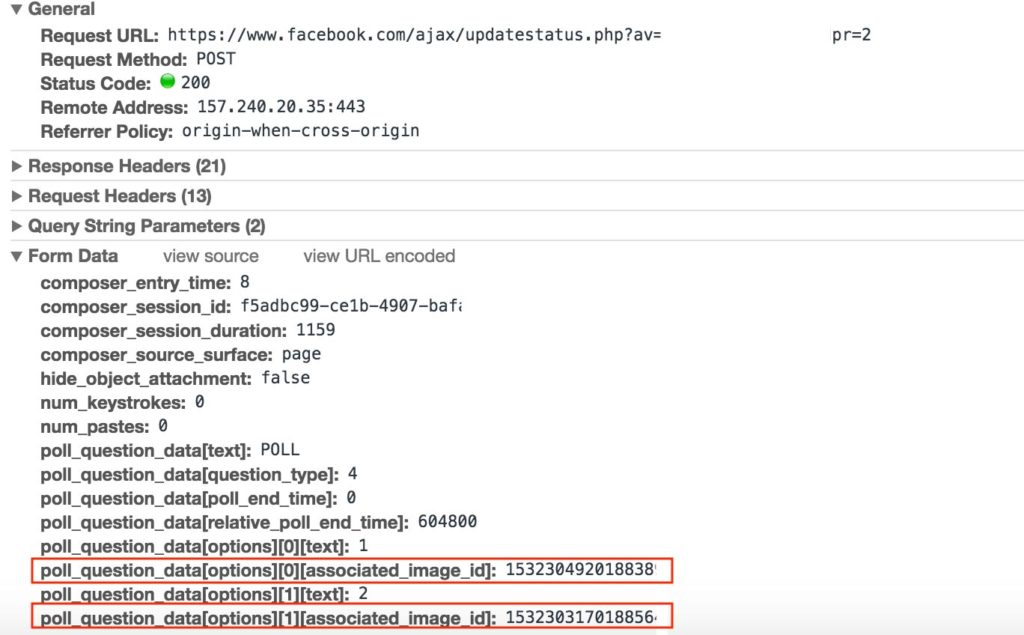
“Whenever a user tries to create a poll, a request containing gif URL or image id will be sent, poll_question_data[options][][associated_image_id] contains the uploaded image id.”

“When this field value changes to any other images ID, that image will be shown in the poll. After sending the request with another user image ID, a poll containing that image would be created.”

Facebook will help you find out if you’ve liked or shared Russian content

This just shows how easy it would be to replace the poll image with any image from any Facebook profile. But that’s not all. Once a malicious actor replaces his image with the victim’s image all he has to do is to delete the poll. That would remove the poll along with the victim’s image from Facebook without them even knowing what happened.

The whole process takes about a minute and is shown in the video below

Delete any image on facebook

Image removal vulnerability in Facebook polling featurehttps://blog.darabi.me/2017/11/image-removal-vulnerability-in-facebook.html

Posted by Dynamic World on Tuesday, November 21, 2017

The good news is that this exploit no longer works. Facebook was fast to fix the bug and everything is safe again, for now.

If you think that you’ve discovered an exploit that would be worth checking out consider reporting it here. Facebook offers a minimum reward of $500 for bug reports that are worthy of their attention.

Facebook’s improved AI uses pattern recognition to help prevent suicides

Facebook isn’t just a simple social networking website, as they’ve shown before with previous projects and are showing again with their new suicide prevention AI. Using pattern recognition on posts and live video streams, the AI should be able to recognize if a Facebook user is having suicidal thoughts.

Guy Rosen, VP of Product Management, explained in a blog post how it is going to work.

“Using pattern recognition to detect posts or live videos where someone might be expressing thoughts of suicide, and to help respond to reports faster

Improving how we identify appropriate first responders

Dedicating more reviewers from our Community Operations team to review reports of suicide or self harm”

Pattern recognition isn’t a new feature. It is already used in Facebook’s “first responders” program. This program has resulted in over 100 wellness checks, based on reports Facebook received via their proactive detection efforts.

The suicide prevention AI will start to roll out very soon outside of the US. After that, it will be available worldwide except in the European Union. The pattern recognition will look into comments like “Are you ok?” and “Do you need help?” This will then send a signal to the AI that the Facebook staff should investigate a certain post or live stream.

Until the AI rolls out, you can help with suicide prevention as well. One way would be to reach out to the person you think is at risk of suicide or report the post to Facebook. Their teams work worldwide and are available 24/7. Reports are sorted by priority so if you report a possible case it will be attended to as soon as possible.

Pattern recognition will add more value to Facebook’s current efforts toward suicide prevention. This is great news for Facebook and one more big victory for AI. As technology advances, we expect to see more tools like this one that will help people worldwide.

What are your thoughts on this tool from Facebook? Let us know in the comments below.


Via: Facebook

Google has been tracking you through cell towers

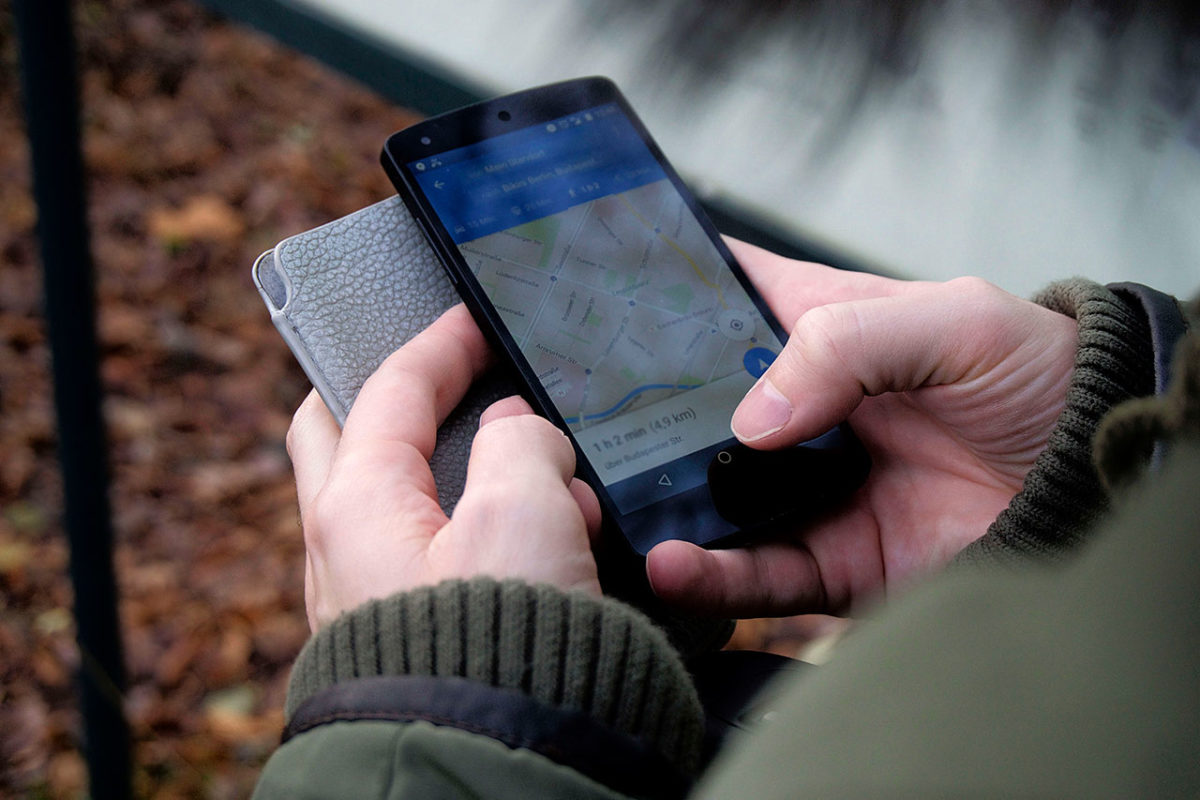
There are some estimates that Android phones make up 55% of all smartphone sales in the United States, making it the most widely used smartphone OS in the country. A lot of those users know that Google, and some other apps, might be tracking their location. What those same users don’t know is that Google knows where you are even if you disabled location services and even if you don’t have a SIM card in your phone.

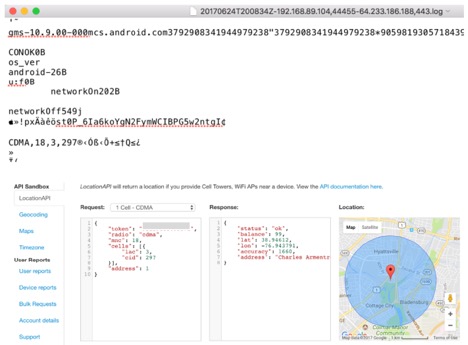
Quartz has conducted an investigation and found some very interesting info. Since the beginning of 2017 Google has been keeping track of user location via nearby cellular towers. This resulted in Google having a lot of data on you even if you didn’t want it to. After contacting Google about this Quartz got a response that this practice is still used but that it will end by the end of the year.

“In January of this year, we began looking into using Cell ID codes as an additional signal to further improve the speed and performance of message delivery, however, we never incorporated Cell ID into our network sync system, so that data was immediately discarded, and we updated it to no longer request Cell ID.” a spokesperson told Quartz in their response regarding this tracking issue.

Google Tracking
Source: qz.com

What remains unclear is how can cell-tower addresses that are transmitted as data strings improve messaging speed. What is clear is that Google can pinpoint your location by triangulating signals from different cellular towers. This is a lot easier in urban areas that have more towers close together.

All data sent to Google is encrypted but that doesn’t completely remove the doubt that this data could also be sent to third parties. It isn’t a troubling fact for a lot of people but if Google knows the locations of law enforcement workers and victims of domestic abuse that data could have big consequences.

Companies like Facebook are known to make huge profits from this data. Geo and location-targeted ads are becoming a common thing. Based on your search history and current location you will be served with ads that match your current interests and location. While it may look harmless, such data can always be collected by hackers and be used against you.

This location-sharing practice wasn’t limited to a specific model of Android phone or tablet so everyone’s location data has been collected. The data was sent once the device got connected to a WiFi network or had cellular data enabled. Bill Budington, a software engineer who works for the Electronic Frontier Foundation, a nonprofit organization commented on this event. “You can kind of envision any number of circumstances where that could be extremely sensitive information that puts a person at risk.”

Google’s privacy policy does mention that user data will be collected but they did not mention how they will be collecting it.

“When you use Google services, we may collect and process information about your actual location. We use various technologies to determine location, including IP address, GPS, and other sensors that may, for example, provide Google with information on nearby devices, Wi-Fi access points and cell towers.”

What are your thoughts on this? Let us know in the comments below.

Bill Gates wants to build a “smart city” in Arizona

World famous billionaire Bill Gates is known as the founder of Microsoft and for being a big innovator. His latest goal is to build a smart city in Arizona. It has been confirmed that one of his investment groups has already invested, but there is no information about when construction will start.

The city, which will be called Belmont, will have 80,000 homes with 3,800 acres reserved for industrial, office, and retail space; 3,400 acres of open space; and 470 acres reserved for public schools. The will feature driverless cars, high-speed networks, data centers, and new manufacturing technologies.

Belmont Properties stated for 12news:

“Comparable in square miles and projected population to Tempe, Arizona; Belmont will transform a raw, blank slate into a purpose-built edge city built around a flexible infrastructure model.”

Very few people live in the area now, but the city would be built on a route planned for the Interstate 11 freeway, which will include a five-mile corridor through Belmont. This unfunded freeway would run from Reno, Nevada, to Mexico.

Belmont would be built with a clean slate and new manufacturing technology. The hope is that it will draw investors and push technology in America even further – in other words, creating a new Silicon Valley. With no exact construction dates, however, it could be something we won’t see for a long time.

What do you think about this new investment? Will it bring worldwide technological change?

AI comes to Tokyo, masquerades as 7-year-old boy

Many people are calling 2017 the year of AI, thanks in part to new tech innovations like Elon Musk’s Open AI. In 2017, we are also seeing a lot of chatbots in commercial use. In particular, Tokyo has is taking these chatbots seriously, and they’ve gone a step further when it comes to AI. They have given residency to a chatbot named Mirai.

Mirai is programmed to be a 7-year-old boy who can have text conversations with users and make small, light-hearted alterations to selfies that you send him. Its new home is in Shibuya, a Tokyo ward with a population of around 224,000 people. “His hobbies are taking pictures and watching people, but he particularly loves talking with people… Please talk to him about anything,” the ward said in a statement with Microsoft. Mirai is a part of the Line messaging app.

The main goal with Mirai is to make the Tokyo government more accessible to the locals and to give them an avenue to share opinions with officials. Its  name means “Future” in Japanese.

While this all may sound like science fiction, let’s not forget that Saudi Arabia actually took the first step with granting residency to a robot named Sophia from Hanson Robotics. This robot showed off its great communication skills and facial expressions while conducting an interview.

Questions have been raised about the treatment of AI and robots. Should we treat them as humans even though they don’t possess human intelligence and aren’t self-aware? This is probably a question that we won’t be addressing in the near future, but it is definitely something worth considering as AI becomes more humanlike. What do you think?

Which smartphones have the best cameras?

Smartphones have come a long way. I still remember the first camera phone from 2000. The SCH-V200 was manufactured by Sharp and was a flip phone that had a 1.5 inch TFT-LCD screen and a 0.35-megapixel camera. The phone was capable of taking 20 photos at a 350,000-pixel resolution. That might not sound impressive now, but ask people who remember it. I am sure they’ll tell you that this phone started a technology revolution.

Since the launch of the SCH-V200, camera phones have made most regular digital cameras obsolete. Your phone is now many times better than a digital camera was just a year ago. But with so much choice comes a burning question. Which phones have the best camera? Let’s have a look.

Which phones have the best cameras?

Samsung Galaxy Note 8

This phone has an impressive dual camera system with X2 optical zoom, live focus, and dual capture. All these features add up to some great photos.

Via: Samsung

Full camera specs:

Primary           Dual 12 MP (26mm, f/1.7, PDAF & 52mm, f/2.4, AF), OIS, autofocus, 2x optical zoom, LED flash

Features         1/2.55″ sensor size, 1.4 µm pixel size @ 26 mm

1/3.6″ sensor size, 1.0 µm pixel size @ 52 mm

Geotagging; simultaneous 4K video and 9MP image recording; touch focus; face/smile detection; Auto HDR; panorama

Video   2160p@30fps, 1080p@60fps, 720p@240fps, HDR, dual-video rec.

Secondary      8 MP, f/1.7, autofocus, 1/3.6″ sensor size, 1.22 µm pixel size, 1440p@30fps, dual video call, Auto HDR

Google Pixel XL 2

Next up is an amazing phone from Google that packs a very powerful 12MP camera. The photos are crisp and clear, and video resolution is stunning, with a 2160p recording ability that will capture videos at 30 frames per second.

Via: GSM Arena

Full camera specs:

Primary           12.2 MP, f/1.8, OIS, phase detection and laser autofocus, dual-LED flash

Features         1/2.6″ sensor size, 1.4 µm pixel size, geo-tagging, touch focus, face detection, HDR, panorama

Video   2160p@30fps, 1080p@30/60/120fps, 720p@240fps

Secondary      8 MP, f/2.4, 1/3.2″ sensor size, 1.4 µm pixel size, 1080p

iPhone 8 Plus

This list can’t be complete without the latest iPhone from Apple. The 8 Plus version comes with a 12MP camera and a lot of functionality.

Full camera specs:

  • 12MP wide-angle and telephoto cameras
  • Wide-angle: ƒ/1.8 aperture
  • Telephoto: ƒ/2.8 aperture
  • Optical zoom; digital zoom up to 10x
  • Portrait mode
  • Portrait Lighting (beta)

If you are looking to make great high-quality photos, the iPhone 8 Plus will deliver.

It should be noted that these cameras are not even close to the Nokia Lumia 1020 when it comes to megapixels. For those who don’t remember, in 2013 Nokia caught us all by surprise with the Lumia 1020 model, which packs a whopping 41MP. It is still unmatched by any phone today. Just look at the specs:

  • Primary: 41 MP (38 MP effective), f/2.2, 26mm, Carl Zeiss optics, OIS, auto/manual focus, Xenon & LED flash, check quality
  • Features: 1/1.5″ sensor size, 1.12 µm pixel size, PureView technology, geo-tagging, face detection, panorama
  • Video: 1080p@30fps, 4x lossless digital zoom, check quality
  • Secondary: 1.2 MP, 720p@30fps

Lumia 1020 is still quite expensive, considering that the phone is almost five years old. The average price is somewhere around $200.

How to set up parental controls for YouTube

YouTube is a great place for hilarious cat videos and Minecraft walkthroughs, but it also contains plenty of videos that parents don’t want their children to see. Fortunately, YouTube has parental controls, and they’re not that hard to set up. If you are a concerned parent, follow these steps to get YouTube’s parental controls up and running.

This is How to Link to the Exact Part of the YouTube Video 

Browser-Based Parental Control

1. Go to YouTube and sign in with your Google account.

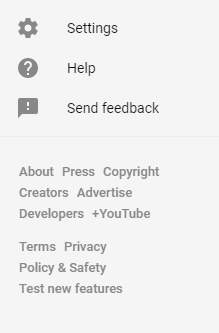
2. Click the Options button on the top left and from the drop-down menu choose Settings.

3. On the bottom of the page, you will find a button named Restricted mode.

4. By default, this will be set to Off, but with a simple click, you can turn it on. You can also lock your choice, which will prevent anyone else from being able to change the settings. Once locked, these settings can only be changed if your Google account is logged in to YouTube.

Mobile-Based Parental Control

On mobile, the process is a bit different but also easy.

1. Log in to your Google account.

2. Click Your Icon, in the top right-hand corner, and choose Settings.

3. There you will find Restricted mode filtering. Click it and choose the Strict option.

4. Hit the back button and you should see that the setting has changed from Don’t filter to Strict.

If you want your child to be protected from flagged and inappropriate content, then be sure to follow these steps. Once you’ve set up Parental Controls, YouTube will automatically filter everything out for you.