WhatsApp collaborates with Google so you can find out the origin of any image sent to you

Meta, in collaboration with Google, is testing a new feature to curb the spread of misinformation on WhatsApp. According to the specialized portal WABetaInfo, the latest beta of WhatsApp Web includes a reverse image search tool that allows users to verify the authenticity of images shared on the platform. Thanks to this new function, called “Search the web,” users will be able to use Google’s search to analyze the images they receive, providing them with additional context and helping them identify if an image has been manipulated. By using Google’s services, WhatsApp will not have access […]

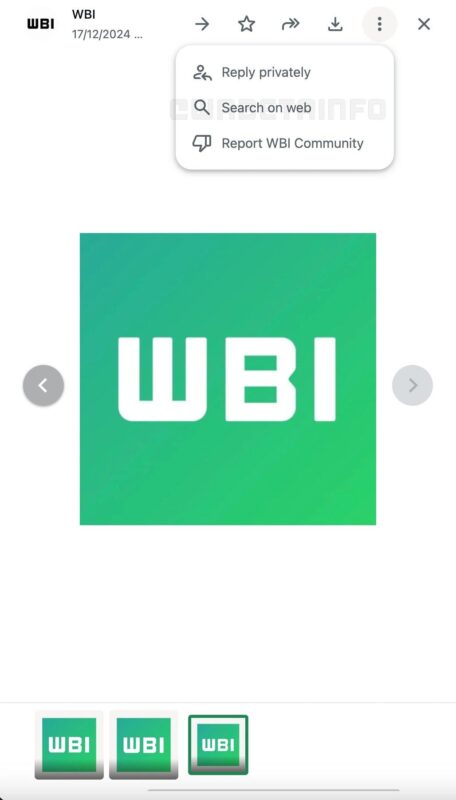
Meta, in collaboration with Google, is testing a new feature to curb the spread of misinformation on WhatsApp. According to the specialized portal WABetaInfo, the latest beta of WhatsApp Web includes a reverse image search tool that allows users to verify the authenticity of images shared on the platform.

WhatsApp DOWNLOAD

Thanks to this new feature, called “Search the web”, users will be able to use Google search to analyze the images they receive, thus providing additional context and helping them identify if an image has been manipulated. By using Google’s services, WhatsApp will not have access to the content of the images during this process, according to the report.

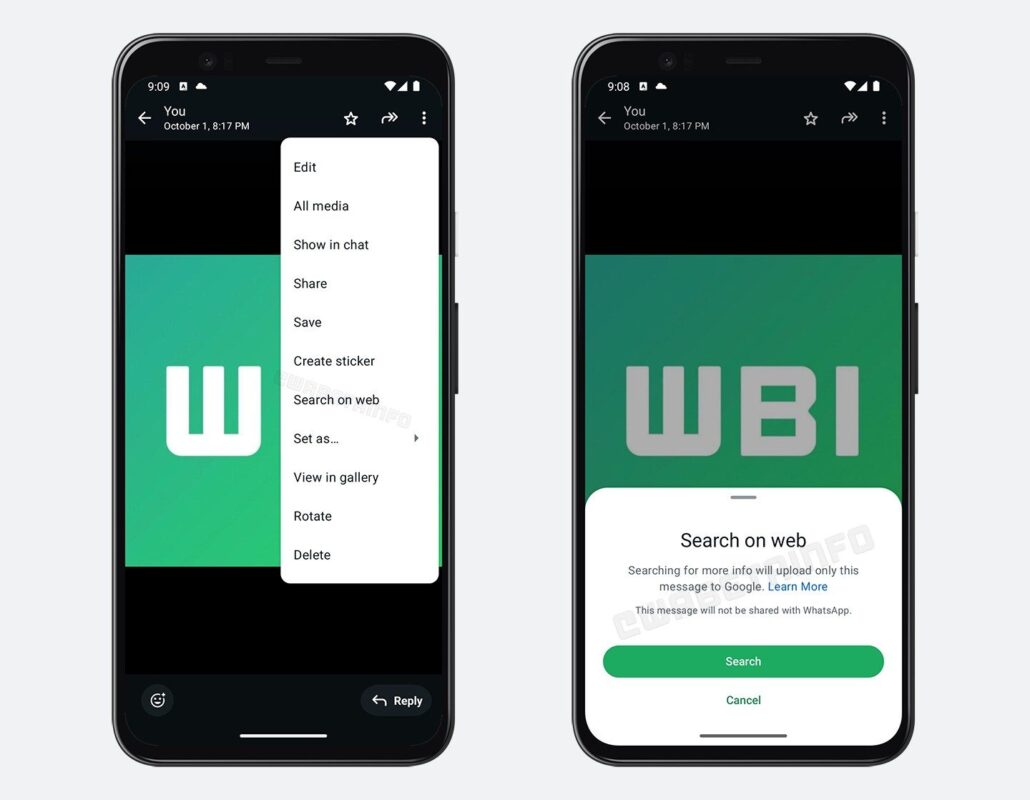
WhatsApp has been testing this new feature in its Android app since early November, which is located in the three-dot menu of the image viewer. The tool allows you to perform a reverse search directly from the platform, avoiding additional steps like downloading and uploading images to a browser.

Although Meta has not yet officially announced the launch of this feature, it is expected to be available to all users both on WhatsApp Web and on the Android app in the coming weeks.

WhatsApp DOWNLOAD

WhatsApp will allow you to react more quickly to Christmas messages

WhatsApp continues to improve its features and now expands its repertoire of quick reactions with a new addition perfect for celebrating any event. Until now, users could choose from six default emojis to react to messages, such as the thumbs up, heart, laughing with tears, surprised, sad, and high-five gesture. However, a seventh emoji is added to the list: the iconic party popper, ideal for celebrations like New Year’s. According to WABetaInfo, this update expands the reaction tray and adds a more lively touch to interactions in the […]

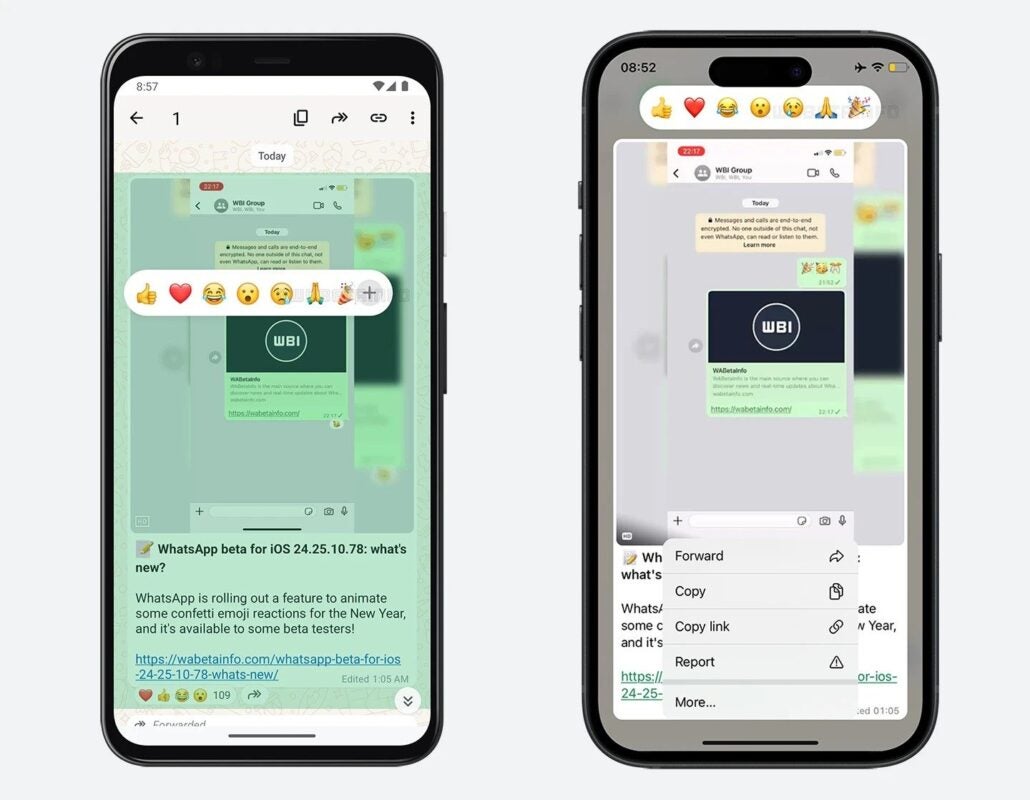
WhatsApp continues to improve its features and now expands its repertoire of quick reactions with a perfect novelty to celebrate any event. Until now, users could choose from six default emojis to react to messages, such as the thumbs up, the heart, the laughing crying emoji, the surprised, the sad, and the high-five gesture. However, a seventh emoji is added to the list: the iconic party popper, ideal for celebrations like New Year’s.

WhatsApp DOWNLOAD

According to WABetaInfo, this update expands the reaction tray and adds a more animated touch to interactions in the app. Although it has always been possible to respond with any available emoji, the quick selection of these default ones makes it much easier to immediately react to a loved one.

Additionally, WhatsApp has introduced another feature that will make its users smile: now, when sending messages that include emojis like confetti or the celebration face, confetti animations will appear on the screen. Although it’s not a revolutionary change, these small improvements add a fun and very timely touch, especially during times when we are continuously communicating with friends and family.

WhatsApp DOWNLOAD

WhatsApp will stop working soon on these phones

Regularly, WhatsApp stops working on older phones. This move is part of its update cycle and results in ending support for older operating systems. As discovered by WABetaInfo, WhatsApp is preparing a warning message for some iPhones. These are the affected devices and the deadline: WhatsApp has announced that starting from May 5, 2025, it will not work on devices with versions earlier than iOS 15.1, which directly affects some Apple phones that, although they continue to function normally, will not be able to access WhatsApp. Specifically, […]

Regularly, WhatsApp stops working on old phones. This move is part of its update cycle and results in dropping support for older operating systems. As discovered by WABetaInfo, WhatsApp is preparing a warning message for some iPhones.

Telegram DOWNLOAD

These are the affected devices and the deadline

WhatsApp has announced that as of May 5, 2025, it will not work on devices with versions earlier than iOS 15.1, which directly affects some Apple phones that, although they continue to function normally, will not be able to access WhatsApp. Specifically, we are talking about the iPhone 5s, iPhone 6, and iPhone 6 Plus, which will no longer receive support from Facebook.

The main reason for this change is that the new features and updates of WhatsApp require the technologies offered by the latest versions of iOS. According to Apple’s data, only 9% of iPhones are running iOS 16 or earlier versions, so the impact of WhatsApp’s decision will be minimal.

We can check if we are on an iOS version compatible with WhatsApp. We just need to go to Settings > General > Software Update. If our device supports iOS 15.1 or later, the solution is as simple as updating the system.

For older models that can no longer be updated, the end of WhatsApp support marks a turning point. Although we can now rely on RCS to send messages to any device for free and without the need for third-party apps —as long as our carrier supports it—, it is true that some groups are still only available on the Facebook app.

Telegram DOWNLOAD

The move by WhatsApp reminds us of the importance of keeping our devices up to date. In a dynamic ecosystem like Apple’s, these updates ensure that we continue to enjoy the best that technology can offer us.

WhatsApp wants to prevent you from falling for hoaxes with this new feature

WhatsApp is testing a new feature that will allow users to verify the authenticity of received images, helping to combat misinformation and fake news. Thanks to this new tool, users will be able to access Google’s reverse image search directly from the app, thus being able to search for evidence of possible image manipulations. The feature, discovered by WABetaInfo in the beta version 2.24.23.13 for Android, is not yet available on iOS. To use it, users just need to open an image in a chat, select the options menu, and tap on “search in the […]

WhatsApp is testing a new feature that will allow users to verify the authenticity of received images, helping to combat misinformation and fake news. Thanks to this new tool, users will be able to access Google’s reverse image search directly from the app, thus being able to search for evidence of possible image manipulations.

The feature, discovered by WABetaInfo in the beta version 2.24.23.13 for Android, is not yet available on iOS. To use it, users simply need to open an image in a chat, select the options menu, and click on “search the web.” This option uses Google’s technology to find similar images and, in some cases, provide additional context, although it does not always guarantee detailed results.

WhatsApp will notify users the first time they use the tool, informing them that, although the function shares the processed images with Google, it maintains the privacy commitment of WhatsApp, which protects their chats with end-to-end encryption. Currently, this functionality is in beta phase, and its widespread release is expected in the near future.

WhatsApp DOWNLOAD

WhatsApp will stop working on the Mac in 54 days if not updated: What needs to be done?

If we are WhatsApp users on Mac and still using the old version based on Electron, it’s time to update our application. Meta has confirmed that this version of the app will no longer be available in just 54 days. The notification has already started to reach users of the old version, warning that we must migrate to the new version of WhatsApp for Mac to avoid losing access to our chats on the computer.

Why will the old version stop working?

This version of WhatsApp for Mac was created using Electron technology, which basically allows web applications to run on the computer’s operating system. Although functional, this approach has significant limitations, especially in terms of performance and functionality. Electron-based applications are usually slower, consume more resources, and lack several native features that significantly enhance the application.

Therefore, last year, Meta decided to rebuild the WhatsApp application completely for Mac using Apple’s Catalyst technology. With this, they ported the iPad application to Mac, ensuring much smoother performance and better integration with the operating system. The new version is therefore faster, more efficient, and better adapted to the system.

So, if we continue using the Electron-based version, we will receive a notification urging us to download the new version within 54 days. As WABetaInfo reported, after this time the old version will no longer be available, and we will no longer be able to access our chats from the computer unless we have migrated to the new application.

The good news is that the migration process is simple and keeps all the information on your site.

How to get the new application and continue using WhatsApp on Mac?

To keep access to WhatsApp on our Mac, we simply download the new version of WhatsApp for macOS. We can do this directly from the official WhatsApp website or from the Mac App Store. However, the new version requires a Mac with macOS 11 or later.

Once the new application is installed, all chats and contacts will be automatically synchronized, ensuring a smooth transition. Although some users resisted the change initially because the new application lacked certain functionalities, Meta has made the change mandatory. After the process is finished, we can drag the old application directly to the Mac trash.

In the coming days, while WhatsApp copies one of Instagram’s most popular features and prepares to allow us to redesign our chats to make them look amazing, the update notification will continue to spread. This way, we will know for sure if we need to update to continue using WhatsApp on Mac. If we do not receive the notification, we are already using the latest version of the application, and do not need to do anything. Meanwhile, if the notification appears at the top of the conversation list, updating takes only a minute.


WhatsApp usernames will include a (very) useful feature

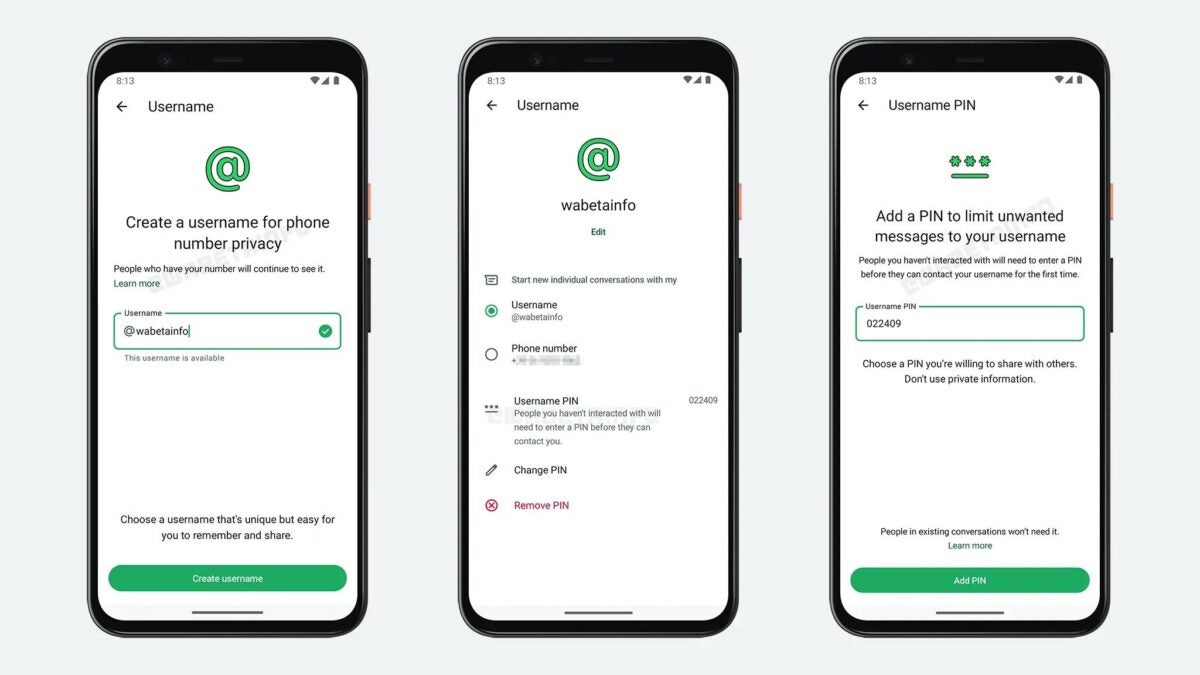
WhatsApp is working on a new feature that promises to significantly improve the privacy and security of its users. According to WABetaInfo, after analyzing the beta version of the app for Android (2.24.18.2), the new username system that WhatsApp intends to implement will come with a PIN security feature, designed to combat spam, a problem that has affected the platform for a long time.

WhatsApp DOWNLOAD

This new feature allows WhatsApp users to set a PIN of at least four digits, which will act as an additional layer of security, greatly reducing the spam received. Thanks to this novelty, those who have not previously interacted with a user will not be able to send them messages just by knowing their username.

The PIN system will not affect conversations with contacts you have already interacted with, allowing current chats to continue unchanged. However, the feature is still in beta testing and there is no confirmed date for its official release yet. It is expected to be available to all users before the end of the year.

WhatsApp DOWNLOAD

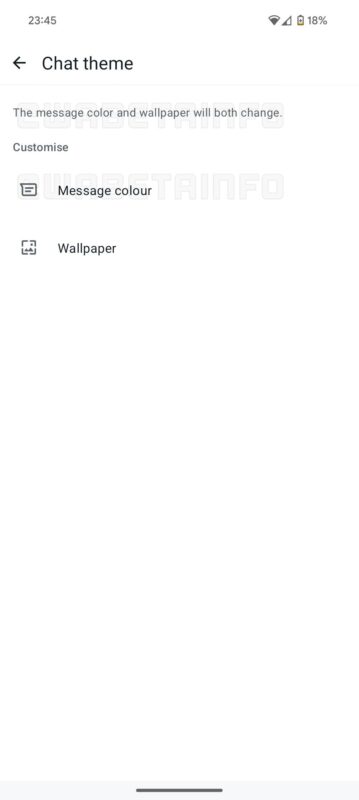
WhatsApp will allow you to redesign your chats so they look amazing

WhatsApp continues to expand its range of features with the aim of improving the user experience. After recently testing an update that integrates new augmented reality features in video calls of the Android app, now the company is testing a new tool: custom chat themes.

WhatsApp DOWNLOAD

In the latest beta version 2.2.4.17.19 of WhatsApp for Android, users have the ability to customize the appearance of their conversations by selecting colors for chat bubbles and backgrounds. This new functionality aims to make chats much more attractive for users, better reflecting their personal preferences.

According to the information provided by WABetaInfo, this feature is also being developed for iOS. Although it is not yet available in its final version, it is speculated that “there will be at least 10 chat themes to enhance the user experience”. When applied, the customized chat theme will only affect the user who sets it up, without modifying the appearance of the conversations for other participants. In addition, it is expected that future updates will include the option to manually override the theme for specific chats.

WhatsApp is also working on other quite striking features. One of them is a new voice chat that will allow users to communicate with Meta AI, Meta’s artificial intelligence, through voice messages. This feature would be added to the possibility of choosing between 10 different voices to interact with the AI.

In addition, WhatsApp is introducing a new feature of reacting to messages with a double tap, which will make interaction with messages easier and faster. And if that wasn’t enough, the Android app is improving the visibility of community groups, adding an extra layer of organization and control for users.

WhatsApp DOWNLOAD

Be very careful with this new and dangerous scam campaign on WhatsApp

Experts in cybersecurity are warning WhatsApp users about a new scam that affects the platform’s group chats. Cybercriminals are taking advantage of the app’s enormous popularity, which already has over 2.78 billion active users worldwide, to infiltrate WhatsApp groups and obtain personal information from victims.

WhatsApp DOWNLOAD

According to Action Fraud, the British center against cybercrime, so far this year there have been over 630 cases of scams related to this modality. The modus operandi of the criminals consists of impersonating legitimate members of a group, using WhatsApp calls to deceive the victims.

The scammer contacts a user, pretending to be another member of the group, and requests a verification code under the pretext of joining a supposed group video call. However, this code is actually used to register the victim’s WhatsApp account on a new device, allowing the criminal to take control of the account.

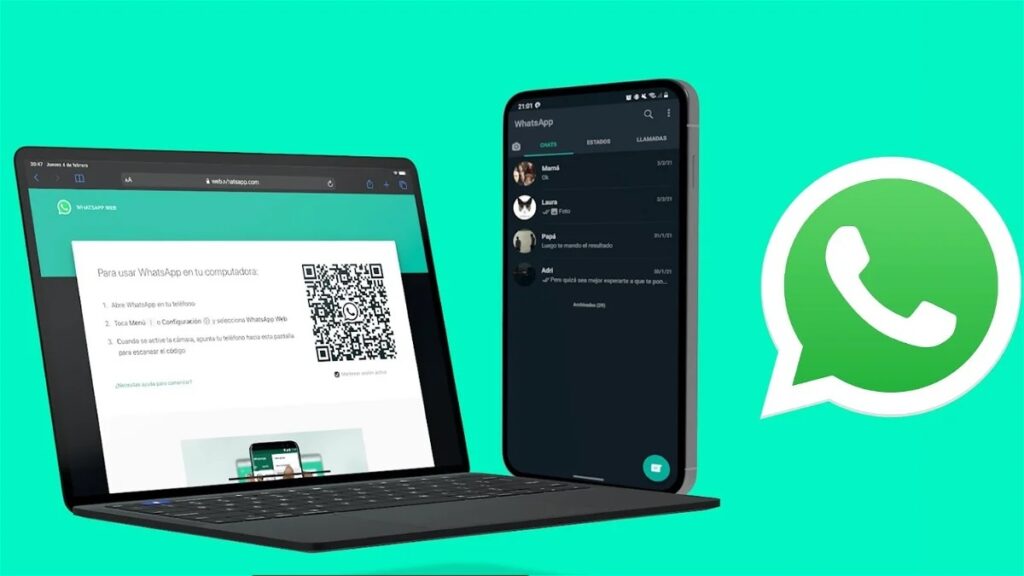
WhatsApp and WhatsApp Web

Once the cybercriminal has gained access to the victim’s WhatsApp account, they activate two-step verification, thus blocking any attempt by the legitimate user to recover their account. Subsequently, they send messages to other group members, as well as to the victim’s friends and family, requesting money urgently.

Gary Miles, head of the National Fraud Intelligence Bureau of the London Police, urges users to stay alert, especially those who participate in large group chats. In addition, a WhatsApp spokesperson emphasizes the importance of enabling two-step verification and recommends never sharing the six-digit PIN code with anyone, not even with close acquaintances. Furthermore, they suggested that, in case of doubt, users should contact the person through a call or voice note to confirm their identity.

WhatsApp DOWNLOAD