
Skip to content

Softonic English

Just another Softonic Sites site

Creation of a safe working environment for AI intended for interdepartmental projects

You already know that, on many occasions, work rhythms can be quite frantic. Having your mind on a thousand things and trying to get to all places is not ideal, not to mention how dangerous it can become if you turn it into a routine. In this case, Adobe can help you lighten your workload, at least when it comes to “paperwork.” Specifically, we are referring to Acrobat Studio. This is the Korean company’s solution for increasing your productivity without sacrificing your health. The focus on collaboration, the enhanced tools with […]

You already know that, on many occasions, work rhythms can be quite frantic. Having your mind on a thousand things and trying to be everywhere is not ideal, not to mention how dangerous it can become if it turns into a routine. In this case, Adobe can help lighten the workload, at least when it comes to “paperwork.”

Specifically, we are referring to Acrobat Studio. This is the solution from the Korean company to help you increase your productivity without sacrificing your health. The focus on collaboration, the AI-powered tools, and its great security are some of the pillars that make Acrobat Studio a very interesting option for both small and large companies.

Adobe Acrobat
Adobe Acrobat DOWNLOAD

How to create PDF Spaces

As defined by Adobe, Acrobat Studio is the company’s “comprehensive solution” for creating PDFs. In addition to the tools we already know from Acrobat, it also provides us with access to PDF Spaces and design features alongside Adobe Express Premium.

Now, we will delve into how to use PDF Spaces. Thanks to this, we can gather several files and analyze their content from the same place. To use them, select PDF Spaces in the left panel of the Acrobat page.

Next, select Create a PDF Space. In the dialog box that opens, you will see numerous options. You can choose to select which files to open from Adobe’s cloud storage, upload files from your PC, add text from Paste copied text…

After adding all the files you want, select Add to PDF Space. You will then see the files listed on the left, a series of small summaries of each document generated automatically, and a chat panel where you can ask questions to the AI agent.

If you want to change the name of your PDF Space, click above on the name that was automatically set, type a new name, and select Save.

How to share your PDF Spaces with other users

The key point of PDF Spaces is its use as a collaborative tool. From there, users with access will be able to view, review, and edit the files.

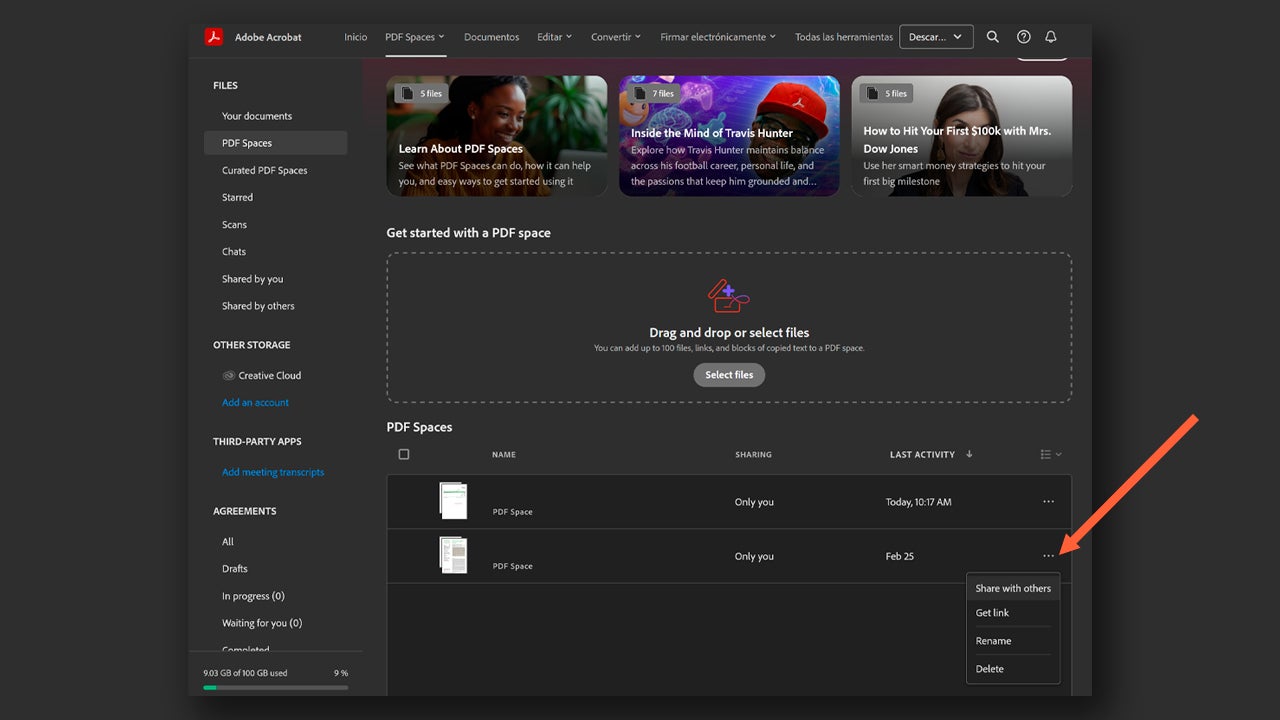
From your browser, access the homepage of Acrobat and click on PDF Spaces. Once here, scroll down and go to the space you want to share. There, select the three dots you will see on the right and click on Share with others.
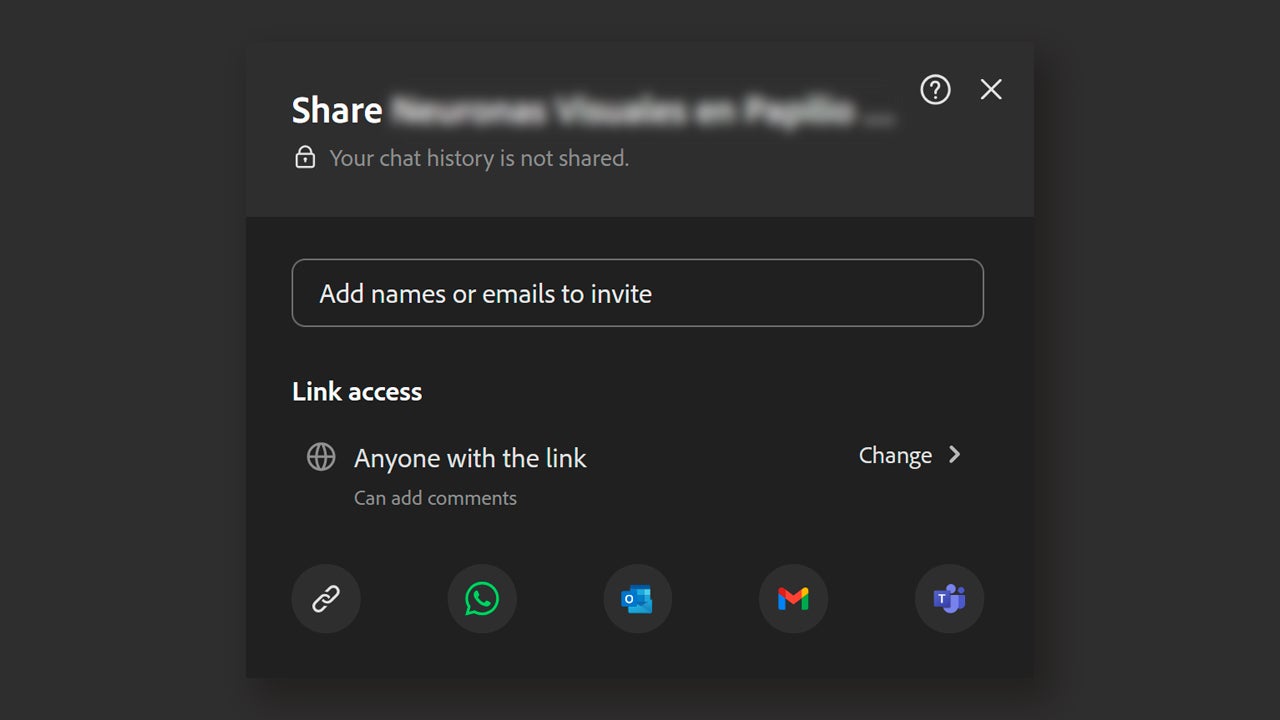
In this panel, you can do several things. The first is that you can write the emails of the users you would like to grant access to that space. You can also generate a link from which anyone who clicks on it will be able to access the space. You have shortcuts to platforms like WhatsApp or Microsoft Teams to share your Space.
This is how you can create summaries with AI

You have several ways to use the AI-generated summary feature with Adobe. One of them is through the Adobe Acrobat website. To use it, go to the website and upload your file by dragging it to the indicated area.
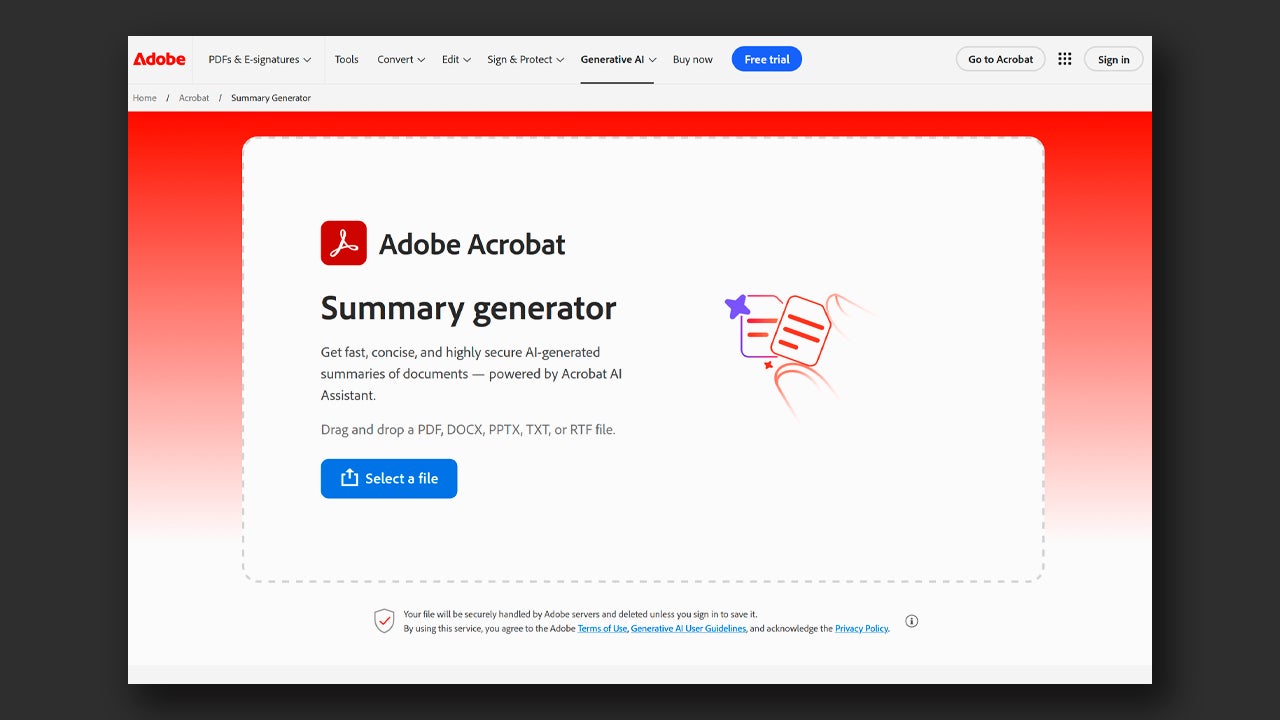
Once it has loaded, Acrobat will automatically generate a summary in a short time. If it suits you, you can use the suggested questions to obtain a bit more specific information.

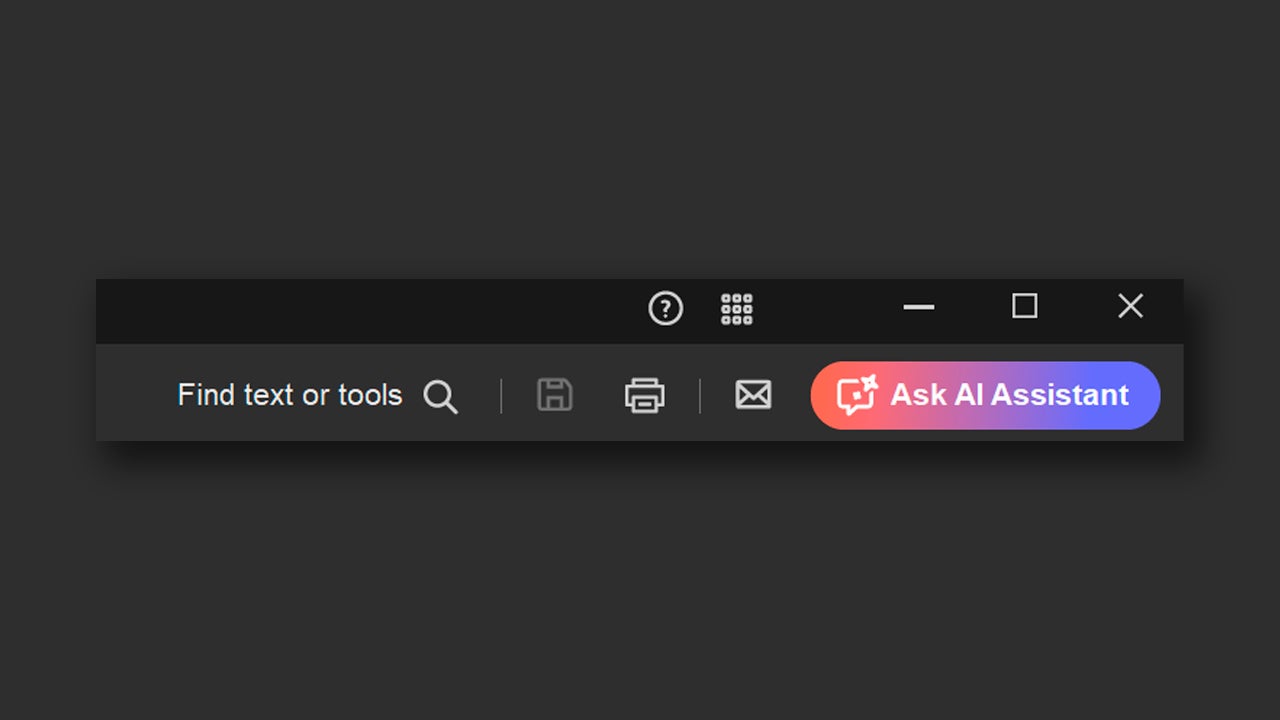
If you use Adobe Acrobat from its desktop version, you will be able to use this feature if you have an active subscription to AI Assistant. To access these functions, you will need to click on the Ask AI Assistant button, located at the top right.
Edit PDF files with AI

To edit PDF files with Adobe Acrobat, you first need to start with the obvious: opening the file in Acrobat. Then, click on the Edit PDF tool. You will find it in the toolbar located on the right.
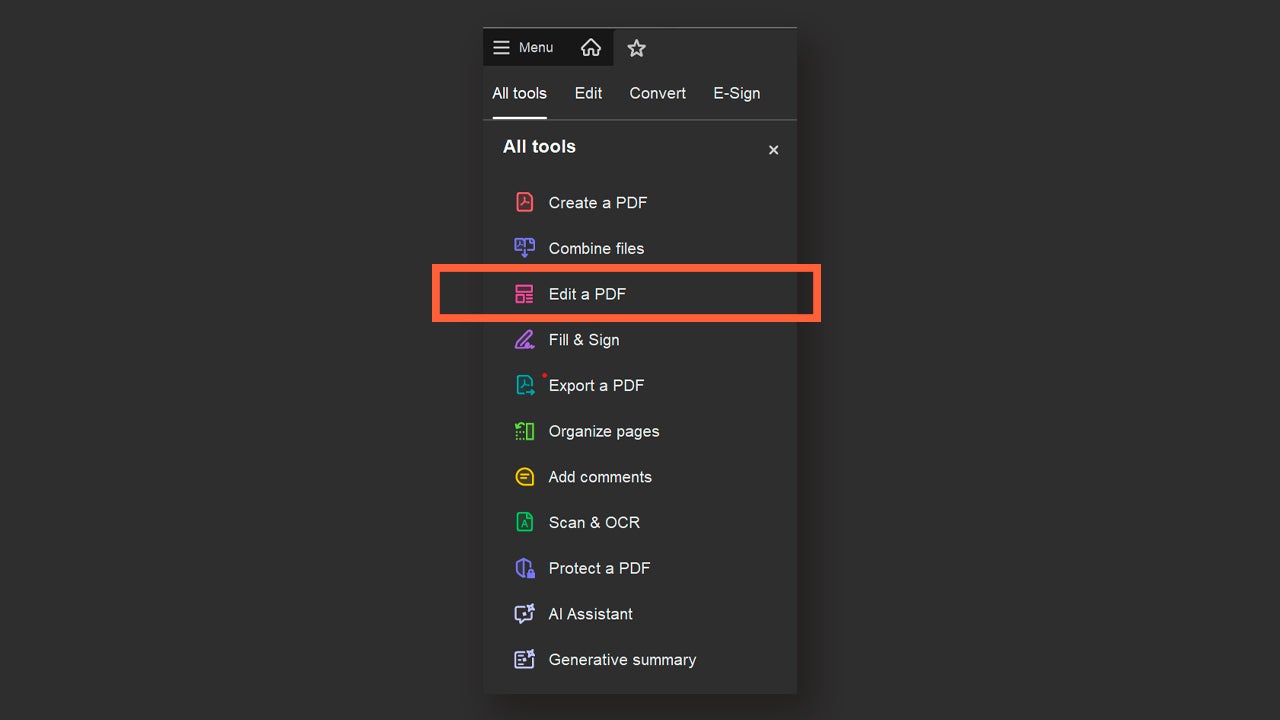
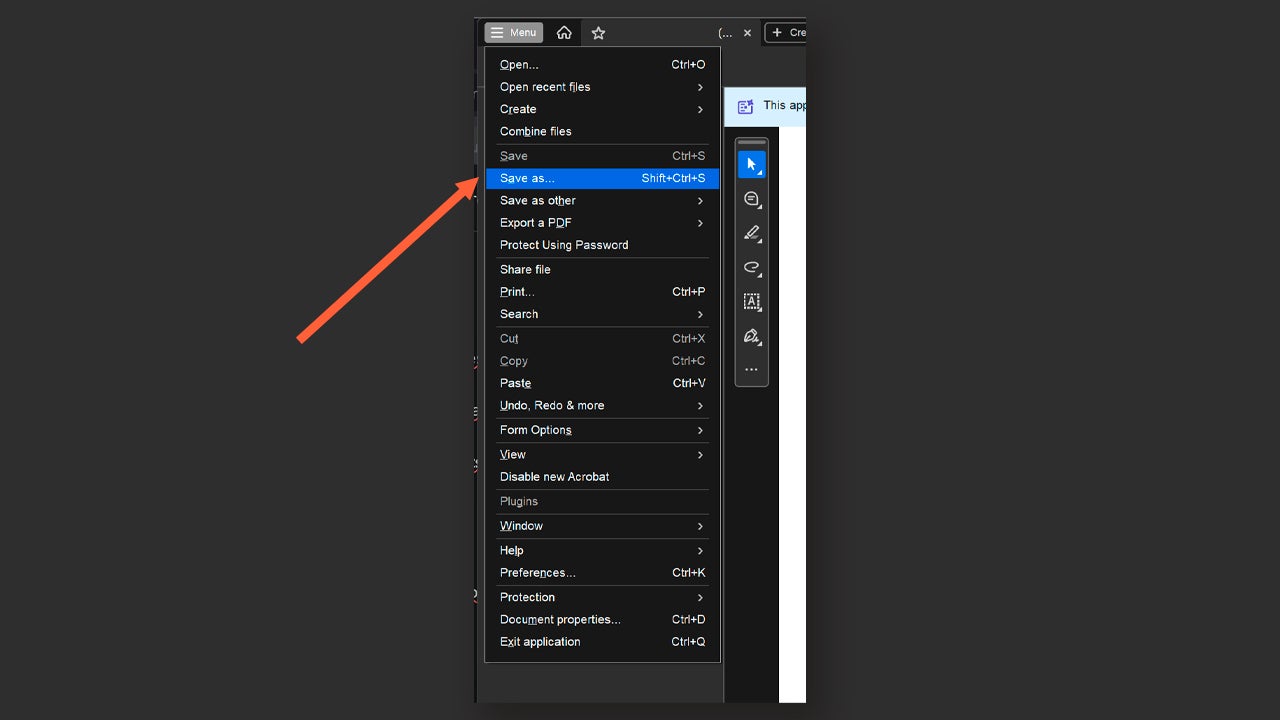
From here you can do many things: add more text, edit it, change the font, change images… You will see that the list is long. When you finish, you can save your edited file. You can click on the save icon, located right next to the Ask AI Assistant button. You can also go to Menu and select Save as.. if you want to save it in a more specific location.
How can I access Acrobat Studio?

If you are wondering how you can make use of Acrobat Studio, we explain it to you here. Acrobat Studio is a specific subscription of Acrobat Pro. Through this link, you can see the different available plans and what each one includes.

If you have an Adobe business account, it will be the main administrator who must grant you a license from the Adobe Admin Console. If you are already subscribed to Adobe, you should check what type of plan you have, as not all include access to Acrobat Studio or Acrobat Pro.

Adobe Acrobat
Adobe Acrobat DOWNLOAD

Author: María López

{ "de-DE": "Künstler aus Berufung und Technikliebhaber. Seit ich denken kann, habe ich gerne an allen möglichen Gadgets herumgebastelt.", "en-US": "Artist by vocation and technology lover. I have liked to tinker with all kinds of gadgets for as long as I can remember.", "es-ES": "Artista de vocación y amante de la tecnología. Me ha gustado cacharrear con todo tipo de gadgets desde que tengo uso de razón.", "fr-FR": "Artiste de vocation et amateur de technologie. J'aime bricoler avec toutes sortes de gadgets depuis que j'ai l'usage de la raison.", "it-IT": "", "ja-JP": "", "nl-NL": "", "pl-PL": "", "pt-BR": "", "social": { "email": "", "facebook": "", "twitter": "", "linkedin": "" } } View all posts by María López

Author María LópezPosted on March 30, 2026March 30, 2026Categories Affiliate post, News

Post navigation

Previous Previous post: Sam Altman reverses his "sexual ChatGPT" amid the company's crisis
Next Next post: Sony has just announced that it is raising the price of all its PS5s again: the second time in a year

Recent Posts

  • Bluey lives, the fight continues: Why Disney+ just released new mini-episodes even though they promised the series was over
  • The critics are hating The Mandalorian and Grogu and that could mean the end of Star Wars
  • Sony's new game is strange, creepy, and dodging literal bullet rains is incredibly fun
  • Yoshi arrives on Switch 2 to cap off an outstanding first half of the year for Nintendo
  • The most hated character from Final Fantasy VII Rebirth will return for the third part

Archives

  • May 2026
  • April 2026
  • March 2026
  • February 2026
  • January 2026
  • December 2025
  • November 2025
  • October 2025
  • September 2025
  • August 2025
  • July 2025
  • June 2025
  • May 2025
  • April 2025
  • March 2025
  • February 2025
  • January 2025
  • December 2024
  • November 2024
  • October 2024
  • September 2024
  • August 2024
  • July 2024
  • June 2024
  • May 2024
  • April 2024
  • March 2024
  • February 2024
  • January 2024
  • December 2023
  • November 2023
  • October 2023
  • September 2023
  • August 2023
  • July 2023
  • June 2023
  • May 2023
  • April 2023
  • March 2023
  • February 2023
  • January 2023
  • December 2022
  • November 2022
  • October 2022
  • September 2022
  • August 2022
  • July 2022
  • June 2022
  • May 2022
  • April 2022
  • March 2022
  • February 2022
  • January 2022
  • December 2021
  • November 2021
  • October 2021
  • September 2021
  • August 2021
  • July 2021
  • June 2021
  • May 2021
  • April 2021
  • March 2021
  • February 2021
  • January 2021
  • December 2020
  • November 2020
  • October 2020
  • September 2020
  • August 2020
  • July 2020
  • June 2020
  • May 2020
  • April 2020
  • March 2020
  • February 2020
  • January 2020
  • December 2019
  • November 2019
  • October 2019
  • September 2019
  • August 2019
  • July 2019
  • June 2019
  • May 2019
  • April 2019
  • March 2019
  • February 2019
  • January 2019
  • December 2018
  • November 2018
  • October 2018
  • September 2018
  • August 2018
  • July 2018
  • June 2018
  • May 2018
  • April 2018
  • March 2018
  • February 2018
  • January 2018
  • December 2017
  • November 2017
  • October 2017
  • September 2017
  • August 2017
  • July 2017
  • June 2017
  • May 2017
  • April 2017
  • March 2017
  • February 2017
  • January 2017
  • December 2016
  • November 2016
  • October 2016
  • September 2016
  • August 2016
  • July 2016
  • June 2016
  • May 2016
  • April 2016
  • March 2016
  • February 2016
  • January 2016
  • December 2015
  • November 2015
  • October 2015
  • September 2015
  • August 2015
  • July 2015
  • June 2015
  • May 2015
  • April 2015
  • March 2015
  • February 2015
  • January 2015
  • December 2014
  • November 2014
  • October 2014
  • September 2014
  • August 2014
  • July 2014
  • June 2014
  • May 2014
  • April 2014
  • March 2014
  • February 2014
  • January 2014
  • December 2013
  • November 2013
  • October 2013
  • September 2013
  • August 2013
  • July 2013
  • June 2013
  • May 2013
  • April 2013
  • March 2013
  • February 2013
  • January 2013
  • December 2012
  • November 2012
  • October 2012
  • September 2012
  • August 2012
  • July 2012
  • June 2012
  • May 2012
  • April 2012
  • March 2012
  • February 2012
  • January 2012
  • December 2011
  • November 2011
  • October 2011
  • September 2011
  • August 2011
  • July 2011
  • June 2011
  • May 2011
  • April 2011
  • March 2011
  • February 2011
  • January 2011
  • December 2010
  • November 2010
  • October 2010
  • September 2010
  • August 2010
  • July 2010
  • June 2010
  • May 2010
  • April 2010
  • March 2010
  • February 2010
  • January 2010
  • December 2009
  • November 2009
  • October 2009
  • September 2009
  • August 2009
  • July 2009
  • June 2009
  • May 2009
  • April 2009
  • March 2009
  • February 2009
  • January 2009
  • December 2008
  • November 2008
  • October 2008
  • September 2008
  • August 2008
  • July 2008
  • June 2008
  • May 2008
  • April 2008
  • March 2008
  • February 2008
  • January 2008
  • December 2007
  • November 2007
  • October 2007
  • September 2007
  • August 2007
  • July 2007
  • June 2007
  • May 2007
  • April 2007
  • March 2007
  • February 2007
  • January 2007
  • December 2006
  • November 2006
  • September 2006
  • August 2006
  • June 2006
  • May 2006
  • July 2001
  • January 2001
  • November 2000
  • September 2000
  • August 2000
  • July 2000
  • April 2000
  • March 2000

Categories

  • Affiliate post
  • Expert Review
  • Gaming
  • Guides
  • How to
  • Legacy how To
  • News
  • Noticias
  • Software>Security
  • Sponsored
  • Trucos y Consejos
  • Uncategorized
  • Windows software

Meta

  • Log in
  • Entries feed
  • Comments feed
  • WordPress.org
Softonic English Proudly powered by WordPress