
A major Windows 11 selling point is the operating system’s advanced security. Microsoft even changed the system requirements of Windows 11 to make sure that all PCs running the operating system are protected by the same core set of security feature.
It turns out, that security protections may impact gaming performance on Windows 11 PCs. The performance issue is not caused by bugs, like the recently reported performance issue on devices with Nvidia graphics processing units.
Instead, it appears that some Windows security features may impact the performance of games in a negative way.
Microsoft published a support page on which it details the issue. It suggests that customers may want to turn off certain security features to achieve the best performance possible on Windows 11 when playing games.
Is your gaming PC affected?
The company confirms that gaming performance may be impacted “in some scenarios and some configurations of gaming devices”. No additional information is provided. It is not clear which devices are affected and whether the performance drop is noticeable.
Considering that Microsoft published a support page to inform customers about the issue, it is almost certain that the issue is not minor.
As a result, gamers on Windows 11 may want to investigate the issue to find out if gaming performance is impacted on their devices.
Gamers who played games on Windows 10 may notice drops in performance after the update to Windows 11. There is no other way to find out, other than running tests.
Microsoft recommends to disable two security features of Windows 11 to improve performance while gaming.
It is therefore necessary to turn off the features, if turned on, and test the performance to find out if the gaming PC is affected.
The security features in question
The features Memory Integrity and Virtual Machine Platform may impact the performance.
Memory Integrity, which is also called Hypervisor-protected code integrity, is enabled on new Windows 11 devices only. It protects processes from malicious code injections. Additionally, it prevents the loading of untrusted and unsigned drivers.
Virtual Machine Platform is a core virtualization feature. The Windows Subsystem for Linux 2 uses it among other applications.
Word of warning: Turning off security features may make devices vulnerable to threats. Gamers who experience noticeable performance issues may still want to run tests to find out if these security features are causing the issues.
How to turn of Memory Integrity
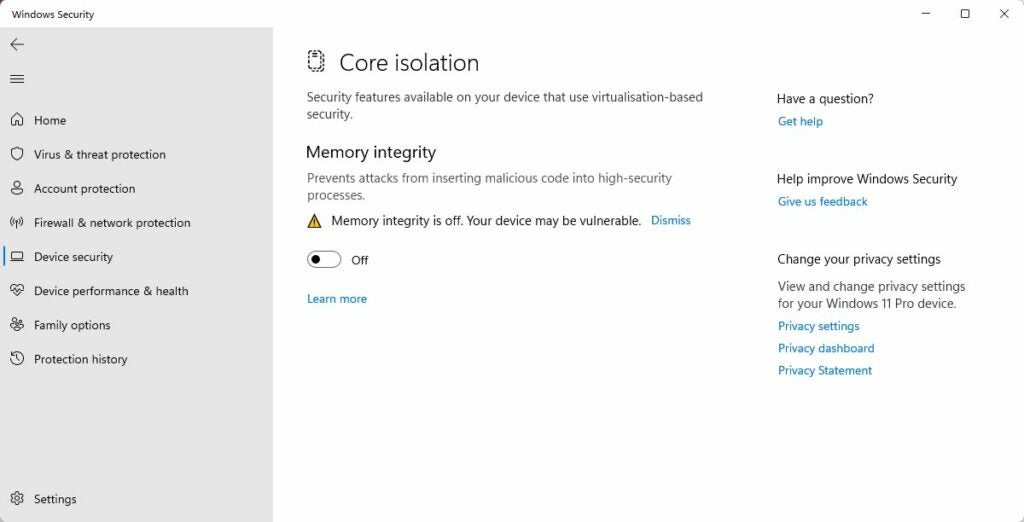
Memory Integrity is a Core Isolation security feature. Windows 11 administrators may configure it in the Settings application of the operating system.
Memory Integrity is enabled on new Windows 11 PCs only, and not on PCs upgraded from Windows 10.
- Select Start and then Settings.
- Go to Privacy & Security.
- Select Windows Security.
- Click on the Open Windows Security button.
- Switch to the Device Security tab.
- Activate the “core isolation details” button.
- There, you find options to turn Memory Integrity on or off.
In the event that Memory Integrity is off, it is not a cause for the performance issue.
Turning off Virtual Machine Platform
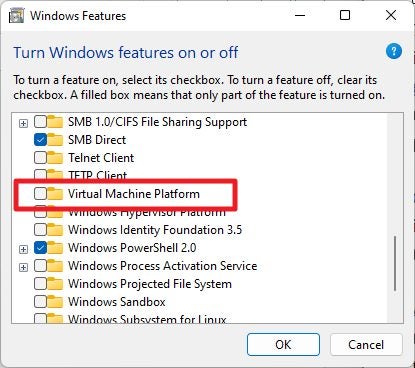
You need to open the Windows Features control panel applet to manage the Virtual Machine Platform feature. It is not enabled on most systems by default.
Note: Virtual Machine Platform may be needed by virtualization software, such as WSL2. These applications may refuse to run after removing support for Virtual Machine Platform on Windows 11.
- Open Start, type Windows Features, and select Turn Windows features on or off from the search results.
- Find Virtual Machine Platform in the Windows Features window.
- Remove the checkmark, if available, to turn the feature off.
- Windows may need to restart to process the change.
The next steps
The security features are one potential cause for PC gaming performance issues on Windows 11 machines. If these were not enabled, other issues, including out of date graphics card drivers, may be the culprit.
It is a good idea to run tests, for instance benchmarks, to find out if turning off the security features improves gaming performance.
Some gamers may notice performance improvements while playing games, especially if the fix bumped performance to a noticeable improvement in frames per seconds.
Generally speaking, it is not a good idea to turn off security features. For this reason, Windows 11 administrators may want to avoid turning the features off, unless gaming performance is impacted noticeably.
Turning the features off to find out if these are the culprit is a good idea. It may lead to other potential issues, if these features are not responsible.
