Facebook Messenger has recently released a feature available on Android that many users have been asking for for quite some time: the ability to chat from different accounts without leaving the application. This option is ideal for people who share a device, such as a family tablet.
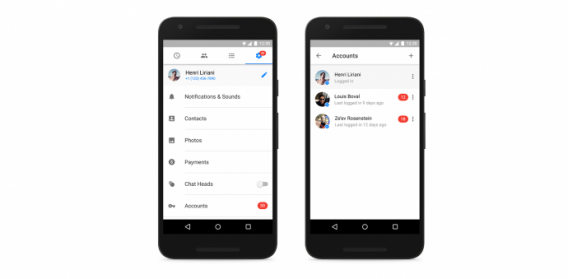
How do I activate the different account option on Facebook Messenger?
1. Make sure you have the Messenger app updated.
2. Go to the Settings option (the wheel).
3. Tap the “Accounts” option.
4. Add the accounts you wish to add to this feature by entering the email account and password registered with Facebook. In order for someone to not use you account without permission, you can also set it to prompt for the password corressponding to that account each time you open it.

Author: Maria Baeta
{
"de-DE": "",
"en-US": "My first computer was an Amstrad CPC 6128 and so began my love for gadgets. Besides tech and games I love music (I'm a singer in two bands of swing, jazz and blues), cinema (watching and writing about it), gastronomy (cooking... but above all eating!) and alternative fashion. Do you follow the cult of The Rocky Horror Picture Show? Great, I'm sure we can get along.",
"es-ES": "Mi primer ordenador fue un Amstrad CPC 6128 y así se inició mi amor por los gadgets. Además de la tecnología y los juegos me apasiona la música (soy cantante en dos bandas de swing, jazz y blues), el cine (verlo y escribir sobre él), la gastronomía (cocinar... ¡pero sobre todo comer!) y la moda alternativa. ¿Sigues el culto de The Rocky Horror Picture Show? Entonces seguro que podemos llevarnos bien.",
"fr-FR": "",
"it-IT": "",
"ja-JP": "",
"nl-NL": "",
"pl-PL": "",
"pt-BR": "",
"social": {
"email": "maria.baeta@softonic.com",
"facebook": "",
"twitter": "https://twitter.com/mariabaeta",
"linkedin": "https://www.linkedin.com/in/mariabaeta/"
}
}
View all posts by Maria Baeta