
Adobe Acrobat remains a go-to solution for PDF management due to its robust features and user-friendly interface. With recent updates, the Adobe Acrobat extension for Google Chrome has become even more powerful, enhancing how users interact with PDFs directly in their browser. Here’s a comprehensive guide to installing and leveraging this extension’s full potential.

Seamless PDF Management with Adobe Acrobat Extension
Adobe’s Acrobat extension for Chrome allows you to manage PDFs directly in your browser, integrating features like viewing, editing, signing, and sharing documents. This extension streamlines workflows, making it easier to handle PDFs without switching between different applications.
Step-by-Step Installation Guide
Step 1: Install the Extension
- Open Google Chrome and go to the Chrome Web Store.
- Search for ‘Adobe Acrobat’ and press Enter.
- Find the Adobe Acrobat extension and click ‘Add to Chrome.’
- Confirm the installation by clicking ‘Add extension’ in the pop-up window.
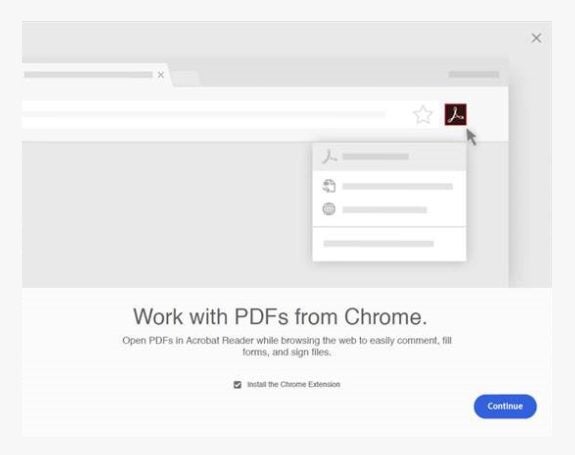
Step 2: Enable the Extension
- Restart Google Chrome if it was already open after installation.
- A notification will appear asking if you want to enable the extension. Click ‘Enable Extension.’
- The extension is now active and ready to use.
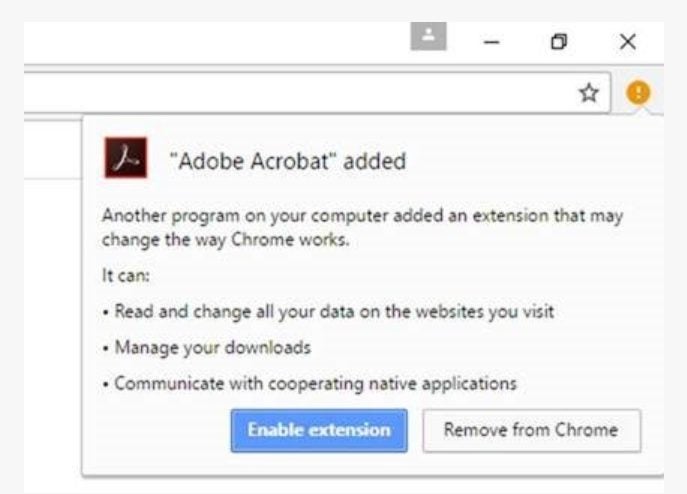
Step 3: Utilize the Extension
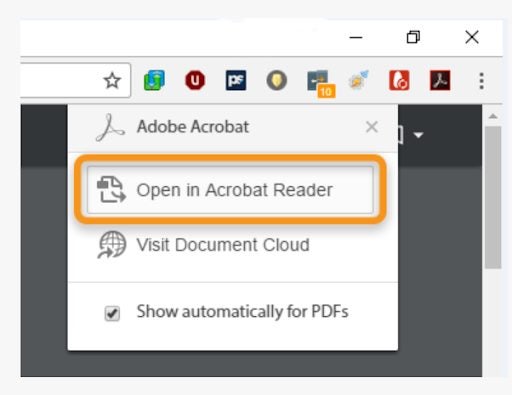
- Open a PDF file in Chrome, and the Adobe Acrobat extension will offer its features, including in-browser PDF editing. You can add comments, fill forms, and sign documents directly without downloading them first.
- Choose to view the PDF in Chrome or open it with Adobe Acrobat for more advanced functions. With cloud integration, you can access and store documents, making transitions between devices seamless.
- Adjust your Chrome settings or Adobe Acrobat preferences to set it as the default PDF viewer if desired. The extension also allows for advanced conversion tools, enabling PDF conversions to formats like Microsoft Word, Excel, and JPEG directly from the browser.
Benefits of Using the Adobe Acrobat Extension
Using the Adobe Acrobat extension in Chrome not only simplifies managing PDF files but also boosts productivity by providing comprehensive tools within a single browser. Here are some additional benefits:
- File Compression: Easily compress large PDF files to facilitate sharing and storage.
- Enhanced Security: Protect sensitive documents by adding passwords and other security features.
- Accessibility Improvements: The extension is optimized for better accessibility, ensuring all users can interact with PDF content effectively.
Enhance Your Creative Cloud Experience
To fully leverage the capabilities of Adobe Acrobat and other Adobe tools, consider exploring Adobe’s Creative Cloud services. With Creative Cloud, you gain access to a suite of powerful applications designed to streamline your workflow and enhance productivity. Whether you need advanced PDF editing, secure document storage, or comprehensive design tools, Creative Cloud has a solution for you.
Download and Explore Adobe Creative Cloud
- Adobe Acrobat Pro Subscription: Unlock premium features including advanced PDF editing, e-signatures, and secure document management.
- Adobe Cloud Services: Store, share, and access your documents from anywhere with Adobe’s cloud storage solutions.
Unlock the Full Potential of Your PDF Management
The Adobe Acrobat extension for Chrome significantly enhances your PDF management capabilities by integrating robust features directly into your browser. From in-browser editing and secure document handling to seamless cloud integration and advanced conversion tools, this extension streamlines your workflow and boosts productivity. Install the extension today and explore the full potential of Adobe’s tools through Creative Cloud to further enhance your document management and creative projects.
