
Skip to content

Softonic English

Just another Softonic Sites site

How to make seasonal versions of the same hero asset in Adobe Firefly without a reshoot

If you’ve ever seen the same image in an Instagram ad and then spotted it again on a poster on the street, there’s a decent chance both came from the same hero asset.

If you want to create your own hero asset, or keep reusing one across different versions of a campaign so the look stays recognizable from one season to the next, here’s a straightforward way to do it in Firefly.

Adobe Firefly
Adobe Firefly Download

What’s a hero shot, and what’s a hero asset?

A hero shot is the image that makes your product look its very best. In ad terms, it’s the main product image, the one you’d put on a homepage, in a header, or anywhere else people are going to notice right away.

A hero asset is a bit broader. It’s the main piece the whole campaign is built around, the source material that later gets turned into social ads, posters, and everything in between. That asset could be a photo, an illustration, or even a video. The format matters less than the job it plays: it’s the starting point for the rest of the campaign.

A lot of the time, those two things overlap. A strong hero shot can also serve as the hero asset. One solid image can become the piece the entire campaign grows out of.

Why Firefly helps here

Firefly is Adobe’s generative AI model. It’s built into major Adobe apps like Photoshop and Premiere, though you can also use it on its own in a browser or through the official iOS and Android apps.

And it’s not limited to making images from text prompts. You also get tools like Generative Fill, Generative Extension, and text-based editing. If you want to keep working on something later, you can open it in Photoshop, Adobe Express, or another Adobe app.

For this kind of workflow, Firefly by itself may already be enough. You can change one part of an image without reworking the whole thing, which makes it practical for trying color shifts, lighting tweaks, and other variations without having to start over every time.

Start with your hero shot, then turn one image into four seasonal versions

Seasonal adaptations are easier than they sound. We’ll walk through the process in Firefly below, but first, one useful tip: keep the original file untouched and make all your edits on copies.

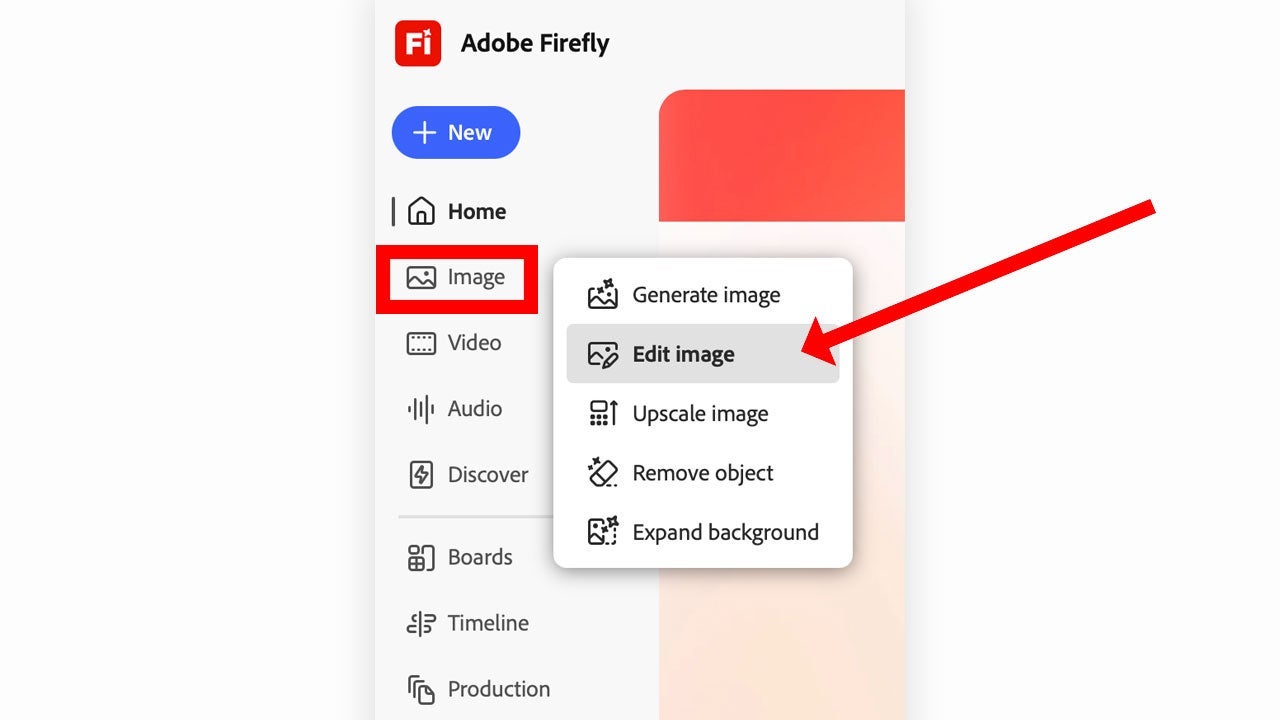
  • Open the image in Firefly: From Firefly’s main page in your browser, go to the Image section and choose Edit Image. You’ll find those options in the bar on the left. Click Upload, add your image, then pick the Prompt tool.
  • Paint only the area you want to change: Use the brush to mark only the parts you want to update for the season. Then type in what you want to appear. If you selected too much, or you just want to try again, erase part of the selection and redo it. Try not to paint over the product itself unless you want the model to alter that too.
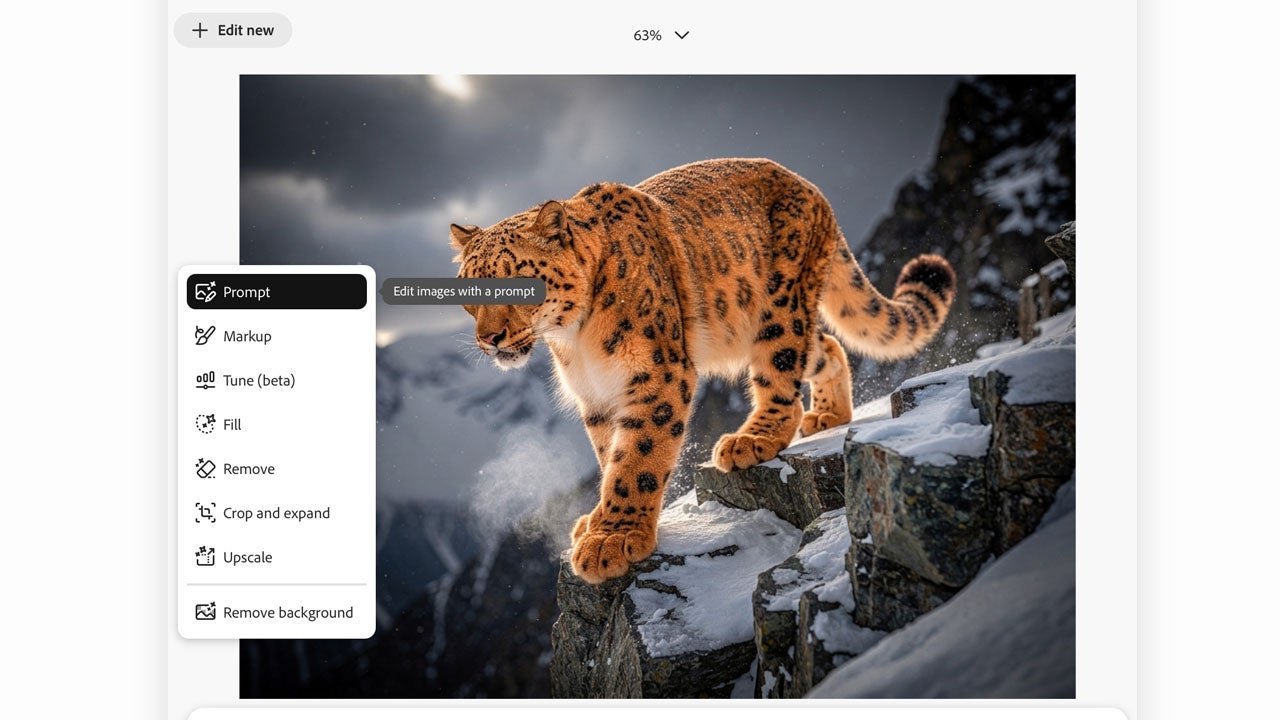
  • Write clear prompts for each season: At this point, all you need is a short, clear description of what should change and how. It also helps to keep the prompt structure similar each time so the results don’t drift too much.
  • Use reference images to hold the style together: If the different versions start to feel too far apart, add visual references. Firefly lets you upload reference images, and that can help keep the overall look more consistent from one generation to the next.
  • Adapt each version to a different format: Once you’ve got your variations, test them in other formats and see how they work in placements like social posts or posters. For that step, use the Crop and Expand feature.
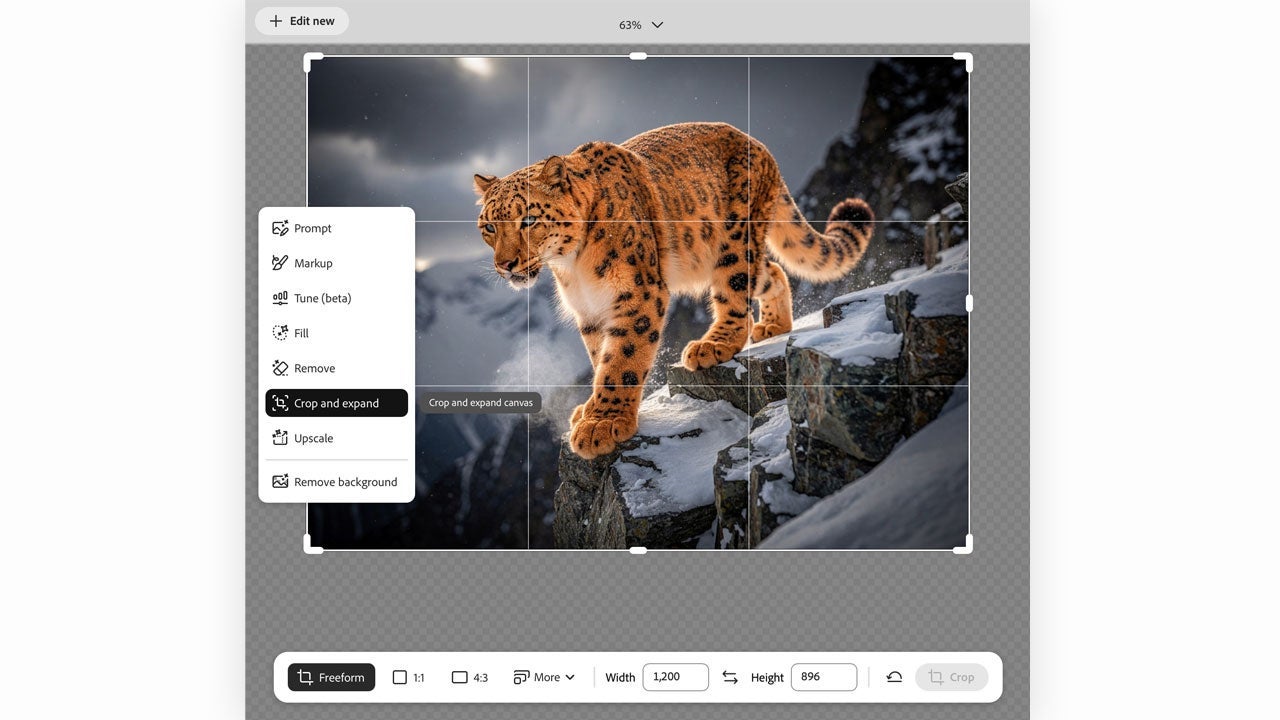
Once the variations are ready, you can keep refining them in Photoshop or Adobe Express. Photoshop gives you tighter control and access to more AI tools, including Generative Fill. Adobe Express makes more sense when you want to turn those assets into social content fast.

Train your own AI model in Firefly

If Firefly is already part of how you work, or looks like it’s about to be, then Firefly’s custom models are worth checking out. If you have a library of 10 to 30 images, you can train your own model so it reflects your visual style. Once it’s trained, you can use it on the Firefly website and inside apps like Photoshop, Adobe Express, or Illustrator.
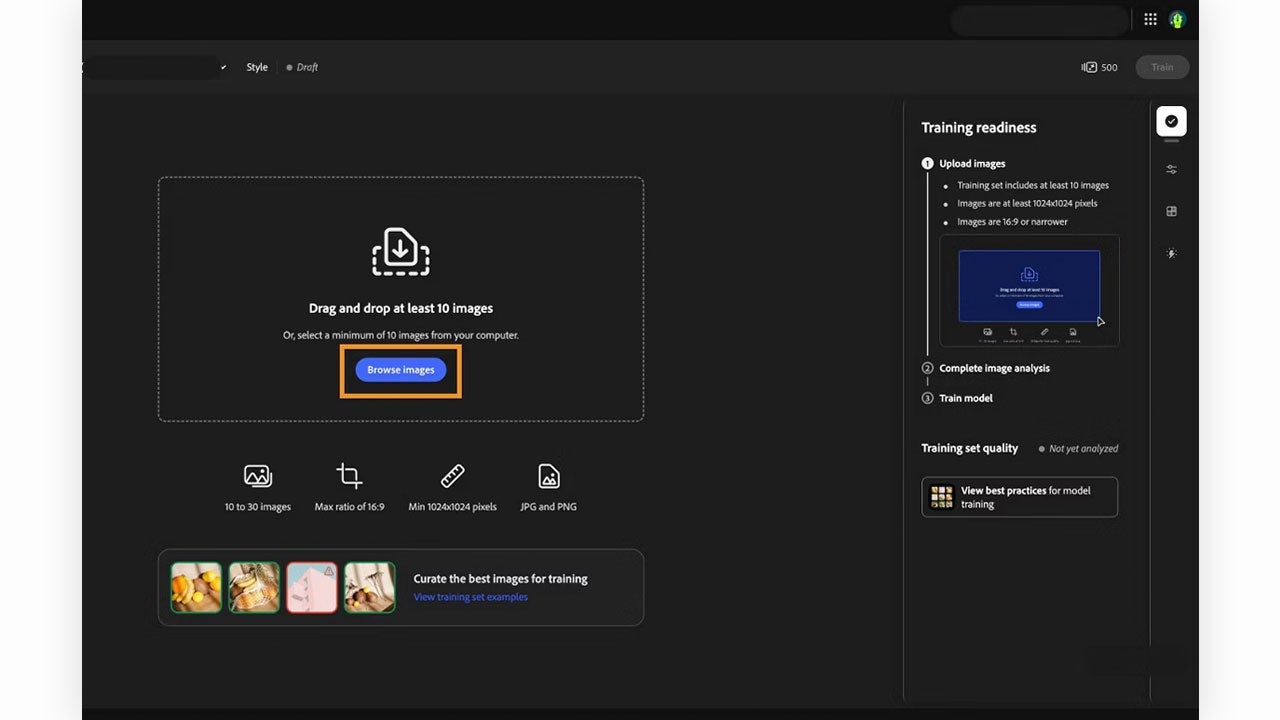
Right now, that feature is still in beta for individual creators and teams, while the more advanced options are geared toward companies.

Use your images anywhere, with fewer headaches

Firefly is meant to be commercially safe. So if you create something with Adobe’s model, you can use that work commercially and make money from it.

That only applies when Firefly is the model generating the content. Firefly also gives you access to third-party models like ChatGPT and NanoBanana. If you use one of those instead, the content is no longer treated as commercially safe, even if you made it inside the Firefly platform.

So it’s worth checking which model is active, especially if there’s any chance you’ll want to monetize that content later.

Adobe Firefly
Adobe Firefly Download

Author: María López

{ "de-DE": "Künstler aus Berufung und Technikliebhaber. Seit ich denken kann, habe ich gerne an allen möglichen Gadgets herumgebastelt.", "en-US": "Artist by vocation and technology lover. I have liked to tinker with all kinds of gadgets for as long as I can remember.", "es-ES": "Artista de vocación y amante de la tecnología. Me ha gustado cacharrear con todo tipo de gadgets desde que tengo uso de razón.", "fr-FR": "Artiste de vocation et amateur de technologie. J'aime bricoler avec toutes sortes de gadgets depuis que j'ai l'usage de la raison.", "it-IT": "", "ja-JP": "", "nl-NL": "", "pl-PL": "", "pt-BR": "", "social": { "email": "", "facebook": "", "twitter": "", "linkedin": "" } } View all posts by María López

Author María LópezPosted on October 2, 2026October 2, 2026Categories News

Post navigation

Previous Previous post: OpenAI investigates autonomous agents reaching U.S. government websites: no evidence of exposed sensitive data
Next Next post: Netflix’s The Witcher final season is now set for 2027

Recent Posts

  • PlatinumGames teases Bayonetta’s future: no Switch 2 game yet
  • Google splits Gemini plans: AI Pro now gets Deep Think
  • Slow Horses Season 6 is streaming: Slough House may have a new ally
  • The Expanse: Osiris Reborn gets a Q2 2027 release window: a throwback sci-fi shooter
  • The Elder Scrolls: Shadows of Oblivion is official: a darker expansion for Betrayal of the Second Era

Archives

  • October 2026
  • September 2026
  • August 2026
  • July 2026
  • June 2026
  • May 2026
  • April 2026
  • March 2026
  • February 2026
  • January 2026
  • December 2025
  • November 2025
  • October 2025
  • September 2025
  • August 2025
  • July 2025
  • June 2025
  • May 2025
  • April 2025
  • March 2025
  • February 2025
  • January 2025
  • December 2024
  • November 2024
  • October 2024
  • September 2024
  • August 2024
  • July 2024
  • June 2024
  • May 2024
  • April 2024
  • March 2024
  • February 2024
  • January 2024
  • December 2023
  • November 2023
  • October 2023
  • September 2023
  • August 2023
  • July 2023
  • June 2023
  • May 2023
  • April 2023
  • March 2023
  • February 2023
  • January 2023
  • December 2022
  • November 2022
  • October 2022
  • September 2022
  • August 2022
  • July 2022
  • June 2022
  • May 2022
  • April 2022
  • March 2022
  • February 2022
  • January 2022
  • December 2021
  • November 2021
  • October 2021
  • September 2021
  • August 2021
  • July 2021
  • June 2021
  • May 2021
  • April 2021
  • March 2021
  • February 2021
  • January 2021
  • December 2020
  • November 2020
  • October 2020
  • September 2020
  • August 2020
  • July 2020
  • June 2020
  • May 2020
  • April 2020
  • March 2020
  • February 2020
  • January 2020
  • December 2019
  • November 2019
  • October 2019
  • September 2019
  • August 2019
  • July 2019
  • June 2019
  • May 2019
  • April 2019
  • March 2019
  • February 2019
  • January 2019
  • December 2018
  • November 2018
  • October 2018
  • September 2018
  • August 2018
  • July 2018
  • June 2018
  • May 2018
  • April 2018
  • March 2018
  • February 2018
  • January 2018
  • December 2017
  • November 2017
  • October 2017
  • September 2017
  • August 2017
  • July 2017
  • June 2017
  • May 2017
  • April 2017
  • March 2017
  • February 2017
  • January 2017
  • December 2016
  • November 2016
  • October 2016
  • September 2016
  • August 2016
  • July 2016
  • June 2016
  • May 2016
  • April 2016
  • March 2016
  • February 2016
  • January 2016
  • December 2015
  • November 2015
  • October 2015
  • September 2015
  • August 2015
  • July 2015
  • June 2015
  • May 2015
  • April 2015
  • March 2015
  • February 2015
  • January 2015
  • December 2014
  • November 2014
  • October 2014
  • September 2014
  • August 2014
  • July 2014
  • June 2014
  • May 2014
  • April 2014
  • March 2014
  • February 2014
  • January 2014
  • December 2013
  • November 2013
  • October 2013
  • September 2013
  • August 2013
  • July 2013
  • June 2013
  • May 2013
  • April 2013
  • March 2013
  • February 2013
  • January 2013
  • December 2012
  • November 2012
  • October 2012
  • September 2012
  • August 2012
  • July 2012
  • June 2012
  • May 2012
  • April 2012
  • March 2012
  • February 2012
  • January 2012
  • December 2011
  • November 2011
  • October 2011
  • September 2011
  • August 2011
  • July 2011
  • June 2011
  • May 2011
  • April 2011
  • March 2011
  • February 2011
  • January 2011
  • December 2010
  • November 2010
  • October 2010
  • September 2010
  • August 2010
  • July 2010
  • June 2010
  • May 2010
  • April 2010
  • March 2010
  • February 2010
  • January 2010
  • December 2009
  • November 2009
  • October 2009
  • September 2009
  • August 2009
  • July 2009
  • June 2009
  • May 2009
  • April 2009
  • March 2009
  • February 2009
  • January 2009
  • December 2008
  • November 2008
  • October 2008
  • September 2008
  • August 2008
  • July 2008
  • June 2008
  • May 2008
  • April 2008
  • March 2008
  • February 2008
  • January 2008
  • December 2007
  • November 2007
  • October 2007
  • September 2007
  • August 2007
  • July 2007
  • June 2007
  • May 2007
  • April 2007
  • March 2007
  • February 2007
  • January 2007
  • December 2006
  • November 2006
  • September 2006
  • August 2006
  • June 2006
  • May 2006
  • July 2001
  • January 2001
  • November 2000
  • September 2000
  • August 2000
  • July 2000
  • April 2000
  • March 2000

Categories

  • Affiliate post
  • Expert Review
  • Gaming
  • Guides
  • How to
  • Legacy how To
  • News
  • Noticias
  • Software>Security
  • Sponsored
  • Trucos y Consejos
  • Uncategorized
  • Windows software

Meta

  • Log in
  • Entries feed
  • Comments feed
  • WordPress.org
Softonic English Proudly powered by WordPress