Skip to content

Softonic English

Just another Softonic Sites site

How to reduce manual retouching time with Firefly in Photoshop

If you are a professional dedicated to graphic arts, it is most likely that Adobe Photoshop is your most used tool, or at least you know it well. Photoshop is one of the most comprehensive programs available for professionally retouching images; if you use it well, you can significantly reduce your working hours, especially if you combine it with Adobe Firefly. If you are not quite sure how to make the most of Adobe’s AI, stay with us and we will try to clear up most of your doubts. Why manual retouching remains a bottleneck The workload […]

If you are a professional dedicated to graphic arts, it is most likely that Adobe Photoshop is your most used tool, or at least you know it well. Photoshop is one of the most comprehensive programs available for professionally retouching images; if you use it well, you can significantly reduce your working hours, especially if you combine it with Adobe Firefly.

If you’re not quite sure how to make the most of Adobe’s AI, stay with us, and we will clear up most of your doubts.

Adobe Photoshop
Adobe Photoshop DOWNLOAD

Why manual retouching is still a bottleneck

The workload that a professional dedicated to graphic arts can handle is increasing more and more. It doesn’t matter what type of work you do (photography, design, art); it’s most likely that in your briefings you will find more and more tasks, but without a significant increase in compensation. That’s why today, it is essential to improve our times without compromising the quality of our work.

It is also important not to be deceived by the type of tasks to be performed. Removing annoying elements, adjusting shadows, straightening images… These are not difficult things, but they are repetitive, and we can automate this (with control).

Where Firefly Changes the Games Within Photoshop

We must first distinguish what Adobe Firefly is and what it has to do with Photoshop. When we talk about Adobe Firefly, we are referring to the family of Adobe’s generative AI models.

Many of the generative AI features we find within Adobe Photoshop are powered by Firefly. Essentially, Photoshop remains the same as always, but certain tools use Firefly technology to function.

AI-driven functions will help you with tasks such as cleaning or reconstructing image backgrounds without losing visual coherence. At the same time, it is also easier to create different proposals to explore other types of graphic solutions.

Reduce downtime without losing control

Although Adobe Firefly functions as an accelerator, Photoshop remains the nerve center of everything. AI makes it easier for us to perform mechanical tasks while we continue to correct and adjust projects. The human touch is not lost, because in the end, it is about dedicating time to what is most important, the creative work.

Practical Use of Photoshop and Firefly

If you’re not quite sure how to apply the Adobe Photoshop functions enhanced by Firefly or exactly what to use them for, stay tuned as we teach you here.

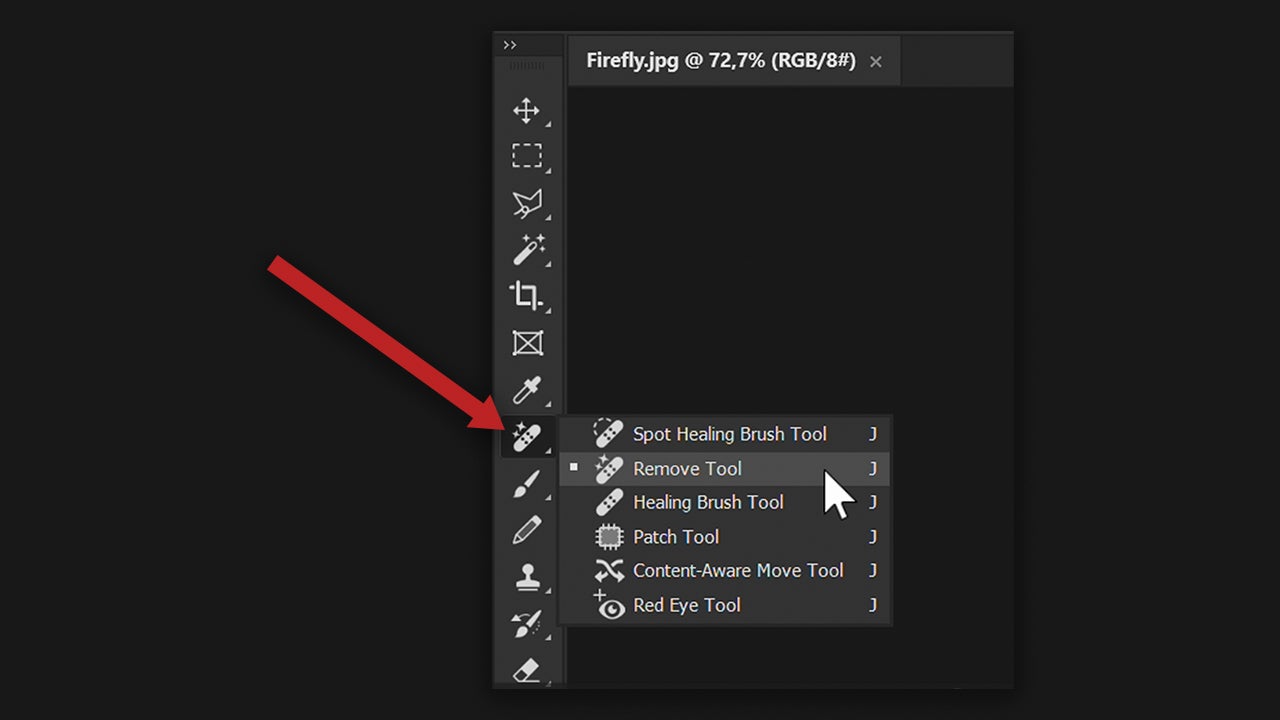
One of the most common editing tasks is removing objects from images. Within Photoshop, you can erase anything in one go if you use the Remove Tool. Open Photoshop and select File > Open…, find the image you want to edit, and click on it. Then, go to the tool panel (if you don’t see it, click on Window > Tools) and look for the Remove Tool; its icon looks like a band-aid. Next, go to the image, and with the tool, paint over what you want to remove. Adobe Photoshop will process the image and erase that object instantly.
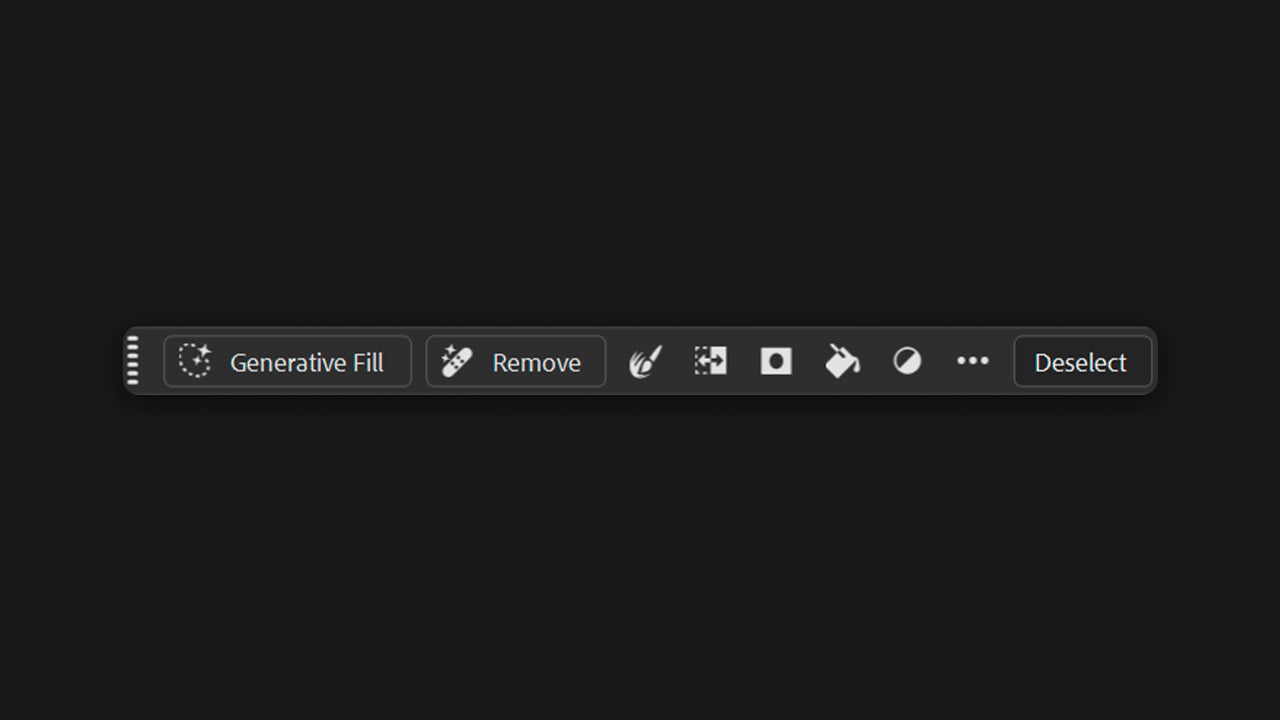
Now it’s time to talk about Generative Fill. This feature will help you add and remove content within your images. To use it, click on the Selection Brush Tool (or any other selection tool) to select an object or area of an image. Next, select the Generative Fill button that will appear in the Contextual Task Bar. If this bar does not appear, go to Window > Contextual Task Bar.
Write a prompt that describes what you want to create and click on Generate. You will then see the result, along with a series of thumbnail previews generated from your input. Additionally, Photoshop will create an additional layer that you can see in Layers so you can edit the original image if it works for you.
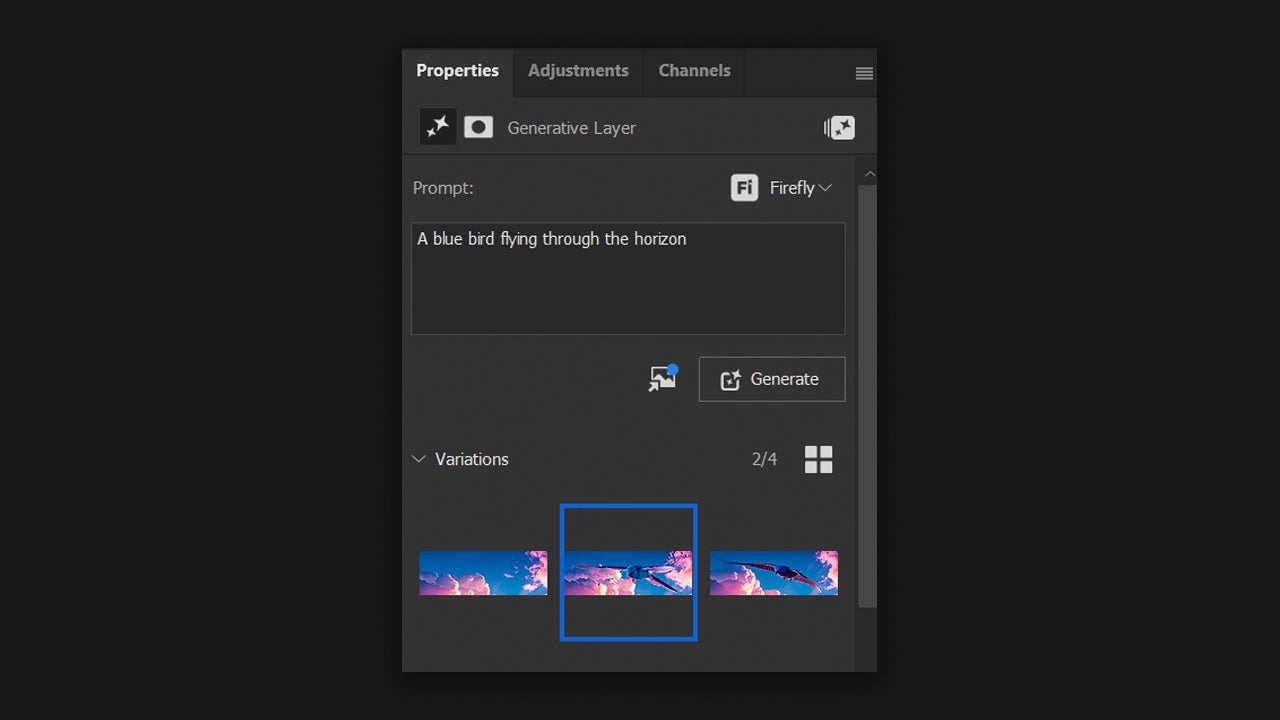
If the first result doesn’t convince you, you can choose from the other variations. If these also don’t convince you, you can generate more by clicking on Generate Similar. Another feature that might interest you a lot is Harmonize. To use it, first open the image you want to act as a background in Adobe Photoshop and add the element you aim to merge into that image. Remember: the element must not have a background. Select the layers of the element and click on Harmonize, an option you will see in the contextual bar.
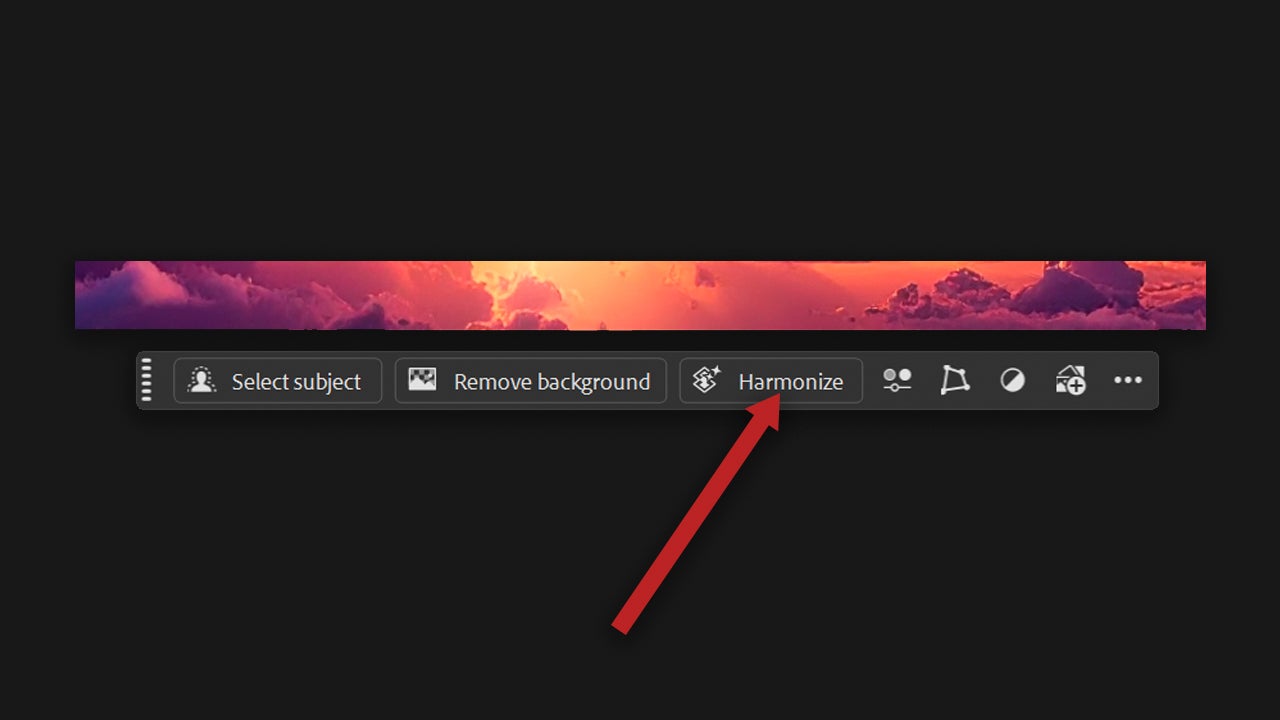
Just like with Generative Fill, with Harmonize you will also get several results. Review them and select the option you prefer. Another option that will also be very useful to you is to expand images with Adobe Firefly. Open your image in Photoshop and then select the Crop Tool (you will find it in the toolbar). Click on the canvas and increase it to the dimensions you need. You can use the context menu to choose from sizes already preset by Photoshop if it suits you.

Click on Generate to expand the image with AI-generated content. This will blend with the rest of the image. Explore other variation options in the Properties panel if you see fit. For a more personalized result, simply describe what you want to appear.

Firefly as a tool to increase productivity

Neither Photoshop nor Firefly can achieve perfection with a single click. However, combining Firefly with Adobe Photoshop will save you time on mechanical tasks and give you more speed without losing control. If you find yourself stuck in an endless retouching loop, try the features we described above; make the AI work for you and not against you.

Adobe Firefly
Adobe Firefly DOWNLOAD

Author: María López

{ "de-DE": "Künstler aus Berufung und Technikliebhaber. Seit ich denken kann, habe ich gerne an allen möglichen Gadgets herumgebastelt.", "en-US": "Artist by vocation and technology lover. I have liked to tinker with all kinds of gadgets for as long as I can remember.", "es-ES": "Artista de vocación y amante de la tecnología. Me ha gustado cacharrear con todo tipo de gadgets desde que tengo uso de razón.", "fr-FR": "Artiste de vocation et amateur de technologie. J'aime bricoler avec toutes sortes de gadgets depuis que j'ai l'usage de la raison.", "it-IT": "", "ja-JP": "", "nl-NL": "", "pl-PL": "", "pt-BR": "", "social": { "email": "", "facebook": "", "twitter": "", "linkedin": "" } } View all posts by María López

Author María LópezPosted on February 16, 2026February 16, 2026Categories News

Post navigation

Previous Previous post: At Bethesda, they believe that video games are too realistic for their own good
Next Next post: The success of 'The Lincoln Lawyer' shows no signs of slowing down and is confirmed as a hit for Netflix

Recent Posts

  • Tesla robotaxi extends Austin hours to 11 p.m.: it still struggles in the dark
  • Googlebook reportedly surfaces: key phone features may need Android 17
  • CNN confirms Mark Thompson will stay on after Skydance merger
  • Trump launches Super Intelligence Force: White House sets 120-day tech strategy review
  • BeamNG.drive hits PS5 on October 19: Early Access is official

Archives

  • October 2026
  • September 2026
  • August 2026
  • July 2026
  • June 2026
  • May 2026
  • April 2026
  • March 2026
  • February 2026
  • January 2026
  • December 2025
  • November 2025
  • October 2025
  • September 2025
  • August 2025
  • July 2025
  • June 2025
  • May 2025
  • April 2025
  • March 2025
  • February 2025
  • January 2025
  • December 2024
  • November 2024
  • October 2024
  • September 2024
  • August 2024
  • July 2024
  • June 2024
  • May 2024
  • April 2024
  • March 2024
  • February 2024
  • January 2024
  • December 2023
  • November 2023
  • October 2023
  • September 2023
  • August 2023
  • July 2023
  • June 2023
  • May 2023
  • April 2023
  • March 2023
  • February 2023
  • January 2023
  • December 2022
  • November 2022
  • October 2022
  • September 2022
  • August 2022
  • July 2022
  • June 2022
  • May 2022
  • April 2022
  • March 2022
  • February 2022
  • January 2022
  • December 2021
  • November 2021
  • October 2021
  • September 2021
  • August 2021
  • July 2021
  • June 2021
  • May 2021
  • April 2021
  • March 2021
  • February 2021
  • January 2021
  • December 2020
  • November 2020
  • October 2020
  • September 2020
  • August 2020
  • July 2020
  • June 2020
  • May 2020
  • April 2020
  • March 2020
  • February 2020
  • January 2020
  • December 2019
  • November 2019
  • October 2019
  • September 2019
  • August 2019
  • July 2019
  • June 2019
  • May 2019
  • April 2019
  • March 2019
  • February 2019
  • January 2019
  • December 2018
  • November 2018
  • October 2018
  • September 2018
  • August 2018
  • July 2018
  • June 2018
  • May 2018
  • April 2018
  • March 2018
  • February 2018
  • January 2018
  • December 2017
  • November 2017
  • October 2017
  • September 2017
  • August 2017
  • July 2017
  • June 2017
  • May 2017
  • April 2017
  • March 2017
  • February 2017
  • January 2017
  • December 2016
  • November 2016
  • October 2016
  • September 2016
  • August 2016
  • July 2016
  • June 2016
  • May 2016
  • April 2016
  • March 2016
  • February 2016
  • January 2016
  • December 2015
  • November 2015
  • October 2015
  • September 2015
  • August 2015
  • July 2015
  • June 2015
  • May 2015
  • April 2015
  • March 2015
  • February 2015
  • January 2015
  • December 2014
  • November 2014
  • October 2014
  • September 2014
  • August 2014
  • July 2014
  • June 2014
  • May 2014
  • April 2014
  • March 2014
  • February 2014
  • January 2014
  • December 2013
  • November 2013
  • October 2013
  • September 2013
  • August 2013
  • July 2013
  • June 2013
  • May 2013
  • April 2013
  • March 2013
  • February 2013
  • January 2013
  • December 2012
  • November 2012
  • October 2012
  • September 2012
  • August 2012
  • July 2012
  • June 2012
  • May 2012
  • April 2012
  • March 2012
  • February 2012
  • January 2012
  • December 2011
  • November 2011
  • October 2011
  • September 2011
  • August 2011
  • July 2011
  • June 2011
  • May 2011
  • April 2011
  • March 2011
  • February 2011
  • January 2011
  • December 2010
  • November 2010
  • October 2010
  • September 2010
  • August 2010
  • July 2010
  • June 2010
  • May 2010
  • April 2010
  • March 2010
  • February 2010
  • January 2010
  • December 2009
  • November 2009
  • October 2009
  • September 2009
  • August 2009
  • July 2009
  • June 2009
  • May 2009
  • April 2009
  • March 2009
  • February 2009
  • January 2009
  • December 2008
  • November 2008
  • October 2008
  • September 2008
  • August 2008
  • July 2008
  • June 2008
  • May 2008
  • April 2008
  • March 2008
  • February 2008
  • January 2008
  • December 2007
  • November 2007
  • October 2007
  • September 2007
  • August 2007
  • July 2007
  • June 2007
  • May 2007
  • April 2007
  • March 2007
  • February 2007
  • January 2007
  • December 2006
  • November 2006
  • September 2006
  • August 2006
  • June 2006
  • May 2006
  • July 2001
  • January 2001
  • November 2000
  • September 2000
  • August 2000
  • July 2000
  • April 2000
  • March 2000

Categories

  • Affiliate post
  • Expert Review
  • Gaming
  • Guides
  • How to
  • Legacy how To
  • News
  • Noticias
  • Software>Security
  • Sponsored
  • Trucos y Consejos
  • Uncategorized
  • Windows software

Meta

  • Log in
  • Entries feed
  • Comments feed
  • WordPress.org
Softonic English Proudly powered by WordPress