
 Twitter announced today a new feature for its popular social networking and microblogging platform. My initial thought was that it looks quite similar to Facebook’s Timeline cover images.
In many ways, that’s just what it is. With the incorporation of this new header image into Twitter’s web-based and iPhone, iPad, and Android UIs, users now have a new method to personalize their Twitter accounts, outside of adding a background image and a user avatar.
Want to learn how to add a header image to your Twitter account? I’ll show you how.
What it looks like
Twitter’s new header image will appear on your Twitter profile directly above your tweets. Where your user icon and summary used to appear in the left column above pictures you’d tweeted, it’ll now appear centered within the new header image itself.
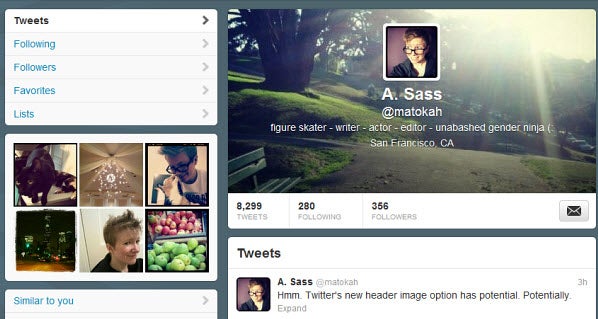
It would’ve been nice to have the option to left or right align your image and text, as the center alignment won’t appeal to everyone. Your profile summary, name, and location will also be listed in white text, so some header images might make them disappear entirely. Apart from that, the header is an unnecessary but nice feature for those who want to make their Twitter profile pages stand out a little more.
How to add your own header
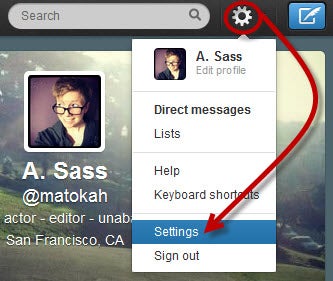
1. Click on the gear on the upper right of your screen. Scroll down and choose the Settings option.
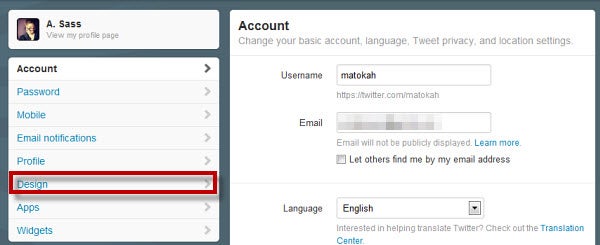
2. In the left column, choose Design.
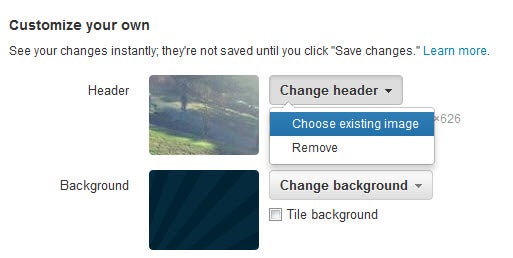
3. Scroll down to the Customize your own section and click Change header > Choose existing image. Make note of the file size requirements along the way.
4. Upload an image from your computer. You’ll be able to move larger images around to get the look you want, and even zoom in and out.
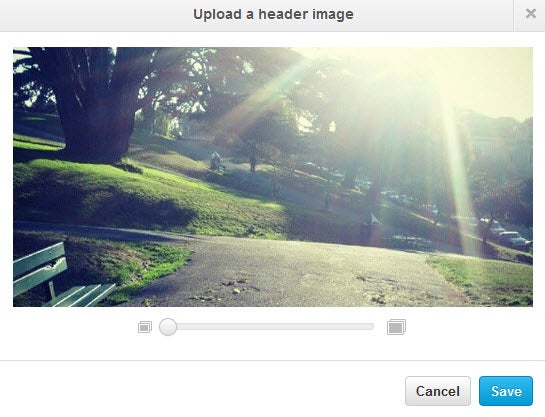 5. Click Save at the bottom right, and you’re done.
The header size is small enough that you can use camera phone pictures and still have it look nice, which is exactly what I did. My header is now an image of iconic Alamo Square Park in San Francisco, originally published on Instagram.
Are you planning to take advantage of Twitter’s new header feature? If so, what sort of image will you use?
Comments are closed.