
Skip to content

Softonic English

Just another Softonic Sites site

How we can expand our capabilities as Photographers using Firefly

Technology advances by leaps and bounds. The fact that generative artificial intelligence yields such good results and is so accessible has completely revolutionized the digital world. A good example of this is the creative sector, particularly photography.

Imagine creating amazing images, enhancing photos, and streamlining your workflow with just a few clicks. Adobe Firefly offers us precisely that. Adobe’s generative technology is an ideal solution for photographers who want to experiment and thus obtain even more creative shots. If you want to know how to revolutionize your photography with Adobe Firefly, stay with us for a few more paragraphs.

Adobe LightRoom
Adobe LightRoom Download

What is Adobe Firefly?

Imagine having an assistant that helps you edit photos, improve their quality, and even create images from scratch. That’s how Firefly works, more or less. Although its main use is generating images from text, its capabilities are much greater.

Adobe Firefly facilitates and enhances digital content creation, something beneficial for photographers and designers. It allows us to generate and edit images from textual descriptions, adjust automatically to color, lighting, and composition, and enhance photos, among other things.

Firefly is available as a standalone web application from which you can generate images based on a textual description. Additionally, one of its latest features is generative expansion, which allows us to expand images, remove objects, or add others.

However, what makes Adobe Firefly so special is its integration with Adobe Creative Cloud. Photoshop, Lightroom, and Illustrator are some of the applications that integrate Firefly-based features, such as generative fill or converting text to vector graphics.

What can Adobe Firefly offer you as a photographer?

Alright, now that we’ve seen a bit of what Firefly is capable of, how could it be used by a photographer? As mentioned earlier, Firefly technology is integrated within Adobe Creative Cloud. Let’s go through the main applications that make use of it:

Adobe Photoshop

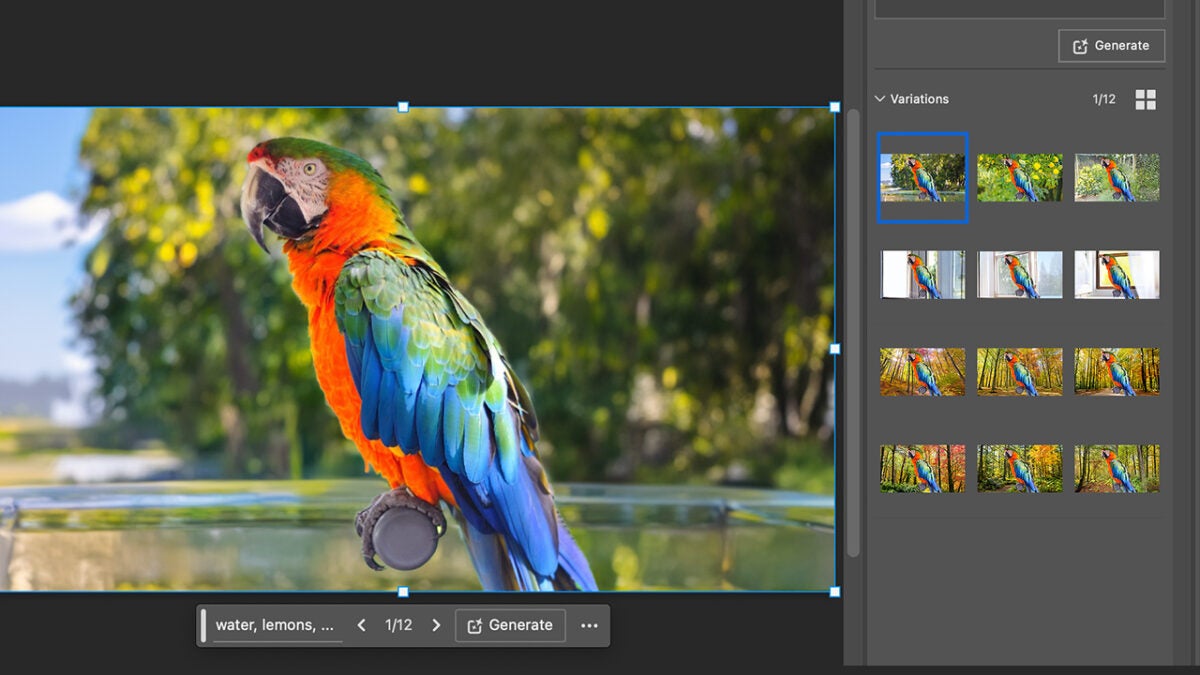
Within Photoshop, Firefly helps us simplify and optimize photo editing. The most obvious feature is image generation. In Photoshop, we have Generative Fill, a tool that allows us to add, remove, or modify images using our own words. If you want to experiment with Generative Fill, follow these steps:

  • Within your canvas, select the layer you want to expand. Using the selection tool, choose the area you want to “complete.”
  • You will see a taskbar appear. There, select the Generative Fill option. You can also find it in the Edit menu > Generative Fill.
  • Next, type in the text box what you want Photoshop to generate. Use short, direct, and concise phrases.
  • Finally, select Generate. From the Properties panel, you can see different variations. Choose the one you like best or that suits your needs.

Generative Fill is more versatile than it seems: you can use it to remove objects, expand images, or create spectacular backgrounds. Experiment with it and completely transform your snapshots.
Adobe Lightroom

In Adobe Lightroom, the Generative Remove option will save you in more than one situation. Say goodbye to unexpected or unwanted elements: Generative Remove will help you eliminate them from your photo in a snap. To use it, you need to:

  • Select the Remove option. You’ll find it by clicking on the eraser icon. Remember that Generative AI must be enabled beforehand for it to work.
  • Adjust the brush size to your liking and “paint” over the area of the photo you want to erase.
  • Lightroom offers several removal results; choose the one that convinces you the most.

Keep in mind that it is currently available as Early Access, so it might give you some unexpected errors. Still, it’s worth trying.

Adobe Illustrator

Firefly has brought us one of the most interesting new features in Illustrator, called Text to Vector Graphic. As its name indicates, it transforms our descriptions into vector graphics. Simply describe what you want, and Illustrator will do the rest. Here’s how you can use it:

  • Add a shape, such as a rectangle, and select it with the Selection tool. As in Photoshop, a taskbar will appear. Click on Generate Vectors there.
  • Describe the type of vector illustration you would like to generate. Here, you can use the Content Type and Detail options if necessary (choose from Scene, Subject, or Icon).
  • You can use the Style Reference option if you want the generation to be aesthetically similar to the rest of your project. You can also adjust other options, such as the number of colors.
  • Once everything is ready, click Generate, an option you’ll find in the Generate Vectors box. Choose from the different variations to select the one you like best.

Expanded Creativity with Adobe Firefly

In short, Adobe Firefly and its applications within the Adobe Creative Cloud suite allow many creatives to improve their workflows. We’re not just talking about significant time savings, but also the various creative possibilities these tools can offer.

Adobe LightRoom
Adobe LightRoom Download

So now you know: experiment within Adobe programs with generative artificial intelligence and elevate the quality of your projects.

Author: María López

{ "de-DE": "Künstler aus Berufung und Technikliebhaber. Seit ich denken kann, habe ich gerne an allen möglichen Gadgets herumgebastelt.", "en-US": "Artist by vocation and technology lover. I have liked to tinker with all kinds of gadgets for as long as I can remember.", "es-ES": "Artista de vocación y amante de la tecnología. Me ha gustado cacharrear con todo tipo de gadgets desde que tengo uso de razón.", "fr-FR": "Artiste de vocation et amateur de technologie. J'aime bricoler avec toutes sortes de gadgets depuis que j'ai l'usage de la raison.", "it-IT": "", "ja-JP": "", "nl-NL": "", "pl-PL": "", "pt-BR": "", "social": { "email": "", "facebook": "", "twitter": "", "linkedin": "" } } View all posts by María López

Author María LópezPosted on August 7, 2024July 1, 2025Categories News

Post navigation

Previous Previous post: Pizza Cat promises us to fulfill a dream: managing a pizza chain… with kittens
Next Next post: Apple Intelligence will officially arrive in Europe, although not in the way we expect

Recent Posts

  • 'The Mandalorian and Grogu' premieres still below expectations, and box office analysts are nervous
  • Helldivers II will have a collaboration with one of its biggest inspirations
  • Elon Musk attacks 'The Boys'. He calls it "pathetic" and suggests that the ending was written as a "servile apology" to a supposed boyfriend of the creator's wife
  • 'Choose Your Own Adventure' will have a movie. It seems impossible, but they have chosen the only people capable of carrying it out correctly
  • Destiny 2 will not receive new content and that is not the worst thing that will happen at Bungie

Archives

  • May 2026
  • April 2026
  • March 2026
  • February 2026
  • January 2026
  • December 2025
  • November 2025
  • October 2025
  • September 2025
  • August 2025
  • July 2025
  • June 2025
  • May 2025
  • April 2025
  • March 2025
  • February 2025
  • January 2025
  • December 2024
  • November 2024
  • October 2024
  • September 2024
  • August 2024
  • July 2024
  • June 2024
  • May 2024
  • April 2024
  • March 2024
  • February 2024
  • January 2024
  • December 2023
  • November 2023
  • October 2023
  • September 2023
  • August 2023
  • July 2023
  • June 2023
  • May 2023
  • April 2023
  • March 2023
  • February 2023
  • January 2023
  • December 2022
  • November 2022
  • October 2022
  • September 2022
  • August 2022
  • July 2022
  • June 2022
  • May 2022
  • April 2022
  • March 2022
  • February 2022
  • January 2022
  • December 2021
  • November 2021
  • October 2021
  • September 2021
  • August 2021
  • July 2021
  • June 2021
  • May 2021
  • April 2021
  • March 2021
  • February 2021
  • January 2021
  • December 2020
  • November 2020
  • October 2020
  • September 2020
  • August 2020
  • July 2020
  • June 2020
  • May 2020
  • April 2020
  • March 2020
  • February 2020
  • January 2020
  • December 2019
  • November 2019
  • October 2019
  • September 2019
  • August 2019
  • July 2019
  • June 2019
  • May 2019
  • April 2019
  • March 2019
  • February 2019
  • January 2019
  • December 2018
  • November 2018
  • October 2018
  • September 2018
  • August 2018
  • July 2018
  • June 2018
  • May 2018
  • April 2018
  • March 2018
  • February 2018
  • January 2018
  • December 2017
  • November 2017
  • October 2017
  • September 2017
  • August 2017
  • July 2017
  • June 2017
  • May 2017
  • April 2017
  • March 2017
  • February 2017
  • January 2017
  • December 2016
  • November 2016
  • October 2016
  • September 2016
  • August 2016
  • July 2016
  • June 2016
  • May 2016
  • April 2016
  • March 2016
  • February 2016
  • January 2016
  • December 2015
  • November 2015
  • October 2015
  • September 2015
  • August 2015
  • July 2015
  • June 2015
  • May 2015
  • April 2015
  • March 2015
  • February 2015
  • January 2015
  • December 2014
  • November 2014
  • October 2014
  • September 2014
  • August 2014
  • July 2014
  • June 2014
  • May 2014
  • April 2014
  • March 2014
  • February 2014
  • January 2014
  • December 2013
  • November 2013
  • October 2013
  • September 2013
  • August 2013
  • July 2013
  • June 2013
  • May 2013
  • April 2013
  • March 2013
  • February 2013
  • January 2013
  • December 2012
  • November 2012
  • October 2012
  • September 2012
  • August 2012
  • July 2012
  • June 2012
  • May 2012
  • April 2012
  • March 2012
  • February 2012
  • January 2012
  • December 2011
  • November 2011
  • October 2011
  • September 2011
  • August 2011
  • July 2011
  • June 2011
  • May 2011
  • April 2011
  • March 2011
  • February 2011
  • January 2011
  • December 2010
  • November 2010
  • October 2010
  • September 2010
  • August 2010
  • July 2010
  • June 2010
  • May 2010
  • April 2010
  • March 2010
  • February 2010
  • January 2010
  • December 2009
  • November 2009
  • October 2009
  • September 2009
  • August 2009
  • July 2009
  • June 2009
  • May 2009
  • April 2009
  • March 2009
  • February 2009
  • January 2009
  • December 2008
  • November 2008
  • October 2008
  • September 2008
  • August 2008
  • July 2008
  • June 2008
  • May 2008
  • April 2008
  • March 2008
  • February 2008
  • January 2008
  • December 2007
  • November 2007
  • October 2007
  • September 2007
  • August 2007
  • July 2007
  • June 2007
  • May 2007
  • April 2007
  • March 2007
  • February 2007
  • January 2007
  • December 2006
  • November 2006
  • September 2006
  • August 2006
  • June 2006
  • May 2006
  • July 2001
  • January 2001
  • November 2000
  • September 2000
  • August 2000
  • July 2000
  • April 2000
  • March 2000

Categories

  • Affiliate post
  • Expert Review
  • Gaming
  • Guides
  • How to
  • Legacy how To
  • News
  • Noticias
  • Software>Security
  • Sponsored
  • Trucos y Consejos
  • Uncategorized
  • Windows software

Meta

  • Log in
  • Entries feed
  • Comments feed
  • WordPress.org
Softonic English Proudly powered by WordPress