You’re sitting at your workstation, and you get a Slack message from a colleague saying something similar to “Hey! Looking forward to the proposal meeting tomorrow, how are the slides going?”. Slides?! What slides? You’ve been so buried in work, it didn’t dawn on you. You don’t even have your slide deck drafted. Now what?
No worries. You already have the content. It is in meeting notes, a chat message, a doc, that PDF that somebody swears is the “final” version, and, of course, yourself. What you do not have is a deck that looks credible, stays on brand, and is easy to edit even five minutes before the meeting. For a great presentation, that means clear structure and facts, consistent styling, and a file you can share.
Adobe Generate Presentation, a feature in Adobe Express powered by Adobe Firefly, can help. It’s available from Acrobat too, where Generate Presentation can draft and polish your slides and power up your deck building skills (even the ones you never expected you had).

Why Slide Decks Still Take Time, Especially When You Already Have Content
It is not writing content that makes presentation building slow; it is the formatting, layout, and coordination involved. These are the tasks that eat into your spare time because they do not always fall neatly into that traditional, pre-planned window you set aside for working on your slides.
These all seem like minor hindrances, but collectively, they’re not.
To start with, the biggest hurdle is getting the ball rolling. Often there is a pronounced planning period from blank slide to actual structure, and this can be a drag on your momentum. Next is maintaining brand consistency on every file through colors, font, logo, and spacing… endless work that always needs attention.
Another handicap is that slide presentations are a composite built from an array of disparate sources: PDFs, Word docs, presentation notes, previous slide decks… You also need to keep in mind you’re likely to receive feedback from people who think they are asking for “minor little changes,” which snowball into massive layout and formatting escapes, causing last-minute mishaps.
Finally, collaboration frequently devolves into a battleground of hard-to-manage file sharing and duplicate work. E-mails resolve into many threads, comments are dropped into presentations, and nobody is totally sure how many files or how much information is ready.
The practical cost of this headache? Time, mostly. Time you now have to spend on building slides instead of prepping your delivery.

Why Decks Go Off Brand and Off Message So Easily
Most “simple slides” turn messy for structural reasons, not because people do not care. That work is usually complicated when there is no singular source from which logos, colors, or fonts are stored. That typically means reusing old decks, and those might be out of date. Skill levels are inconsistent, so some people have layouts down while others just paste and adapt.
And then there is last minute input from team members. When someone adds a new section at the end, the deck leaves you with reformatting tasks, not just more content. The source content you’re working from can also work against you, too. When content detail is from another format contained in PDFs or long documents, team members migrating that content to the slideshow break under pressure and rush to compress, copy, and paraphrase to fit something in the final slides.
And you’ll see the result with inconsistent styles, differing alignments, incomplete formatting, and text blocks. Technically, it may be right, but it doesn’t feel right.
What is Adobe Generate Presentation
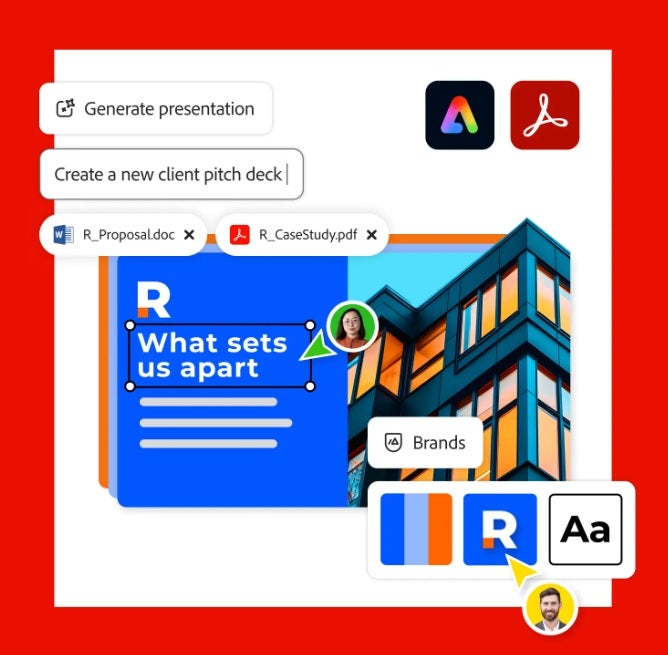
Generate Presentation is a generative AI tool that creates a draft of a presentation from a prompt or some existing documents. It first makes a structured outline and then creates finished slides from that outline in the template of your choosing. Afterward, you can refine and tweak the deck as needed.
This workflow integrates seamlessly with Acrobat, which frequently forms the origin of content, making it the ideal place to start building structure for your presentation slides. You can also kick off a presentation using the Quick Actions menu in Adobe Express, where you’ll find “Generate Presentation.” The two apps can be intertwined depending on how you build your workflow.
To give you an idea, you could generate content from a project folder using PDF spaces in Acrobat, use Generate Presentation to whip up a draft, and finalize in Adobe Express where you can invite collaborators.
Think less “singular button” and more similar to “better workflow.” It’s about lowering the time to get slides off the ground by making consistency possible and editable through your connected set of tools.

Turn Bullets or Documents Into a First Draft Deck in Minutes
First, a good draft deck does not need to be perfect. It needs to be structured, editable, and close enough that your time goes into decisions, not formatting. Adobe Generate Presentation supports three realistic starting points: bullet points, existing files, and a shared workspace in Acrobat.
Start with Bullet Points When You Only Have Notes
If you are starting from scratch, give the tool context, not just a topic. Provide the audience the goal of the deck, and your key points. That helps the outline come back in a usable order.
A practical input looks like this:
- Topic and goal: For example, “Q1 project update, align on next steps and risks.”
- Audience: For example, “leadership team.”
- Your bullet points: grouped by sections like Progress, Metrics, Risks, and Decisions needed.
- Constraints: Like slide count and the level of detail.
You typically get an outline and slide flow first. Review it before you generate the full slides. Reorder sections, delete repetition, and add the missing step that you know somebody will ask about.
Start with Files When the Content Already Exists
If the narrative has already been put into documents, upload those and save yourself from retyping out facts and figures. Adobe Express supports common business formats, including PDF, Word, and TXT files. The best part of using your documents is that you heavily reduce the chance of factual errors on slides because information comes right from your source material.
It is also worth knowing the technical limitations. In the Express workflow, Generate Presentation works with a maximum of 10 documents, summing up to a maximum of 150 pages in total. There’s a max size of up to 100 MB per file.
Start From a Shared Space When Multiple People Own the Inputs
When a team is involved, gather the source material first, then generate the deck from that set. Acrobat supports generating a presentation from a PDF Space. That matters when the “real content” is spread across several documents and links, and you want everyone aligned on what counts as the source of truth.
Controls That Matter Before You Generate
Take note of the following settings, which can affect the quality of your first draft slide:
- Slide count and length
- Audience
- Detail level
- Whether to use images from uploaded files
- Template choice (the more it’s consistent with your typical templates and brand style, the less work for you in the end)
You preview the outline, generate the deck, and then make light refinements in the editing tool. For Generate Presentation in Acrobat, you can edit the content and layout using Adobe Express-powered tools, adjust themes, add media, and regenerate slides as needed instead of having to rewrite.
Keep Every Slide on Brand More Easily
Adobe Express hosts a series of brand-oriented building blocks that map to business requirements:
- Brand kits to save logos, colors, and fonts in one location
- Branded templates that allow new decks to start from the same base
- Team friendly controls, so people do not start improvising new styles on every slide
These go far in preventing “mixed deck syndrome,” where styles shift slide to slide, and visuals do not match. It may take some time to set up, but correcting inconsistencies at the last minute is considerably slower than fixing content in a deck already made and consistent.
Handling Sensitive Content and Approvals
For sensitive content in slides, care, and attention can prevent avoidable issues. Don’t paste confidential details into prompts when you do not need them. Summarize or redact sensitive sections in source files before you generate a deck, especially for regulated, legal, or personnel content.
Keep approvals clean by sharing links, limiting copies, and keeping feedback in one place. Adobe documents its approach to AI features in Acrobat, and enterprise controls can matter if your team requires tighter governance.
Best Practices for More Accurate, More Usable AI-Generated Slides
Get better drafts with actionable inputs like briefs, instead of vague requests. Tiny improvements in the way you write bullet points typically save time later.
Here are some examples:
- Write clear, direct bullet points with metrics where available, and information contained under one concept. Label sections like Problem/Impact/Recommendation to help Generate Presentation in Adobe Express put forward a strong outline.
- Use a helpful prompt that provides context. This should be the audience, the objective, the tone, and the format.
- Include clear and specific directives such as setting the slide count, the layout (3 columns), the overall flow of the slides ( “Problem → Solution → Impact”), and how formal the writing should strive to be.
- Review the outline before diving into edits. Adobe Generate Presentation in Acrobat and in Express includes a preview for reviewing the outline generated from your files or input before starting to generate a presentation. Make the most of this opportunity, reorder the slide flow so that it matches the narrative order, and remove points that feel repetitive. This will get your pacing down correctly.
- The final step to success is to simply set the export to whatever format matches your workflow best; choose PPTX to allow stakeholders the possibility to modify the document or a simple PDF for easier sharing with broad adoption.
A Repeatable Team Workflow for Every Deck Request
You can turn generating presentations into a habit, so each new deck request starts from a consistent baseline.
What does that mean? Maintain a reusable branded template and keep it updated. Keep a standard prompt starter for your common deck types, like pitches, quarterly business reviews, and project updates. Store approved assets in one place, including logos and standard diagrams.
The real impact from implementing these improvements is to:
- Draft faster
- Cut revision and error-proofing cycles for editing and formatting slide layouts
- Spend more time polishing your message and not actually fixing the slide formatting.
It’s easy to be wary of generative AI features where you put your trust in work, especially with something important such as your meeting slides, a sales deck, or a presentation you host with your CEO. Try testing Generate Presentation in Adobe Express; the results are surprising, and pragmatically, it really reduces the time, effort, or both involved with that dreaded “just going to need those slides tomorrow” request when you have other work that needs to be prioritized.
