Let’s face it: having a slow phone can be very frustrating. Smartphones have now become an extension of our bodies and the truth is that we use them for everything. If we take this into account, waiting for a website or application to load can take us down the street of bitterness. Fortunately, everything in this life has a solution and there are several ways that we can follow to speed up devices like the iPhone.

We can’t always fix an old iPhone and sometimes, it’s just not worth it. However, there are easy ways to tune it up by simply adjusting a couple of settings.
Disable background app refresh
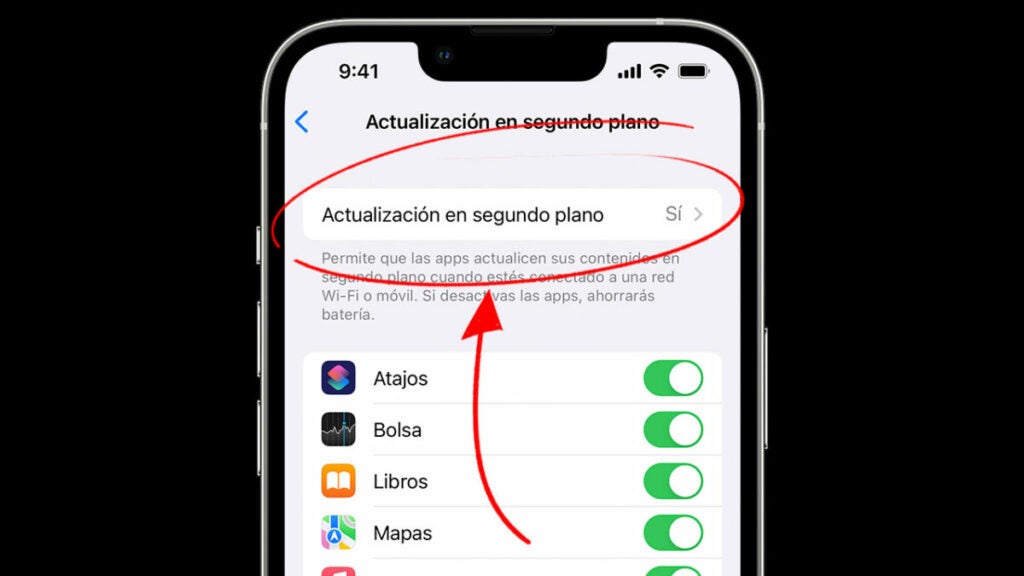
By default, iPhones have background updating of apps enabled. This allows apps to continuously load new content, whether you open them or not. The background update is one of the functions that consumes more battery and resources of our iPhone. To remove it, just follow these steps:
- Go to Settings on your iPhone.
- Tap on the General section and then on Background App Refresh.
- After this, click on Background App Refresh again and select No. This will stop all apps from loading when you are not using them. If you do not want to disable them all, you also have the option to select one by one the ones you want to remove.
Also check how many applications you have open in the background. Although multitasking works differently in iOS, it is advisable to close the ones you do not have in use to avoid consuming more resources than necessary.
Don’t have your storage at the limit
One thing we all do is to make the most of the space we have on our iPhones. If I have 128GB, why shouldn’t I be able to use it all? However, this reasoning will make your device run slower than usual. The more apps and data you have to load, the slower it will go overall.
From time to time, it is convenient that you do a thorough cleaning of your device. Get rid of those repeated photos and those applications you haven’t opened in months, you won’t need them. Digital diogenes syndrome is more common than you think, especially if we take into account that the cell phone has become our second (virtual) home.
