We live in an image-driven era. From social media to corporate websites, first impressions are everything. A powerful photograph can communicate in a second what text takes effort and time to achieve- and effort on the part of the reader.
Whether you’re launching a brand, presenting a design proposal to your boss, or creating content for social media, the visual component has become an essential part of the message.
However, there’s a common issue: professional images are often expensive. Many personal projects or small businesses are not able to afford quality photos or illustrations. At that point, many people turn to free stock images, which, while useful, have significant limitations: lack of exclusivity, low resolution, or simply pictures that are repeated on hundreds of websites.
This is where Adobe Stock comes in handy, among the world’s most recognized and prestigious platforms for professional visual resources, its offering that can be the perfect starting point for any project.
What is Adobe Stock, and why is it so highly valued among designers?
Adobe Stock is the visual resource library developed by Adobe, the same company behind iconic tools such as Photoshop, Illustrator, Premiere Pro, and InDesign. In other words, it is an official and professional source of images designed to integrate directly with the most widely used creative applications on the planet.
Still, Adobe Stock is not limited to photographs. Within its catalog, which exceeds 850 million resources, you can find:
- High-resolution professional photographs.
- Ready-to-use vectors and illustrations.
- Design templates for networks, posters, presentations, or videos.
- Video clips and animations in 4K quality.
- Royalty-free music for audiovisual projects.
- 3D files for design or motion graphics projects.
All content on Adobe Stock is professionally curated and reviewed, ensuring not only aesthetic quality but also clear and secure licenses for commercial use. This means you can use the images in personal, commercial, or advertising projects without worrying about hidden copyrights or ambiguous usage restrictions.
Why take advantage of this opportunity?
There are several compelling arguments to seize this opportunity. Here are the most convincing reasons to try Adobe Stock for free:
1) Professional quality at no initial cost
Adobe Stock resources are used by designers, advertising agencies, video production companies, and international brands. The images and designs are created by professionals who understand composition, lighting, emotion, and visual impact.
Being able to download Adobe Stock assets for free is an opportunity that’s hard to turn down, especially if you’re in the early stages of a project and don’t want to commit to a budget.
2) Full integration with the Adobe ecosystem
If you work with tools such as Photoshop, Illustrator, or Premiere Pro, Adobe Stock integrates directly into their panels, which means you can search, preview, and license images, videos, templates and more without leaving the program. It’s a seamless experience that saves time and improves creative flow.
3) Secure and clear licensing
One of the biggest fears when using images taken from the internet is infringing copyright. Adobe Stock removes that concern: all images, videos, vectors, illustrations and more come with standard or extended licenses– depending on the use- and are backed by a solid legal framework. This allows you to use them in print, digital, social media, websites, and more.
4) Variety for any type of project
Whether you’re a photographer, designer, influencer, content creator, or entrepreneur, Adobe Stock has visual resources tailored to all styles and themes. From natural portraits to minimalist illustrations and abstract textures.
In addition, its intelligent search engine allows you to filter by color, orientation, framing, emotion, trend, or even search by image (you upload a reference and it shows similar results).
How to sign up for the 30-day free trial
Signing up for the 30-day free trial of Adobe Stock is really easy, all you have to do is:
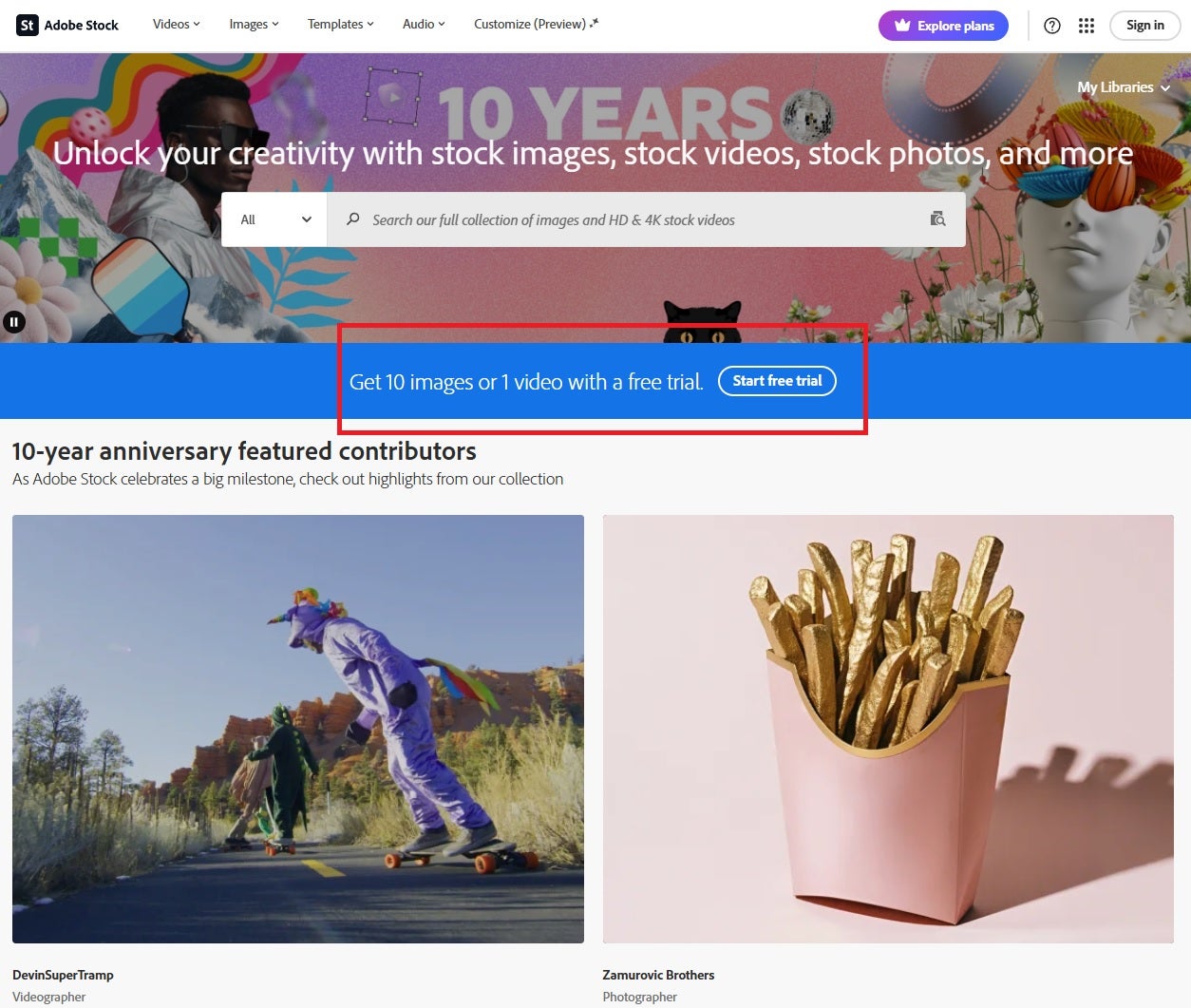
- Go to their website (click here) and the first thing you’ll see on the screen is the free trial.
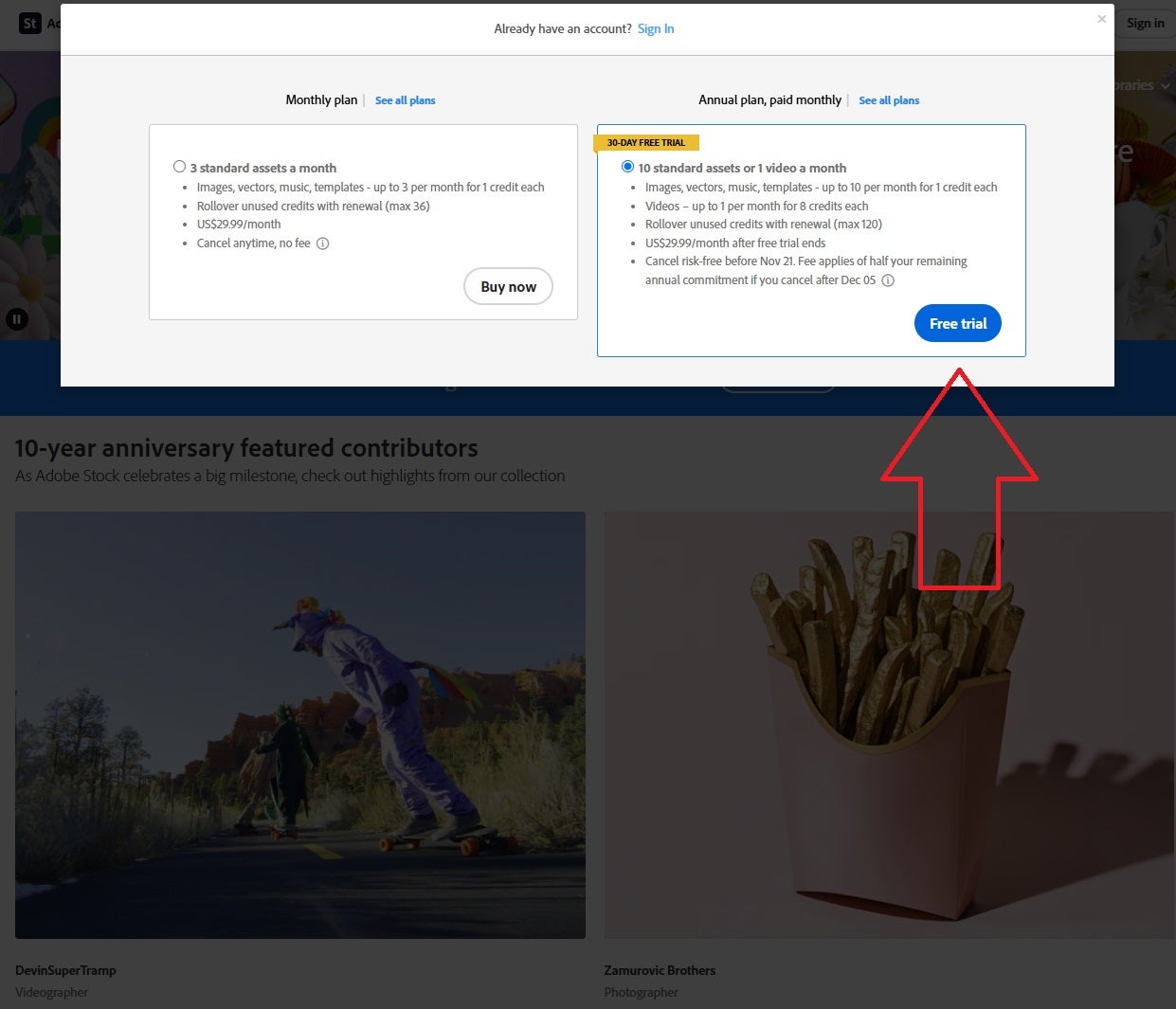
- When you click on it, the payment plan and the free plan will appear- you have to choose the free one.
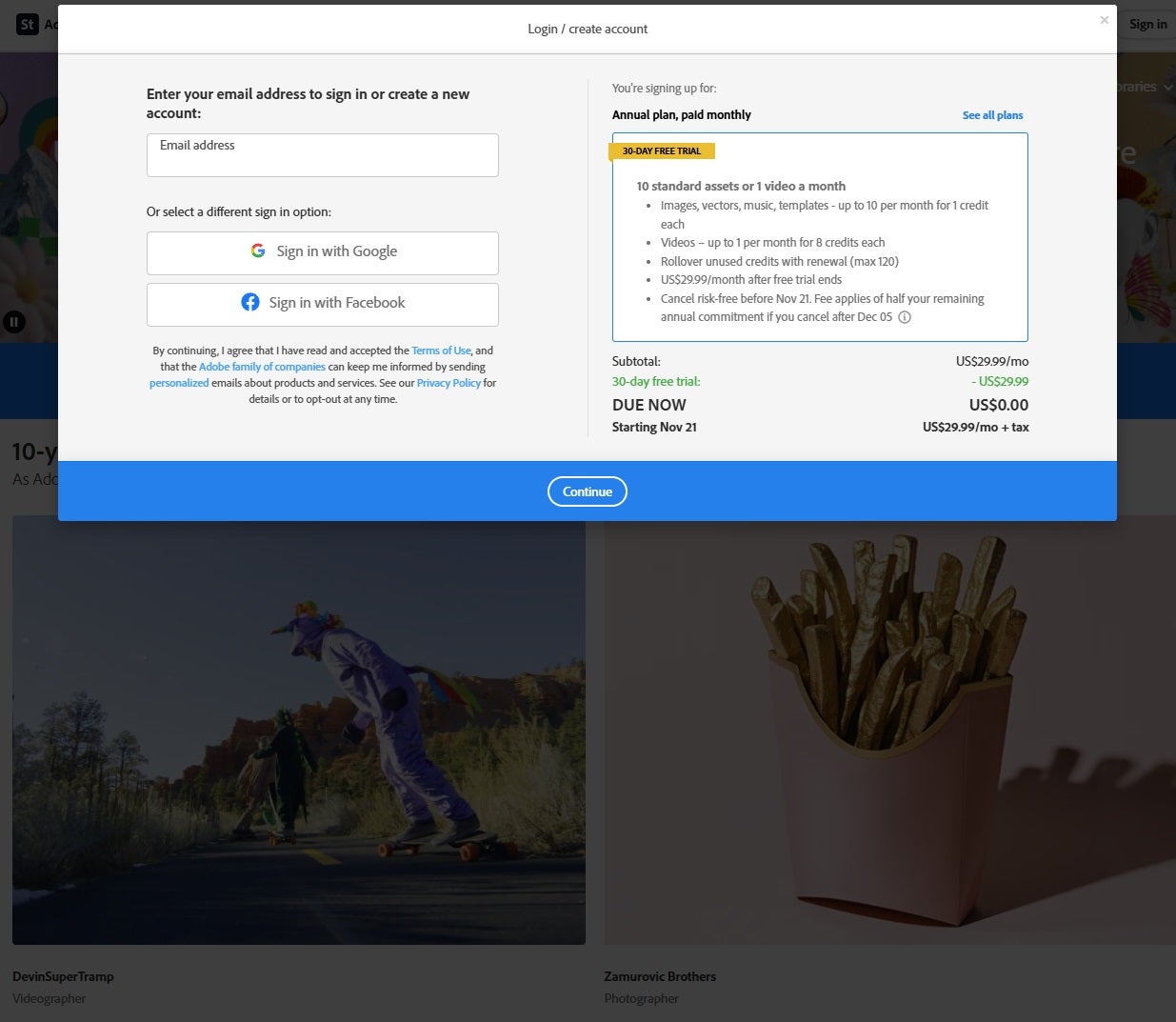
- Once you select the free trial, you will be asked to enter your email address to confirm your request.
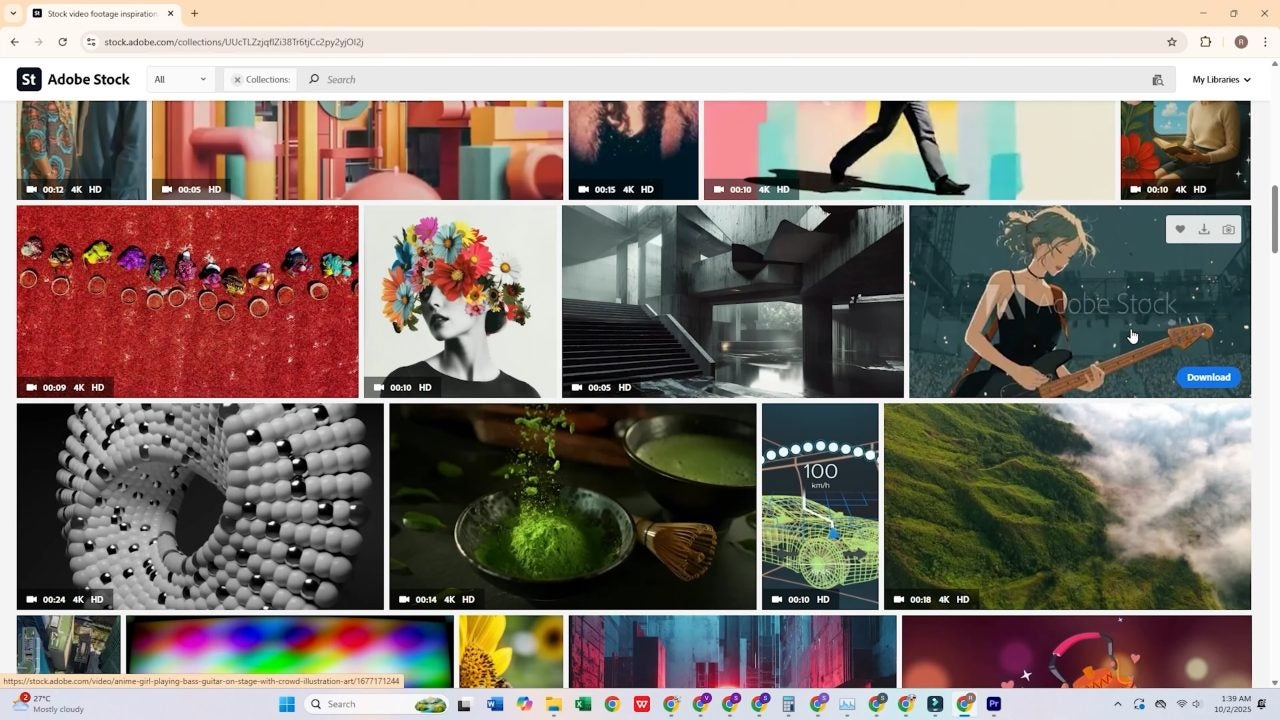
- After confirming your email address, you will be able to access Adobe Stock and the thousands and thousands of resources waiting to be used for your next project.
Tips for choosing the best free images
Having access to millions of images and other asset types can be overwhelming. So before downloading your 10 free standard assets, it’s a good idea to do a little planning. Here are some practical recommendations for getting the most out of what you’ll find on Adobe Stock:
1) Define the visual style of your project
Before you start searching, think of the kind of feeling you want to convey. Is your brand modern and minimalist? Or do you prefer a natural and sensitive style? Choosing a consistent style from the outset will help ensure that all your images share the same visual language.
2) Use advanced search filters
Adobe Stock allows you to filter by dominant color, orientation (horizontal or vertical), space for text, composition, and many other variables. Profit from these tools to find images that perfectly suit your planned design.
3) Look for versatility
The best images are those you can reuse in different contexts: a presentation cover, a social media banner, a website background, or an advertisement. Look for clean photos with space to incorporate your own text or logo.
4) Explore the “Trends” collections
Every year, Adobe publishes themed collections based on global visual trends. They are an excellent source of inspiration, especially if you want to keep your project up to date with the latest aesthetics.
What you can do with your 10 free images
Once you download your free resources, the possibilities are virtually endless. Here are some examples of how you could use them:
- Design the logo or visual identity for your new brand.
- Create engaging social media posts.
- Put together a professional presentation for clients or investors.
- Design the cover of an eBook or digital catalog.
- Illustrate a blog post or newsletter.
- Create promotional materials such as posters, flyers, or banners.
- Customize the design of a website or online store.
- Use them as backgrounds or textures for videos and multimedia projects.
The important thing is that each image, even if it’s free, retains the professional quality your project needs to stand out visually.
What happens if you decide to cancel the trial
One of the most common questions is: “What if I don’t want to continue paying after the first month?” The answer is simple: you can cancel the trial at any time during the first 30 days at no cost, and you’ll keep your 10 free images permanently.
Adobe makes the cancellation process easy from your user profile. There are no tricks or fine print: simply confirm that you do not want to continue with the subscription, and that’s it. Your downloaded resources will still be available in your account, with a valid license.
If you decide to continue: full plan benefits
If after the first month you fall in love with the catalog, Adobe offers different subscription plans tailored to the needs of each user.
- Individual plan: starting at 10 credits per month at very competitive prices.
- Business plans: ideal for creative teams, with shared license management.
In addition, paid plans include access to premium resources, higher resolution, exclusive collections, and advanced support.
Conclusion: your next project starts today
You don’t need a big investment to take a leap in quality in your visual communication. Thanks to the free trial of Adobe Stock, you can get 10 high-quality professional images today and give your project the visual boost it deserves.
Every idea, every project, and every brand deserves to be presented with an aesthetic that matches its potential. And now, with a tool like Adobe Stock, that’s within everyone’s reach.
So if you have an idea in the works—a website, a campaign, a presentation, or a personal brand—now is the perfect time to get started.
Take advantage of the 30-day trial, download your free images, and start building a visual universe that conveys professionalism, emotion, and quality.
Because in today’s world, the difference between a good project and a memorable one is often a single image.
