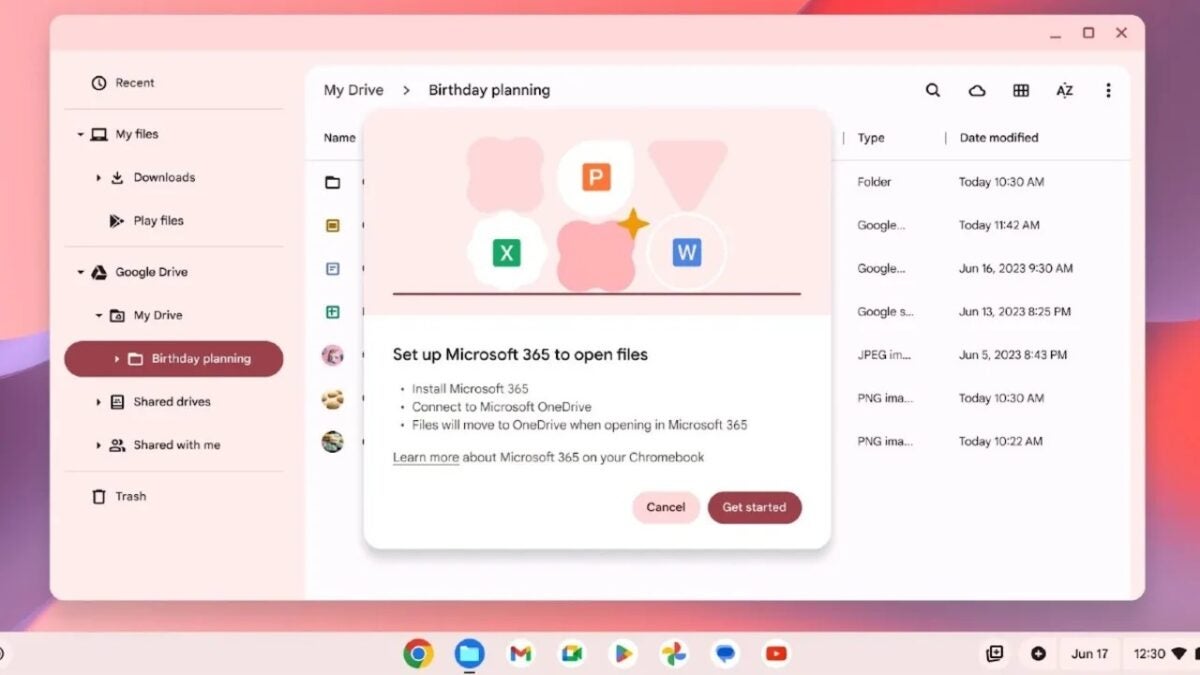
If you are users of any Chromebook, which operate under the ChromeOS operating system, the news we are going to talk about in this post will surely interest you. Quite some time ago, Google announced that they were working on a new feature for the mentioned operating system, with which its users could open documents from applications such as Word, Excel or PowerPoint directly from the files of the Chromebook itself. Well, after a long wait, it seems that this is already being implemented.

That is to say, Chromebook users can now open OneDrive documents directly from the Files app on their ChromeOS device. Obviously, not only will you be able to open these documents, but you can also edit them from your device. Google has shared this news through a post on the support website, where they explain how this new addition works.
If you use a Chromebook, now you can open OneDrive documents directly from your device
“When you get access, you can simply open an Office file and then choose to open it in the Microsoft 365 app when prompted. From there, you will be guided through a unique setup experience to install the app and connect Microsoft OneDrive to the Chromebook Files app. That’s it! We will remember your preference and you will have quick and easy access to your files,” they indicate in the aforementioned post.
“You can try it today (if you haven’t already): just search and enable the “#upload-office-to-cloud” option. We will continue with the rollout over the next few weeks,” they add in the aforementioned blog post. With this, it is clear that if you are a Chromebook user and still cannot enjoy this functionality, you should not worry too much, as you will likely be able to do it in a few weeks, at most.
Before the arrival of this feature, when opening an Office document on a Chromebook, it would open it from the Chrome browser. Well, now it allows you to choose the app to open the file, including Google Docs and Microsoft 365. If you choose the latter, you will have to complete some settings in order to be able to edit an Office document from the ChromeOS device itself.
