
Skip to content

Softonic English

Just another Softonic Sites site

From Prompt to Pattern: Creating Custom Vector Patterns for Fashion and Textiles with AI

No hay duda de que Adobe Illustrator es uno de los mejores programas para diseño vectorial que puedes encontrar hoy en día. Dentro de su amplia gama de herramientas, hay una que nos gustaría destacar hoy: la generación de patrones uniformes y personalizables a través de Texto a Patrón. ¿Te imaginas poder crear patrones sin pasar horas ajustando nodos, clonando formas o luchando con la simetría? Esta novedad abre un nuevo rango de posibilidades para profesionales enfocados en diseño textil, moda, papelería creativa o incluso decoración de interiores. Si quieres saber cómo usar Texto a Patrón, quédate con […]

There is no doubt that Adobe Illustrator is one of the best programs for vector design that you can find today. Among its wide range of tools, there is one that we would like to highlight today: the generation of uniform and customizable patterns through Text to Pattern.

Can you imagine being able to create patterns without spending hours adjusting nodes, cloning shapes, or struggling with symmetry? This innovation opens up a new range of possibilities for professionals focused on textile design, fashion, creative stationery, or even interior decoration. If you want to know how to use Text to Pattern, stay with us for a few more paragraphs. 

Adobe Illustrator
Adobe Illustrator DOWNLOAD

Text to Pattern: this is how it is used

To begin, we will start by creating a new project within Illustrator. Select the New File option that you will see highlighted in blue. In the New Document panel, set the dimensions you want for your file. Illustrator offers a series of presets already established depending on the purpose of your project: mobile, web, print… in this case, we will choose one for Mobile, like the iPhone X.
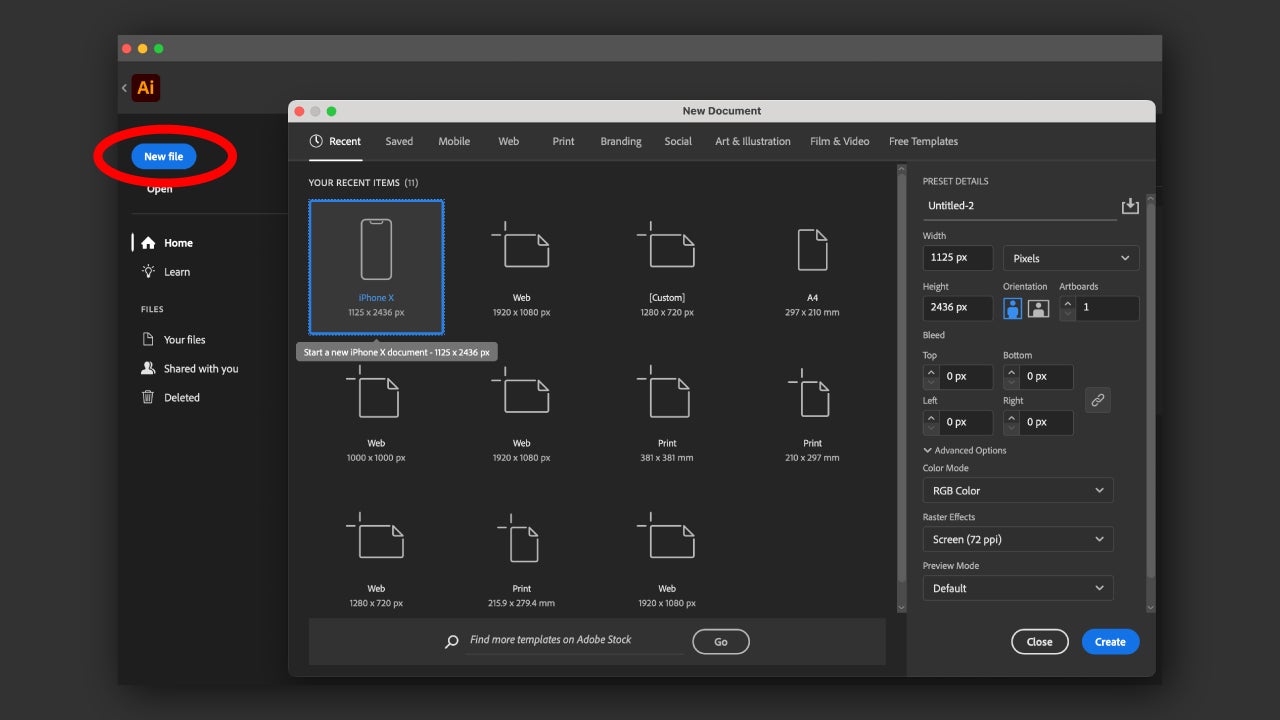
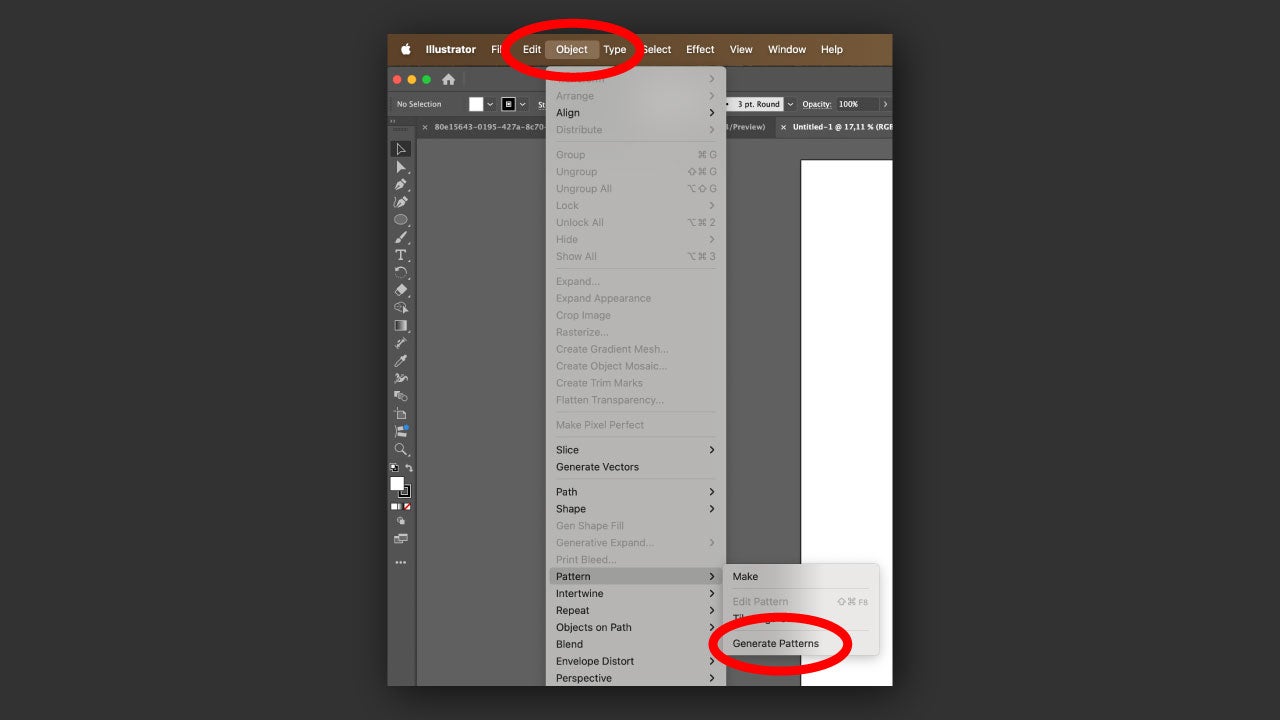
Once our project is created, go to Object > Patterns > Generate Patterns. You can also find the same option from the Properties panel. To open the Text to Pattern panel, we will need to go to Window > Generate Patterns.
Next, a new panel will open with a text box (prompt) where you can describe how you want your pattern to be. You can also adjust some parameters such as the number of colors you want to include. To do this, click on the painter’s palette icon that you will see all the way to the left of Generate.
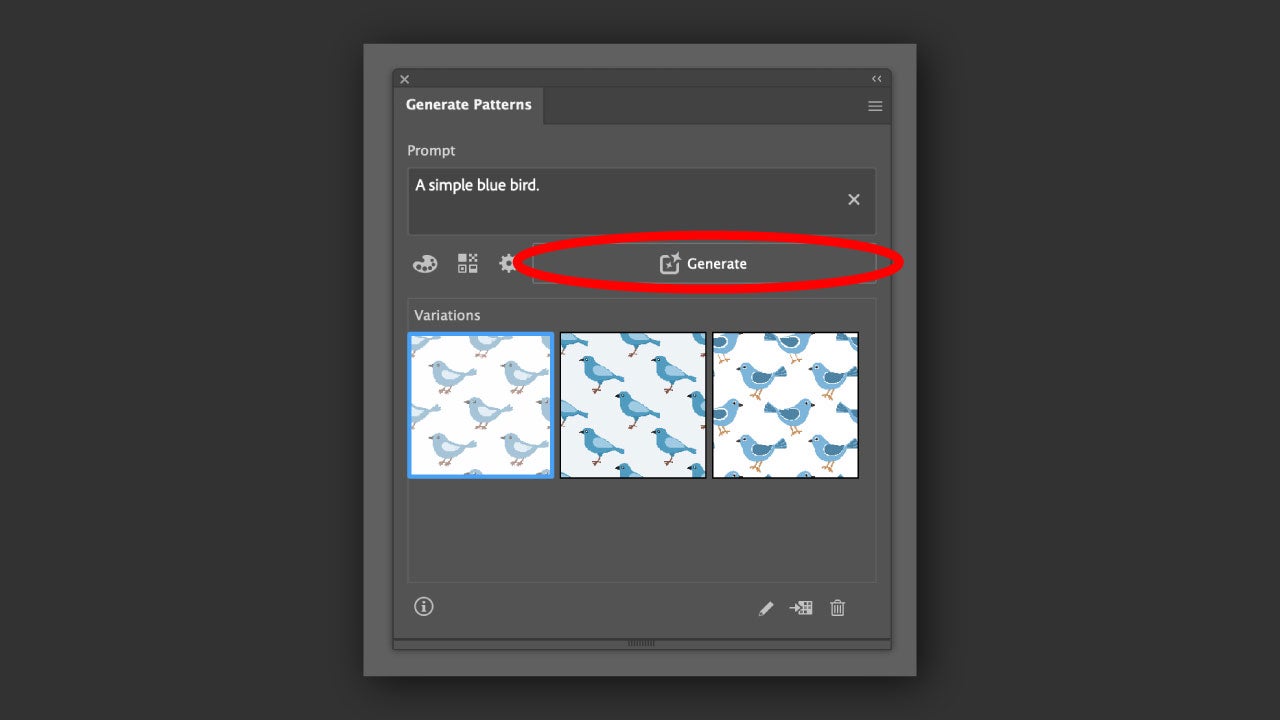
When you finish, click on Generate. Illustrator will show you three distinct variations based on your description. Select the one that catches your attention the most and drag it to the canvas to see it in full size. Based on the results you get, you can refine your description until you achieve exactly what you wanted.

If you click on the three-dot symbol that appears in the upper right corner of each generated pattern, you can indicate whether you liked the result or not. Specifically, you have three options to choose from: Good Result, Bad Result, or Delete variation. This feedback will be used by Adobe to improve the results in the future.

Once you have finished, you will be able to make some quick edits such as grouping shapes or changing colors. If you want to keep exploring new colors, you can click on Recolor and try Generative Recolor.

If you want to save some of the results directly, you can select the Add to swatches button, located in the same Generate Patterns panel at the bottom right.

How to save your pattern

Once we have our design to our liking, it’s time to save it within Illustrator, especially if we intend to use it on other occasions.

Select the vector design we have previously generated and then go to Object > Pattern > Make. Within the Pattern Options panel, you can edit how it repeats, the placement of the motifs, and more.
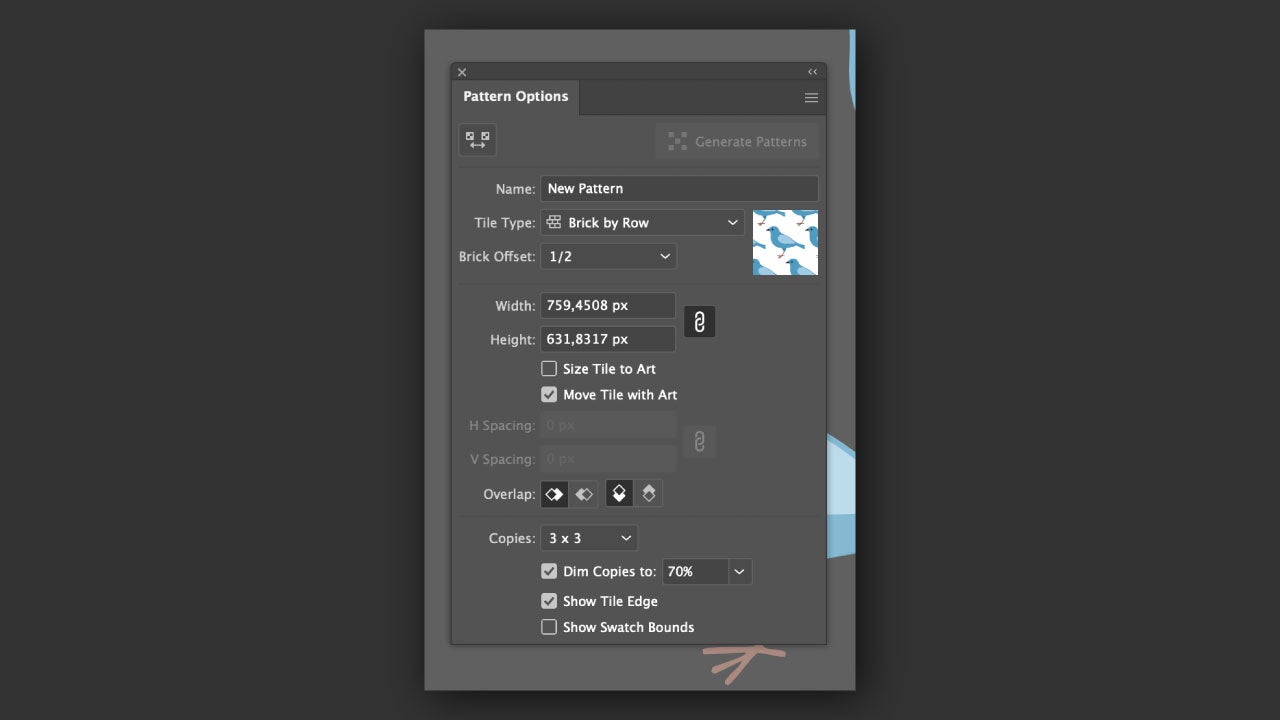
Within Tile Type we can choose from several pattern layout options, such as Grid, Brick by row, etc. Select them to see how your pattern changes in real time. You will also be able to change the width and height, determine the number of rows and columns, etc.

To finish, in the bar located under Control Panel, click on save or discard the changes you have made.

Other features that also use generative AI within Illustrator

Although in this article we have focused on Text to Pattern and how you can use it, within Illustrator there are a number of very interesting functions that also use generative AI.

One of them, Text to Vector Graphic, allows you to generate fully editable vectors —such as scenes, shapes, or even icons— from simple text descriptions. Another, Generative Expand, expands the limits of our design to intelligently fill additional areas, such as the bleed zones of a document, for example.
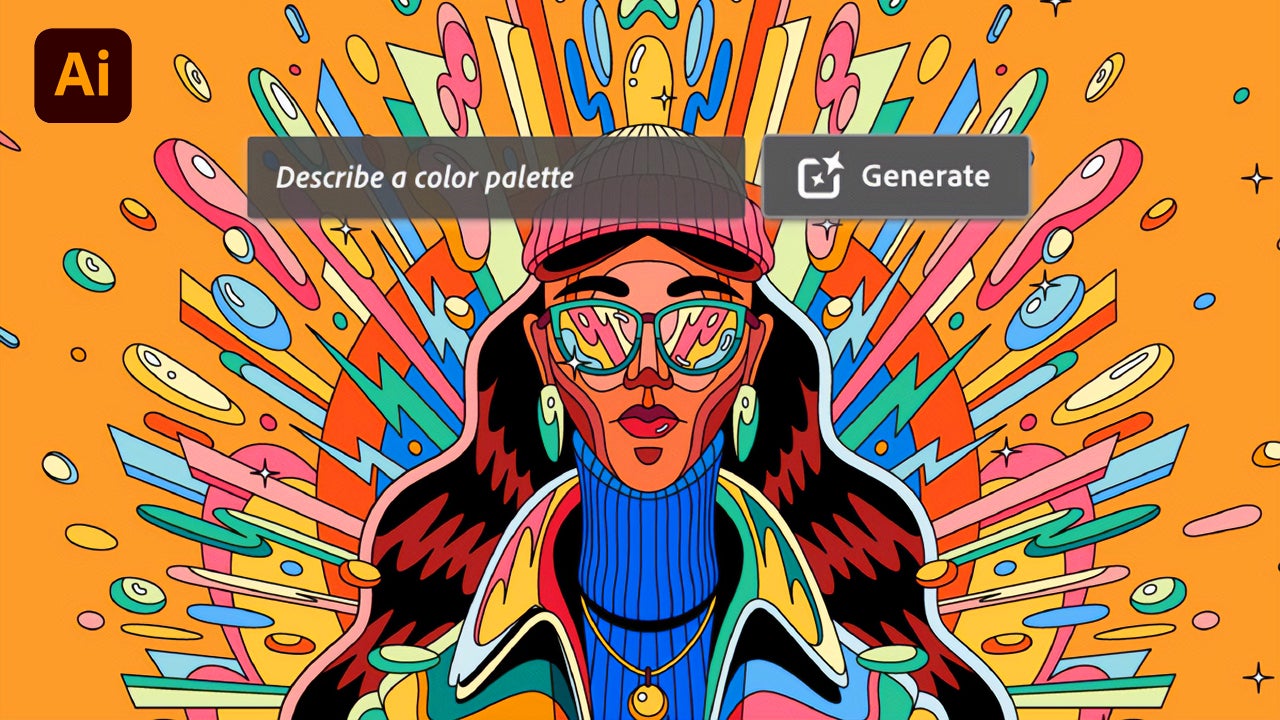
Currently, the features powered by generative AI are supported in more than 100 languages, including Spanish. To use them, generative credits are employed, which are renewed monthly along with our subscription. The number of these varies depending on the type of plan you have. We leave you this section of Adobe’s official website so you can thoroughly check which actions consume credits and how many you can opt for each month.

Adobe Illustrator
Adobe Illustrator DOWNLOAD

Author: María López

{ "de-DE": "Künstler aus Berufung und Technikliebhaber. Seit ich denken kann, habe ich gerne an allen möglichen Gadgets herumgebastelt.", "en-US": "Artist by vocation and technology lover. I have liked to tinker with all kinds of gadgets for as long as I can remember.", "es-ES": "Artista de vocación y amante de la tecnología. Me ha gustado cacharrear con todo tipo de gadgets desde que tengo uso de razón.", "fr-FR": "Artiste de vocation et amateur de technologie. J'aime bricoler avec toutes sortes de gadgets depuis que j'ai l'usage de la raison.", "it-IT": "", "ja-JP": "", "nl-NL": "", "pl-PL": "", "pt-BR": "", "social": { "email": "", "facebook": "", "twitter": "", "linkedin": "" } } View all posts by María López

Author María LópezPosted on August 13, 2025August 13, 2025Categories News

Post navigation

Previous Previous post: From Chaos to Collaboration: How to Streamline Your Agency Workflow with Photoshop Projects
Next Next post: Microsoft fixes 111 vulnerabilities that exposed your computer to all kinds of threats

Recent Posts

  • Best AI Image Generators for Professionals in 2026: Quality, Licensing and Pricing Compared
  • Vaultwarden gets a 2FA bypass fix—but still needs maintenance
  • Disney’s Hexed opens tomorrow, but early reviews find familiar flaws
  • Dune: Part Three unveils war footage ahead of December release
  • Avengers: Doomsday’s final trailer shows Thor barely knows his allies

Archives

  • November 2026
  • October 2026
  • September 2026
  • August 2026
  • July 2026
  • June 2026
  • May 2026
  • April 2026
  • March 2026
  • February 2026
  • January 2026
  • December 2025
  • November 2025
  • October 2025
  • September 2025
  • August 2025
  • July 2025
  • June 2025
  • May 2025
  • April 2025
  • March 2025
  • February 2025
  • January 2025
  • December 2024
  • November 2024
  • October 2024
  • September 2024
  • August 2024
  • July 2024
  • June 2024
  • May 2024
  • April 2024
  • March 2024
  • February 2024
  • January 2024
  • December 2023
  • November 2023
  • October 2023
  • September 2023
  • August 2023
  • July 2023
  • June 2023
  • May 2023
  • April 2023
  • March 2023
  • February 2023
  • January 2023
  • December 2022
  • November 2022
  • October 2022
  • September 2022
  • August 2022
  • July 2022
  • June 2022
  • May 2022
  • April 2022
  • March 2022
  • February 2022
  • January 2022
  • December 2021
  • November 2021
  • October 2021
  • September 2021
  • August 2021
  • July 2021
  • June 2021
  • May 2021
  • April 2021
  • March 2021
  • February 2021
  • January 2021
  • December 2020
  • November 2020
  • October 2020
  • September 2020
  • August 2020
  • July 2020
  • June 2020
  • May 2020
  • April 2020
  • March 2020
  • February 2020
  • January 2020
  • December 2019
  • November 2019
  • October 2019
  • September 2019
  • August 2019
  • July 2019
  • June 2019
  • May 2019
  • April 2019
  • March 2019
  • February 2019
  • January 2019
  • December 2018
  • November 2018
  • October 2018
  • September 2018
  • August 2018
  • July 2018
  • June 2018
  • May 2018
  • April 2018
  • March 2018
  • February 2018
  • January 2018
  • December 2017
  • November 2017
  • October 2017
  • September 2017
  • August 2017
  • July 2017
  • June 2017
  • May 2017
  • April 2017
  • March 2017
  • February 2017
  • January 2017
  • December 2016
  • November 2016
  • October 2016
  • September 2016
  • August 2016
  • July 2016
  • June 2016
  • May 2016
  • April 2016
  • March 2016
  • February 2016
  • January 2016
  • December 2015
  • November 2015
  • October 2015
  • September 2015
  • August 2015
  • July 2015
  • June 2015
  • May 2015
  • April 2015
  • March 2015
  • February 2015
  • January 2015
  • December 2014
  • November 2014
  • October 2014
  • September 2014
  • August 2014
  • July 2014
  • June 2014
  • May 2014
  • April 2014
  • March 2014
  • February 2014
  • January 2014
  • December 2013
  • November 2013
  • October 2013
  • September 2013
  • August 2013
  • July 2013
  • June 2013
  • May 2013
  • April 2013
  • March 2013
  • February 2013
  • January 2013
  • December 2012
  • November 2012
  • October 2012
  • September 2012
  • August 2012
  • July 2012
  • June 2012
  • May 2012
  • April 2012
  • March 2012
  • February 2012
  • January 2012
  • December 2011
  • November 2011
  • October 2011
  • September 2011
  • August 2011
  • July 2011
  • June 2011
  • May 2011
  • April 2011
  • March 2011
  • February 2011
  • January 2011
  • December 2010
  • November 2010
  • October 2010
  • September 2010
  • August 2010
  • July 2010
  • June 2010
  • May 2010
  • April 2010
  • March 2010
  • February 2010
  • January 2010
  • December 2009
  • November 2009
  • October 2009
  • September 2009
  • August 2009
  • July 2009
  • June 2009
  • May 2009
  • April 2009
  • March 2009
  • February 2009
  • January 2009
  • December 2008
  • November 2008
  • October 2008
  • September 2008
  • August 2008
  • July 2008
  • June 2008
  • May 2008
  • April 2008
  • March 2008
  • February 2008
  • January 2008
  • December 2007
  • November 2007
  • October 2007
  • September 2007
  • August 2007
  • July 2007
  • June 2007
  • May 2007
  • April 2007
  • March 2007
  • February 2007
  • January 2007
  • December 2006
  • November 2006
  • September 2006
  • August 2006
  • June 2006
  • May 2006
  • July 2001
  • January 2001
  • November 2000
  • September 2000
  • August 2000
  • July 2000
  • April 2000
  • March 2000

Categories

  • Affiliate post
  • Expert Review
  • Gaming
  • Guides
  • How to
  • Legacy how To
  • News
  • Noticias
  • Software>Security
  • Sponsored
  • Trucos y Consejos
  • Uncategorized
  • Windows software

Meta

  • Log in
  • Entries feed
  • Comments feed
  • WordPress.org
Softonic English Proudly powered by WordPress