Skip to content

Softonic English

Just another Softonic Sites site

Reducing risks in creativity: why AI prototyping is the new standard in campaign management

Being creative and not dying in the attempt has become increasingly difficult. The marketing industry has always faced the same problem: high production costs. The most expensive decisions are made when there is the least time to correct them. Once a campaign is underway, changing something costs much more time, money, and patience. With the establishment of generative AI, we have a system to validate ideas before executing them. Beyond the technical aspects, with tools like Adobe Firefly we can preview what we want and be more efficient. If you want […]

Being creative and not dying in the attempt has become increasingly difficult. The marketing industry has always faced the same problem, high production costs. The most expensive decisions are made when there is the least time to correct them. Once a campaign is underway, changing something costs much more time, money, and patience.

With the establishment of generative AI, we have a system to validate ideas before executing them. Beyond the technical aspects, with tools like Adobe Firefly, we can preview what we want and be more efficient. If you want to know how to make the most of it, keep reading below.

Adobe Firefly
Adobe Firefly DOWNLOAD

The Creative Gap, one of our worst enemies

When we talk about Creative Gap, we refer to that gap between what we imagine and what is ultimately produced in reality. In the long run, it can represent a significant black hole of money if we do not manage our expectations well.

It can happen at any time, like in the studio photograph, for example. In some cases, the actual result may not be what you expected, which means repeating sessions, investing more effort, and ultimately causing delays.

Here Adobe Firefly can help you solve this. In addition to Adobe’s proprietary generative model, Firefly Image 5, you can use Gemini 3.1 (Nano Banana 2), GPT Image 1, or FLUX. This way, you can imagine how certain types of photos, poses, or lighting styles would look before bringing the concept to reality.

How to use Adobe Firefly to bring our ideas to life

Since its launch, Adobe Firefly has become more powerful and capable. Currently, we have two ways to access it: the browser on our computer or the mobile app, available for iOS and Android. While you can generate content from both locations, through the browser you will have access to more options, such as Boards.
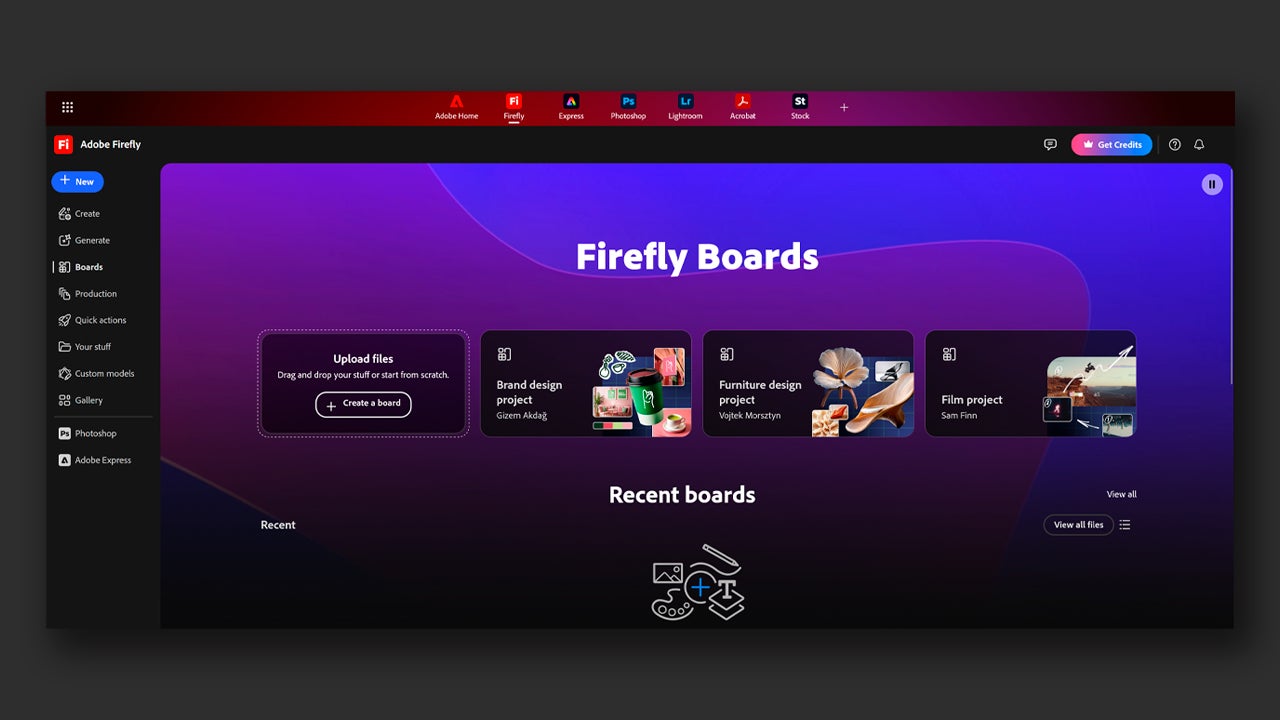
If you want to see how your ideas can be materialized in an image, use the Create function, the most important one in Firefly. It’s very easy to use; as soon as you enter the page, you will see a box where you can write your prompt, that is, describe what you want to generate as an image.
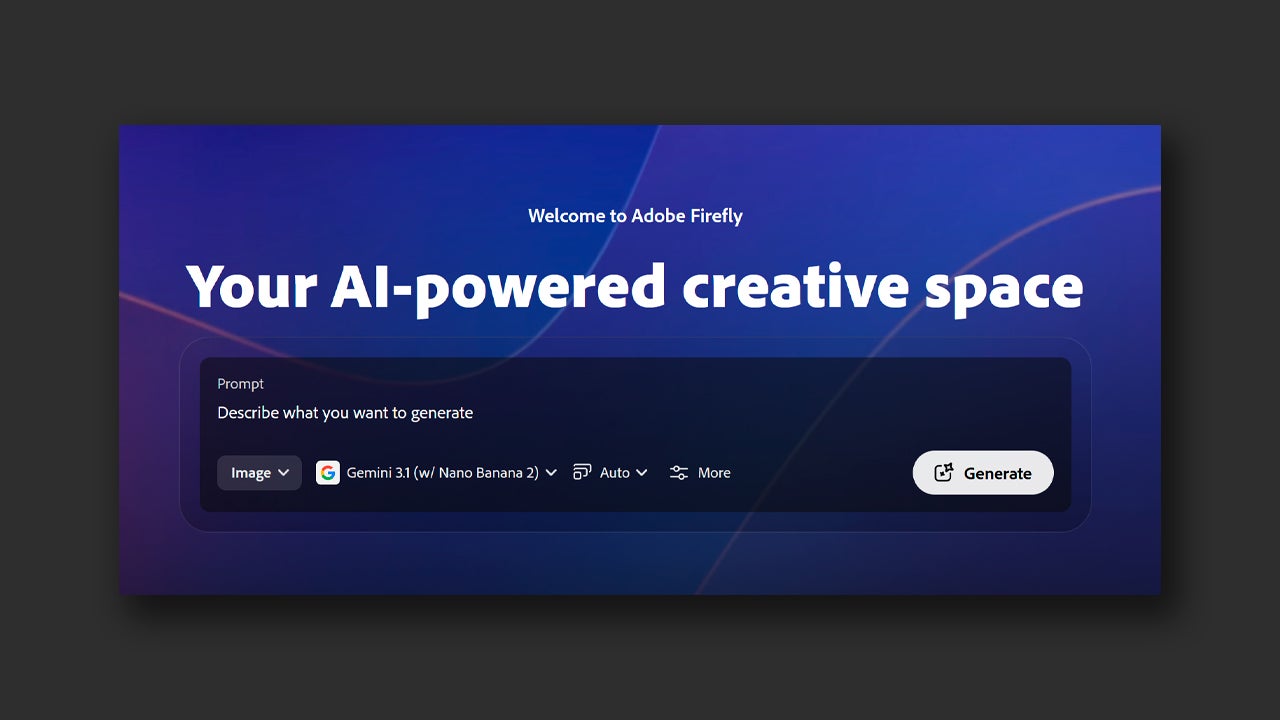
From here you can also choose what type of content to generate (images or videos) from the Image tab, which will be set as the default option. If you choose Image, on the right you will see another tab to switch to a generative model. As we mentioned before, you can choose from different Firefly models and other partner models (Gemini, GPT, FLUX…)
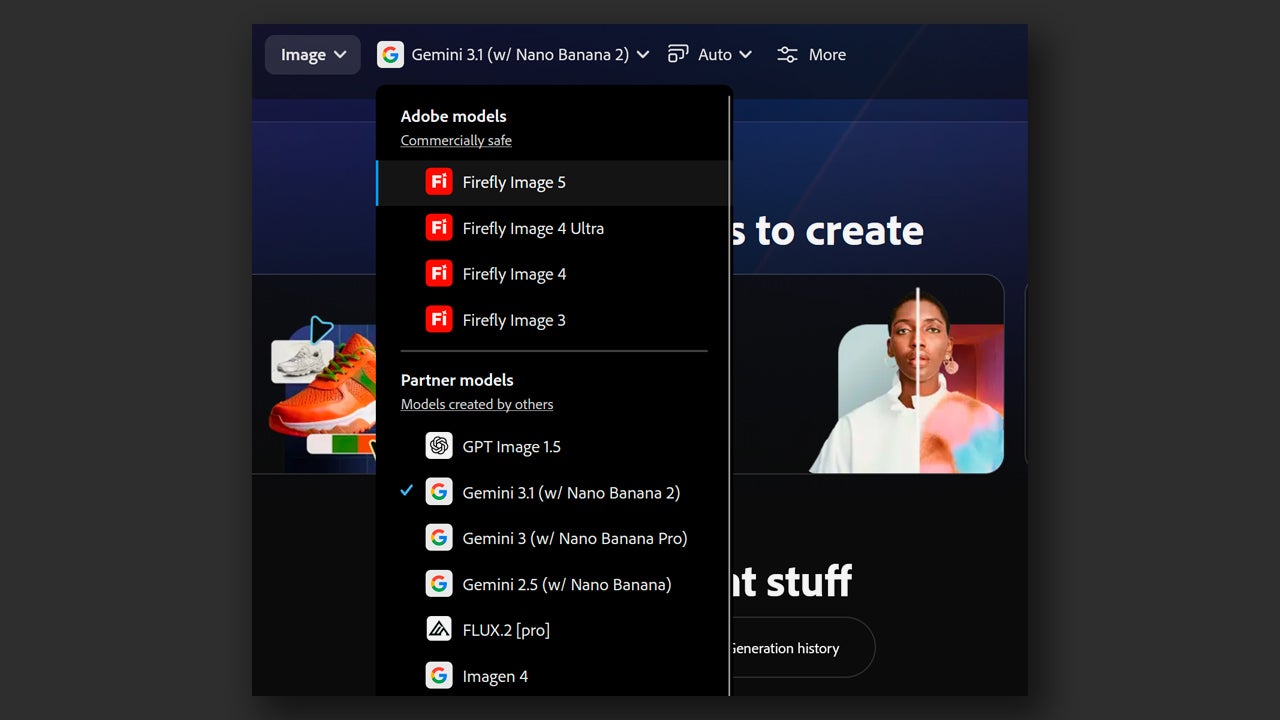
Each of them works better in different contexts. To create realistic photos, for example, the Gemini models can be a good option. Additionally, each model has a different cost of generative credits, as we will see later. Firefly Image 5, for example, uses 10 credits while Gemini 3.1 uses 40 credits.

After writing what you want to generate, select Generate to see the result. This is the fastest way we have to create content, but we can also further customize the result and obtain more refined things by clicking on More.
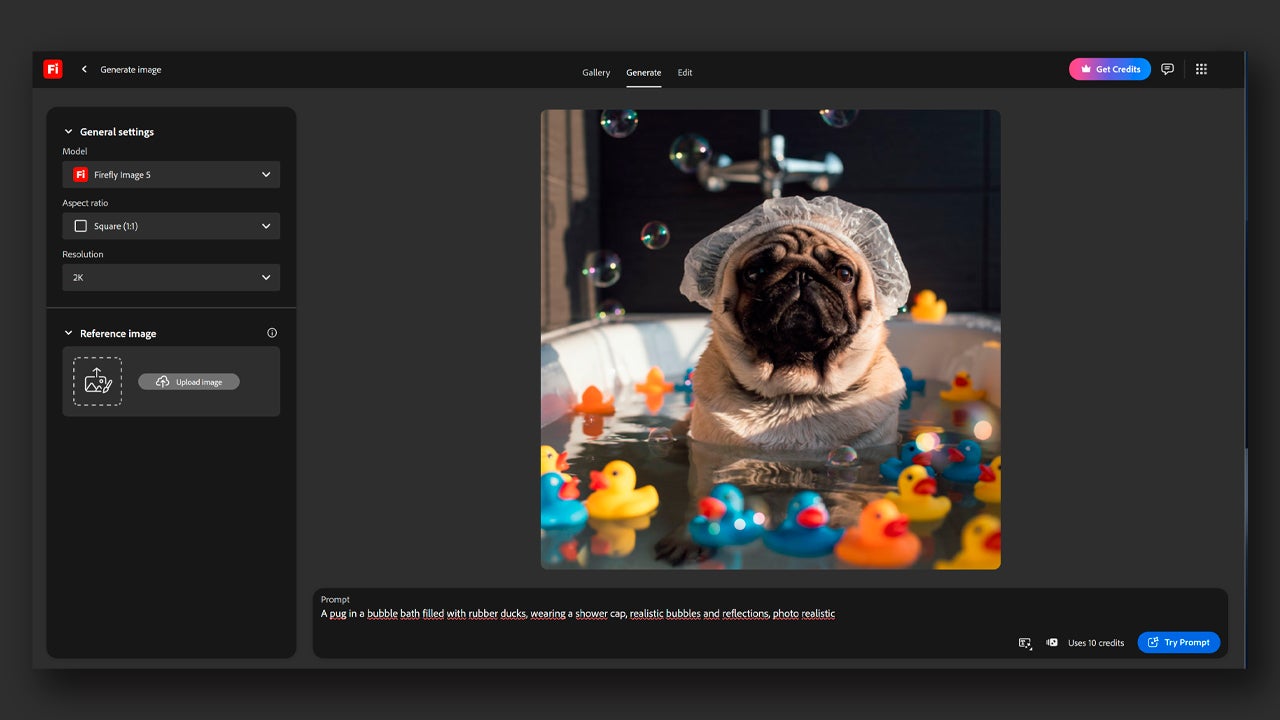
By doing so, you will enter a new screen where you will see on the right the settings that you can modify in order to generate images. In General settings, you can also choose the model, the image size from Aspect ratio, and the resolution. You can also complement your creations by allowing Google Search to be used by activating the tab.

Further down you can add up to six reference images. This will help to “guide” the model better when bringing your ideas to life. Here you can add references for colors, artistic styles… anything you think might be useful for your images.

Once you have generated the image or images, Firefly also allows you to edit them. At the top, you will see three different sections: Gallery, Generate, and Edit. If you select the image, you will automatically switch to Edit. You can switch between sections at any time.
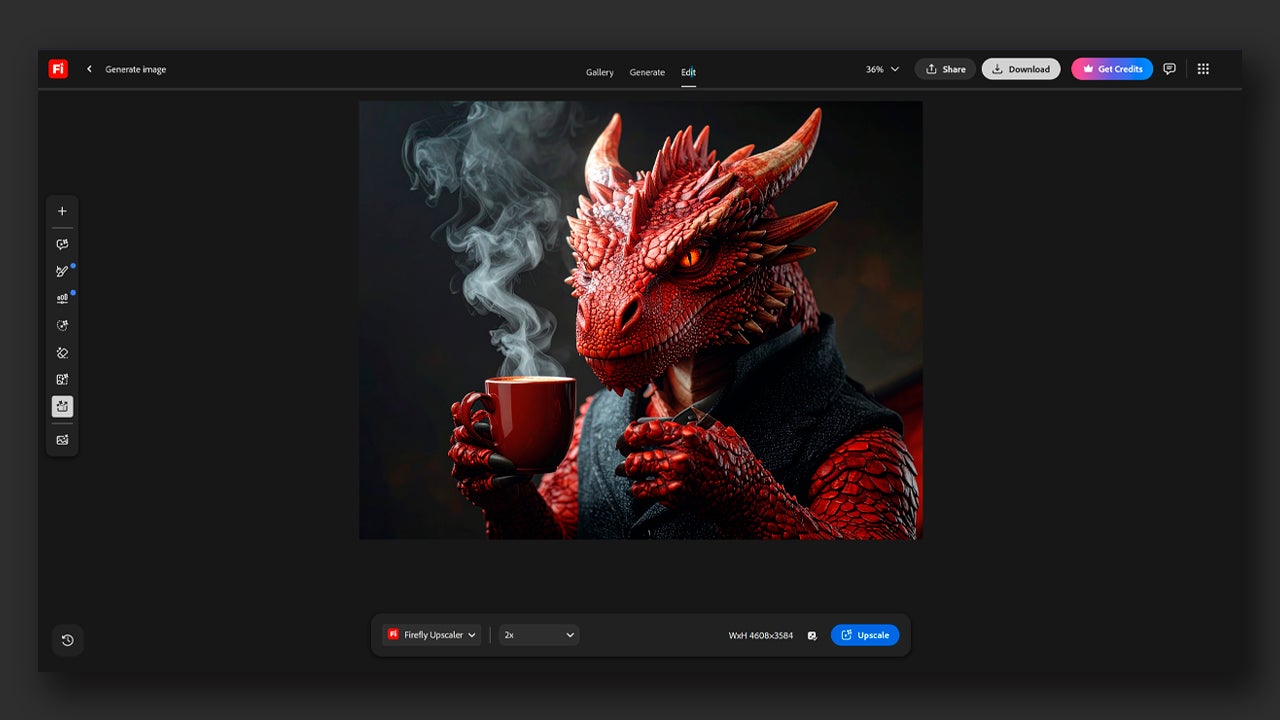
In Edit, we will see our image in the center and in the text box located below, we can write what we want to change and how. Just like when generating, the changes cost generative credits and vary depending on the model you want to use.
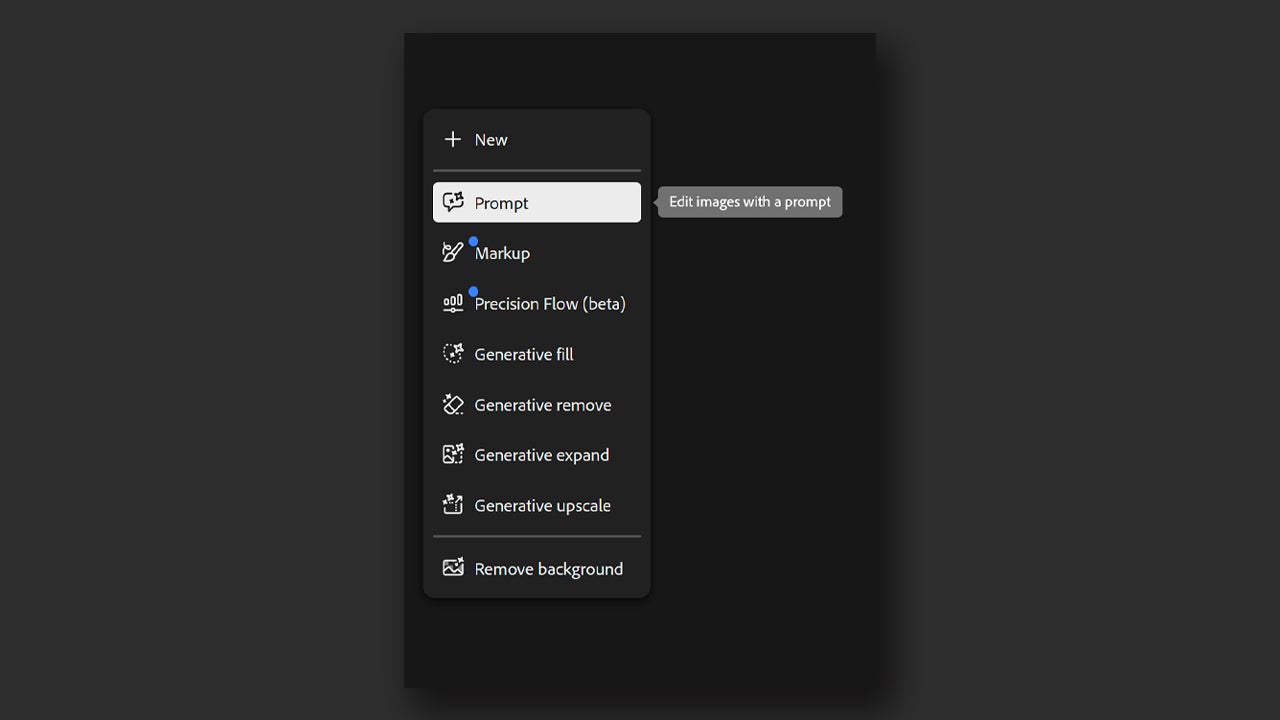
On the left, we will see several tools that will also help us edit the image more precisely. Prompt, the first one, allows us to edit images with written descriptions. With Markup we can leave notes on the image (Text) to make very specific changes and even draw (Brush and Region) on it to be more visual when editing.

We also have Precision Flow, which will allow us to regulate the described changes. With Generative Fill, we can add new elements to the area we want in the image. Generative Remove will help us do the opposite, removing any object from a specific place, previously marked by us. Generative Expand is used to increase the boundaries of the image with generated content. Finally, we have Generative Upscale, which is used to increase the resolution of the image if needed.

At the very bottom, you will see the option to Remove Background, which is used to do exactly that, remove the background from the image almost instantly. Use all the options we have explained here to experiment with your ideas and see if they can be carried out in other media.

Adobe Firefly
Adobe Firefly DOWNLOAD

Author: María López

{ "de-DE": "Künstler aus Berufung und Technikliebhaber. Seit ich denken kann, habe ich gerne an allen möglichen Gadgets herumgebastelt.", "en-US": "Artist by vocation and technology lover. I have liked to tinker with all kinds of gadgets for as long as I can remember.", "es-ES": "Artista de vocación y amante de la tecnología. Me ha gustado cacharrear con todo tipo de gadgets desde que tengo uso de razón.", "fr-FR": "Artiste de vocation et amateur de technologie. J'aime bricoler avec toutes sortes de gadgets depuis que j'ai l'usage de la raison.", "it-IT": "", "ja-JP": "", "nl-NL": "", "pl-PL": "", "pt-BR": "", "social": { "email": "", "facebook": "", "twitter": "", "linkedin": "" } } View all posts by María López

Author María LópezPosted on April 13, 2026April 13, 2026Categories News

Post navigation

Previous Previous post: Can the first stars of the universe be found? They believe they have found them 80,000 light-years from Earth
Next Next post: Keanu Reeves' new movie is already number 1 worldwide (although you might not have heard of it)

Recent Posts

  • The best 'Star Wars' series is one that we will never see. George Lucas planned more than 400 episodes
  • No foreign series could pass the Iron Curtain… except the Muppets
  • Bluey lives, the fight continues: Why Disney+ just released new mini-episodes even though they promised the series was over
  • The critics are hating The Mandalorian and Grogu and that could mean the end of Star Wars
  • Sony's new game is strange, creepy, and dodging literal bullet rains is incredibly fun

Archives

  • May 2026
  • April 2026
  • March 2026
  • February 2026
  • January 2026
  • December 2025
  • November 2025
  • October 2025
  • September 2025
  • August 2025
  • July 2025
  • June 2025
  • May 2025
  • April 2025
  • March 2025
  • February 2025
  • January 2025
  • December 2024
  • November 2024
  • October 2024
  • September 2024
  • August 2024
  • July 2024
  • June 2024
  • May 2024
  • April 2024
  • March 2024
  • February 2024
  • January 2024
  • December 2023
  • November 2023
  • October 2023
  • September 2023
  • August 2023
  • July 2023
  • June 2023
  • May 2023
  • April 2023
  • March 2023
  • February 2023
  • January 2023
  • December 2022
  • November 2022
  • October 2022
  • September 2022
  • August 2022
  • July 2022
  • June 2022
  • May 2022
  • April 2022
  • March 2022
  • February 2022
  • January 2022
  • December 2021
  • November 2021
  • October 2021
  • September 2021
  • August 2021
  • July 2021
  • June 2021
  • May 2021
  • April 2021
  • March 2021
  • February 2021
  • January 2021
  • December 2020
  • November 2020
  • October 2020
  • September 2020
  • August 2020
  • July 2020
  • June 2020
  • May 2020
  • April 2020
  • March 2020
  • February 2020
  • January 2020
  • December 2019
  • November 2019
  • October 2019
  • September 2019
  • August 2019
  • July 2019
  • June 2019
  • May 2019
  • April 2019
  • March 2019
  • February 2019
  • January 2019
  • December 2018
  • November 2018
  • October 2018
  • September 2018
  • August 2018
  • July 2018
  • June 2018
  • May 2018
  • April 2018
  • March 2018
  • February 2018
  • January 2018
  • December 2017
  • November 2017
  • October 2017
  • September 2017
  • August 2017
  • July 2017
  • June 2017
  • May 2017
  • April 2017
  • March 2017
  • February 2017
  • January 2017
  • December 2016
  • November 2016
  • October 2016
  • September 2016
  • August 2016
  • July 2016
  • June 2016
  • May 2016
  • April 2016
  • March 2016
  • February 2016
  • January 2016
  • December 2015
  • November 2015
  • October 2015
  • September 2015
  • August 2015
  • July 2015
  • June 2015
  • May 2015
  • April 2015
  • March 2015
  • February 2015
  • January 2015
  • December 2014
  • November 2014
  • October 2014
  • September 2014
  • August 2014
  • July 2014
  • June 2014
  • May 2014
  • April 2014
  • March 2014
  • February 2014
  • January 2014
  • December 2013
  • November 2013
  • October 2013
  • September 2013
  • August 2013
  • July 2013
  • June 2013
  • May 2013
  • April 2013
  • March 2013
  • February 2013
  • January 2013
  • December 2012
  • November 2012
  • October 2012
  • September 2012
  • August 2012
  • July 2012
  • June 2012
  • May 2012
  • April 2012
  • March 2012
  • February 2012
  • January 2012
  • December 2011
  • November 2011
  • October 2011
  • September 2011
  • August 2011
  • July 2011
  • June 2011
  • May 2011
  • April 2011
  • March 2011
  • February 2011
  • January 2011
  • December 2010
  • November 2010
  • October 2010
  • September 2010
  • August 2010
  • July 2010
  • June 2010
  • May 2010
  • April 2010
  • March 2010
  • February 2010
  • January 2010
  • December 2009
  • November 2009
  • October 2009
  • September 2009
  • August 2009
  • July 2009
  • June 2009
  • May 2009
  • April 2009
  • March 2009
  • February 2009
  • January 2009
  • December 2008
  • November 2008
  • October 2008
  • September 2008
  • August 2008
  • July 2008
  • June 2008
  • May 2008
  • April 2008
  • March 2008
  • February 2008
  • January 2008
  • December 2007
  • November 2007
  • October 2007
  • September 2007
  • August 2007
  • July 2007
  • June 2007
  • May 2007
  • April 2007
  • March 2007
  • February 2007
  • January 2007
  • December 2006
  • November 2006
  • September 2006
  • August 2006
  • June 2006
  • May 2006
  • July 2001
  • January 2001
  • November 2000
  • September 2000
  • August 2000
  • July 2000
  • April 2000
  • March 2000

Categories

  • Affiliate post
  • Expert Review
  • Gaming
  • Guides
  • How to
  • Legacy how To
  • News
  • Noticias
  • Software>Security
  • Sponsored
  • Trucos y Consejos
  • Uncategorized
  • Windows software

Meta

  • Log in
  • Entries feed
  • Comments feed
  • WordPress.org
Softonic English Proudly powered by WordPress