
Skip to content

Softonic English

Just another Softonic Sites site

See It, Believe It: Illustrator’s Mockups Make Your Designs Tangible

In the world of design, “mockups” are essential tools that allow us to visualize what a project would look like if it were tangible. Aware of their importance, Adobe Illustrator has launched a new feature, Mockups, which promises to save us a considerable amount of time when designing these prototypes.

In addition to facilitating the creation of prototypes, this feature in Illustrator also allows us to implement changes and see the results in real time. Mockups have been designed to adapt to any situation and need, as you will see below.

Adobe Illustrator
Adobe Illustrator Download

What is a mockup and why are they so useful?

A “mockup” (or prototype) is a visual representation, almost always to scale, of a product or design that has not yet been built. It is mainly used to show what a finished product will look like, whether it’s a website, a mobile app, packaging, clothing, or any other item. Mockups allow designers and clients to imagine how a product would look in real life and also make necessary adjustments before going into production.

As you can see, creating a prototype is essential because it allows us to detect any design or functionality problems before time and resources are invested in producing them. For example, creating a mockup for a cup design would allow us to see how it would look in real life. Additionally, it is an excellent way to present and sell an idea, as it offers a clear and realistic image of the final product.

Create your own mockups in Adobe Illustrator

The new Mockup tool will allow us, in a few steps, to place our design on any product, be it a box, a cup, a t-shirt, or anything else. In this way, Illustrator can take a vector illustration and fit it to a raster image. Here’s how you can do it:

  • Open Adobe Illustrator and go to Windows. Then, select Mockup (beta) to bring up the mockup panel.
  • Use the Selection tool (V) to select both your vector design and the image you want to place it on. Now, click on Create Mockup from the Mockup panel.
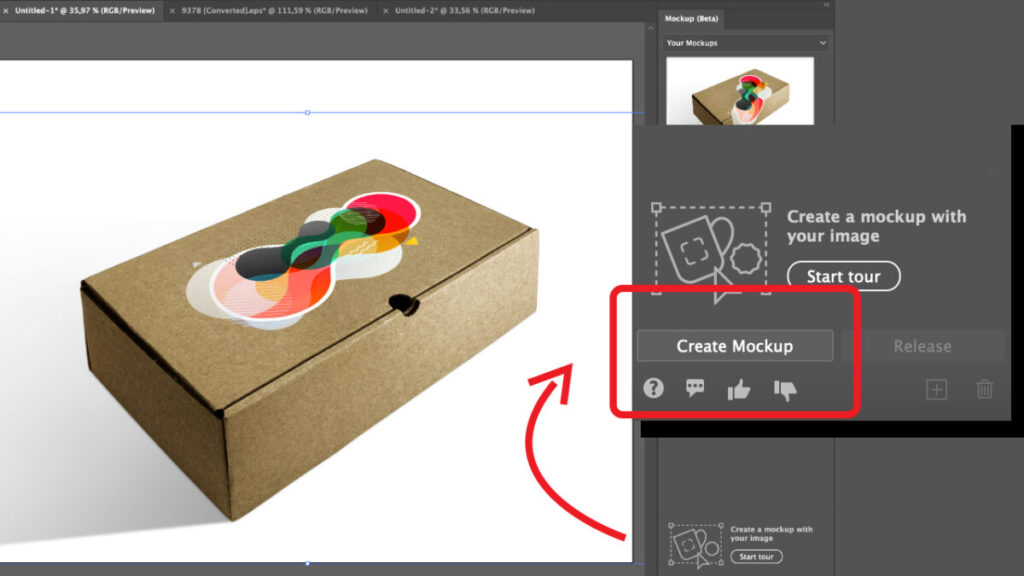
From the Mockup panel, you can also see how your design looks on other Adobe Illustrator templates. If you like any of them, you can always select it and drag it to the canvas. As you will see, the vector illustration will automatically fit the geometry of the object detected in the image.

To adjust the position of the vector image, you just need to go to the Properties panel and select the Edit Content option. If you want to detach the vector illustration from the object, simply click on Release, and it will return to its previous state.

From here, you can also edit the mockup, change its position, or alter certain things. To do this, go to Properties. Then, click on Edit Mockup Group, Edit Image, or Edit Content. Each of these options will help you change size, colors, alignment with the canvas, etc. Experiment with your designs to make the most of this feature.

And if you like it, save it for later use

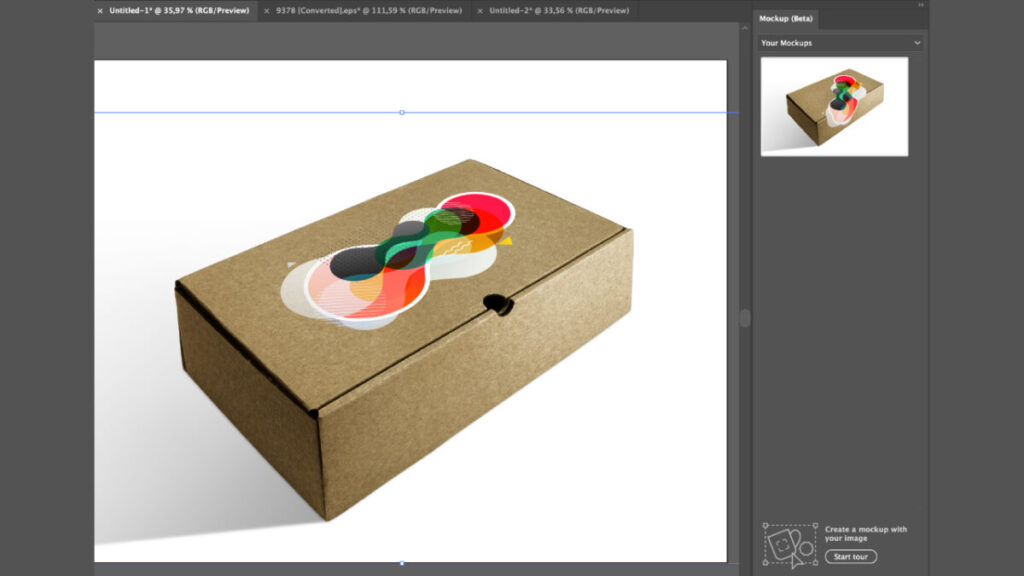
If you want to save your mockup project for future use, select the + symbol you will see in the Mockup panel. This will add it as a template within Your Mockups.

Adobe Illustrator allows you to save up to 20 templates. However, keep in mind that you cannot add mockups created with version 28.5 or earlier of Illustrator to Your Mockups. If you still want to do so, you will have to recreate your mockup from scratch.
Use the templates offered by Adobe Illustrator

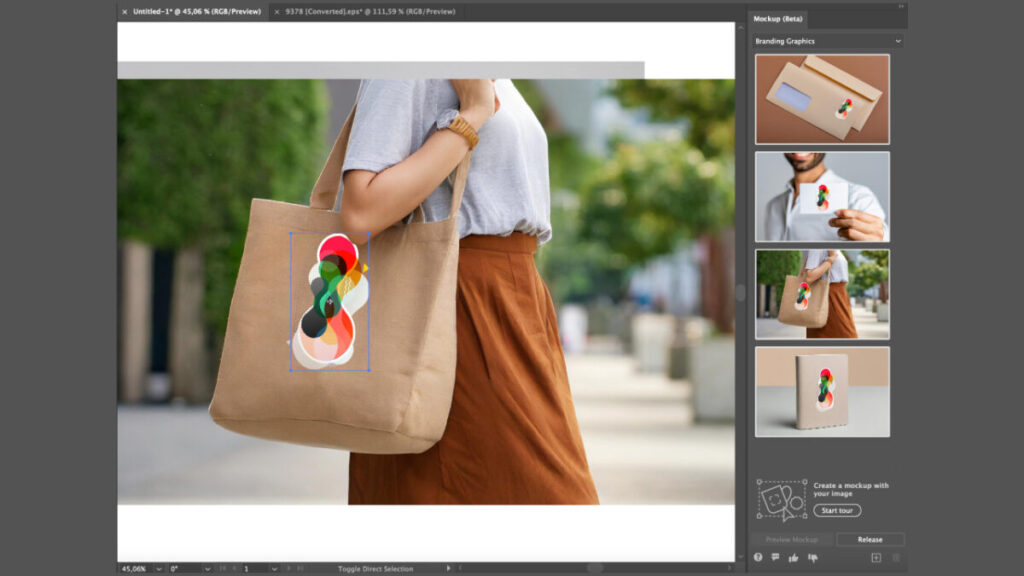
As mentioned earlier, Illustrator itself has several predefined templates that you can use to see how your design will look on clothing, packaging, cards, and more. There are several categories to choose from, including Apparel, Branding Graphics, Digital Devices, or Packaging.

Adobe Illustrator
Adobe Illustrator Download

Using these templates is quite simple, as you will see now:

  • Go back to the Mockup panel.
  • Select from the categories mentioned earlier and see which template best suits your needs.
  • Use the Selection tool (V) and select your design. Then, in the Mockup panel, click on Preview Mockup on any of the templates.
  • Once you have decided on one, select it and drag it to the canvas (you can also select Place on canvas). As we did before, click on your design and place it on the part of the template you prefer. The vector image will automatically adjust to the object you place it on.
Although Mockups is quite a useful feature, it currently has some limitations. For example, we cannot create prototypes with multiple designs, and we cannot create mockups within a mockup. However, we won’t tell you what can or cannot be done: it is better that you check it out for yourself within Adobe Illustrator.

Author: María López

{ "de-DE": "Künstler aus Berufung und Technikliebhaber. Seit ich denken kann, habe ich gerne an allen möglichen Gadgets herumgebastelt.", "en-US": "Artist by vocation and technology lover. I have liked to tinker with all kinds of gadgets for as long as I can remember.", "es-ES": "Artista de vocación y amante de la tecnología. Me ha gustado cacharrear con todo tipo de gadgets desde que tengo uso de razón.", "fr-FR": "Artiste de vocation et amateur de technologie. J'aime bricoler avec toutes sortes de gadgets depuis que j'ai l'usage de la raison.", "it-IT": "", "ja-JP": "", "nl-NL": "", "pl-PL": "", "pt-BR": "", "social": { "email": "", "facebook": "", "twitter": "", "linkedin": "" } } View all posts by María López

Author María LópezPosted on July 29, 2024July 1, 2025Categories News

Post navigation

Previous Previous post: Deadpool and Wolverine already has one of the best premieres in Hollywood history
Next Next post: Apple Intelligence will not arrive with iOS 18, but we have good news

Recent Posts

  • Widows Is Now Free on Pluto TV: Steve McQueen’s crime thriller
  • Tesla renames Full Self-Driving in Europe: Assisted Driving appears on EU sites
  • Microsoft updates its AI push with “Super Intelligence”: against OpenAI and Anthropic
  • Microsoft Outlook retires Themes by Copilot this October
  • Over the Garden Wall is back in Prime Video’s Top 10 for Halloween

Archives

  • October 2026
  • September 2026
  • August 2026
  • July 2026
  • June 2026
  • May 2026
  • April 2026
  • March 2026
  • February 2026
  • January 2026
  • December 2025
  • November 2025
  • October 2025
  • September 2025
  • August 2025
  • July 2025
  • June 2025
  • May 2025
  • April 2025
  • March 2025
  • February 2025
  • January 2025
  • December 2024
  • November 2024
  • October 2024
  • September 2024
  • August 2024
  • July 2024
  • June 2024
  • May 2024
  • April 2024
  • March 2024
  • February 2024
  • January 2024
  • December 2023
  • November 2023
  • October 2023
  • September 2023
  • August 2023
  • July 2023
  • June 2023
  • May 2023
  • April 2023
  • March 2023
  • February 2023
  • January 2023
  • December 2022
  • November 2022
  • October 2022
  • September 2022
  • August 2022
  • July 2022
  • June 2022
  • May 2022
  • April 2022
  • March 2022
  • February 2022
  • January 2022
  • December 2021
  • November 2021
  • October 2021
  • September 2021
  • August 2021
  • July 2021
  • June 2021
  • May 2021
  • April 2021
  • March 2021
  • February 2021
  • January 2021
  • December 2020
  • November 2020
  • October 2020
  • September 2020
  • August 2020
  • July 2020
  • June 2020
  • May 2020
  • April 2020
  • March 2020
  • February 2020
  • January 2020
  • December 2019
  • November 2019
  • October 2019
  • September 2019
  • August 2019
  • July 2019
  • June 2019
  • May 2019
  • April 2019
  • March 2019
  • February 2019
  • January 2019
  • December 2018
  • November 2018
  • October 2018
  • September 2018
  • August 2018
  • July 2018
  • June 2018
  • May 2018
  • April 2018
  • March 2018
  • February 2018
  • January 2018
  • December 2017
  • November 2017
  • October 2017
  • September 2017
  • August 2017
  • July 2017
  • June 2017
  • May 2017
  • April 2017
  • March 2017
  • February 2017
  • January 2017
  • December 2016
  • November 2016
  • October 2016
  • September 2016
  • August 2016
  • July 2016
  • June 2016
  • May 2016
  • April 2016
  • March 2016
  • February 2016
  • January 2016
  • December 2015
  • November 2015
  • October 2015
  • September 2015
  • August 2015
  • July 2015
  • June 2015
  • May 2015
  • April 2015
  • March 2015
  • February 2015
  • January 2015
  • December 2014
  • November 2014
  • October 2014
  • September 2014
  • August 2014
  • July 2014
  • June 2014
  • May 2014
  • April 2014
  • March 2014
  • February 2014
  • January 2014
  • December 2013
  • November 2013
  • October 2013
  • September 2013
  • August 2013
  • July 2013
  • June 2013
  • May 2013
  • April 2013
  • March 2013
  • February 2013
  • January 2013
  • December 2012
  • November 2012
  • October 2012
  • September 2012
  • August 2012
  • July 2012
  • June 2012
  • May 2012
  • April 2012
  • March 2012
  • February 2012
  • January 2012
  • December 2011
  • November 2011
  • October 2011
  • September 2011
  • August 2011
  • July 2011
  • June 2011
  • May 2011
  • April 2011
  • March 2011
  • February 2011
  • January 2011
  • December 2010
  • November 2010
  • October 2010
  • September 2010
  • August 2010
  • July 2010
  • June 2010
  • May 2010
  • April 2010
  • March 2010
  • February 2010
  • January 2010
  • December 2009
  • November 2009
  • October 2009
  • September 2009
  • August 2009
  • July 2009
  • June 2009
  • May 2009
  • April 2009
  • March 2009
  • February 2009
  • January 2009
  • December 2008
  • November 2008
  • October 2008
  • September 2008
  • August 2008
  • July 2008
  • June 2008
  • May 2008
  • April 2008
  • March 2008
  • February 2008
  • January 2008
  • December 2007
  • November 2007
  • October 2007
  • September 2007
  • August 2007
  • July 2007
  • June 2007
  • May 2007
  • April 2007
  • March 2007
  • February 2007
  • January 2007
  • December 2006
  • November 2006
  • September 2006
  • August 2006
  • June 2006
  • May 2006
  • July 2001
  • January 2001
  • November 2000
  • September 2000
  • August 2000
  • July 2000
  • April 2000
  • March 2000

Categories

  • Affiliate post
  • Expert Review
  • Gaming
  • Guides
  • How to
  • Legacy how To
  • News
  • Noticias
  • Software>Security
  • Sponsored
  • Trucos y Consejos
  • Uncategorized
  • Windows software

Meta

  • Log in
  • Entries feed
  • Comments feed
  • WordPress.org
Softonic English Proudly powered by WordPress