Do you also feel like Facebook scams are getting sneakier in 2026? The content is sharper, stories more convincing, and it all starts with a simple ad or friendly DM. But this is not happening at a small scale either. In Gen’s analysis of Meta ads in both the EU and UK, 30.99% of ads lead to scam sites. That is 4.51 million out of 14.57 million Facebook ads having malicious intent. The statistic alone might make you hesitate before you trust what seems like a harmless sponsored post inviting you to join a huge giveaway.

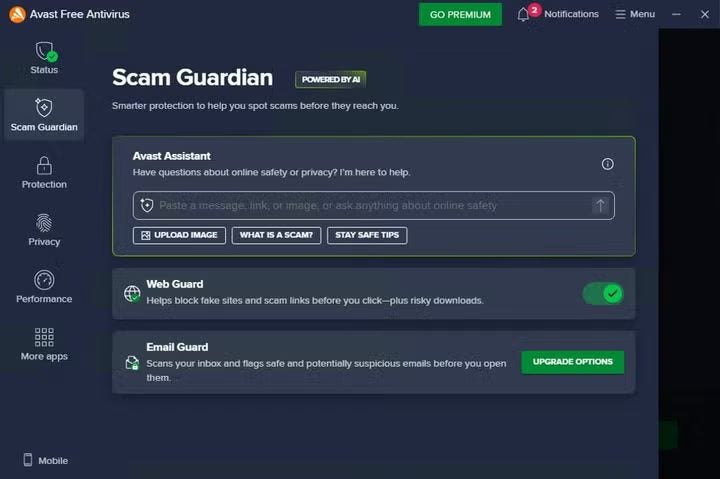
Thankfully, as long as you keep your wits about you, there are ways around these digital scams. Also, if you want an extra layer of protection and security, Avast Free Antivirus is one solution to consider. It scans for suspicious sites and downloads as they happen, which is useful since many scams prompt you to leave the platform to click on a link or download a file.
To help you protect your data, in today’s article we’ll help you identify the latest Facebook scams and share our tips to keep your devices secure.
Why Facebook Remains a Prime Channel for Scams
Facebook is where reach meets trust. Ads can quickly reach millions since its groups provide legitimacy, Marketplace rushes decisions, and Messenger enables scammers to take things private.
Meta fights this with comprehensive rules, but sheer scale works against them too. According to Meta, it removed over 134 million scam ads in 2025, and in 2026 that’s likely to be higher. Even with stricter removals, scams get through because fraudsters keep changing accounts, domains, and backgrounds.
Scams now tend to follow a journey. They might begin on Facebook and end somewhere entirely different, such as:
- A fake website asks for payments by card
- Phishing login pages that trick you into sharing passwords
- You get asked to download software disguised as “help” or “verification”
- Apps such as WhatsApp or Telegram or email to increase pressure
The damage is usually done off-platform, so your approach to your online security should cover both in-Facebook and on-device tools.
Trending in 2026: Facebook’s Most Common Scams
So now we know why, but what about how? Facebook surfaces like ads, pages, groups, comments, Marketplace, and Messenger. So there are a lot of opportunities for scamming.
These are the tricks to watch out for:
1. Deepfake Investment Scams
These are sponsored ads using AI-altered videos where celebrities or trustworthy financial figures “endorse” investments. Clicking such ads will take the user to a page that might request financial information and payments up front or push to a Messenger or WhatsApp conversation with an “advisor”. In fact, the Bank of Italy recently warned about deepfake scams using their governor’s likeness.
Red flags:
- They move the conversation to Whatsapp or DMs.
- The landing page looks like news or a sign up but the URL is suspicious.
- You are asked to deposit quickly via bank transfer or crypto.
Treat investment ads with suspicion and always verify them through official channels, never through an ad link.
2. Fake Online Stores
Sponsored ads offer huge discounts on popular items. The site and checkout looks professional but you may never see the item you purchase.
Gen’s reporting found e-shop scams made up 65.4 percent of social scams, which matches how often these ads appear as “normal shopping.”
With generative AI tools (tools that can quickly create realistic text, images, and branding), scammers can produce an entirely professional and legitimate looking eCommerce brand with just a few hours of time. An advertised scam store might look polished and the domain might look normal.
Red flags:
- The domain name looks odd, or it looks fine but the brand doesn’t have much history or much said about it outside of the ads and its own website.
- Pushing an urgent warehouse clearance, today only, and countdowns.
- Limited contact information or just a web form. No verifiable address (or that appears fake when you check it).
- The site gives a legitimate looking company name, however the company name does not appear to be registered in the official government company registry it’s said to be operating in.
- No real reviews or repeated bot-like praise.
- Policies that feel generic or copied, like shipping and returns missing a return address, including the wrong name, or contradicting information.
Don’t buy via ads for unfamiliar stores. Research any retailer directly via multiple third party sources before purchasing from a new website you don’t recognise and verify the official URL if it is legitimate. Search for their name with “reviews” and “scam” to see what people are saying online. If you can’t find reliable sources, then it’s better to assume it’s not legitimate.
If you must buy, only do so if you can via a payment system that offers buyer protection. Never enter your card details, use a bank transfer nor pay by crypto.
3. Marketplace Payment Tricks
On Marketplace, a “buyer” messages you quickly and claims payment has already been made along with a screenshot or a fake email as proof. Another way is they ask you to click a shipping link or QR code for verification.
Red flags:
- They insist they paid, but nothing shows in your bank.
- They ask for your email or phone so they can confirm their payment.
- They want you to pay a fee to receive your money, such as shipping insurance or upgrade
- They send you a link to a specific courier you don’t use.
- Overly scripted messages, especially when you ask basic questions
Only trust your own bank or payment app, not a screenshot or mysterious link. Otherwise you could end up sending an item without being paid, get phished on a fake courier page or tricked into paying them.
4. Fake “Meta Support” Messages and Account Takedown Threats
You get a message from “Meta” stating that your page broke the rules and “needs immediate attention,” along with a link to log in and fix it. These scams tend to affect those running a business page the most.
Red flags:
- Deletion threats issued with tight deadlines.
- Links that go to non-Meta domains, strange subdomains, or odd spelling.
- The sender of the message has a generic name and little history
- Messages that push you to act before you can verify
Never click the link. Rather, log in by going to your browser and visiting Facebook directly. Check in-app notifications, if it’s real it will be there too. If you’re still unsure contact meta via the official website to ask.
5. Tech Support Scams
An ad or private message claims your device is infected or that your account has been compromised. It urges you to call a number or install remote access software. If you click a download might initiate automatically.
Red flags:
- Claims your device is infected without any credible diagnostic
- They insist you call a phone number listed in the ad
- You are asked to install remote access/diagnostic software.
- Payment should be made by transfer, gift card or crypto.
- Uses aggressive and urgent language like “your data will be deleted today”
Close the page. Never call or download. If you are worried, contact your official device maker or a trusted local repair provider using a number you find independently.
6. Romance Scams and “Pig Butchering”
Romance scams have existed for years now, but AI chatbots can help scammers adapt their tone and writing style to make more convincing and deeper emotional connections based on the information you show on your profile.
There is also a non-romantic variation of this scam called “Pig butchering” where a scammer builds trust over time, then steers the victim into a fake investment platform.
Red flags:
- Moves to an encrypted chat quickly and avoids video calls or keeps them brief
- Rapid emotional escalation.
- Urgently needs your help or hits an issue with travel that requires you to pay for them.
- Pressure to keep the relationship or investment secret
- In the case of Pig butchering: Claims they can teach you a “simple” investment method and guides you to a platform that cannot be verified through regulated sources
Always verify the person and any platform independently, and be sure to talk to friends and family you trust about it before you send any money, they can be the voice of reason.
Why Are These Scams Still Effective?
AI didn’t invent the scams but in 2026 it has made red flags harder to spot. Choppy language and bad graphics once gave scams away, but now AI creates videos and polished articles easily.
Despite this, some things never really change, and scams still try to play on human weakness in the following ways:
- Urgency: “Your page will be deleted”, “last chance.”
- Familiarity: Celebrities, logos, legitimate sounding brands.
- Complacency: People are busy, and don’t notice the small glaring details when in cognitive overload.
- Reinforcement: If you click on or dwell on a suspicious post, the recommendation algorithms will push even more content your way.
Of course Meta is fighting scams, but volume stays high, and attackers adapt quickly. That’s why it’s important you try to form personal habits and look for device-level protection to help.
Potential Impact of Falling for a Scam
While the most obvious thought may be scams only lead to financial loss, it’s often more than that with long-term consequences pushing into work and personal life too:
- Accounts locked: Scammers may lock you out of your accounts, holding your details for ransom and message others that you know to scam them.
- ID Theft and Fraud: Personal details can allow bad actors to carry out fraud with your information instead of theirs.
- Malware: Some scams may have malicious file downloads that aren’t just used for stealing your payment information, but also can severely invade privacy by stealing photos and documents.
- Emotional Impact: Stress and shame are real, leading people not to report scams and affecting mental health.
These reasons make taking your protection seriously important.
What You Can Do To Stay Safe on Facebook
You don’t have to be paranoid. Just smarter about what you do.
Get into the habit of a fifteen-second check before clicking:
- View the page profile of advertisers for signs of “throw-away” accounts.
- Look into comments for odd patterns like repeated compliments and similar phrasing.
- Does the link match the brand?
- For investments, always assume a scam until proven otherwise. Verify via official sources you find yourself.
For your account safety make sure to:
- Use passkeys if possible. A passkey is a device-based login that replaces passwords and is designed to resist phishing because it is tied to the real device.
- Two-factor authentication is also good if you can’t use passkeys.
- Review active sessions and log out of devices you do not recognize.
- Audit any Page admins or roles you do not know/recognize.
To be able to use Messenger without getting scammed:
- If someone you do not know / trust requests anything or sends a link, be cautious.
- Don’t install any tools for someone on Messenger.
- Meta is starting to include automatic scam detection warnings in Messenger chats. Treat warnings as helpful, but not foolproof. If there’s no warning it doesn’t mean the person is legitimate.
And in general, you should pair your common sense with a reliable security tool like Avast Free Antivirus, acting as a second safety net against the most common threats on Facebook and other social media platforms.
Where Avast’s Free Antivirus Fits into the Scam Equation
Oftentimes scams can complete the moment a link is clicked or something’s downloaded – and that’s where security tools like Avast Free Antivirus can potentially help as your safety net.
Avast Free Antivirus can add a practical layer in those moments:
- Scam Guardian and Web Guard scans sites with real-time warnings for scams. If they identify a scam page, they can block access and warn you before you engage.
- File Shield checks open/downloaded files for signs of malware disguised as legitimate documents or apps.
- Behavior Shield picks up new threats that are not widely known to be obviously malicious. It can help to detect and stop suspicious activity in the browser such as pop-ups from causing you harm.
The protections work well with your own improved habits, because you’ll have a tool that’s got your back as an extra layer of security. Sometimes, real-time scanning features like the one in Avast Free Antivirus can make the difference between a close call and a long weekend of password resets.
How Facebook Scams May Evolve Through 2026 and 2027
Now we know how Facebook scams work in 2026 but… What can we expect in the near future? If recent trends in digital fraud continue, we can look forward to the same core cons with better packaging. These will include:
- More synthetic video and voice, including “news” formats that feel legitimate.
- More personalized lures using public profile details, group memberships, and local context.
- Continued abuse of ads at scale, as suggested by the high share of scam-linked ads found in transparent ad datasets.
- More pressure to move into private chats where social engineering works best.
Enjoy a Safer Scrolling with a Layered Approach
If we had to point to a defining trait of what makes Facebook scams different in 2026 it’s that they are built to look normal and not raise any suspicion. A sponsored post can mimic a real brand, a “support” message can copy Meta’s tone, and a convincing video can borrow a familiar face. The safest mindset is to assume any ad, DM, or link could be part of a longer scam funnel. That’s why before clicking, paying or downloading, it’s vital to verify the source outside of Facebook. Treat urgency as a warning sign, not as a reason to act quickly.
Also, keep in mind that as scams get better, it’s recommended to always have device security software such as Avast Free Antivirus. Web Guard helps you not land on known dangerous pages, File Shield scans downloads before they can run, and Behavior Shield looks for suspicious activity that can signal a new threat.It’s free, so you’ve got that added layer of peace of mind waiting for you right now.
