AdBlock Browser, Google Street View, and Android Wear: Five Apps to Try This Week

This week on 5 Apps to Try this Week we look at a mobile browser that removes online ads, navigate around the latest iteration of Google Street View, and check out three other interesting apps that caught our eye.

First up is the Android Wear app for iOS (iOS). This app lets you pair your Android watch with your iOS device – perfect for fans of wearables who don’t think the Apple Watch is for them.

Next we have Puzzle Craft 2 (iOS), a game that merges together match-three puzzles and the city building genre. Certainly worth a look for puzzle fans.

Third is the new Google Street View (Android|iOS) app. This incorporates Google’s Photo Sphere Camera, letting you upload panoramic pictures from your city to expand the service’s catalog of images to ensure that it is constantly up-to-date.

Mirrativ (Android) is next, an app that lets you easily stream gameplay directly from your Android phone or tablet screen to anyone else on the service. Just open the application and a few clicks later you can be sharing your gaming skills.

Finally we have AdBlock Browser (Android|iOS) for mobile, the browser that hides website ads and stops malware contained within. However, if you regularly visit a site, do remove it from your blocked list as ads are what enable it to keep bringing you content.

That’s it for this week, as always remember to subscribe and have a look at our other great videos. See you next time.

Related Stories

Goat Simulator MMO Simulator, Star Wars Uprising, and Corpse of Discovery: let’s Click-Swipe-Play

Noom and Six Pack, just two of our Top Five Fitness Apps

Adblock, Apple, and EA news

Follow me on Twitter: @DoFuss

Adblock, Apple, and EA news

This week on the Softonic Roundup we checkout what’s going on between YouTube and Adblock, get excited about Apple’s announcements, and ponder why EA is taking games off the App Store.

Ad-blockers were in the news quite a lot last week. We start looking at recent clashes between the Chrome YouTube App and AdBlock Pro (Source: Neowin), but then have a closer look at a recent report regarding the impact of ad-blockers on  websites. (Sources: BuzzFeed, Ad Age, and PageFair)

Obviously, last week’s Apple Keynote is also a focus of this week’s Roundup. Information on the WatchOS2, iPad Pro, and the new iPhone 6S (and iPhone 6S Plus) all got us excited. That said it was the new Apple TV announcement that got our minds racing, pondering how the tech company intends to change how we behave in our living room. (Source: Apple)

Finally, game news from EA. The gaming giant has removed a number of its games from the App Store (including Flight Control, Real Racing, and Dead Space). There is still no words as to why, but we are guessing it is will be due to either compatibility issues with iOS 9 or a move to re-release them in a free to play format as they did with Peggle. (Source: Touch Arcade)

That’s it for this week. Subscribe, like, share, and check back in the week for more Softonic videos.

Related Stories

Volume, Final Fantasy VII, and Horizon Chase: let’s Click-Swipe-Play

Noom and Six Pack, just two of our Top Five Fitness Apps

Fallout 4, Soma, and other exciting game previews: let’s Click-Swipe-Play

Follow me on Twitter: @DoFuss

Adblock Plus browser gets rid of annoying ads

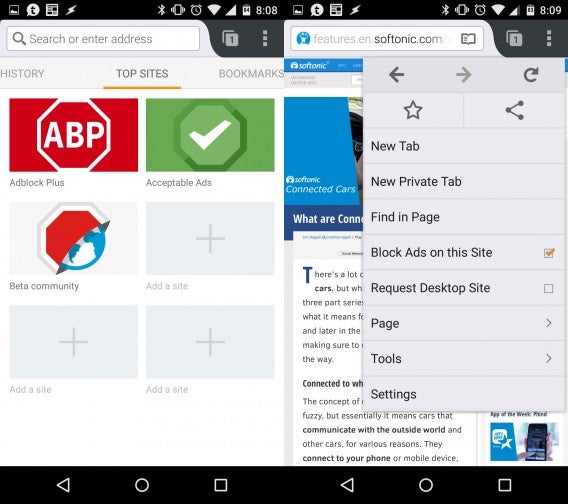
Adblock Plus released an Android browser that blocks annoying ads. The browser is based on Firefox for Android and it looks and feels extremely similar. Firefox for Android users will feel right at home.

The Adblock Browser is currently in beta, so it’s not quite ready for prime time just yet. However, during my short testing, the browser never crashed and worked as well as Firefox for Android. The biggest drawback so far is the lack of integration with Firefox Sync. This means you won’t be able to sync your Firefox settings, tabs, history, or passwords with Adblock Browser just yet. Hopefully Adblock Plus includes this feature in a future release.

Adblock Browser combined

If ads annoy you, Adblock Browser works wonders. This beta is just as effective as its browser add-on for Chrome and Firefox. By blocking ads, web pages load faster and you’ll use less data too. But if you’re already using Firefox for Android, you can enable “reading mode” on any page to get a focused view of the page, showing only text and images. This won’t block pop-up ads but it’s a nice feature nonetheless.

By default, some non-obtrusive advertising is allowed but you can tell the browser to block all ads if you want. But please don’t as this is how sites like ours make money. In fact that’s how Google and Microsoft make money too and as a result, both companies have struck a deal with Adblock Plus to be whitelisted.

Adblockers have always been controversial since that’s how a majority of internet sites make money. Adblock Plus hopes to put pressure on sites and advertisers to increase the quality of their ads and decrease their annoyance.

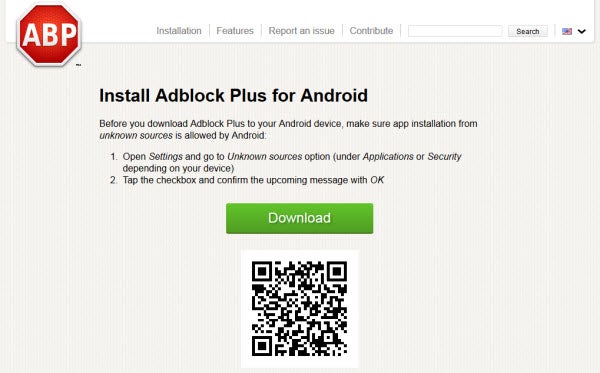
If you want to try the Adblock Browser, scan the QR code using your phone or click on this link. You’ll also need to enable installing applications from unknown sources. See this guide for how to enable this feature.

Adblock Browser QR code

Related Stories

News Roundup: No free Windows 10 for pirates and more

The best in tech: what you missed this weekend – May 18th

My (almost) year with Android Wear

Five Apps to Try This Weekend: featuring Phind and GoatZ

What are Connected Cars?

Follow me on Twitter: @lewisleong

Adblock Plus updated

Free ad blocking tool Adblock Plus has been updated. Version 1.8.4 fixes bugs in the browser extension for Chrome, Opera and Safari. The biggest improvement is that the ‘block element’ dialog, that was sometimes covered up by other things on a page, has been fixed.

In the extensions for Chrome and Opera, more problems with webpage displays have been cleaned up. With the Safari extension, there is now support for ad blocking on YouTube when using its HTML5 player. It should also work better with JavaScript, and a problem with ‘EasyPrivacy’, which would break some pages, has also been fixed. Safari users should also notice improved browsing speed with lots of open tabs.

Version 1.8.4 of Adblock Plus is available now for Chrome, Opera and Safari. If you already use the extension, it will update automatically in your browser.

Related Stories

Canvas fingerprinting web tracking tool isn’t the end of privacy

Adblock Plus responds to German lawsuit

Adblock Plus is a memory hog in Chrome and Firefox

Follow Jonathan on Twitter: @jonathanriggall

Adblock Plus responds to German lawsuit

Popular adblocking extension, Adblock Plus is being sued in Germany. Media companies have banded together, arguing that Adblock Plus is affecting revenue by blocking ads.

Adblock Plus acknowledges the lawsuit and provided the following statement:

“We’ve received one lawsuit, but if what is being alleged in the press proves true we may well expect a few more. We view this situation with relative calm given that already in 2004 the Federal Court of Justice, Germany’s highest court, confirmed the general legality of adblocking with a ruling regarding blocking ads on television. In addition, just last year the District Court of Hamburg essentially validated our specific model after a huge publisher withdrew a case directed against Adblock Plus.

Adblock Plus will continue to represent the end-user by providing a tool that helps put the Internet back into his or her hands. At the same time we will endeavor to work with publishers, insofar as they permit us to, in order to encourage unobtrusive ads and a sustainable Internet ecosystem.”

Note that the company doesn’t want to get rid of ads, it just wants them to be “unobtrusive.” In fact, the company admits to being paid by bigger companies to whitelist their ads. Search giant Google is one of the paying companies. Adblock Plus estimates that only about 10% of companies actually pay.

This controversial whitelisting will undoubtedly play a role in the lawsuit.

Source: Spiegel (Google Translate)
Via: Neowin

Follow Lewis on Twitter: @lewisleong

RELATED STORIES

Adblock Plus is a memory hog in Chrome and Firefox

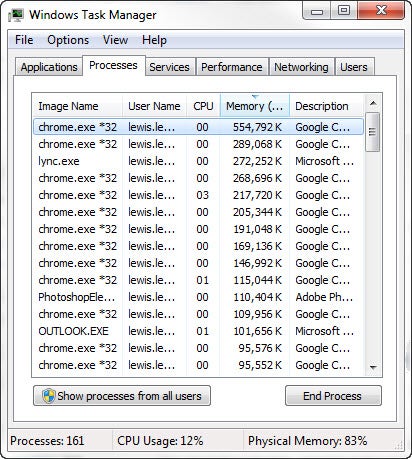
The popular Adblock Plus extension may be hogging your computer’s memory. Mozilla developer Nicholas Nethercote published a blog post today explaining why Adblock Plus doing this.

The problem comes from Adblock Plus loading custom CSS stylesheets into every website it loads. This wouldn’t be a problem except for widespread use of iframes, which act like separate websites, causing Adblock to load the stylesheet many times.

Each stylesheet takes up 4MB, which can add up for websites that feature lots of ads with iframes. Even social sharing buttons for Facebook and Twitter are created with iframes.

Adblock Plus task manager

It’s a bit ironic that Adblock Plus is causing performance issues when it aims to increase performance by not having ads load.

Mozilla and Adblock Plus are working together to resolve the issue. You can follow the bug report to see what’s being done.

“We’re doing the best we can to figure out what’s wrong and where, then fix it if it’s on our end,” said Adblock Plus spokesperson Ben Williams.

If you find Firefox or Chrome running slowly, you may want to disable Adblock to see if performance improves.

Source: Nicholas Nethercote

Follow Lewis on Twitter @lewisleong

RELATED STORIES

AdBlock – using ads to get rid of ads?

AdBlock is a Chrome extension that blocks internet advertising from sites you are viewing. Now, in an unusual turn of events the company is crowd sourcing for donations so it can run its own advertising campaign to raise awareness of the tool. As it says on the campaign site, ‘We’re going to use ads to get rid of ads.’

AdBlock is founded on the idea that advertisements are annoying, and the Chrome extension apparently has 15 million users. While some users do find ads annoying, it is those ads that keep most sites running, and available for free. There has yet to be a viable alternative to this model for websites, and if everyone used AdBlock, most sites would probably cease to exist.

AdBlock’s competitor, AdBlock Plus (they are not related), takes a slightly more subtle approach, with its ‘acceptable ads’ feature. AdBlock Plus sees that there are annoying, intrusive ads, and acceptable ones. They have a ‘whitelist’ of sites that meet their criteria of acceptable ads.

AdBlock’s advertising goals include a Times Square billboard if they reach $50,000, a New York Times full page ad at $150,000 and right at the top, the unlikely goal of $4.2 million for a Superbowl 2014 ad.

Download AdBlock for Chrome

[Source: TheNextWeb]

Interview with Adblock Plus’ co-founder Till Faida

adblock plus iconLast week Google removed all ad-blocking apps from the Play Store, triggering outcries from many Android developers and fans. One of the affected apps, Adblock Plus, released a new version of their ad-blocker for direct download today. Many fans of Adblock Plus will no doubt be upset; the company gained just under one million users within the three months of being in the Play Store.

They’re not the first company to circumvent Google’s Play Store to push updates. Last week, Facebook quietly began testing pushing updates directly to its Facebook app for Android.

Google’s official response to the removal of ad-blockers cites section 4.4 of the Android Developer Distribution Agreement. Here’s what it states:

“You agree that you will not engage in any activity with the Market, including the development or distribution of Products, that interferes with, disrupts, damages, or accesses in an unauthorized manner the devices, servers, networks, or other properties or services of any third party including, but not limited to, Android users, Google or any mobile network operator.”

till faida linkedinImage credit: Linkedin

I emailed the co-founder of Adblock Plus, Till Faida, about the future of Adblock Plus and what this move means for consumers.

Here’s what he had to say. Continue reading “Interview with Adblock Plus’ co-founder Till Faida”

Adblock Plus now available as a direct download, offers automatic updates

adblock plus iconA week ago, Google quietly removed all ad-blocking apps from its Google Play Store. Android has long been known as the “open” platform for smartphone users to install whatever they want. This move by Google has infuriated many Android users who think Google is turning away from Android’s open roots.

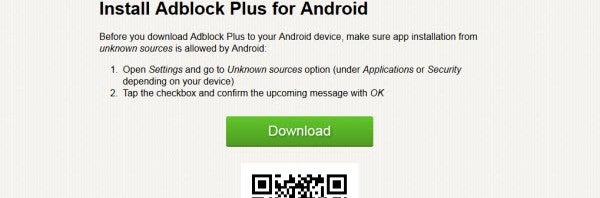
Developers like Adblock Plus aren’t taking things lightly and have begun offering their app as a direct download from their site. Android users will have to enable installing apps from “unknown sources” in the setting but the rest will be easy. Users won’t even need to type in a URL on their phone as Adblock Plus provides a QR code for users to scan.

adblock plus qr code install

Changes in this version of Adblock Plus include the ability to automatically update the app, something Facebook is currently experimenting with. Here’s the full changelog:

  • Implemented automatic updates
  • Added a dialog to help with the manual proxy configuration
  • Separated filtering and proxy activation settings to avoid loss of connectivity after manual configuration
  • Switched to the Holo user interface theme
  • Improved icon hiding
  • Implemented a workaround for a Chrome issue causing blank pages
  • Fixed an issue with URLs containing apostrophes

While it’s a minor annoyance to have to sideload Adblock Plus, it’s nice to see the company standing behind its product and providing its users with a means to continue using Adblock Plus.

Source: Adblock Plus

Adblock Plus finally comes to Android – but it’s a buggy mess

adblock plus iconAdblock Plus made itself famous by being a fantastic browser extension that helped users block annoying ads. It was easy to download, install, and use. Unfortunately, that’s not the case with Adblock Plus’ new Android app. After spending months in beta, Adblock Plus finally reached gold today but perhaps its developer pulled the trigger too quickly.

Looking at its features, Adblock Plus does have plenty of desirable features. It doesn’t require root, it works on older Android devices, and has a simple interface. Yet for every positive quality, Adblock Plus provides a caveat. Let’s see what those caveats are. Continue reading “Adblock Plus finally comes to Android – but it’s a buggy mess”