Adobe releases updated Flash Player 14 and Adobe AIR 14

Adobe has released Flash Player 14 and AIR 14 Runtime and SDK, updates to two of its most popular web add-ons in the production of online content and web apps. In addition to the usual bug fixes, this version brings new features.

Developments are aimed primarily at developers and include an anisotropic filtering tool, which is basically a method to improve the quality of the texture of images. It also includes a new, advanced profile to create objects in Context3D.

In addition, Adobe has added support for Intel X86 Android and the Gamepad function for Adobe AIR. The latter lets developers enable second screen functions on Android devices for flash browser games, so you could be playing a game on your PC, and interact with it in real time using your Android phone or tablet.

If you want to try AIR Gamepad, there are already two games that incorporate the system: ModelViewer and HungryHero.

Follow me on Twitter @suzieblaszQwicz

Source: Adobe Blog

Twitter removes Facebook integration from TweetDeck, kills Android, iPhone, and Adobe Air clients

tweetdeck iconAfter Twitter purchased TweetDeck in 2011, the company made its best effort to squash 3rd party Twitter clients, many of which offered more features and a superior user experience. The company announced today that Facebook integration would be removed from TweetDeck and that it would be killing off the TweetDeck client for Android, iOS, and Adobe AIR.

Mobile TweetDeck users will now be forced to use Twitter’s own official client or one of the 3rd party Twitter apps that haven’t been ruined by the company’s token system. It’s a sad day for TweetDeck fans as Facebook will no longer be integrated into the app, shining some light as to how deep the rivalry goes for the two social networking giants.

Twitter will also be shutting down the Android, iOS, and Adobe AIR applications. While Twitter will continue to support the Mac and Windows versions of TweetDeck, their futures are not clear. It appears that Twitter wants its users to use the website or the Google Chrome application, possibly to gain more revenue from promoted ads.

Power users who require Facebook integration should check out Hootsuite instead.

Source: TechCrunch

Machinarium via Adobe Air isn’t that awesome

The lack of Adobe Flash support by Apple started with the first iteration of the iPhone.  Now one year and five months after the release of the iPad and six months after the release of the iPad 2; the first Flash-based game was ported and released for the tablet.

Machinarium is a great game, first released in 2009, it’s a fun interactive point and click puzzler.

Continue reading “Machinarium via Adobe Air isn’t that awesome”

Adobe AIR 2.5 brings support for Android and smart TV

Adobe AIR, everyone’s favorite cross platform sexy app-maker/resource hogger is soon updating to version 2.5, with some important new features. The big news is support for the Android platform and for TV.

Taking advantage of the proliferation of Android devices around today, Adobe is clearly hoping AIR will catch on with smartphone and tablet users. Just like on your desktop, if you try to use an AIR application on your Android device, you will now be directed to download the AIR runtime from the Android Market. This may not be ideal, but Adobe hopes to convince manufacturers to sell devices with AIR pre-installed.

The second big development is a deal to put Adobe AIR in Samsung TVs. There will be a Samsung Apps platform that allows consumers to buy and download apps for their television. With Apple and Google stepping up to make TV the next technology for a platform war in our homes, I wouldn’t like to bet on Adobe managing to succeed here, but the competition should be fun.

All you need to know about Adobe AIR

Everything about Adobe AIRAdobe AIR (which used to be know as Apollo, remember?) is slowly becoming a solid software platform for developers, especially those who work on their own and don’t belong to any big company. But what is this AIR thing about? AIR is a runtime coding environment that enables developers to create web software tools, working in between a web-based app and a native desktop utility. AIR apps typically include Internet elements such as HTML, Flash or Ajax, but are launched from your computer as you would normally launch any other program.
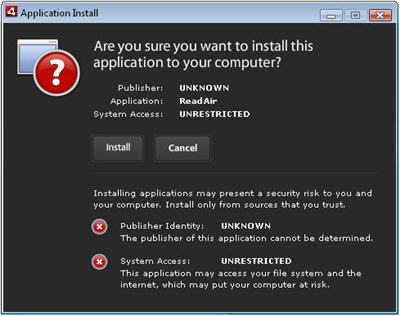
How do you install AIR apps? First of all, you need the basic component, Adobe AIR. Then, simply download the AIR tool you’re interested in (usually a file with the .air extension) and double click on it. You’ll start up an installation process similar to this one:

Everything about Adobe AIR

Click on “Install”, select the program’s location on your hard drive and you’re ready to go. When the installation is finished, run your newly AIR app as you would run any program.

There is already a wide range of AIR tools available to download, covering all sorts of areas: from Twitter clients to microblogging tools, including web stats analyzers or even RSS feed readers. But if you want more, take a look at Freshairapps: they have an extensive catalog with all the latest AIR apps out there, together with top rankings, news, tutorials and other AIR resources.

Will Adobe AIR change the way we use the web?

Adobe AIRAlthough it is true that more and more services are going to be web-based, giving you the benefit of having access to them from any device connected to the Internet, it is also true that users are still fond of double-clicking an icon on their desktop. This is probably because it’s still not very easy to stay online wherever you go (in fact, most areas don’t have free access to the Internet). I have the feeling that people still like working on their computer, with locally installed applications. So, what to do? Step up, Adobe Air….

Adobe Air is a free, cross-platform and open-source technology which allows web-applications to be used offline. It is aimed at bringing the same functionality of rich Internet applications built using technologies such as Adobe Flash and Flex Builder to the desktop. Developers of web services can now offer the possibility to download their services for offline use. The benefits are clear: users will be able to work with any service they need while offline, and upload their changes as soon as an internet connection becomes available. Adobe AIR’s competitors are Microsoft with Silverlight and Google with Gears which differ for type of technologies supported (like .NET framework rather than Flash) and for type of service they point at.

So far, among the big names developing desktop versions of their online products there are: eBay, AOL and Yahoo!. The BBC is also building prototype applications with AIR. According to eBay’s frequent users for example, the desktop application is really useful as it is designed to do everything in the quickest possible way by pre-organising the activity of selling and buying in customizable ways.

Continue reading “Will Adobe AIR change the way we use the web?”