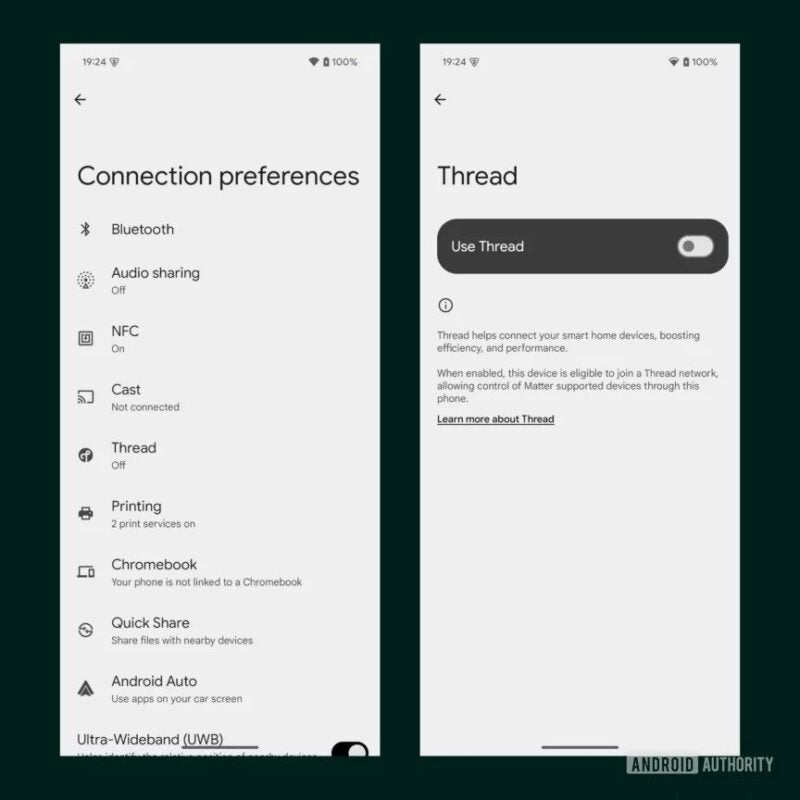
Google is working to integrate its Thread network (not to be confused with Meta’s social network) into certain devices that will run on Android 15. Mishaal Rahman, from Android Authority, discovered through a code trick that the Pixel 8 Pro is compatible with the Android 15 Thread network and that Google plans to implement this feature in the “Connection Preferences” section of Settings > Connected Devices.
By clicking on the “Thread” option in this section, users will be able to activate or deactivate the functionality. According to Google’s description, “Thread helps connect your smart home devices, increasing efficiency and performance.” By activating Thread, a compatible Android phone will be able to join the network and control Matter smart home devices.
Rahman highlights that this will eliminate the need for a “Thread border router,” such as Google TV, which acts as a bridge between Thread-compatible devices and the Wi-Fi network. It is expected that Android 15 will perform more tests and provide more information about Thread network compatibility when the operating system is launched later this year.
Thread is a wireless mesh protocol that connects smart home devices. Its networks have “no single point of failure and include self-healing capability.” Not all Matter devices include Thread, but those that do are easy to set up and are end-to-end encrypted.
Google would have been inspired by the Live Activities of the iPhone to bring widgets to the lock screen of phones with Android 15 through the widget “At a Glance”, as reported by Mishaal Rahman, an Android expert at Android Authority. To do this, the company would want to integrate the RemoteViews API, used by Android widgets, into the Smartspace API of At a Glance.
Although the idea sounds promising, Google would have to overcome several technical obstacles. The current version of At a Glance does not have enough space on the lock screen to display third-party widgets in full size, it can only extract the relevant information and display it in a summarized way. In addition, At a Glance is only available on Pixel devices on the lock screen, which limits its reach.
If Google wants to extend this functionality to other Android devices, it will have to collaborate with other manufacturers. One possible solution would be to reposition the At a Glance widget at the bottom of the lock screen, an idea that Google is considering, according to Rahman, who found clues to this possibility in the beta version of Android 15.
It is not clear if Google will introduce support for widgets similar to Live Activities in Android 15, but it is very likely to be a reality in future Android 16. Google is expected to provide more details about this and other features at the upcoming Google I/O conference.
Google is preparing for the official launch of Android 15. The Android Preview program, which started in February 2024, will continue until the stable version is released, expected by the end of 2024. Meanwhile, the Android 15 Developer Preview 2, released in March, seems to include a new feature that will help extend the battery life of your Android device.
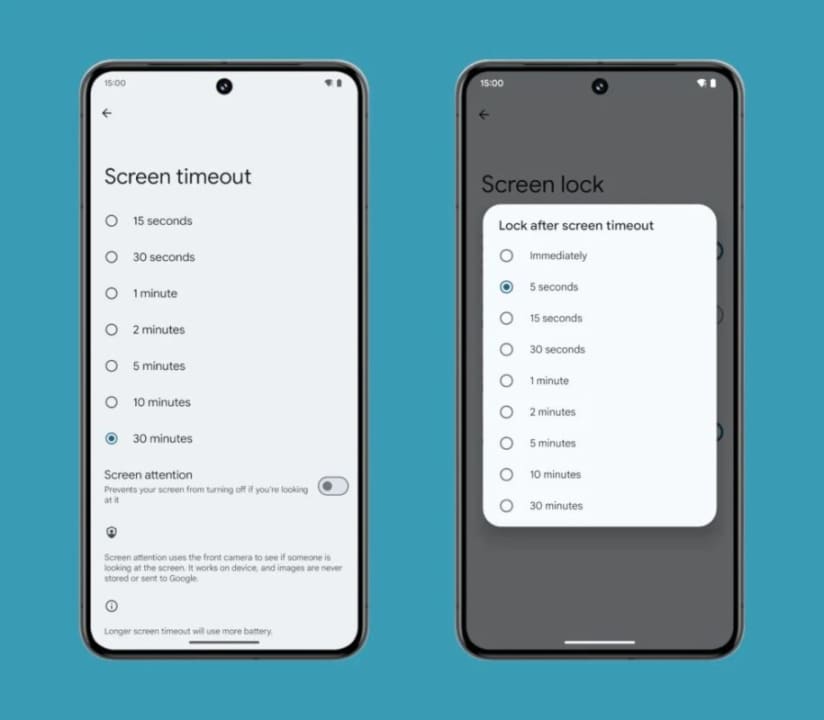
While there is already a function that allows you to choose the time your phone will stay on before the screen turns off, and another one that keeps the screen on longer if you are looking at it, the newly discovered function serves the opposite purpose.
Mishaal Rahman, an Android expert and writer for Android Authority, has found code strings related to a new adaptive timeout feature in the second version of Android 15 Developer Preview. The strings describe that when enabled, the setting “automatically turns off the screen early if you’re not using the device”.
Image by Mishaal Rahman – Android Authority
Right now, it is not clear how Android 15 will know when a phone is not being used. As such, it is likely to use the same detection method as the current screen attention setting. Rahman discovered the following strings in the Android 15 Developer Preview 2 settings app, which point to the new functionality:
<string name=”contextual_timeout_description”>Automatically turns off the screen early if you are not using the device</string>.
Specifically, these strings are found in com.google.* and, according to Rahman, this means that the adaptive timeout feature will likely be launched as a Pixel exclusive. This aligns with the debut of the screen attention feature on the Pixel 4, which has since been expanded to other smartphones.
Nothing issued several statements defending the app’s pedigree before finally launching it. 36 hours later the app disappeared.
Last week was a whirlwind for Nothing. In the span of five days, the company announced, launched, and subsequently removed access to a chat application called Nothing Chats. This app, created in collaboration with a company named Sunbird, promised to bring iMessage support to the Nothing Phone 2.
As soon as Nothing announced the app’s launch, many media outlets highlighted the app’s obvious and terrifying security risks.
They also pointed out that Sunbird’s technology wasn’t secure enough. Unfazed, Nothing issued several statements defending the app’s pedigree before ultimately launching it.
Less than 36 hours later, the app was partially disabled due to being a security and privacy nightmare.
Whether you’re a fan of Nothing, own a Nothing product, or even respect the company, one thing is very clear: we may forgive the company for this epic mistake, but we shouldn’t forget it.
November 18, 2023: A Twitter report further highlighted security issues with Nothing Chats. The report presented evidence that Sunbird had unencrypted access to all messages sent through Nothing Chats; all media sent through the app was easily accessible to the public in an unencrypted database.
Nothing Chats was far from being end-to-end encrypted, despite claims to the contrary. Two hours later, Nothing announced on Twitter that they were disabling the ability to install Nothing Chats from the Play Store and that they would “delay the release until further notice to work with Sunbird on fixing various issues.”
By early afternoon, Sunbird had sent a notification to all active Nothing Chats users informing them that the transfer of multimedia files through the app would be temporarily disabled. In total, Nothing Chats was active for less than 36 hours.
Why didn’t Nothing close it earlier?
Since Nothing withdrew access to Chats, the company has been notably quiet. The only activity we’ve seen on the official X account of the company—its most active means of communication—is a new post about Carl Pei’s attendance at the Las Vegas GP.
Before the launch of Chats on November 17, Nothing had multiple opportunities to abandon the application and its partnership with Sunbird. Sunbird had undeniable issues from the moment it arrived, including organizing shady events, false claims about its product, missing deadlines, and much more.
Even after Nothing announced Chats and saw the negative reaction from media outlets like Android Authority and independent researchers, it didn’t stop or even slow down. Not even Apple’s announcement of RCS compatibility deterred Carl Pei from pulling the plug.
It’s confusing and concerning that Nothing thought Chats was a good idea. The security risks were evident and dangerous.
After Nothing disabled its iMessage client this week, its partner app Sunbird has followed suit https://t.co/Ku2AZaOmDT
One can’t help but wonder: if Nothing couldn’t see (or chose to ignore) all the issues present with Nothing Chats, what else might the company irresponsibly push to launch? Will Nothing OS receive a feature in the future promising significant gains but being unsafe to use? What will happen to owners of Nothing Phones in that situation?
Nothing Chats is just an app, and its issues are causing people to change their Apple ID credentials and hope that their private information didn’t fall into the wrong hands during the time it was publicly accessible.
Fixing an operating system update isn’t as straightforward. If Nothing were to push something directly to Nothing OS of a similar scale of danger as Nothing Chats, users would have to stop using their phones until a new update arrived, which is incredibly problematic.
The only appropriate response to this debacle is for Carl Pei to formally apologize for the blunder. He needs to completely end the Nothing Chats program and sever ties with Sunbird. Additionally, he must promise that future developments and partnerships will undergo much more scrutiny to ensure they don’t jeopardize users.
Any response other than that would put the company in a terrible situation. Nothing’s user base isn’t made up of “average” consumers—they’re tech-savvy, young individuals who are aware of what’s happening within the company thanks to Pei’s unique openness with that information.
Exciting news for Android users! Google recently announced a game-changing feature that’s about to shake up how apps work on Android devices. This feature, called “Credential Manager,” is all set to launch on November 1st, bringing a big update to Android 14. Credential Manager, after being tested by developers for some time, is a new tool designed to gather passkeys, usernames, and passwords all in one place through a special system made just for Android.
With the release of Credential Manager right around the corner, big changes are coming to how apps protect you and how you get into your accounts. This new system will let apps use things like your face or fingerprint to let you in, instead of making you type in a password every time. It’s like having a VIP pass to all your accounts, making things super easy and safe.
This isn’t just good news for users; developers are getting a major break too. They won’t need to juggle different login methods anymore. By using the Credential Manager, they can simplify the login process for users, making it smoother and safer.
Here’s the cool part: the Credential Manager lets you have different sign-in methods for various accounts within the same app. For example, you can use a passkey for your personal account and a traditional password for your family account. When you want to sign in, a pop-up lets you choose which account you want to use – making life much easier.
And there’s more good news: the Credential Manager plays nice with other password managers, like 1Password and Enpass. It can even work with multiple password managers simultaneously. This means your saved credentials from these platforms will pop up, making your login experience smooth and familiar.
For developers interested in jumping on this train, Google’s got you covered with detailed info on their blog. They’re showing the way on how to smoothly integrate the Credential Manager with existing login systems, ‘Sign In with Google,’ and how to switch from FIDO2 to the Credential Manager API.
With Android 14’s impending release, the Credential Manager promises to simplify how we interact with our apps, giving us a safer, easier, and more convenient login experience. It’s a game-changer that’s set to benefit both users and developers, marking a new chapter in how we log in and access our favorite apps.
In a cut-throat market where competition is terrible, brands have to stand out with unique options and features. Honor has achieved…
The smartphone market is a battlefield, where all brands claim to have the best devices (or at least that’s what they try to convince us). That’s why it’s logical for companies to introduce distinctive features, like the one from Honor today.
We expected a lot of talk about generative AI this morning when Honor CEO, George Zhao, took the stage at the Qualcomm Snapdragon 2023 Summit.
What we didn’t expect was the announcement that their flagship, the Honor 6, would come with a surprising feature: it includes a function that allows interaction with the device using your eyes. It sounds pretty cool (if privacy isn’t a concern). Here’s the Honor Magic 5 Pro from earlier this year.
Don’t touch the screen, just look
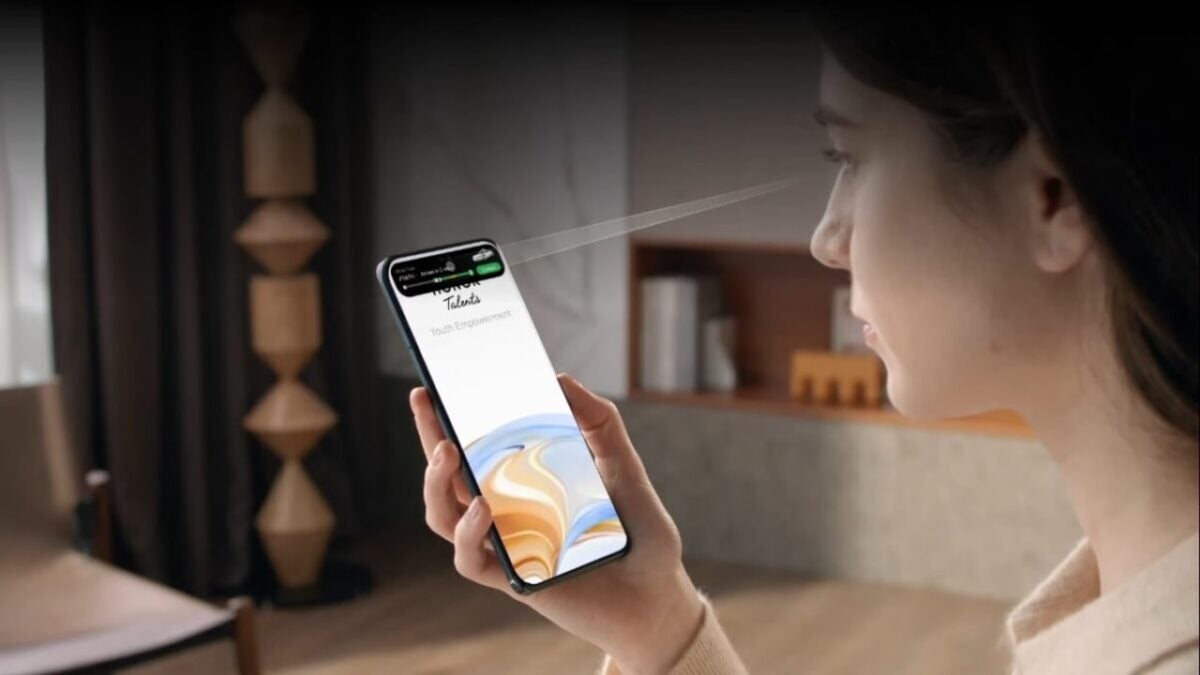
In the keynote, a brief demonstration was shown of how this technology will work. It depicted a woman looking at her phone with a snippet of the Uber app running at the top of the screen, akin to a live activity.
By changing the direction of her gaze, the full app opens. Honor refers to this technology as Magic Capsule, describing it as “eye-tracking-based multimodal interaction,” which is more descriptive but less fanciful than Magic Capsule.
This feature is part of the upcoming Magic 6, which will also feature a virtual assistant utilizing Qualcomm’s AI on the device. You can ask it to do things like gather all the videos on your device that meet specific criteria, refine them by other features, and have it generate a new video with your clips.
Presenting the revolutionary Magic capsule of #HONORMagic6Series. Eye tracking-based multimodal interaction enabling you a smart experience to interact with your own eyes. Get the full scoop by watching our video now. pic.twitter.com/bJCf9pYoIN
We’re likely to see many more developments like this in the near future because this year’s Snapdragon Summit revolves around AI. 5G is a thing of the past; now, it’s all about AI.
Whether Magic Capsule truly works and how it functions remain uncertain. The demo video isn’t a real-world representation, and it seems like a feature that could generate more frustration than utility.
It’s reassuring to see original equipment manufacturers driving advancements in how we use our phones that don’t just begin and end with an AI chatbot.
Reliable eye-tracking technology could offer real accessibility advantages and isn’t entirely out of place. It could be useful for moments when your hands are occupied. Honor hasn’t specified when the Magic 6 will be available.
Google has sent an important warning to all Android users, and if you are one of them, pay close attention. These alerts are for five important messages that may display when you use Google Chrome on an Android device or PC. These signals are your online protectors, and ignoring them may lead you into the hands of cybercriminals.
Google understands the significance of protecting its users from cyber dangers. Google emphasizes in their official release that these alerts are intended to protect you against hazardous websites, sometimes known as ‘phishing’ or ‘ malware’ sites. Cybercriminals with evil intentions create these harmful websites, according to The Sun.
These fraudulent websites may appear to be reputable platforms providing important services. However, underneath their mask is the possibility of a cyber-attack. They intend to steal important information from you, perpetrate fraud, or install malicious malware on your device, allowing criminals to take control and spy on you.
Google advises users to “Download with caution,” emphasizing the need for vigilance. With phishing and malware detection activated by default, Google provides five vital warnings that demand your attention.
Possible consequences
These alerts are your digital defenders, constantly looking for any cyber-attacks. Ignoring them exposes you to the hazards these signals intend to prevent.
Ignoring these warnings can have serious consequences, ranging from identity theft to financial loss and violating your digital privacy. Remember that Google gives these warnings to ensure your online safety. In such cases, it’s advisable to consider whether another website can meet your objectives without jeopardizing your online security.
Google’s five important alerts serve as your first protection against online threats. You can preserve your online experience and promote a safer digital environment by paying attention to these warnings and making educated decisions. It is critical to remain watchful and cautious while surfing the web since this is your best security against potential online attacks. Remain safe, remain informed, and allow Google to lead you to a more secure online future.
Android has consistently been at the forefront of technological advancements. However, with innovation often comes the risk of disrupting existing features, occasionally leading to reduced battery longevity and diminished performance.
With Android 14, the emphasis has shifted towards perfecting existing functionalities rather than merely introducing new ones. This iteration brings several improvements to the table, notably in the realm of memory management.
Frozen apps, maximized efficiency
Tech aficionado Mishaal Rahman highlighted these enhancements on X (previously known as Twitter). A standout feature in Android 14 is the advent of “frozen cached applications.”
Here are four ways that Android 14 improves on performance and memory efficiency:
1) Freezing cached applications
Android 14 freezes cached apps after a "short period of time", giving them 0 CPU time. During the Android 14 Beta, Google saw cached processes consume "up to 50%… pic.twitter.com/vKW50wY5L1
Once these apps remain idle for a short duration, they are “frozen,” preventing them from consuming CPU resources. Preliminary tests have shown that, thanks to this feature, cached processes consume up to half the CPU cycles they did on Android 13.
Adding to this efficiency, Android 14 has revamped its broadcasting system. This ensures that frozen apps stay dormant by modifying how they interact with context-registered broadcasts when marked as cached.
Instead of bombarding the system with numerous broadcasts, events like BATTERY_CHANGED can now be amalgamated into a single notification. This refined methodology promotes seamless system performance.
Boosting app launch speeds
Android 14’s latest optimizations don’t just stop at enhancing existing features; they bring a tangible acceleration to app launch speeds. With increased restrictions on the total number of cached apps, the OS minimizes the instances of cold app starts, which are notorious for hogging CPU resources. Early tests on 8GB RAM devices registered a decrease in cold app starts by about 20%. Remarkably, devices with 12GB RAM saw an even more impressive drop of over 30%. This not only bolsters power efficiency but also ensures a snappier user experience.
In addition, the memory footprint on Android 14 has seen significant contraction. The updated Android Runtime, now transitioned to ART 14, showcases optimizations that have led to an average code size reduction of 9.3%, without sidelining performance. This leaner code naturally exerts less pressure on device memory and storage, thereby boosting system efficiency.
Interestingly, while these innovations weren’t the marquee features during the launch of Android 14, their impact on user experience can’t be underestimated. It’s evident that Google is channeling its efforts not just in rolling out flashy features but in enhancing the very core of the operating system.
Tackling Pixel predicaments
On the practical front, Android 14 has risen to the occasion by addressing persistent challenges faced by Pixel users, especially those using the Pixel 6 and 7 series. Many reported concerns like device overheating and rapid battery depletion.
However, with the introduction of Android 14, a significant number of users are noticing their devices operating at more moderate temperatures, smoother performance, and a longer battery span. While the specifics of these enhancements remain under wraps, it’s clear that Android 14 has made pivotal strides in internal optimizations to tackle these issues head-on.
If history repeats itself, we could see a launch in May 2024 just like we saw with the Pixel 7a when it launched in May 2023. It will be the Pixel 8a…
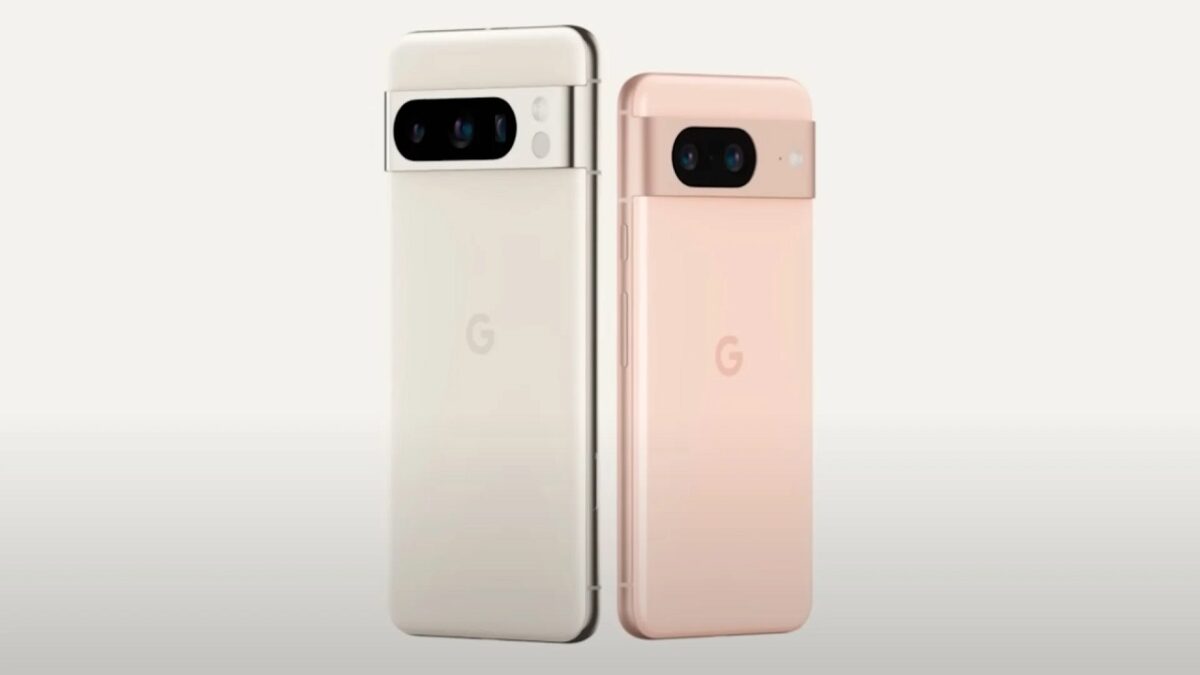
It’s been just a week since Google unveiled its new Pixel 8 family to the world. This generation, for now, consists of the Pixel 8 and the Pixel 8 Pro. Of course, we all know that a Pixel 8a will arrive later on.
In collaboration with OnLeaks, the tech news website SmartPrix recently shared several renders of the possible design of Google’s future mid-range smartphone, which the company always releases for those seeking something more affordable.
At first glance, the device appears to be a cross between the standard Pixel 8 and the Pixel 7a, as it features characteristics of both. The Pixel 8a will have the same rounded corners as the other models in the lineup.
However, it will be slightly larger than the main model, with dimensions of 152.1 x 72.6 x 8.9 mm.
And despite its increased size, the screen won’t be bigger. In fact, it will be the opposite. The report reveals thicker bezels around the corners, reducing the screen size to 6.1 inches, compared to the Pixel 8’s 6.2 inches.
A very consistent design: yet another Pixel
Other notable design features include the rear camera module, which will maintain the visor-like appearance for which the series is known. On the front, you will see a small pinhole cutout for the selfie camera.
The power and volume buttons are on the left side, with the SIM tray on the opposite side. At the bottom edge, you’ll find a USB-C charging port between the speakers. The top edge apparently houses “an ultra-wideband antenna,” according to SmartPrix. The device will be available in sky blue and what appears to be peach pink.
The most interesting part is that these images align with another leak from late September. Apparently, industry insider Abhishek Yadav got hold of a prototype and posted pictures of it on Twitter. So, the rounder design might be more plausible than we initially thought.
And in terms of power? Less powerful, obviously
Obviously, being a mid-range device, the Pixel 8a won’t be more powerful than its siblings. The SmartPrix report mentions a benchmark test discovered back in August for the smartphone, referred to by its codename: Google Akita.
The results suggest that the model will feature an “underclocked variant of the Tensor G3 chipset, along with the Mali-G715 GPU.” The amount of memory remains the same, as it “appears with 8 GB of RAM.” Of course, Android 14 will be the operating system.
And a good photography section, as is typical of Google
Returning to the rear camera, we know that the Pixel 8a will have two lenses judging by the images, but we don’t know how many megapixels each one will have. If history repeats itself, the phone’s camera could have more megapixels than the standard model.
This is similar to how the lenses on the Pixel 7a are technically better than those on the Pixel 7. However, keep in mind that more megapixels don’t always mean better photos. Other factors such as the processor come into play. Taking photos on the Pixel 8a might be a less impressive experience, although not necessarily bad.
As always, take this information with a grain of salt. Things can always change at any moment. The leaks didn’t provide a release date.
But again, if history repeats itself, we could see a launch in May 2024, just like we did with the Pixel 7a when it was released in May 2023. Google’s budget-friendly model always comes out midway through the generation.
Because, like any new technology, it has its pros and cons. Today we are going to look at the cons of the Pixel 8, although it is one of the most…
We are all amazed by the technology of Google’s new Pixel 8. And it’s not without reason, as the implementation of new tools linked to artificial intelligence makes the phone the smartest smartphone on the market.
Indeed, not only that, Google has also promised to update the phone’s operating system for the next 7 years. Quite a record in the Android market. It’s even a record in Apple’s territory, as they usually stick to 6 years.
But today, we have to write a post that tempers the excitement that comes with the launch of a new technological product. Because, like all new technology, it has its pros and cons. Today, we’re focusing on the cons.
NEW VIDEO – Hands-on with the Google Pixel 8/8 Pro! It has Tensor G3 and a new set of cameras, but really it's all about software with these Google phones… always has been
When Google debuted the Tensor chip in the Google Pixel 6 series, it marked the first step away from Qualcomm’s Snapdragon chips that largely dominate the sector.
However, since its debut – and even now with the Pixel 8 – Tensor chips have been largely designed in collaboration with Samsung. Essentially, the Tensor chips in the G series have parts built by Google, but most of the design is similar to Samsung’s own Exynos chips.
We probably won’t see Google’s custom Tensor chip until 2025 with the Google Pixel 10, and Google is likely to continue working with Samsung for the Tensor G4 next year.
Still, Tensor chipsets haven’t been the best performers so far. In our time with previous Pixel phones, Tensor chips can get quite hot after just a few minutes with resource-intensive apps or tasks.
Despite having large batteries, Google’s Tensor phones usually don’t last more than a day with heavy use. We’ve also encountered bugs and performance issues.
Although the Google Pixel 8 and Tensor G3 have just been released, we don’t yet know how the chip will perform. The third time might be the charm for Google, but it wouldn’t hurt to wait another year or more for a G4 chip with better performance and energy efficiency, or even later.
Best cameras for the Google Pixel 9
With the Google Pixel 8 series, only the Pixel 8 Pro received significant camera improvements. That’s good news if you want the Pro model, but the regular Pixel 8 feels like it was left behind.
The camera specifications of the Pixel 8 include a dual-camera system with a 50 MP main sensor along with a 12 MP autofocus ultrawide camera, virtually unchanged from the cameras of the Google Pixel 7.
On the other hand, the Pixel 8 Pro features a 50 MP main camera with 2x optical zoom, a new 48 MP ultrawide camera, and a 48 MP telephoto camera with 5x optical zoom and Super Res Zoom up to 30x.
Both have a 10.5 MP selfie camera, but only the Pro model has autofocus.
It wouldn’t surprise us if next year there are more improvements introduced in the cameras of the regular Pixel 9, such as a higher-megapixel ultrawide camera and autofocus on the selfie camera.
Your upgrade aw8s.#Pixel8 and Pixel 8 Pro are available for pre-order now, so you can call dibs early.
Google has maintained the same overall design aesthetic for its Pixel smartphones since the Pixel 6. And there’s really nothing wrong with that: it’s a good design that stands out from the crowd.
The rounded corners and the camera bar definitely make the Pixel unique among a sea of iPhones and Samsungs.
If you look at the history of Google Pixel’s design, the design changes every two or three years. Since the Pixel 6, Google has continued to use the same design for three years, carrying on the Pixel 6’s aesthetic with the Pixel 7 and now the Pixel 8. The Pixel 9 would be the perfect time to shake things up a bit.
We have no idea what a refreshed design for the Google Pixel could look like, but for anyone tired of the same old camera bar on the back, it might be worth waiting one more year to see what Google comes up with for the Pixel 9.