Why do smartphones need so much battery?

Innovations like solid-state batteries, fast charging, and software optimization are steps in the right direction. But the question persists: are we willing to compromise certain functionalities for greater autonomy, or will we continue pushing the boundaries of energy technology to do as much as possible with our devices?

In the last decade, smartphones have evolved from being mere communication devices to becoming the nerve centers of our digital lives. These advancements have brought about an exponential increase in energy demand, pushing the limits of current batteries. But, why do these devices require so much battery power nowadays?

AppleTV+ DOWNLOAD

Pushing the limits of a technology we rely on every day

First, it is essential to consider the power of the chips they house. Smartphone processors are true engineering marvels, capable of performing billions of operations per second. This power allows devices to run complex applications, high-definition games, and manage multiple tasks simultaneously. However, such power comes at a price: considerable energy consumption.

Cameras are another aspect that contributes to battery consumption. Improvements in the quality and functionality of smartphone cameras involve higher energy expenditure. Capturing high-resolution images and recording videos, especially in 4K or higher formats, require a large amount of resources and, therefore, a higher battery consumption.

Background processes and system services also play a crucial role in power consumption, and there are more and more of them. Email synchronization, background app updates, real-time notifications, and location services are just a few examples of processes that, although not always visible, are constantly draining the battery in a more or less optimized way.

To make matters worse, Artificial Intelligence has started to play a significant role in the functioning of smartphones. AIs consume a lot of energy, especially when it comes to processing large volumes of data in real-time or performing complex machine learning tasks. Apple, for example, has integrated the Neural Engine into its chips —and plans to improve it in the iPhone 16—, a dedicated component to enhance the efficiency of these tasks through hardware, but even so, energy consumption remains a major challenge.

Despite these challenges, it is remarkable how the battery life of smartphones has managed to stay the same or even slightly improve over the years, an example of this is the iPhone 15 Pro Max. And this achievement is even more notable when we consider that battery technology has hardly evolved at all. Yes, we have been able to change some designs, make them more compact, but we are still relying on the same chemical energy source as 30 years ago.

AppleTV+ DOWNLOAD

This is where balancing the arrival of new features and battery life comes into play. The industry continues to search for that ideal balance, where technological advances are not limited by battery capacity, although it is not always possible. Innovations such as solid-state batteries, fast charging, and software optimization are steps in the right direction, although the focus on performance per watt is something that could still be improved. In any case, the question persists: are we willing to compromise certain functionalities for greater autonomy or will we continue pushing the limits of energy technology to do as much as possible with our devices?
How to use Avast Battery Saver

Have you ever been working against time on your Windows 10 laptop only to realize your battery is not going to make it? Battery-saving apps can be a great tool to help you extend your battery life so that you can get more done. Avast Battery Saver is one of the best battery-saving apps for Windows 10 computers.

Not only does it run automatically in the background without the need for human intervention, but it is also low on system resources. This means the app can effectively run in the background saving your battery without you even knowing. But how do you start using Avast Battery Saver?

Features of Avast Battery Saver

The features included with Avast Battery Saver are one of the reasons it’s seen as one of the best battery-savings apps available. The features that are included with the app are:

  • Synchronizing the PCs performance
  • Auto-dim display settings
  • Switches off power-draining programs running in the background
  • Operates automatically in the background

Pros and cons of Avast Battery Saver

Avast Battery Saver does require a paid subscription to work. As such, it may be helpful to see the pros and cons of the app before investing in it. Let’s look at some of the advantages and disadvantages of using the Avast Battery Saver.

Pros:

  • Easy to use
  • Intuitive user-interface
  • It runs in the background
  • Support available through chat and email
  • Automatically saves battery
  • Multiple FAQs and guides are available

Cons:

  • Subscription can be costly
  • Could use more features such as an optimizer

Steps to using Avast Battery Saver

Now that we’ve covered the features and benefits of using Avast Battery Saver, it’s time to look at how to start using the app on your Windows computer.

  1. Download Avast Battery Saver

    How to use Avast Battery Saver

    The first thing you’ll need to do is download the Avast Battery Saver app and save it in a location you’ll remember. 

  2. Install Avast Battery Saver

    How to use Avast Battery Saver

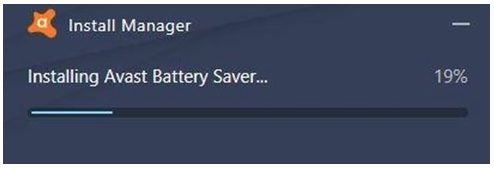
    Once you’ve downloaded the app, you need to install it. You can start the installation process by double-clicking on the install file in your downloads folder.

  3. Register for the full version

    How to use Avast Battery Saver

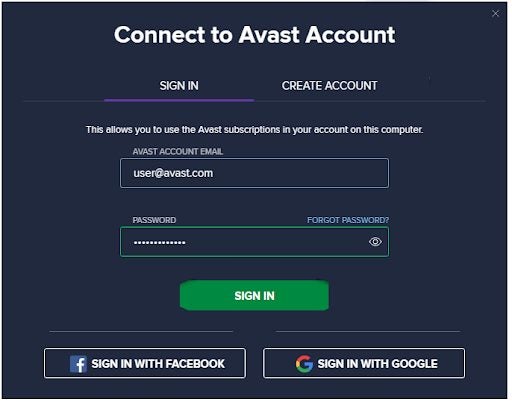
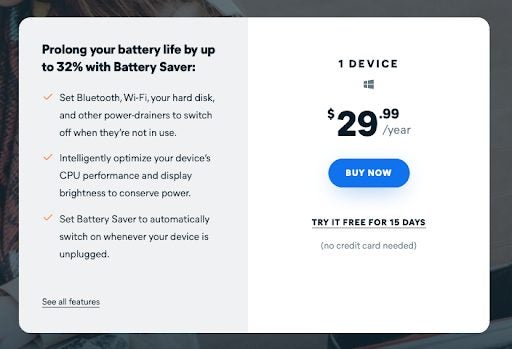
    At the end of your installation of Avast Battery Saver, you’ll be asked to register your account. If this is your first time using the app, make sure to take advantage of the 15-day free trial. This will give you a chance to see if you enjoy the app and whether it’s worth the subscription fee of $29.99/year.

  4. Click on ‘Let’s Start’

    How to use Avast Battery Saver

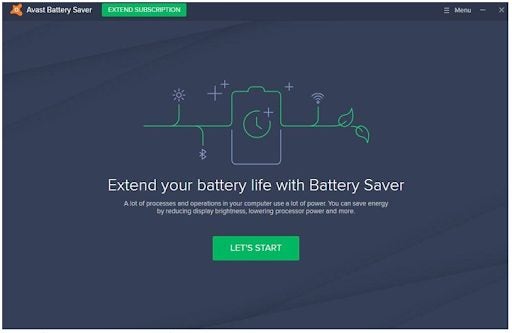
    Once you’ve registered your account, you’re ready to get started with Avast Battery Saver. In the program window, click on ‘Let’s Start.’ The battery saver will start running in the background and assess your saving needs. The program will also quickly run through all your processing, identifying those that are using too many resources.

  5. Review the status of your battery

    How to use Avast Battery Saver

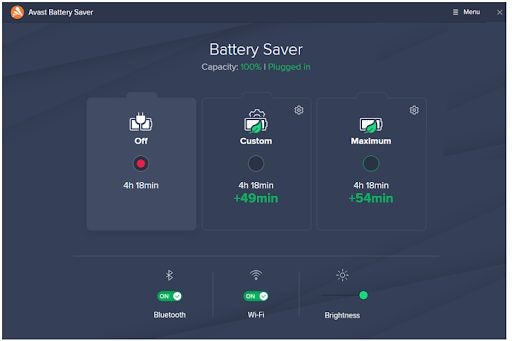
    Once the battery saver has completed its scan, it will return you to a window showing a summary of your battery and potential saving options. You can choose between the options given to ensure that your battery is saved.

Avast Battery Saver – the caffeine for your machine

If you’re looking for an app to help you save your battery power on Windows, then Avast is a heavy contender. Although it’s a premium app that requires a subscription, it’s still one of the favorites when it comes to the different features for saving battery life.

It’s also straightforward to use and intuitive, making it a good option for people who want an effective app running in the background without needing too much effort from the user. If you want to give it a try, why not start with the 15-day free trial to see if Avast Battery Saver meets your needs.