Following the previous trailer, which revealed the new Goblin Mines Capital District, Supercell has now confirmed the arrival of a new Mega Troop…
It is one of the most played games in the world, making a significant amount of money and attracting a vast audience. Clash of Clans equals thousands of hours of fun on mobile devices, and we are now facing its second major update of October.
Today, the second teaser for the October 2023 update of Clash of Clans has been unveiled.
Following the previous preview, which revealed the new Goblin Mine Capital District, Supercell has now confirmed the arrival of a new Mega Troop, Mega Sparky, as well as a new Capital Troop, the Super Miner.
Mega Sparky (Mega Troop)
Mega Sparky is the first new Mega Troop to arrive in Clash of Clans since the Clan Capital release last year. If you play Clash Royale, Mega Sparky will look quite familiar to you.
It’s a slow-moving unit that unleashes an incredibly powerful electrical explosion inflicting mega damage on its target (and surrounding targets with splash damage). Similar to the Clash Royale version, each shot requires a slow charge, making it vulnerable to defenses.
Mega Sparky is unlocked by building the Mega Sparky Workshop in the Goblin Mines. As revealed earlier, Goblin Mines are unlocked at Town Hall level 9.
New Capital Troop: Mega Sparky
A sluggish ground unit that attacks using a slow charging blast of electricity with splash damage
Another new troop that should be familiar to Clash Royale players, the Super Miner is an upgraded version of the Miner with the ability to tunnel underground, allowing it to move undetected towards enemy defenses.
Once surfaced, it becomes a target, but the damage it inflicts against the chosen target will continuously increase until the target is destroyed or the Super Miner is eliminated. When the Super Miner is destroyed, it leaves behind a bomb that deals explosive damage.
New Capital Troop: Super Miner
He travels underground (including underwater) and attacks using his power tool. Upon destruction, detonates a bomb
The third revelation in this preview is Infinite Haste, a clan capital spell that increases the movement speed of clan troops entering its area of effect. The spell remains active for four attacks.
Supercell has confirmed that this is the final preview, which means the October update should arrive on Monday or Tuesday this week. Come back tomorrow for the development update.
Overall, it’s a relatively small update, but it should bring some excitement to Clan Capital.
Mobile games have evolved a lot since the first sighting of that well-known digital snake. With some games even coming close to PC and console-style quality, there’s a whole new world of options on mobile platforms.
Clash of Clans is one such option; in some spheres of mobile gamers, it’s more than an option; it’s a staple. But with so much mention of it in popular culture, you might be left wondering what is Clash of Clans and how do you play it?
What is Clash of Clans?
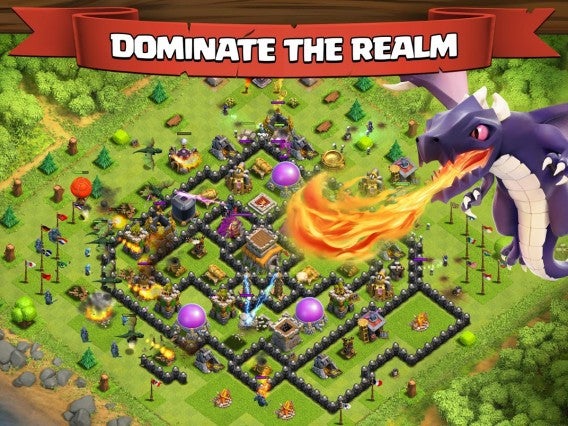
Clash of Clans is a hybrid online multiplayer game set in a fantasy realm. You play as a village chief, and you are responsible for expanding the village, cultivating mutually beneficial relationships with other chiefs to form clans, and engaging in battle with rival clans.
What Type of Game is Clash of Clans?
Developed and published by Finnish game developer Supercell, Clash of Clans is a free-to-play mobile strategy video game. Players in Clash of Clans construct their own villages by using the materials they gain by attacking other players’ villages, earning rewards, buying them with medals, or producing them at their own villages.
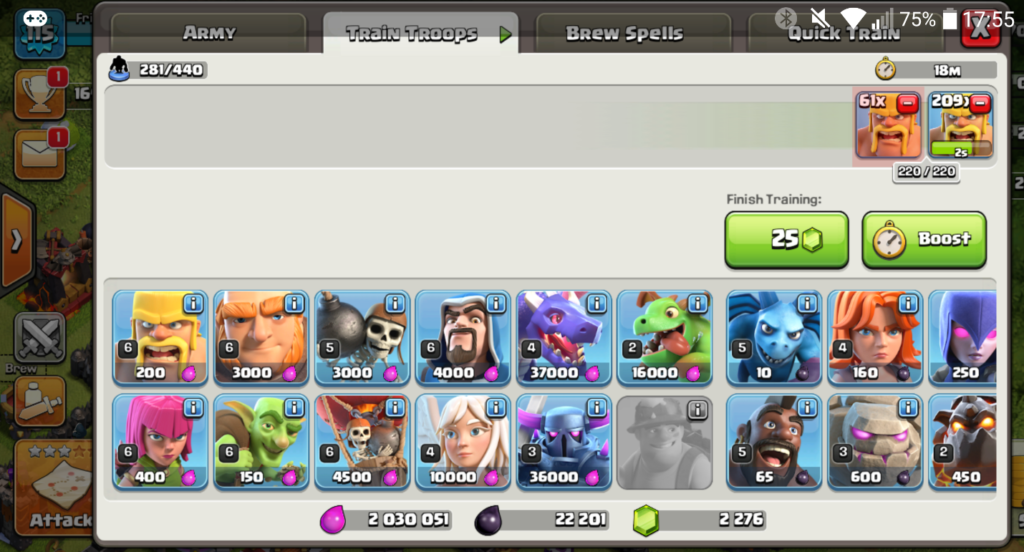
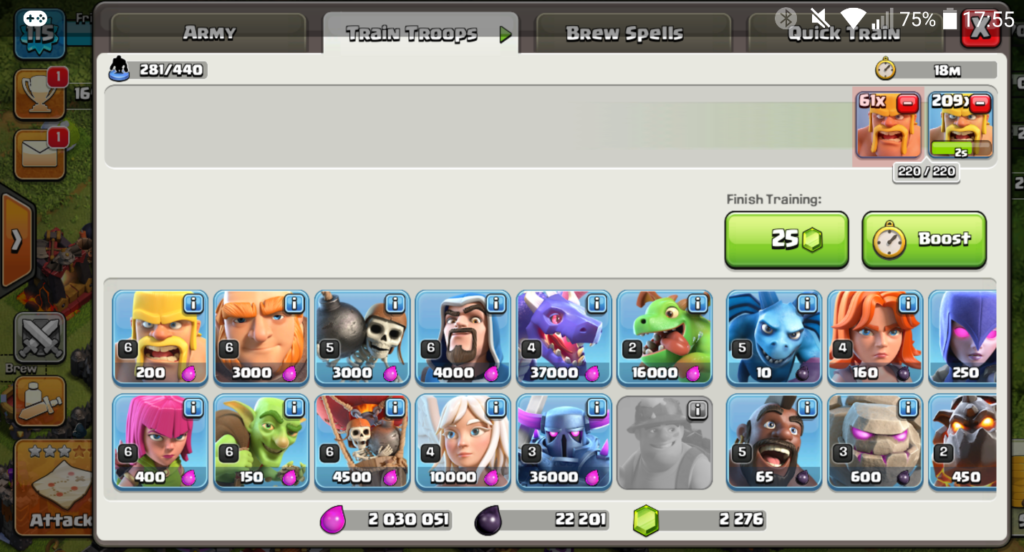
Different types of troops can be trained using resources for the attack. Gold, elixir, and dark elixir are the main resources. The game allows players to form clans of up to fifty members, who can participate together in Clan Wars, donate and receive troops, and chat with each other.
How to play Clash of Clans
While it’s helpful knowing what Clash of Clans is, it still doesn’t explain how to play it. Get ready, as we’re about to give you an extensive guide on getting started.
What you need to know
Clash of Clans can be a complex game, but the built-in tutorial is easy to follow. The key to the game is to build a base surrounded by great defenses while raiding other players’ bases for loot and trophies. The loot allows you to upgrade your base or create stronger troops. As you level up, you may choose to join a “clan” of other players to battle rival clans around the world.
When you first start playing, your base is defended by a shield. The shield gives you a 72-hour window of safety when enemies can’t attack your base and steal your loot. If your shield is down, attackers could swoop in, but the shield will return to defend you after a catastrophic loss.
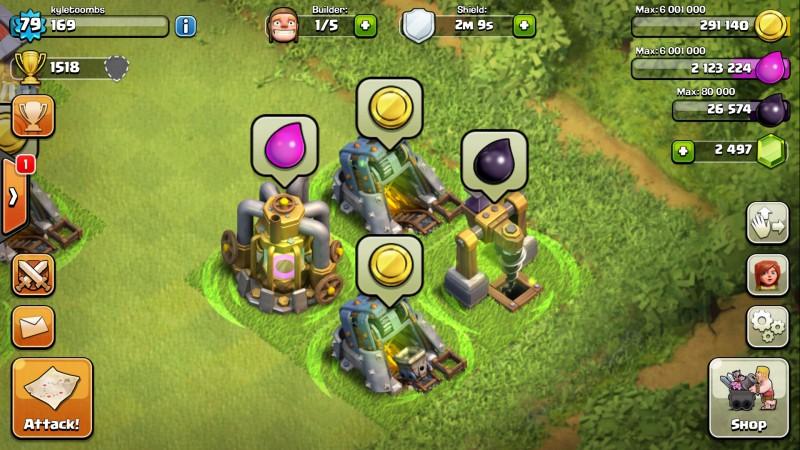
How do you upgrade your squad? Clash has one currency and three resources within the game. Gems are the “money” in the game. You’ll earn them by removing obstacles around your base. If you’re less patient, you can purchase them in-game with real money. Think of gems as a shortcut to repair your heroes and speed up construction.
Clash has three resources: gold, elixir, and dark elixir. All three can be “mined” with structures in your base or looted from other players. Gold is used to create buildings. You’ll spend elixir to create your troops and helpful spells. Dark elixir appears later in the game, unlocking even more powerful elements. Bottom line: Grab all of this stuff as often as possible and you’ll get more powerful.
The initial setup
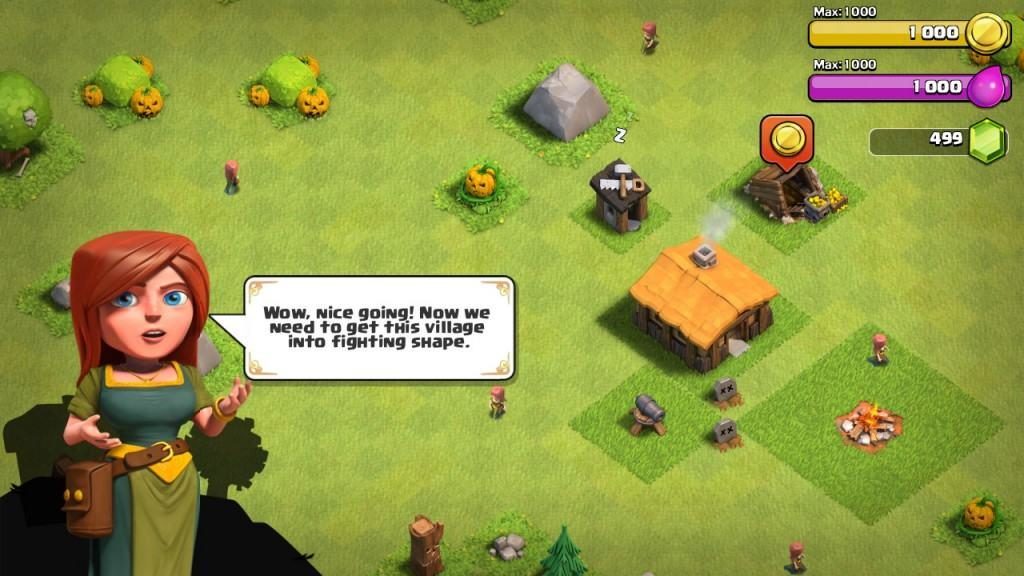
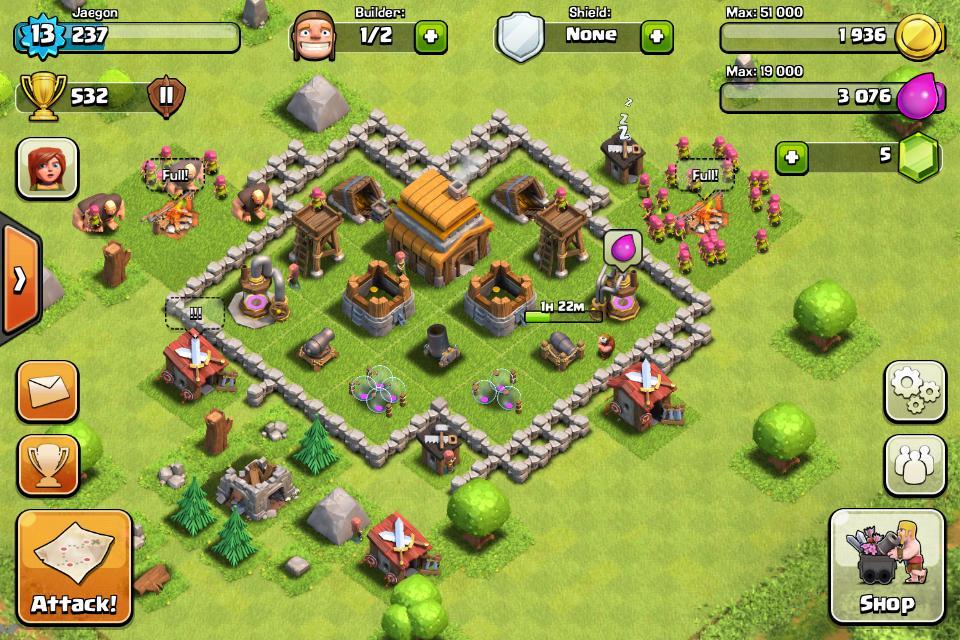
As you begin gameplay, a helpful tutorial makes it impossible to mess up. The heart of your base is the town hall, and you want to protect that at all costs. Try placing your town hall at the center of the map and surround it with buildings. This way, enemy raiders will need to go through multiple levels of buildings before getting to the town hall.
Walls will slow down the enemy, so put those around your precious town hall, along with your gold and elixir storage units. If you’re short on walls, you can place your defensive buildings (cannons, archer towers, etc.) outside the barriers. Hopefully, your defenses will shred the enemy before they can get to your goodies.
At the beginning of the game, try to save all your gems so you can buy builder huts. These structures are critical to building up your base, so don’t waste gems on minor time-savers. (Yes, the tutorial will tell you to spend gems recklessly. Ignore it. Save those gems for the builder huts.)
During the tutorial, you are given five wizards to destroy an enemy base, but you only need two. Just don’t deploy the other three! They’ll simply wait in your army camp. Since wizards don’t unlock for a few town hall updates, having three extra wizards will give you extra firepower in the future.
Another key tip: Don’t bother building extra gold or elixir storage at the beginning. It will be a while before you can fill them, so they’re mostly a waste of your resources.
Protecting your base
The key to a strong defense is to upgrade defensive weapons quickly. Improve your cannons, archer towers, and mortars and they’ll rip through opposing armies. As you level up your town hall, more defensive weapons will be unlocked. But you should resist the urge to upgrade the town hall until all your other buildings have been maxed out. Yes, you should even upgrade all your walls before making the leap to a new town hall.
It’s also important to keep your base compact. If you’re too spread out, your defenses won’t be able to tag-team incoming armies. One exception to the rule? Put your builder huts in the very corners of your map. The extra travel time for opposing armies could prevent a perfect 3-star attack.
In addition to defensive buildings, you can also set traps to thwart your enemies. While defensive buildings keep firing until they’re destroyed, traps only go off once. For a great defensive base, place your slower and longer-range defenses (like mortars or air defense) closer to the center. Cannons and archer towers should be placed to protect the slower defenses while still defending the town hall and your gold and elixir storage. When your base is protected, your trophy count stays high.
Attacking others
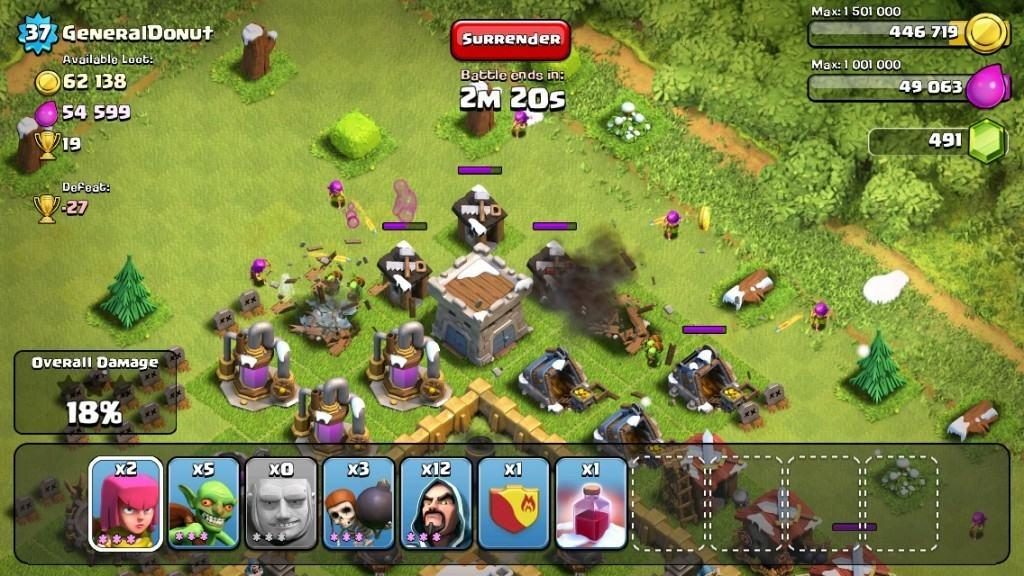
Now that your base is protected, it’s time to blow up your enemies on their turf. Whether you’re taking on other humans or the computer-led goblin bases, there is a method to the madness.
Before you start the attack, look at the loot that is available. Generally, you will want to target bases that have weak defenses, but lots of available gold and elixir. Win a battle and you’ll gain trophies. Lose and (you guessed it) your trophy count goes down. Each successful attack helps you earn bonuses, adding more gold and elixir to your stash.
For the maximum victory, you’re aiming for a 3-star attack. That means that the base is 100 percent destroyed. You’ll get one star for destroying half an enemy’s base or taking out their town hall. The only way to get all three stars is to blow up every structure on the map. (It’s extremely gratifying.)
The key to a great attack is to find a base’s weakest point. Is there a spot where the walls are weak? Can you snipe some structures with long-range archers before sending in the slow, heavy giants? Or can you wipe out the big guns with your heavy troops before sending in the less expensive, faster-firing fighters? Think strategically and you’ll increase your odds.
Ways to raid resources
Simply looking to grab loot as fast as possible? Here are two great attack methods that have proven to be successful at all levels of Clash. The first is the Goblin Rush.
Goblin Rush
4 Wall Breakers
4 Giants
Fill the rest of your army with goblins
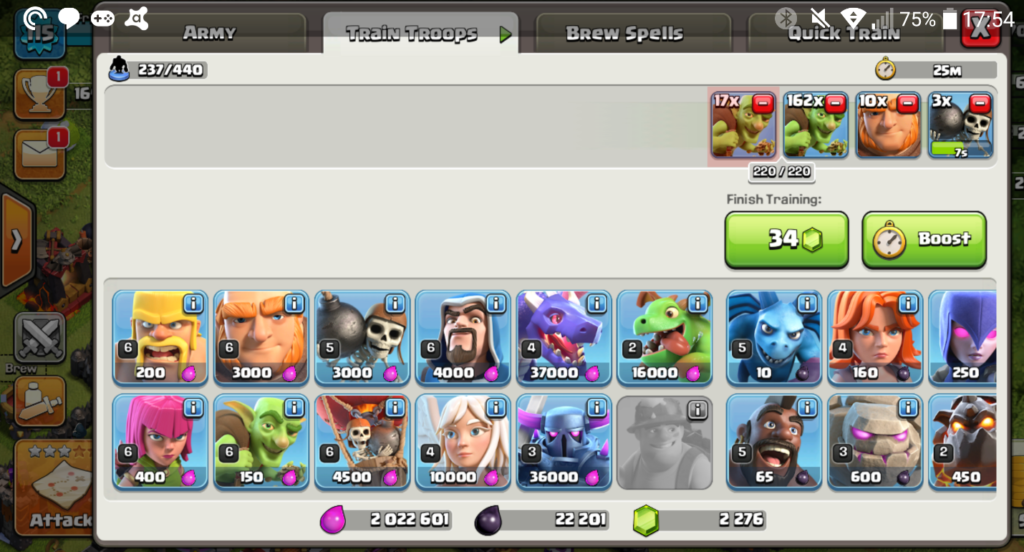
This attack method relies on overwhelming numbers and luck. Release the giants to absorb damage while your wall breakers take out the walls. Once the barriers are gone, send in the goblins. These greedy little guys target elixir and gold storages and collectors, providing maximum return on minimum investment. When deployed properly, a 1-star is guaranteed and you’ll gain tons of loot.
Barbarian Rush
All Barbarians
This attack relies on massive troop numbers to overwhelm a base’s defenses. The method works best against weak walls. You will need to deploy your barbarians quickly, but it does risk a zero-star attack if your troops get held up.
In addition to the regular player-vs.-player gameplay, there are also side games that involve your clan fighting other clans and a builder village with different troops and defenses. No matter how you clash, you’re bound to have a lot of fun for years with this top-notch freemium game.
FAQ About Clash of Clans With Tips and Tricks
Now that we’ve piqued your interest, you probably have burning questions about the finer points of Clash of Clans gameplay. We’ve assembled a comprehensive list of the most frequently asked questions to help you improve your Clash of Clans experience.
If you have any other questions, we have other articles on Clash of Clans that will benefit you; check them out below:
There are two ways to obtain gems in Clash of Clans; you can purchase them through the store or earn them as you play.
Purchasing
This method of getting gems is the easiest way to secure a good collection, but it’s counted as an in-app purchase. To access this option, head to the in-game shop and click on the treasure menu. Here is a list of what it will cost for each in-app purchase option for gems:
Pocket of Gems: 80 gems for $0.99
Pile of Gems: 500 gems for $4.99
Bag of Gems: 1,200 gems for $9.99
Sack of Gems: 2,500 gems for 19.99
Box of Gems: 6,500 gems for $49.99
Chest of Gems: 14,000 gems for $99.99
While buying gems is the easier and quicker option, it’s also an option that costs real money. Players who buy gems are called Gemmers, and the process of using gems to upgrade your buildings is called Gemming. Gemming is a fast way to upgrade your setup, but many Gemmers focus only on Gemming their town hall.
The best way to Gem your setup is by focusing your attention on all your crucial buildings. Upgrading your town hall progresses your game further, but without upgrading your other buildings, you’ll get to a point where your resource production buildings can’t keep up with the demand required for raids.
Gems are also useful for speeding up processes. For example, use some of your gems to speed up your troop training so that you can launch attacks in rapid succession and capitalize on faster raids yielding more resources. You can also use gems to speed up longer building processes. As your buildings increase in rank, upgrades take longer. Why not plow a few gems into reaching higher production volumes instead of just Gemming your town hall?
Earn gems
The other way to obtain gems is by simply playing the game. You earn gems by completing achievements. Each achievement awards a specific amount of gems. One of the achievements that awards gems is clearing obstacles. Earning gems from achievements has a cap, however. There are 3,200 trophies to collect from completing achievements, and the total amount of gems you can earn this way is 2,000. If you take into account the earnings from the individual achievements as well, this total is 3,715 gems.
This is a good amount, but it’s remarkable how fast your gem stash can dwindle when you use it indiscriminately. It’s a little like winning the lottery; while you make be vastly wealthy for a time, spending excessively to show your wealth, or without a proper plan for progression, you might not be wealthy for long. The best advice here again is don’t spend all your gems in one place or on one building.
Clearing obstacles is a slow but steady and limitless way to earn gems. As you expand your village, you’ll need to clear obstacles, and you’ll earn a few gems in the process. Not all obstacles award gems, though; sometimes, you’ll just be clearing them for the sake of a cleaner area. Some obstacles award up to 6 gems in addition to experience points, but the big prize is the Gem Box. This obstacle yields 25 gems when you clear it. However, Gem Boxes are rarer than any other obstacle, so trying to grind gems from finding Gem Boxes is going to be difficult.
Events are a good way to generate gems as well. Events typically give you instant XP and gems. The highest amount of gems ever earned from a single event is 250, in addition to 600 XP.
Playing a strategic and successful enough game to land in the top 20 players of the top 3 clans is another way to make bank with gems. This is definitely the rarest way to make gems, but the payoff is incredible. The top clan typically earns 50,000 gems to be shared equally among its top 20 players. The second and third place clans win 30,000 and 15,000 gems, respectively.
Mining gems is always an option. The Gem Mine is in the builder base and produces a maximum of 4.8 gems a day. This is a slow method, but you’ll have gems trickling in slowly and passively while you play.
As you can see, even if you aren’t willing to part with your hard-earned dollars to buy gems, there are plenty of ways to increase your stash, albeit fairly slowly on average. The most efficient way to make the most gems is to dabble in all the different individual methods. This way, you have a fairly constant passive stream, in addition to moderate bonus amounts from events, achievements, and obstacles.
How to get 6th builder CoC?
Unlocking the elusive 6th builder in Clash of Clans is a process to end all in-game processes. First off, you need to get your builder’s hall to level 9. Most players discourage you from rushing one particular building; we even mentioned earlier that a more holistic approach was the better way to play. However, this section is purely the journey to unlocking the 6th builder.
This takes long. If the 6th builder is your main focus, rushing a few key buildings and focusing your attention on your builder’s hall is the right move. This means that every time you upgrade to a new builder’s hall level, build all the buildings required to advance levels further.
The following buildings are important to upgrade to the max with each builders hall level you obtain:
Elixir collectors
Gold mines
Gold storage
Elixir storage
Star laboratory
Clock tower
Getting all of these buildings to their max on each builder’s hall level increases your passive income, storage capacity and boosts your elixir and gold production. These are all the resources and processes you need in place to get the 6th builder as fast as possible.
Once you get to builder’s hall level 9, you’ll be able to build the OTTO hut. The OTTO hut is essentially your gateway to the 6th builder, and you’ll need to upgrade this key structure to level 5. This also takes a little time because each level has requirements for other buildings around your base to level up as well. Even if you don’t rush to builder’s hall level 9 and you upgrade your entire base as you go through the different town hall levels, you’ll still need to make upgrades to be able to upgrade the OTTO hut.
Once all these upgrades are done, you’ll be able to use the OTTO hut to send the master builder to your home base, and he will be the 6th builder. There is no definitive timeline to how long this will take because it depends on how often you play, how you prefer to upgrade your setup, and whether you use in-app purchases to speed things up for yourself.
How to get super troops?
Super troops are a new addition to the Clash of Clans universe. Essentially, these new types of troops will replace your traditional troops once you’ve unlocked and equipped them and are valid for three days. This means if you choose to boost your giants to super giants for the three days of the validity period, all the giants you make will be super giants.
To be able to unlock super troops, you need to have your town level at 11 or higher. You also need to have the troops you want to upgrade to super troops at a high enough level. For most, this is level 9, but it’s easiest to just make sure all your troops are maxed out.
It’s also important to note that you can only have two classes of super troops active at once and that they take up more housing space than their base alternatives.
How many people play Clash of Clans?
Clash of Clans boasts 1.9 million active players each day. This means it is among the most popular mobile multiplayer games in the world.
How to make a second account on Clash of Clans?
Before the launch of Supercell ID, it was nearly impossible to have a second Clash of Clans account. The process involved watching sketchy videos on YouTube and going into the developer options on your phone to basically manipulate game files.
Now, this process is significantly easier. All you need is one device and two email addresses. Supercell doesn’t let you link two accounts to one Supercell ID, but this makes sense. It would be like trying to create two Facebook accounts with one email address; impossible.
So, all you need to do is click on the tab to create a Supercell ID. Once you do this, your game won’t be connected to Google Play or Game Center, but this is not a problem. Supercell ID has its own game-saving functionality. Creating a Supercell ID requires you to register with your email address, which you’ll need to confirm to continue. Follow the prompts you receive via email, and you’ll be directed back to the game.
Now you need to log out of your Supercell ID so that you can create another one. Once you’ve logged out, you’ll see two options, log in with Supercell ID and play without Supercell ID. Click on play without Supercell ID, and you’ll be taken to the game tutorial. When the tutorial is done, enter your username, and click the disconnected button under Supercell ID in the game options.
Create a new Supercell ID with a second email address, and you’re done. Now when you play, you can log in with either of the Supercell IDs and even create more using the same process.
How to upgrade troops?
Upgrading troops in Clash of Clans is really easy. You’ll need to be on town hall level 3; otherwise, you won’t have the upgrade option available yet. Once you have reached level 3, tap the Shop button on the bottom right-hand side of the screen. From there, buy the laboratory and place it in your village. When the laboratory is finished being built, tap on it, and select the Resources option. Select the unity you’d like to level up, and start upgrading your troops.
How to get master builder?
The Master Builder’s hut is unlocked once you’ve unlocked and placed the OTTO hut and completed all the necessary tasks to upgrade the hut to level 5.
What are clan wars?
Usually, Clan Wars are fought between Clans that are roughly equal in strength. For both clans to be matched against each other, they must have the same number of participants selected. A player must have a green Clan War button in his profile to fight in a war, indicating that he is available and must have been chosen by the Clan Leader. Clan leaders may also choose people who opted out of Clan War lineups.
Below we’ll highlight the two stages of Clan Wars.
Preparation Day
War Bases can be adjusted, and troops donated or requested during Preparation Day. Clan Castles at your War Base are separate from Clan Castles in your village, and they require separate donations of troops. A War Base’s troops will be used to defend it against all enemies during the War, so make sure you request those who you feel will be best suited for defending your layout.
War Base troops will not be available in your regular village, and vice versa. Troops donated to your War Base cannot be used for your own attacks; these must be requested from Clanmates in the Troop training screen and the Clan Chat.
Battle Day
By the end of Preparation Day, your Clan should be ready and hungry to win! On Battle Day, participants can attack twice, but not against the same opponent. Following the start of Battle Day, changes to your War Base layout or building levels will no longer take effect.
Are you ready for a clash?
As you can see, Clash of Clans has so many game mechanics involved, it can be easy to become confused. We hope this guide has helped you in some way towards winning more victories.
In big news for mobile gamers Supercell, developers of Clash Royale, have released their newest title called Brawl Stars. There is good news and bad news about the launch of the 3 on 3 online shooter so we’ll get the bad news out of the way first. The bad news is Brawl Stars has only been given a Soft Launch in Canada. The good news, however, is that if you click here you’ll find our guide for downloading it right now, no matter where you are.
Brawls Stars is only available on iOS at the moment but it looks a lot of fun and we’re hoping it will come to Android soon. There are no details yet as to when it will come to Android or when it’ll get a global release. In the meantime, however, follow our tutorial and you’ll playing the game anyway. If you do make sure you let us know what you think of it.
The free-to-play city builder The Simpsons: Tapped Out received a major update on Android and iOS. The update brings the latest expansion to the game, which spoofs the popular combat strategy game Clash of Clans (Android | iOS).
The update brings an entirely new multiplayer gameplay system to the game. You can build up an army of Simpsons characters to attack and raid neighboring cities. Watch out as you’ll have to defend against attacks, just like in Clash of Clans.
The merging of Simpsons and Clash of Clans may seem random but it actually makes perfect sense. Players have been building their towns for a while but there hasn’t been a way to really interact with other players online. Sure, you could visit their cities but you couldn’t really interact with one another. With this update, players can attack each other, offering a completely new challenge.
After a long wait, you can finally download Clash of Clans for Android! If you were first in line when the game was released, however, you might be a little bored already. If you’re looking for something new, you’re in luck! Below, we give you a list of 7 excellent alternatives to Clash of Clans on Android!
CastleClash stands out from other games that look like Clash of Clans because it introduces some interesting modifications to the well-known CoC formula. After a successful attack, individuals on the battlefield don’t actually die, and can be used again in combat. In addition, units stationed at the base are able to help defend it. These rules seem pretty standard in other games, but not in Clash of Clans. Castle Clash doesn’t follow CoC 100%, but we’re okay with that.
The game mechanics in Battle Dragons are very similar to Clash of Clans, but it doesn’t copy the rest of the game too closely. The game doesn’t follow the graphics or menu placement of CoC and, as the name of the game suggests, the main characters are dragons. It’s a good choice, as it gives developers a huge range of options to create even better, more powerful, and more beautiful dragons.
Jungle Heat appeals to lovers of military games. The action takes place in the jungle, raw materials are gold and crude oil, and the goal is to expand the base and buy futuristic arsenals of weapons. The graphics are nice and colorful, but it has its own style. The gameplay is very similar to that of Clash of Clans.
Clash of Lords is another game that draws in handfuls of Clash of Clans fans. The game and menu placement are very similar to the original. Images appear more three-dimensional and polished than other CoC clones, but of course this is a matter of individual preference. To be honest, it’s difficult to identify one element that distinguishes Clash of Lords from other similar games!
Greed for Glory: Strategy War is the only game in this compilation which features fully three-dimensional graphics that let you freely rotate and zoom in on the village. This gives you a better view of the battlefield during battle, but the graphics aren’t very refined. Greed for Glory has a kingdom instead of a clan and the atmosphere of the game is, therefore, more “medieval,” with a touch of fantasy, magic and, of course, dragons!
Clans Clash: League of Shadows has the most atmospheric graphics. They introduce their own style of mystery by using darker, dirtier colors. It will appeal to those who have had enough of the gaudy, candy colors in other games similar to Clash of Clans. The aesthetics are Steampunk style, or the alternative version of reality in which technology has developed rapidly, and the nineteenth century has many modern inventions. All this is mixed with fantasy in which there are orcs, goblins, and other fantastic creatures. The gameplay and mechanics of the game are very similar to that of Clash of Clans.
Throne Wars is a game for those who are getting a little bored with games too similar to Clash of Clans. Throne Wars gameplay differs greatly from games like CoC. It involves developing a village, improving buildings, fighting with other players, and creating clans. In Throne Wars, we also have to develop more than one village. It’s the only game that’s played in portrait mode, or vertically. If you want to try something other than an exact copy of Clash of Clans, Throne Wars is well worth the download.
These seven games can be divided into two groups. The first is games that are very much like Clash of Clans, which include Jungle Heat (the only difference is a more military appearance) and Clash of Lords. All other games mentioned are trying to add something to make them stand out from the rest: Castle Clash is about battlefields and defending settlements; Battle Dragons is all about dragons; Greed for Glory is the only one presented in full 3D; and Throne Wars is the most distinct from the rest – graphics, vertical arrangement of the game, and more complex gameplay. In short, there’s something for everyone!
What’s your choice when you want a change to Clash of Clans on your Android phone?
Clash of Clans is finally available on Android, and it’s great news if you’re a fan of the game. If you’ve recently moved to an Android device, however, you may be worried about syncing your progress from iOS to Android! Lucky for you, you don’t have to worry too much: below is our tutorial that’ll help you easily transfer your saved Clash of Clans game from your iPhone or iPad to your Android phone or tablet.
1. Go to the tutorial
In order to sync accounts, you need to go through the tutorial. Open the Clash of Clans app on your Android device and go to the tutorial. The village should look something like this:
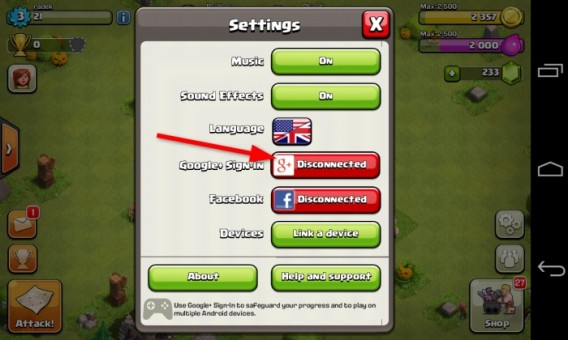
Start the account synchronization process from iOS to Android by opening Settings, in the bottom right hand corner of the screen.
2. Connect with Google+
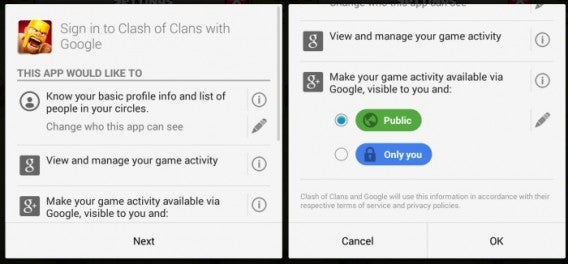
To load a Clash of Clans game on your Android device that’s saved on your iPhone or iPad, you must link your account to Google+. Click on the ‘Disconnected’ button beside Google+ Sign-In and, if necessary, sign in.
3. Select Privacy Settings
Once opened, scroll down the page and select the privacy options. You can choose to keep your game activity private or make it publicly visible to those in your Google+ circles.
4. Configure your Android device
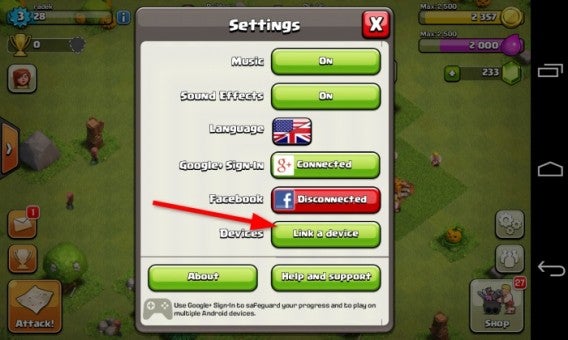
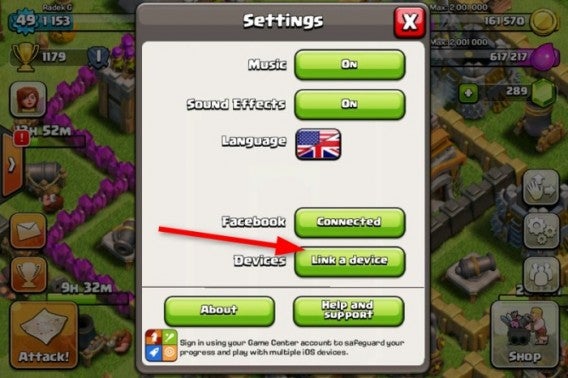
The next step is connecting devices. Once you’re back in Settings, click on Devices and then click ‘Link a device’.
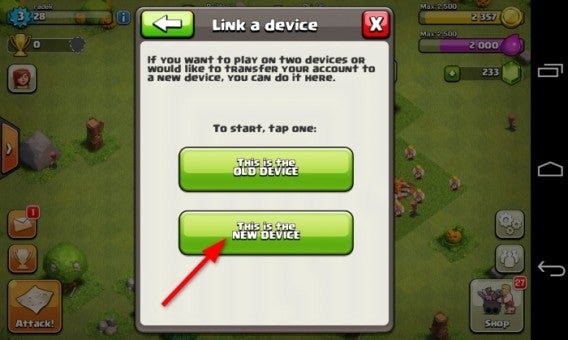
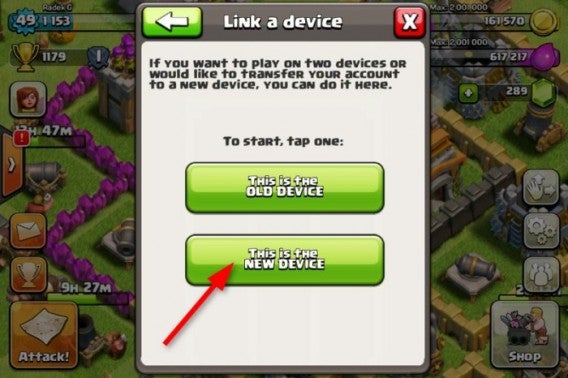
On the next screen, select ‘This is the NEW DEVICE’.
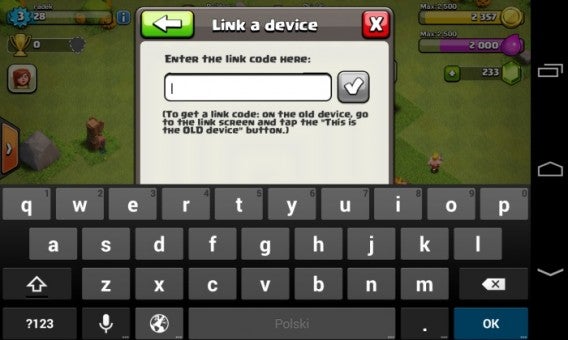
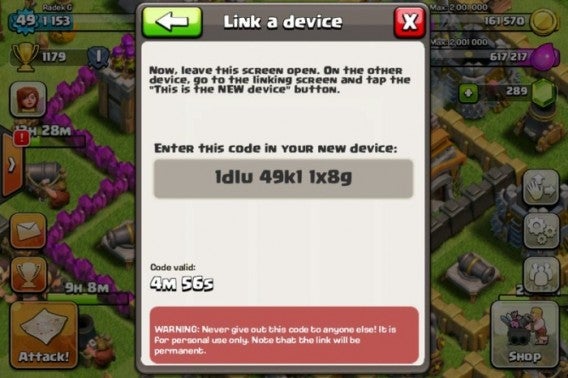
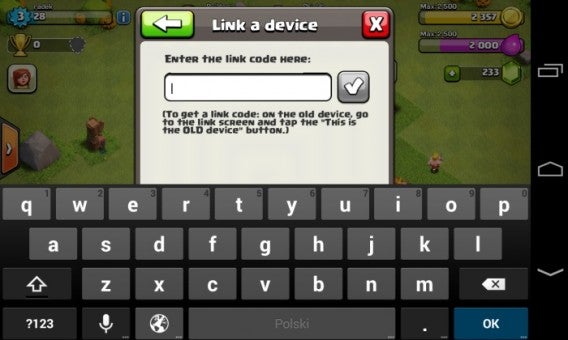
At this point, you’ll be asked to enter a code. You’ll need to get this code from your iOS device, so leave this screen open on your Android phone or tablet.
5. Configure your iOS device
Open Clash of Clans on your iPhone or iPad. Again, go to the settings menu by accessing the icon in the bottom right hand corner of the screen. Select Devices and then ‘Link a device’.
Once again, click on ‘This is the NEW DEVICE’.
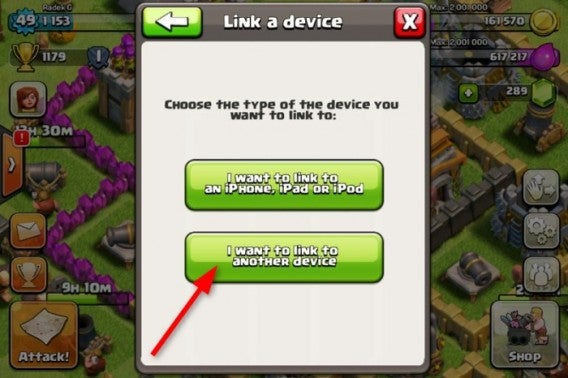
On the next screen, click ‘I want to link to another device’.
6. Generate the connection code
Clash of Clans on your iOS device will generate a unique code that you’ll need to input in the window you’ve left open on your Android device.
7. Enter the code on your Android device
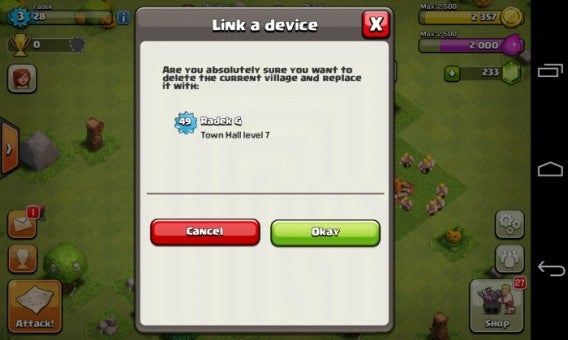
Once you enter the code on Android, you only have five minutes before the code becomes invalid. Note: as the disclaimer warns, the link will be permanent.
8. Ready!
Once you’ve entered the code correctly, your iOS game will sync with your Android device. Click ‘Okay’, and your saved Clash of Clans game will be ready to play on Android!
The game will automatically sync between both devices so that you can play on either device, just not at the same time!
Clash of Clans has had great success on iOS. We’ll see if the Android version is as successful, but in the meantime, you can enjoy your hard work and progress on either your iOS and Android device!
Clash of Clans, the popular free to play combat strategy game for iOS has been released for Android. The game syncs across platforms, so you can continue your game on either.
Clash of Clans makes you build a village, and make sure it has everything you might need for fighting goblins and other clans, and defending yours. Construction, resource management and fighting and the basis of the game. You can join clans online, and share troops and resources.
You can purchase in game items, but the freemium model is really well implemented and doesn’t get in the way of your fun. It is also possible to disable in app purchases, which is great news for parents nervous about kids racking up huge bills!