2014 World Cup: Softonic editors go head-to-head in a FIFA 14 final [video]

The way this year’s 2014 World Cup has been going, it’s almost impossible to guess who’ll win the tournament in Brazil, although that doesn’t mean we haven’t tried guessing. Of course, being Softonic, we predicted the results of the game the best way we could: playing FIFA 14.

Recreating (or maybe forecasting) the final between Germany and Argentina, four of our Softonic editors, including two from both Argentina and Germany, went head to head to see who could win the World Cup trophy, at least in virtual reality. Is it the Germans with veteran Klose and golden-boy Müller, or the passionate Argentinians with powerhouse and world’s best player Messi?

We can’t predict what’ll happen on Sunday, but we certainly had a winner in the Softonic World Cup. Check out the video below to see who it was and whether our not-so-scientific predictions can hold up on Sunday.

Default player


brightcove.createExperiences();

If you still haven’t taken advantage of social media this World Cup, take a look at our tips for following all the action of the 2014 World Cup in Brazil on Twitter.

FIFA 14 mobile updated with World Cup content

FIFA 14 for mobile has been updated with content for the 2014 World Cup 2014 in Brazil. The update for the free mobile soccer game from EA Sports is now available on iOS, Android, and Windows Phone.

The update includes official national teams and jerseys, the ability to play with the Adidas Brazuca, the official soccer ball of the tournament, and Matches of the Week from some of the most memorable qualifiers of the last two years. Once the tournament kicks off on June 12, new games will be added to the Match of the Week as the tournament progresses.

FIFA 14 Mobile(Source)

As a reminder, the the 2014 World Cup in Brazil will take place between June 12th and July 13th.

Follow Zuzanna on Twitter @suzieblaszQwicz

RELATED ARTICLES:

FIFA 14 for iPhone, iPad & Android: The controls

FIFA comes to iPad and Android in a new edition focusing on tactics. The latest edition uses a new, unique touch control that takes a little practice. Let’s review the basics that’ll help lead your team to victory.

Note: You can revert to the conventional mode of control (virtual joystick + buttons) at any time – this option can be accessed from the game menu.

Controlling a player

fifa 14 mobile

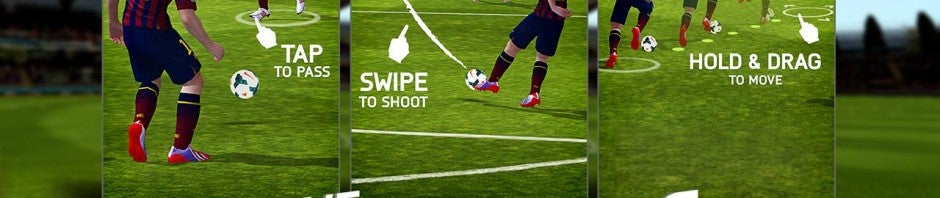
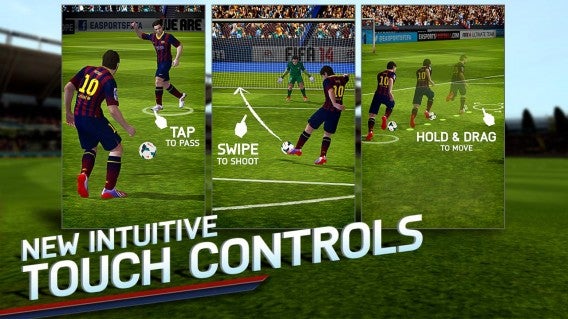
To control the player, hold your finger down until a white circle appears around their feet. Then drag your finger in the desired direction, i.e. where you want the player to go.

Attacking

fifa-14-mobile

When you’re in possession of the ball, tap another player to make a pass and slide your finger anywhere on the screen to shoot at goal.

Defending

In the defensive phase, tapping on whoever has the ball will guide your player in their direction, while pressing shift will let you tackle.

Sprinting

To make the selected player sprint, tap your finger anywhere on the screen. This is very handy for outrunning a defender or getting closer to the action. To directly control a player and sprint at the same time, you need to move your finger in the desired direction (see Controlling a player) and then tap the screen with another finger to accelerate.

Shooting

fifa-14-mobile

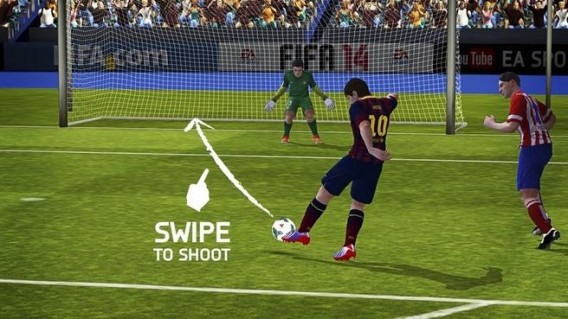
To shoot accurately, swipe your finger from your attacker to the desired area of the goal. The longer and faster you slide your finger, the more powerful your shot will be. For more accurate shots keep to short movements. Finally, a curved movement will have the same effect on your shot.

Pressing

To press a player who’s in possession, tap him when he’s close to one of your players. Make sure to remember to make your players sprint for more explosive bursts.

Get the goalie out of goal

fifa 14 mobile

To get the goalkeeper out of goal, hold your finger down until a white circle appears around him. Then move your finger in the direction you want him to go.

Clearing the ball/making a long pass

In order to clear the ball, drag your finger in the direction of the opposing team. If a teammate is nearby, he’ll recover the ball.

Losing hard-to-shift defenders

To lose a tricky defender, hold your finger down until a white circle forms around him. Then move your finger in the direction you want to direct him.

Tackling

When your players aren’t in possession of the ball, a swipe in any direction allows them to make a sliding tackle.

Hopefully you now know enough to play your first match! It’s up to you win though!

What are your winning tactics for FIFA 14?

You might also like …

Via: Softonic FR

FIFA 14 finesse shots and headers too effective

Many people have noticed that goals in FIFA 14 from finesse shots and headers from corners and crosses are really common, and EA has now said it will re-balance the gameplay in an update soon.

The gameplay issues identified are:

• The effectiveness of headers from corner kicks and crosses.
• The effectiveness of finesse shots.
• The accuracy of lofted through-balls.

EA promises to make some changed to these areas soon, which could result in more realistic match results.

Unlike PES 2014, FIFA 14 is still a really fast soccer game. Player strength is supposed to be able to dictate the pace of a game – the new Protect the Ball feature is designed so you can block other players while running with the ball to keep possession. This should mean strong players can keep the pace of a game down, but it’s not really the case.

Have you played the FIFA 14 demo yet? It’s no revolution for the series, but an excellent incremental improvement over FIFA 13. Check out the Windows demo here.

Read more about FIFA 14.

[Source: EA FIFA Forums]

FIFA 14 for Android and iOS goes free-to-play, out now

Electronic Art’s popular soccer game is out now on Android and iOS as a free-to-play game. The mobile version of FIFA 14 has been rolling out slowly across the globe but it should be available to all at the time of this writing.

FIFA 14 for mobile includes over 16,000 of your favorite soccer stars and over 600 different teams. There are 34 stadiums for you to play in 33 different leagues. This is all very impressive for a free-to-play mobile game but there is a catch: the game is a whopping 1.3GB. Make sure your battery is full and connect to Wi-Fi before installing the massive game.

fifa 14 controls

As FIFA 14 for mobile is free-to-play, expect a ton of in-app purchases to drain your wallet. You can pay for additional game modes like Manager and Tournament as well in-game currency, which allows you to speed things up in the game.


RELATED STORIES


Download FIFA 14 for Android and iOS

[Source: Android Police]

FIFA 14 leagues and clubs officially announced

EA has announced the official list of leagues and clubs you’ll find in FIFA 14, released tomorrow in North America on PC, PlayStation 3 and Xbox 360. There are an impressive 33 licensed leagues, more than 600 clubs and over 16,000 players in the game.

There are no big surprises, although some fans will no doubt be disappointed with the exclusion of the Turkish Super Lig, although Galatasaray is included. EA say it wasn’t possible this year, but perhaps next year once the ‘next gen’ of consoles is established, we’ll see that and much more.

See the full list of leagues below, and check the FIFA site here to make sure your team is included.

Americas

  • Mexico Liga MX
  • USA Major League Soccer
  • Liga Argentina
  • Liga do Brasil
  • Campeonato Nacional Petrobras
  • Colombia Liga Postobón

Europe

  • Austrian Bundesliga
  • Belgium Pro League
  • Denmark Superliga
  • England Premier League
  • England League Championship
  • England League One
  • England League Two
  • France Ligue 1
  • France Ligue 2
  • Germany 1. Bundesliga
  • Germany 2. Bundesliga
  • Holland Eredivisie
  • Italy Serie A
  • Italy Serie B
  • Norway Tippeligaen
  • Poland T-Mobile Ekstraklasa
  • Portugal Liga ZON SAGRES
  • Rep. Ireland Airtricity League
  • Russia Premier League
  • Scotland Premier League
  • Spain Primera Division
  • Spain Segunda A
  • Sweden Allsvenskan
  • Switzerland Super League

Asia

  • Hyundai A-League
  • Korea K League Classic
  • Saudi Abdul Latif Jameel League

There are also 46 international teams and 15 other teams from the rest of the world, including Galatasaray SK and Rangers.

[Source: EA Sports]

    FIFA 14 Soccer for iOS released in New Zealand

    With just over a week before the PC and console launch of FIFA 14, EA have released the iOS version of the soccer game. Currently FIFA 14 for iOS is only available in New Zealand, but we don’t know if it will roll out to other regions today, or is being tested in New Zealand, which is an increasingly common practice.

    Much like Real Racing 3, EA have opted to make FIFA 14 on iOS free to play. This freemium model means you’ll probably need to make in game purchases to progress in the game. With Real Racing 3, the freemium model met a great deal of criticism in the media, but it seems users were very happy with it.

    FIFA 14 for iOS features over 600 teams, 33 divisions, and more than 16,000 players.

    One difference with FIFA 14 is that you can buy a ‘fully unlocked’ version of the game for $5.99, which adds Kickoff, Tournament and Manager modes. Whether you choose to pay or not, FIFA 14 is a huge download, at 1.16GB, so make sure you have space on your device!

    When companies get freemium right, it can make games more accessible and popular, but if it feels unfair or unreasonably expensive, gamers are unsurprisingly offended. EA’s football game Madden NFL 25 for iOS was really unpopular with users who complained that rewards for playing well were far too small, forcing you to pay for in game currency.

    If EA are testing FIFA 14 early in New Zealand, it could be that the freemium model is being tested and tweaked before the game is rolled out to the whole world.

    FIFA 14 is currently available for iOS in the New Zealand iTunes Store, with no announcements regarding an Android release date.

    The Softonic Minute: iOS 7, Steam, FIFA 14 and Facebook

    iOS 7 finally announces its launch date, Steam lets your share games, FIFA 14 launches its demo, and Facebook expands its services to let you add professional skills. Check out this week’s biggest news stories in The Softonic Minute.

    Default player


    brightcove.createExperiences();

    Facebook becomes your newest resume. The most popular social network now lets you include your professional skills on your profile page. Facebook has clearly gotten inspiration from LinkedIn by entering the working world, with plans to become the most complete social network. Will you use Facebook as a resume?

    Steam lets you share games. Steam is ten years old, and to celebrate, it announces a new feature: Unique Family Sharing. This feature, which is now in beta testing, lets you share your entire library of games with family and friends. Up to 10 devices can access your catalog, with your permission of course!

    FIFA 14 launches its demo. The demo finally lets you play sample games from the latest version of the soccer game from EA Sports. The demo includes renowned teams like FC Barcelona, Boca Juniors and Manchester City. FIFA 14 will be released on September 24th in the US and the 27th in the UK.

    iOS 7 has a definitive launch date. iOS 7 will officially be available on September 18 for iPhone, iPad and iPod touch, a week after the Gold Master edition was released to developers. The arrival of the operating system will be rounded out with the addition of free iWork and other Apple applications for new devices. The hacker community claims to have the jailbreak in advance.

    Check out all of our past Softonic Minutes here.

    FIFA 14: the pros and cons

    We played the new soccer sim from Electronic Arts and share our first impressions below.

    After analyzing PES 2014, it’s now time to evaluate the pros and cons of FIFA 14, the favorite again this year in the long-running battle between Pro Evolution Soccer and FIFA. Who will win the battle of the 2013/2014 season? The choice is in your hands…

    Graphics and sound

    If you thought that FIFA 13 was technically superior, FIFA 14 takes things to a whole new level. Unfortunately, the PC version can’t take advantage of the much-heralded new Ignite engine, which improves graphics and takes the faces, movements, and animations of the players closer and closer to reality.

    The expressions of the players during celebrations, and the way they move, are faithful to their real-life counterparts. You can see the effect of Pure Shot immediately since it replaces “steps” with a smooth-looking shot.

    Most of the innovations are for those who are already familiar with previous versions of the game but some of the goodies, like sound effects when you kick the ball or when it hits the post, are small details appreciated by anyone who is a fan of the sport.


    EA has spoken at length about Ignite, the new graphics engine for FIFA 14 on next-gen consoles (PS4 and Xbox One). For older generation consoles and the PC, unfortunately, the decision was made to use the same graphics engine as the previous version. EA says conversion of the engine would be difficult because of the architecture of the next-gen consoles. As a result, the visual and audio improvements are pretty marginal. I would have expected something more since, their key rival, PES 2014, has just released one of its best versions yet.

    Gameplay

    I was impressed by the new FIFA 14 gameplay. I was expecting some improvements, but they’ve surpassed my all of my expectations. First of all, the animations have an impressive fluidity to them and direction changes are less abrupt and more harmonious. Players move in a realistic way, like the real champions they represent. The new Precision Movement feature does a great job of recreating the dynamic movement of real-world players. In short, everything seems to be modeled and animated with great care.

    FIFA 13 was criticized by many, and rightly so, for game speed, which many found to be excessive. EA has listened to the feedback from its users and FIFA 14 imposes a slower, more reasonable pace of play which allows for better setup of plays.

    The defensive side of the game is much-improved. The one-on-one play is incredibly realistic. Players have the intelligence to break down defenses by creating space for themselves and separation from defenders. You’ll see that attacking players will watch the backline to avoid being caught offside before breaking free for a pass or through ball. Attackers will now also perform checked runs to confuse defenders.
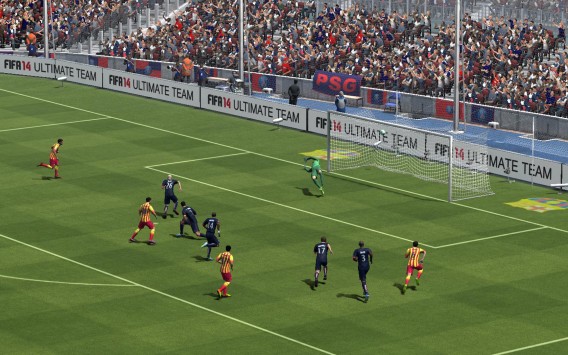
    Even tactics development has improved. The slower pace of the game encourages players who like to play more with ball possession. And long passes are more precise, aided by the new ball physics that allows trajectories to appear very realistic. We haven’t even mentioned the shooting: while in FIFA 13, ways to score were more or less the same, in FIFA 14 everything has changed. Pure Shot actually allows you to set the power and direction of your shot with a precision and variety not possible in previous versions.

    Not only that, but attackers are now able to better coordinate their moves, looking for the best angle or proper timing to shoot. Best of all, kicks are now bona fide spectacular.

    I’m still thinking about the goal you scored a while back, Daniel – it was a beautiful kick that went just inside the post. A real treat for the eyes. I’m sure the volley will be the most appreciated feature by many gamers in this version of FIFA.
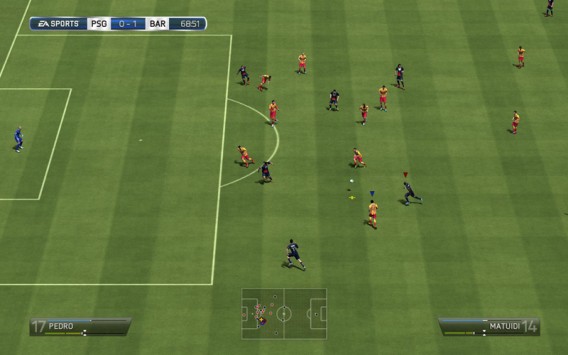
    When we’re talking about gameplay changes, it’s true that the list is long and clearly the improvements are numerous and more realistic, especially when compared to FIFA 13 which was fun but gameplay was too fast.

    But if we’re talking about casual players, would they give the same answer? I doubt it. In fact, I think that the gameplay improvements are finishing touches that only longtime fans can appreciate.

    Do you remember the first version of the Impact Engine? Notwithstanding improvements, it seems that EA has been asleep at the wheel…or rather, on the field, given the advantage Pro Evolution Soccer 2014 has over its competitor.

    Interface and menus

    In previous versions, FIFA neglected usability when it came to the navigability of menus. In FIFA 14, the settings are the same as before, but are now accessible via an innovative tiled appearance, inspired by Windows 8 aesthetics.

    The new Home screen is very user-friendly and it’s easy to find everything you need. Not only that, now you can find explanations in the menus that explain terminology and gameplay. This is a real breakthrough for beginners, letting them learn how to play and catch up to the more experienced players.

    The new menus and design are a feast for the eyes and a masterpiece of usability. There are other things I think are worth mentioning too. For example, have you noticed the menus for settings, training, and tactics? They’re all exactly the same as before. Given the redesign, I would have expected some changes there as well. In particular, I would have modified the tactics editor, which has been unchanged for years and isn’t as good as the one in PES 2014.

    The final judgment, however, is up to you. What are your impressions after trying the new FIFA 14?

    Original article published on Softonic IT.
    Download the FIFA 14 PC demo now

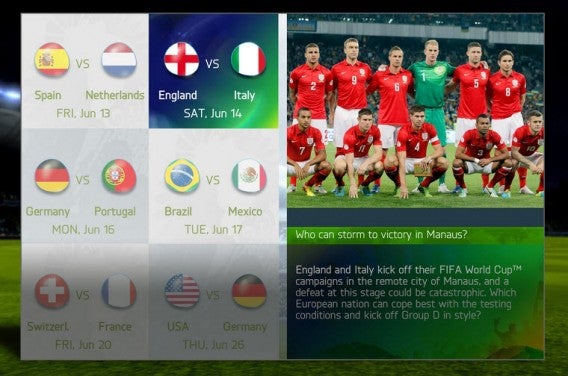
    The demo for FIFA 14 is available for PC now. Download it here. EA’s soccer franchise has a raft of new features, including new leagues, better animations and more realistic ball control.

    We took a look at the game back in June, so why not check out our hands-on preview below while you wait for the demo to download. As usual with EA releases, you need to have their Origin app to download and play the game, but it’s free to download and register.

    While PC gamers can get their hands on the FIFA 14 demo right away, Konami are not releasing the PC demo for PES 2014 until the game comes out on September 20th.

    FIFA 14 is released on September 24th.