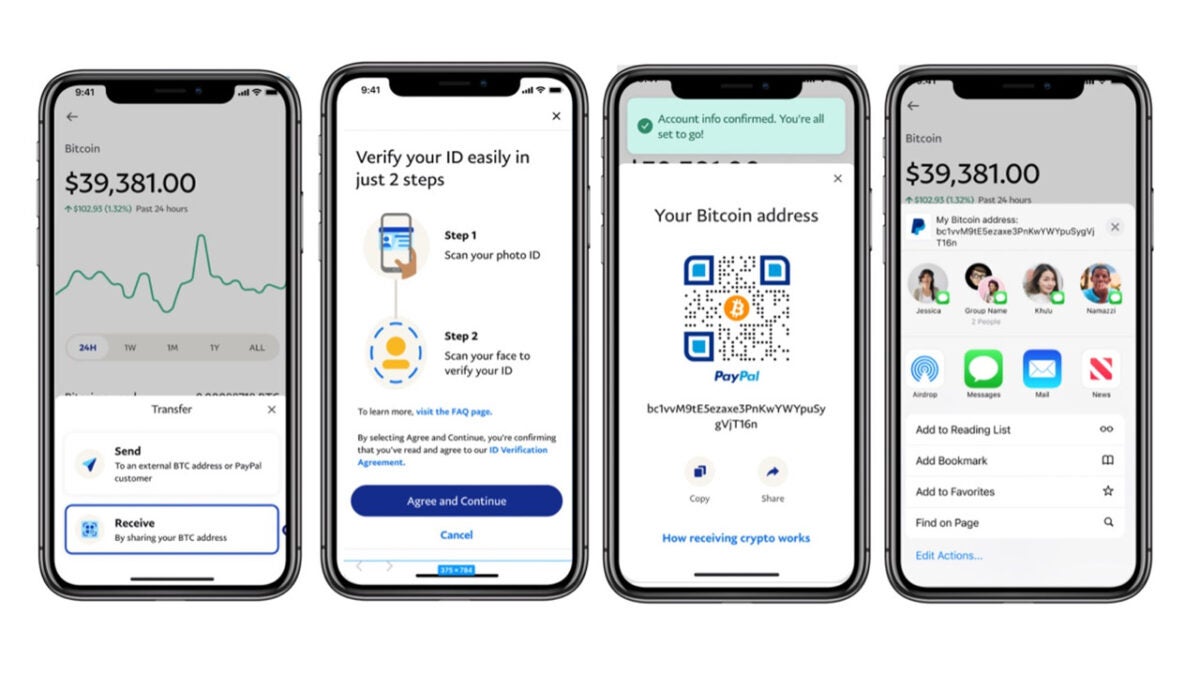
If you have a PayPal account, you now have a fully functional crypto wallet

PayPal has been around for decades and is one of the original FinTech companies. The company is still going strong though and is one of the biggest digital finance services on the web. To stay on top for so long though is not easy and requires constant innovation to move with the times. This latest report follows along this track, with PayPal announcing that it is going all-in on cryptocurrency.

PayPal Download Now

PayPal users in countries like the US and the UK have enjoyed certain cryptocurrency features for a while now. They have been able to buy, sell, and hold cryptocurrencies and even pay for things using some of the most prominent cryptocurrencies. Now, however, PayPal is adding some crucial functionalities to that list of features by allowing users to send and receive cryptocurrencies from other users and third-party exchanges.

This new move in essence makes PayPal a fully functioning crypto wallet akin to something like Metamask. The update will work for PayPal users in the US for Bitcoin, Ethereum, Bitcoin Cash, and Litecoin. This means that as well as allowing users to fully immerse themselves in all things crypto, PayPal is also now a key that users can use to access Web3 and all the new possibilities that come with it.

In the PayPal blog post announcing the move PayPal’s Senior Vice President and General Manager for Blockchain, Crypto & Digital Currencies, Jose Fernandez da Ponte said:

“Allowing PayPal customers the flexibility to move their crypto assets (Bitcoin, Ethereum, Bitcoin Cash, or Litecoin) into, outside of, and within our PayPal platform reflects the continuing evolution of our best-in-class platform and enables customers to interact with the broader crypto ecosystem. […] and we will continue to roll out additional crypto features, products, and services in the months ahead.”

This move from PayPal opens up a whole host of possibilities for anybody who has a PayPal account and creates a new pathway for people to enter crypto, Web3, and the metaverse. If you are thinking about getting involved in the world of crypto or are already there, you should beware of these phishing scams targeting major crypto websites.
How to link a bank account in PayPal

paypal

PayPal is an easy and safe way to purchase things online. Make it even faster by linking your bank account to your PayPal account. In a couple of steps and a couple of days, you can easily pay for items online via your bank.

How to link a bank account in PayPal

To get started, head over to PayPal and sign in. Click “Wallet” at the top of the screen.

paypal menu

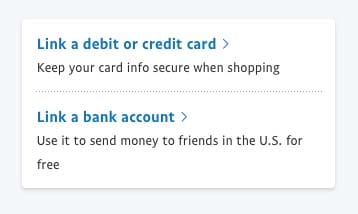
Here you can “Link a debit or credit card” or “Link a bank account.” In this case, we’ll click the bank option.

paypal link

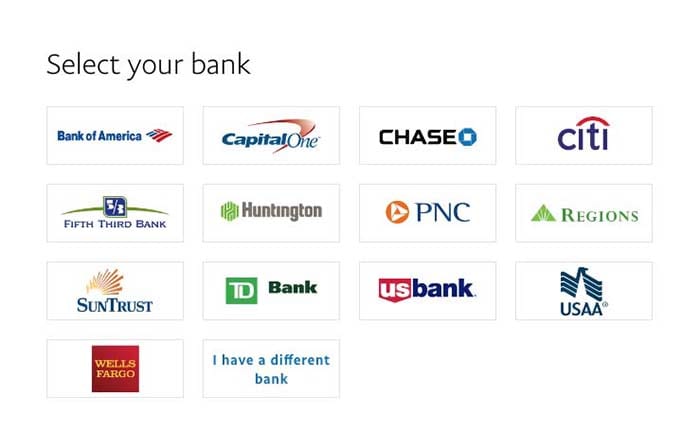
Now, choose your bank from the list:

paypal banksIs your bank missing? Click “I have a different bank” if you don’t see yours listed. If that’s the case, enter in your routing and bank account number at the prompt to connect your bank and PayPal.
If your bank is on the list, choose it. Some banks will let you instantly connect by using your bank login information. You would use your user ID and the password for your online bank account, not your PayPal login information, for instant confirmation.

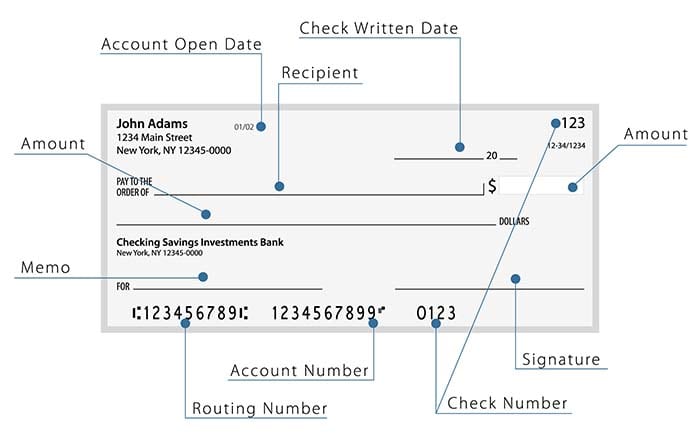
Otherwise, select “Checking” or “Savings,” and enter in your account number and your bank’s routing number. If you have a check lying around, here’s where to find those numbers:

check image

The routing number contains nine numbers. Double check the numbers you entered. Then, select “Agree and Link.”

In a couple of days, take a look at your bank statement. You should find two small deposit amounts that range between $.01-$.99. Then, you will see a third amount that has added the numbers and withdrawn it. To connect your bank and PayPal, you must enter in the two deposit amounts.

If your bank has only deposited one lump sum from PayPal, you will need to call PayPal to confirm the information or you can turn to instant confirmation and input your info.

If you have two separate deposit amounts, click on “Wallet” at the top of the PayPal page. Choose the bank you want to confirm. Next, carefully enter the exact amount deposited into your account. Submit the information.

Is your bank confirmed? If not, PayPal shares a few things to keep in mind when linking accounts.

  • The bank account must be a U.S. bank.
  • The bank account can’t be linked to more than one account at a time.
  • The bank account can’t be linked if it has already been linked to 3 previous PayPal accounts.
  • The name on the bank account must match the name on the PayPal account.

Your accounts, connected

Connecting your bank account to PayPal is a simple way to streamline your online shopping. There’s no reason not to get your accounts connected.

Battle of the cash apps: Square Cash vs. PayPal

PayPal or Square Cash? Which is the best way to settle up after last night’s pizza party?

For many small businesses and even just personal exchanges, PayPal is a program that’s used pretty frequently. Despite its popularity, it’s not always the best choice when making personal transactions. There are a few other free money transfer applications that essentially do the same thing as PayPal but with less work involved. The best of these is by far: Square Cash.

What is Square Cash

Square Cash (or Cash App) is a free mobile app for transferring money between users. The transactions are fast and simple, and function off of a user created screenname called a $cashtag.

Like PayPal, Square Cash links directly to your debit (or credit) card in order to access your immediate funds. It essentially works like a mobile app version of your debit card. You can even get a Cash Card to use funds in the app, if you want to limit the amount you spend with it.

Why use Square Cash over PayPal

The main benefit of Square Cash is the speed and simplicity of the transaction. While both apps function similarly and offer similar forms of payment, Square Cash transactions are instant, and feature a much shorter wait time when transfering to your bank account.

This makes the Cash App perfect for personal exchanges. Maybe you’re out to dinner with some friends and you pay with your card, with the intention of your friends paying you back. The Cash App can make this return payment instant. If these types of exchanges happen frequently, then PayPal is not going to be a great option considering the time it takes to use it.

Square Cash Free Download
10

When not to use Square Cash over PayPal

Despite having the benefit of instant transactions, there are some times where Square Cash isn’t the best choice. Primarily when making international exchanges. Unfortunately, Square Cash is only available to U.S. residents. As such, if you’re going to make international payments, then PayPal is one of your better options.

PayPal Free Download
8

Other alternatives

Venmo is the main competitor of both, as it fits somewhere in the middle ground between the two. It features faster and simpler transactions than PayPal, but still more complex and slower transactions then Square Cash. All three apps are completely free to use, and each has their own benefits. While PayPal is still a great option for some, you may want to look into getting Square Cash if you’re frequently sending money between friends.