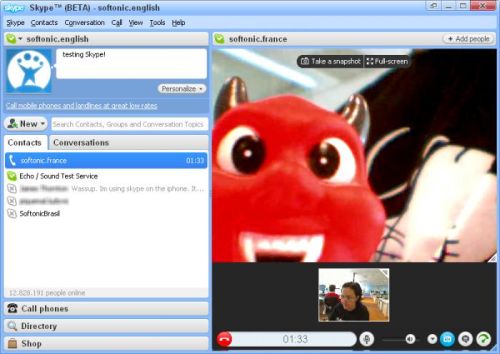

Bring Windows Live Messenger back from the dead with Messenger Reviver 2

messenger reviver 2Microsoft discontinued Windows Live Messenger on April 8th, 2013, frustrating many loyal users. The company offered little solace for users, transitioning them to the Skype app, which is completely different from Live Messenger. Just look at the comments on our blog to read the backlash.

But there’s good news; you can bring Messenger back from the dead with Messenger Reviver 2. The app supports Windows Live Messenger 2012, 2011, and 2009 and can modify installations to continue working. If you’ve already upgraded to Skype, this app will help you install either Messenger 2012 or 2009 without the need to download the apps themselves.

To use the app, simply download it, unzip the files, and run it. There will be a simple dialog box with a “Start” button. If you have Messenger installed, the process is completely automated and will patch the installation. If you don’t have Messenger or Windows Essentials 2012 installed, you have the option to install either Windows Live Messenger 2009 or 2012 in the language of your choice.
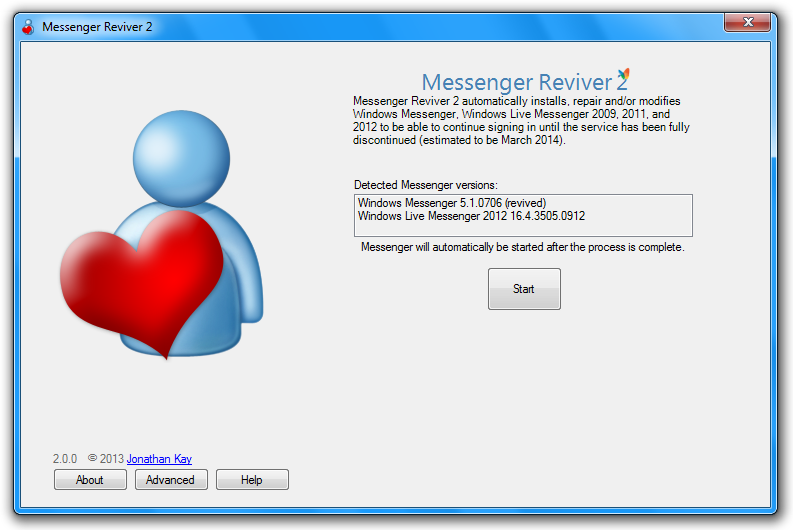
messenger reviver 2

There are advanced settings that allow users to do a new install of Messenger or to repair an existing installation.

System requirements for Messenger Reviver 2 are as follows:

  • Operating systems: Windows XP, Windows Vista, Windows 7, or Windows 8
  • .NET Framework 2.0 or higher (version 3.5 or 4.0 is recommended)

While it’s nice that Messenger fans can continue using this product, be aware that Microsoft will no longer support the app so it’s only a matter of time until Messenger becomes incompatible with newer versions of Windows.

You can download Messenger Reviver 2 here.

Source: Messenger Geek

Alternatives to Windows Live Messenger

Windows Live Messenger’s demise is nearing, which means Microsoft will push Skype as the native Windows messaging on April 8, 2013. Even though you can import your contacts into Skype, many users are still unhappy about being forced to use Skype because of its limited features compared to Windows Live Messenger.

Many people prefer Windows Live Messenger because it is the default instant messaging client in Windows but there are a lot of good alternatives. Even though Messenger includes features like sharing photos and videos and customization options, the client itself is rather limited. While you can chat with friends on other services, connecting to other services isn’t as streamlined as it could be.

Now with the use of the cloud to collaborate on documents, photo sharing, and productivity, Windows Live Messenger presents itself as something from the past. Nowadays, having a separate client isn’t really necessary as many sites have included chat services and apps that aren’t limited to Windows.

If you still need an instant messaging service to use to communicate with friends, there are a lot of options if you move away from Windows Live Messenger.

Continue reading “Alternatives to Windows Live Messenger”

Bypass the Windows Live Messenger 2009 forced upgrade

The release of Windows Live Messenger 2011 was met with an overwhelming amount of negative reactions. Many users chose to stick with the tried and true older version of the popular messaging program as a result. Windows Live Messenger 2009 users encountered an unwelcome surprise a few days ago though, when logging into the messaging service.

Upon login, Windows Live Messenger 2009 now displays a popup box, informing users that a newer version of the program was available that must be installed in order to launch the program.

Not cool, Microsoft. Not cool at all. Continue reading “Bypass the Windows Live Messenger 2009 forced upgrade”

5 Alternatives to Windows Live Messenger

The latest version of Windows Live Messenger has gotten mixed reception from users. Judging by the number of comments on Elena’s tutorial about how to uninstall Windows Live Messenger 2011, a lot of users aren’t thrilled with the changes!

You can always follow Elena’s tutorial to downgrade to Windows Live Messenger 2009, but you’ve got other options as well. In fact, there are quite a few alternative programs you can use that’ll let you chat with your friends online. Some of them even give you the experience of chatting with Live Messenger without the hassle of actually having to install it!

Here are five chat programs you can try out if you want to give Windows Live Messenger the boot. Continue reading “5 Alternatives to Windows Live Messenger”

Uninstall Windows Live Messenger with Revo Uninstaller

A while back, we showed you how to uninstall Windows Live Messenger 2011. However, if you are are still having problems uninstalling it or finding that components are left behind, there is another solution.

Here is a very simple step-by-step guide about how to completely uninstall Windows Live Messenger 2011 using Revo Uninstaller. Note that this method works for any version of Windows Live Messenger although older versions may not be listed on your system as “Windows Live Essentials”.

Continue reading “Uninstall Windows Live Messenger with Revo Uninstaller”

How to: Uninstall Windows Live Messenger 2011

Judging by the user comments I’ve read in the program’s review and blog post, I’d say Windows Live Messenger 2011 hasn’t been very successful among users. Whether the problem is the integration with Facebook or the new “social” interface, I can’t tell. What I know for sure is that many people want to get rid of it and go back to a previous, lighter and more friendly version of Live Messenger. So here’s a short tutorial I wrote on how to downgrade to Windows Live Messenger 2009 in just a few easy steps.

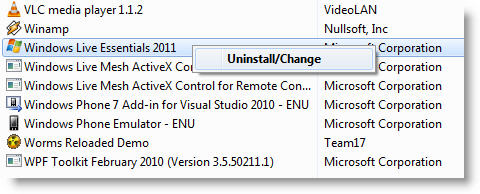
1. First of all, you need to remove Windows Live Messenger from your computer. Go to Control Panel > Programs and Features, scroll down to Windows Live Essentials 2011, right click on it and start the uninstalling wizard.

Uninstall Windows Live Messenger 2011

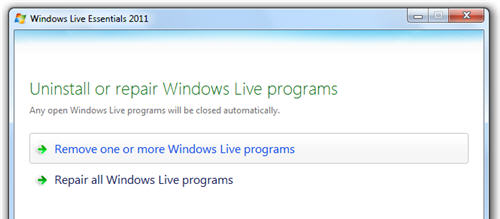
2. In the first screen of the wizard, select the “Remove one or more Windows Live programs”.

Uninstall Windows Live Messenger 2011

Continue reading “How to: Uninstall Windows Live Messenger 2011”

New features in Windows Live Messenger 2010

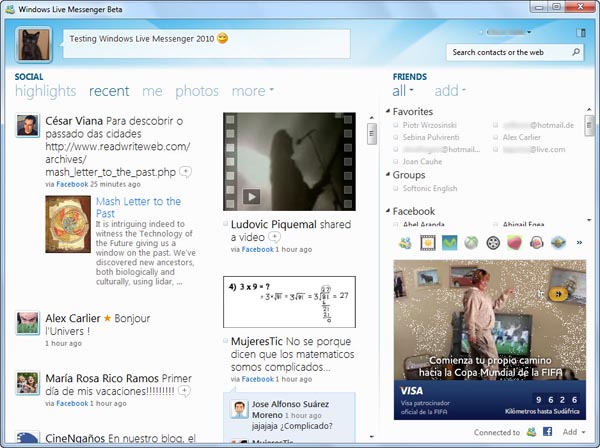
Windows Live Messenger 2010 is finally here. The long-awaited new version of Microsoft’s chat client was launched a couple of days ago, featuring a load of new features: redesigned interface, new emoticons, easier photo sharing…

New features in Windows Live Messenger 2010

But if there’s one thing that characterizes this new version of Windows Live Messenger, that’s its integration with Facebook and other social networks and online services. The lack of connectivity with social sites was an issue in Microsoft’s instant messenger, especially as other IM clients (such as Yahoo! Messenger, ICQ, Trillian or Nimbuzz, to name a few) were already hooked up to the big social networks.

Continue reading “New features in Windows Live Messenger 2010”

Windows Live Messenger for iPhone – first pictures

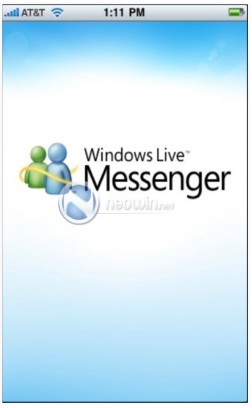
Windows Live for iPhoneThe new Windows Live Messenger for iPhone seems to be taking shape nicely, if these first screenshots are anything to go by. The images, released by Neowin.net, show the user interface of the new IM client, which is due for release as a public beta in June. The app will also include the brand new Windows Live Wave 4.
The user interface of Windows Live Messenger on the iPhone (assuming the screenshots are genuine) appears to be very well structured. There are tabs for Social, Friends, Chats and Photos. It looks like it will be essentially be a social networking hub a la the Facebook app, with the IM client bolted on. The Messenger client should support file transfers (or at least photo transfers) and it seems the traditional sky blue color scheme of Windows Live Messenger will be retained.

Watch this space for more details about Windows Live Messenger. Oh, and thanks to OnSoftware France for the tip-off.

(More images after the jump)

Continue reading “Windows Live Messenger for iPhone – first pictures”

Windows Live Messenger 2010 Preview

A beta version of the next Windows Live suite has leaked to torrent sites and, as eager as we always are to test new software, we couldn’t help downloading it and giving it  a try. It seems that the new Windows Live Messenger will be the star of the suite again, though Microsoft has also given an important role to Facebook and social networks. So, would you like to know what the new Live Messenger 2010 looks like? Let’s take a look.

Windows Live Messenger 2010 Preview

Continue reading “Windows Live Messenger 2010 Preview”

Ask Onsoftware: Solving video problems in Windows Live Messenger

We’ve just had a plea in from OnSoftware reader for some help with a problem she’s having with Windows Live Messenger. Shirley writes:

I have MSN Messenger Live 8 (or it might be 8.5) and I have a problem when I try to do video chats with my granddaughter. Sometimes when we both can see each other, but others she will not be able to see me, even though I can see her. Do you have any suggestions for me on how to correct this problem?

This isn’t an uncommon problem, Shirley, and unfortunately there is no straight answer because the cause of the problem could be one of a number of things, related to your webcam hardware or software, or to Live Messenger. Here’s what I’d recommend you try to do, in chronological order, until you find the solution:

  1. Check your hardware – It might sound obvious but you should make sure that your webcam is plugged in correctly and switched on. You should be able to see the device from the ‘My Computer’ panel the Windows Start menu. If it’s not showing up then try reinstalling the driver software that came with your webcam.
  2. Update Live Messenger – It sounds like you’re using an old version of Windows Live Messenger there, Shirley. Download the latest build of the program from here and install it. It could be that there are some compatibility issues with the version your granddaughter is using.
  3. Try Trillian – If you’re still having no luck with the Live Messenger program, try switching to Trillian Astra instead. This is a free application that lets you make video conferences over a range of different instant messaging networks, including Windows Live. It’s a great program, and I find it a lot more streamlined than Live Messenger (note, that your granddaughter wouldn’t have to switch to using Trillian as well).
  4. Switch to Skype – If all else fails, you could always both switch to using Skype as your means of video chatting. The video features of Skype are second to none, and the call quality is excellent. This is the solution I always use for chatting with my friends – even with my buddies who I normally text chat with on Live!

Skype is a better option for video than Live Messenger