Evernote Restructures Operations: U.S. Layoffs Signal European Expansion Strategy

The situation at Evernote is going through turbulent times. After the news of 129 layoffs in February, it has now been revealed that Evernote will be letting go of nearly all its teams in the United States and Chile to focus its operations in Europe.

This development isn’t surprising considering the recent acquisition of Evernote by the Italian tech company Bending Spoons. With a strong determination to prioritize the European market, Bending Spoons has made the decision to part ways with a majority of the employees in the U.S. and Chile, while assembling a smaller team in Europe. The main reason behind this move is the financial sustainability of Evernote.

Evernote DOWNLOAD

Evernote’s bumpy road

Evernote has been a highly popular application in the last decade. During a time when content synchronization was still in its infancy, this application stood out. The ability to create notes that were accessible across multiple devices was a significant advancement, and although they were not the pioneers, they set a benchmark for the improvement of digital services.

However, we cannot rest on past success indefinitely. Evernote started to struggle against fierce competition and gradually lost a significant market share. Nowadays, there are numerous ways to enhance productivity, and the landscape has evolved significantly.

The market for productivity applications and services is highly competitive

Furthermore, controversial actions such as increasing their business pricing and past concerns about privacy placed the company in a challenging position. This led Evernote to be open to new buyers who could bring about a change in its business model.

Last November, the tech company Bending Spoons took over Evernote, resulting in the layoff of a significant number of employees in America. The plan is to establish a European office dedicated to Evernote’s services.

Today, Evernote faces fierce competition in a similar space, with rivals like Notion, Trello, Asana, and many others. They will need to work hard to regain their status as a leading application for productivity management and note synchronization.


How to save a web page to Evernote

Save that site and come back when you have more time.

Evernote

Have you ever stumbled upon a fantastic web page and wished you could save it? Well, in just a few easy steps you can do just that in the note-taking app Evernote. Just make sure you follow the instructions for your specific phone.

How to save a web page to Evernote

Saving a Web Page on iPhone

First, you will need to tap the iOS sharing button – it looks like a square with an arrow pointing up.

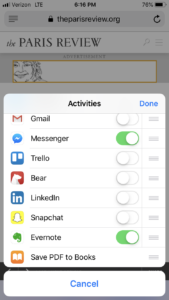
Once you’ve done that, tap the More button. This will allow you to edit your sharing options.

After you’ve done that, you can tap the Evernote switch to make it active. By tapping the switch, you’ll add Evernote as a sharing extension in the future. Once you’ve done so, tap the Done button to close the share options panel.

After you have closed the share options panel, Evernote will now appear in the list of apps your device can share to. If you want Evernote to appear higher up on that list, you can simply tap and drag Evernote to move it to the front of the list.

Just click the Evernote icon and the web page is clipped and shared to Evernote in the background. You have the option of selecting a notebook to save the clipped note to in Evernote.

Saving a Web Page on Android

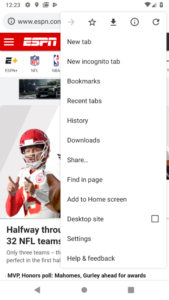
In your browser, select the Share… option from the options menu on your Android device. (If you’re having trouble finding the options menu on your Android, remember it is typically represented by three small vertical dots). Finally, you can select Evernote from the list of sharing options.

For Android, unless you choose otherwise, web pages will be saved as full articles to the default notebook. If you want to change the destination notebook, add tags, or save only the URL, tap the elephant button that appears after you share to Evernote.

Once you’ve added the share option to your device, saving a web page to Evernote is easier than ever!