Skip to content

Softonic English

Just another Softonic Sites site

The email attachment has gone down in history: an analysis of the new PDF Spaces from Acrobat Studio

As of today, we can find a plethora of organization programs and applications. Adobe has wanted to contribute its grain of sand to the productivity sector with PDF Spaces, a shared workspace focused on PDFs and other types of files. In fact, it is the ideal solution for all those users who have ever looked for collaboration tools centered on PDFs. It is more than just a shared space, like any cloud service: with PDF Spaces, several people (or yourself) can edit, comment, review instructions from different files, and have summaries generated by […]

As of today, we can find a plethora of organization programs and applications. Adobe has wanted to contribute its bit to the productivity sector with PDF Spaces, a shared workspace focused on PDFs and other types of files.

In fact, it is the ideal solution for all those users who have ever searched for collaboration tools focused on PDFs. It is more than just a shared space, like any cloud service: with PDF Spaces, multiple people (or yourself) can edit, comment, review instructions from different files, and have AI-generated summaries, all from one place. And here we will explain what it is and how it works.

Adobe Acrobat
Adobe Acrobat DOWNLOAD

What is PDF Spaces?

PDF Spaces is one of the most interesting new features of Adobe Acrobat that focuses entirely on productivity. Within PDF Spaces, you can gather several PDF files, documents, links, and notes in one place to read, analyze, comment on, summarize, and even share if you want.

However, it is much more than just a simple place to share files. PDF Spaces can analyze your PDFs and create text or audio summaries with generative artificial intelligence so you can quickly grasp the ideas of more complex texts. Additionally, you also have an AI Assistant at your disposal to ask your questions about the document and get instant answers.

How PDF Spaces Works

The easiest and most direct way for you to access PDF Spaces is by logging in to Adobe Acrobat from your trusted browser. Once you do that, you will see that section at the top of the page, right next to Home.
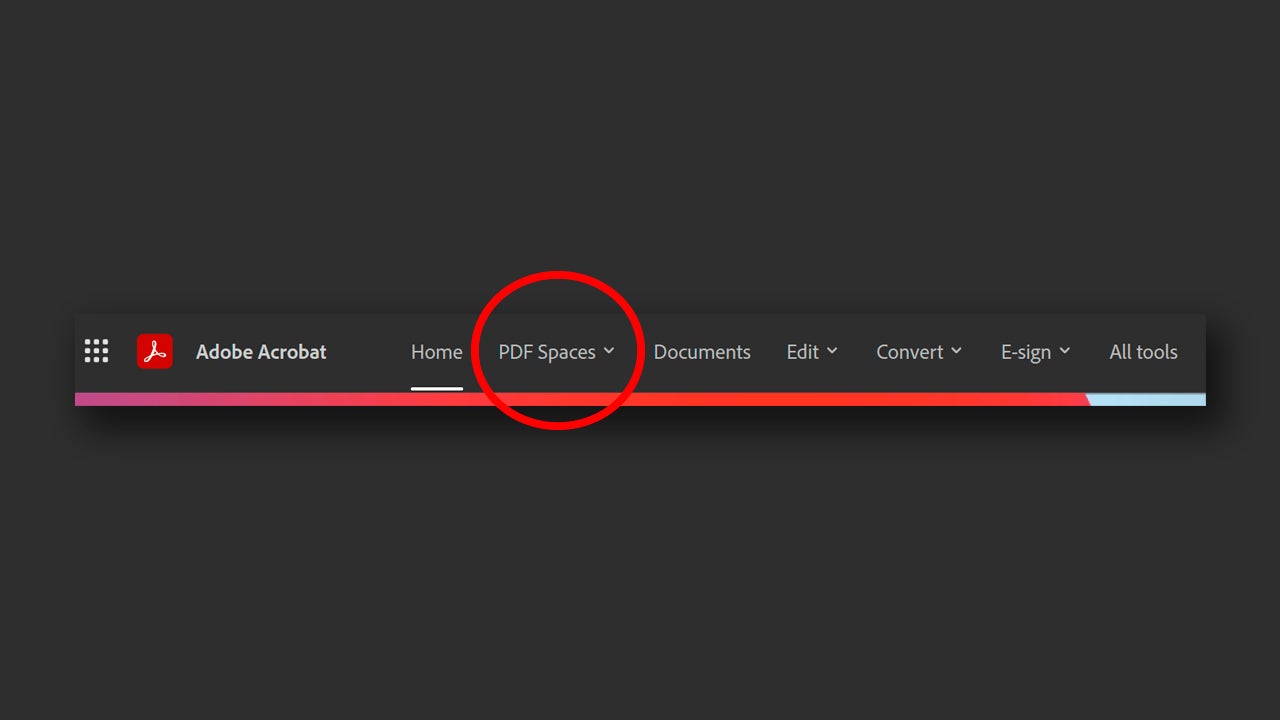
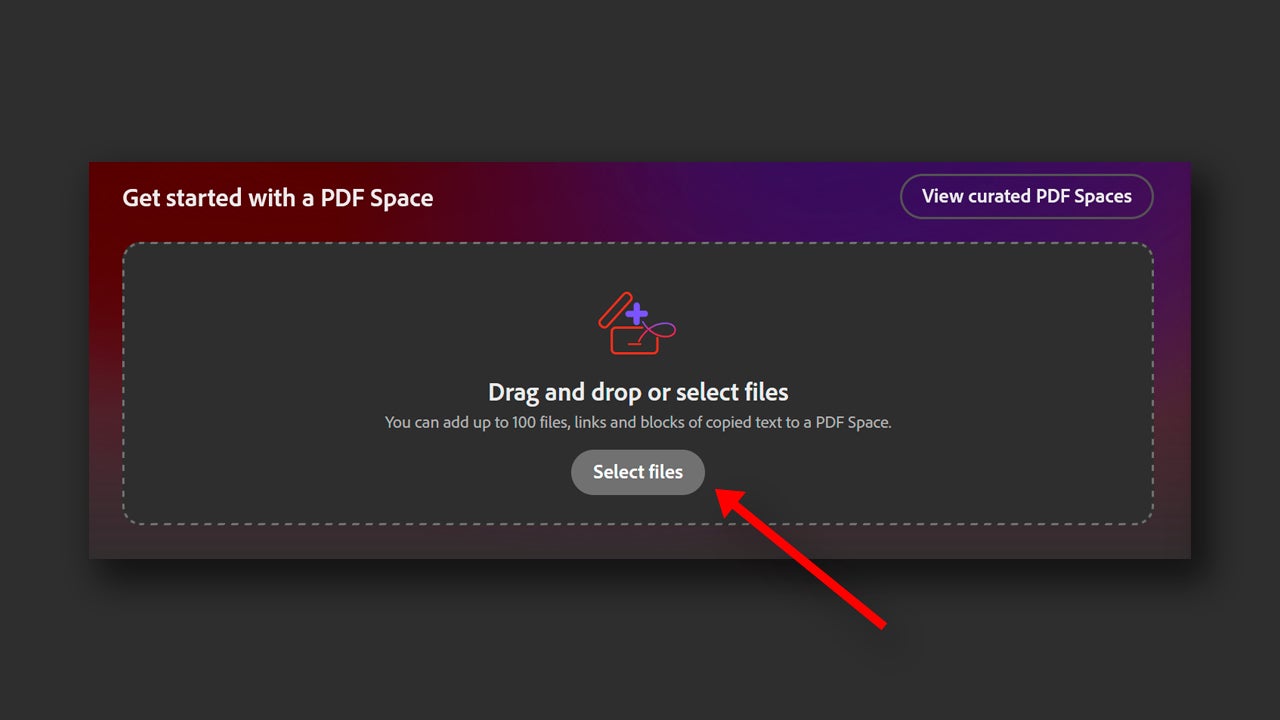
By clicking there, you will directly access the PDF Spaces panel. If you want to create your own space, start dragging files from your computer that you want to be part of it. On the other hand, you can also click on Select files and upload files from your PC. You have a third optional way, which is selecting PDF Spaces > Create a PDF Space.
Wait for the documents to load and you will see how they appear listed in the left panel. Further to the left, you will see a series of options for your space. The first, Overview, will help you quickly see what files you have uploaded and two summaries, one generated by written and the other by audio. On the right, you will always find your AI Assistant, to “whom” you can ask more specific questions.
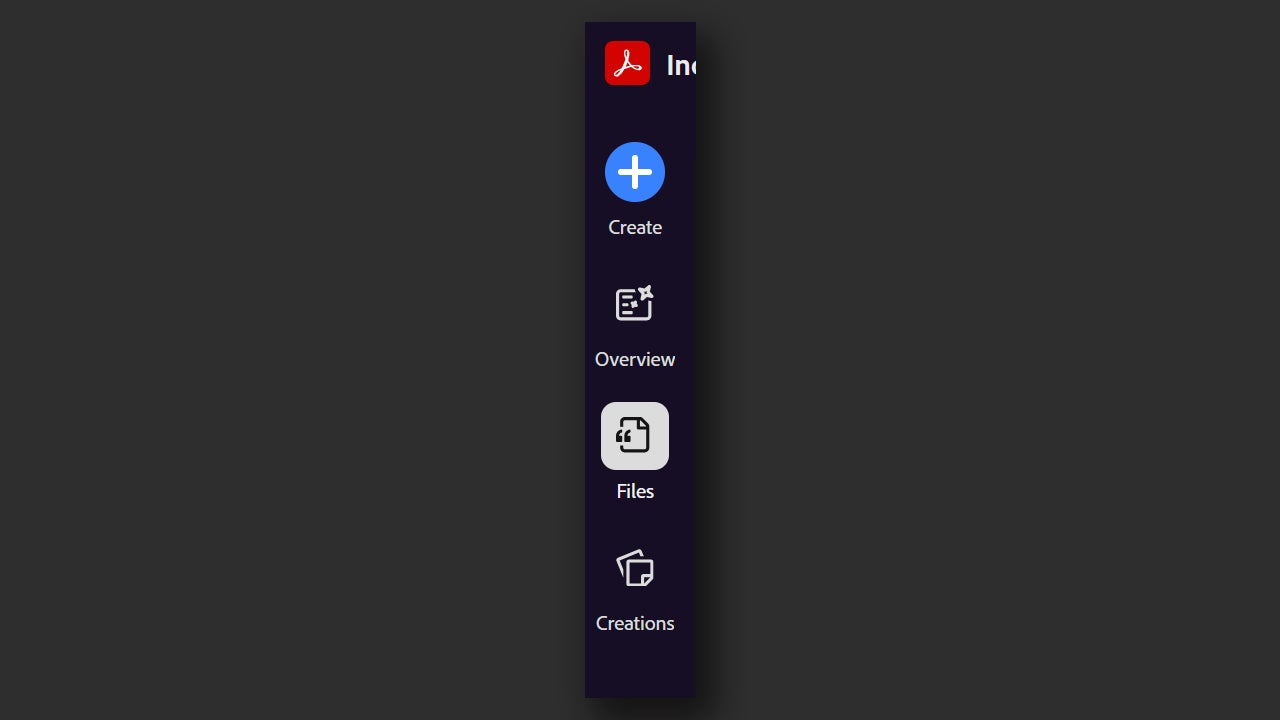
Then you have Files, which is for viewing the files directly, and finally, Creations. From Creations, you can access a podcast generated by Adobe that explains what you have in your Space and what the uploaded documents are about. They are very useful tools, especially if you work with files that are very dense or difficult to understand (legal documents, medical reports, etc.)

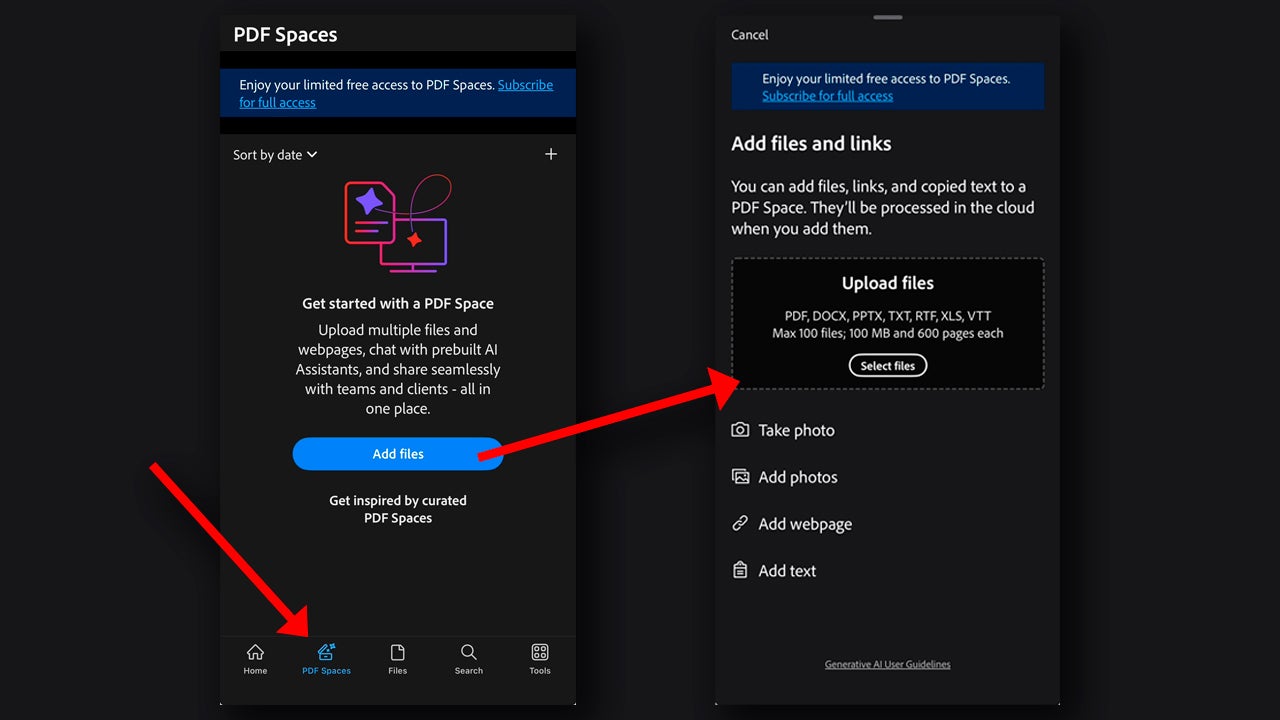
If you want to use PDF Spaces from your mobile, simply download the Adobe Acrobat app for iOS or Android and log in with your Adobe username and password. Then, tap on PDF Spaces, the button you will see below next to Home. Start by adding files from Add files, from here you can take photos, add web links, or upload your documents from your iPhone or the cloud.
AI Assistant, your virtual companion

At this point, we have our space created. Now, you can ask AI Assistant things like: “summarize the key points,” “compare these two documents,” “detect contradictions,” and more. Adobe explains that PDF Spaces allows you to know what the key points are, make more concrete summaries, and compare documents if necessary.
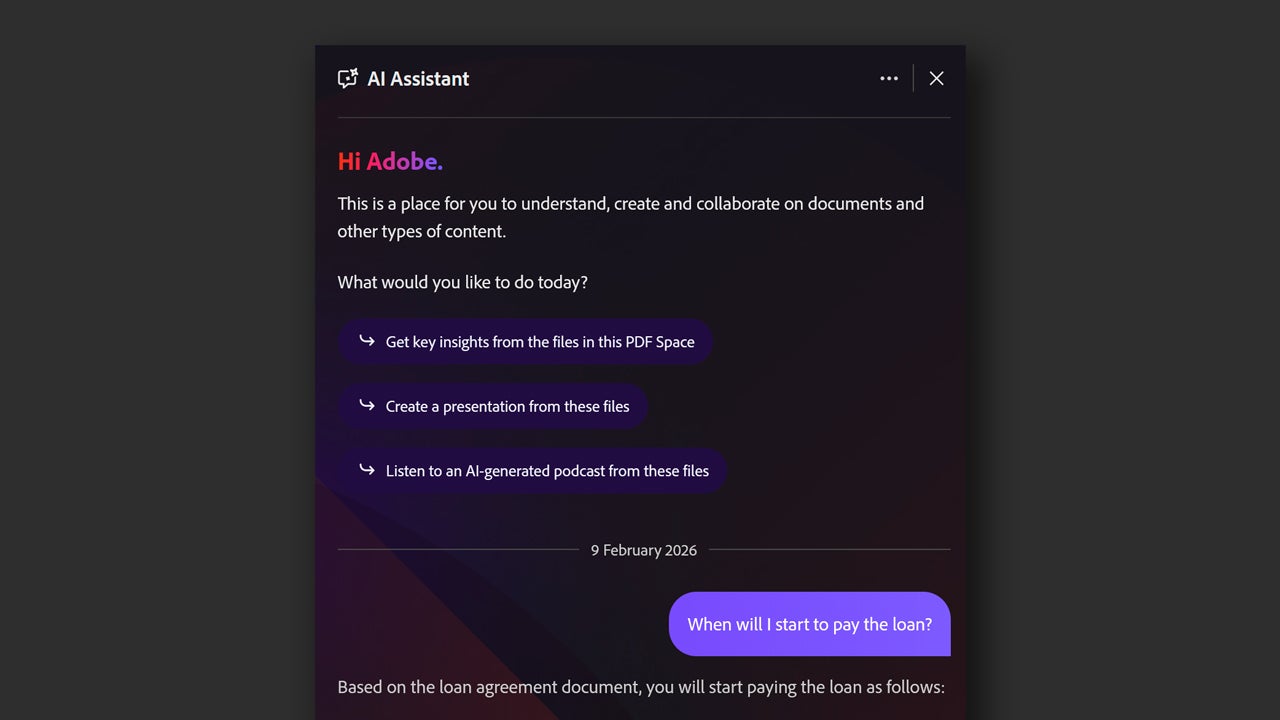
In this case, to make the most of AI Assistant, you should speak to it in a specific and concise manner. It will always be better to ask for a specific action, such as “make a table with agreements, responsible parties, and deadlines” than to ask it to tell you “what the important things are.” If you don’t do that, you are likely to get less optimal results and give the AI the opportunity to “hallucinate.”

When we talk about an AI hallucinating, we mean that it generates a fabricated response with data that is not found in the document. That is why it is important to formulate your questions well and sensibly.

Share your Space with others

You can share your space with other users from the Share button, located at the top right. Here you have several options: the first, is to write the emails of the users you want to share the space with. When you do this, you can assign them the permissions of Viewer to view files and notes, Reviewer to comment, and Contributor to add comments, files, or notes.
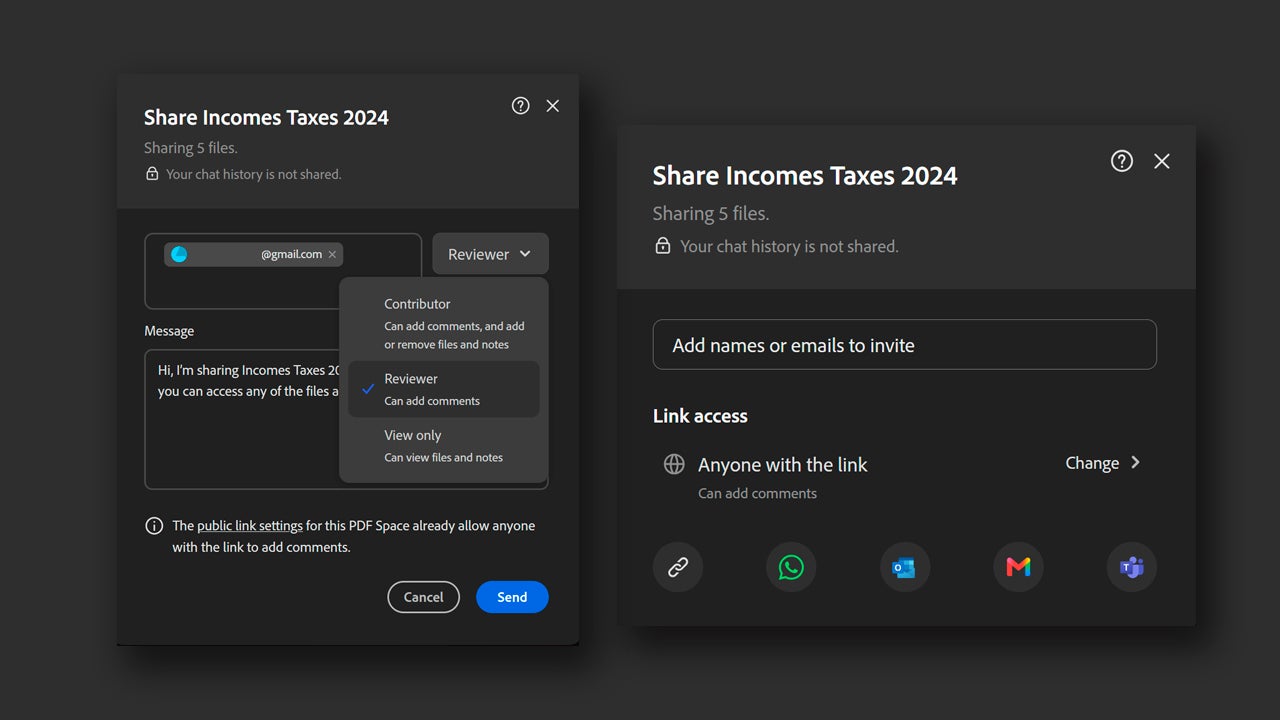
You can also control access by using an invitation or by creating a link for people in your company or the public. We don’t need to tell you that, for sensitive documents, it is wise to avoid public links by all means. To set who can view the link or not, configure it from Change.

How can I access PDF Spaces?

PDF Spaces is part of Adobe Acrobat and you can access it from the web or from your mobile (iOS and Android). To create your own spaces, you need to log in with an Adobe account; if you don’t have one yet, you can create it for free in just a few minutes.

Unfortunately, PDF Spaces is not free. The feature is available for users who are subscribed to Acrobat Studio or who have the AI Assistant add-on. However, you can try for free for 7 days the Acrobat plans, such as Acrobat Studio. Through the official Adobe website, you can access trials of their applications to help you decide if it’s worth it or not.

Adobe Acrobat
Adobe Acrobat DOWNLOAD

Author: María López

{ "de-DE": "Künstler aus Berufung und Technikliebhaber. Seit ich denken kann, habe ich gerne an allen möglichen Gadgets herumgebastelt.", "en-US": "Artist by vocation and technology lover. I have liked to tinker with all kinds of gadgets for as long as I can remember.", "es-ES": "Artista de vocación y amante de la tecnología. Me ha gustado cacharrear con todo tipo de gadgets desde que tengo uso de razón.", "fr-FR": "Artiste de vocation et amateur de technologie. J'aime bricoler avec toutes sortes de gadgets depuis que j'ai l'usage de la raison.", "it-IT": "", "ja-JP": "", "nl-NL": "", "pl-PL": "", "pt-BR": "", "social": { "email": "", "facebook": "", "twitter": "", "linkedin": "" } } View all posts by María López

Author María LópezPosted on July 9, 2026July 9, 2026Categories News

Post navigation

Previous Previous post: Claude Cowork comes to mobile and the web: what we can do with Anthropic’s agent
Next Next post: Red Dead Redemption 3 rumors heat up: Rockstar still hasn’t announced it

Recent Posts

  • Where to watch France vs Morocco for free: legal live options, channels, and kick-off time
  • AI image generators now create more convincing fakes: the old giveaways no longer work
  • The Matrix Reloaded returns to free streaming: Pluto TV comeback puts it back in the top 10
  • Arm, Intel and AMD update upcoming CPUs: a big boost for on-device assistants
  • Marvel Rivals adds Scarlet Witch’s Age of Ultron skin: it arrives July 31

Archives

  • July 2026
  • June 2026
  • May 2026
  • April 2026
  • March 2026
  • February 2026
  • January 2026
  • December 2025
  • November 2025
  • October 2025
  • September 2025
  • August 2025
  • July 2025
  • June 2025
  • May 2025
  • April 2025
  • March 2025
  • February 2025
  • January 2025
  • December 2024
  • November 2024
  • October 2024
  • September 2024
  • August 2024
  • July 2024
  • June 2024
  • May 2024
  • April 2024
  • March 2024
  • February 2024
  • January 2024
  • December 2023
  • November 2023
  • October 2023
  • September 2023
  • August 2023
  • July 2023
  • June 2023
  • May 2023
  • April 2023
  • March 2023
  • February 2023
  • January 2023
  • December 2022
  • November 2022
  • October 2022
  • September 2022
  • August 2022
  • July 2022
  • June 2022
  • May 2022
  • April 2022
  • March 2022
  • February 2022
  • January 2022
  • December 2021
  • November 2021
  • October 2021
  • September 2021
  • August 2021
  • July 2021
  • June 2021
  • May 2021
  • April 2021
  • March 2021
  • February 2021
  • January 2021
  • December 2020
  • November 2020
  • October 2020
  • September 2020
  • August 2020
  • July 2020
  • June 2020
  • May 2020
  • April 2020
  • March 2020
  • February 2020
  • January 2020
  • December 2019
  • November 2019
  • October 2019
  • September 2019
  • August 2019
  • July 2019
  • June 2019
  • May 2019
  • April 2019
  • March 2019
  • February 2019
  • January 2019
  • December 2018
  • November 2018
  • October 2018
  • September 2018
  • August 2018
  • July 2018
  • June 2018
  • May 2018
  • April 2018
  • March 2018
  • February 2018
  • January 2018
  • December 2017
  • November 2017
  • October 2017
  • September 2017
  • August 2017
  • July 2017
  • June 2017
  • May 2017
  • April 2017
  • March 2017
  • February 2017
  • January 2017
  • December 2016
  • November 2016
  • October 2016
  • September 2016
  • August 2016
  • July 2016
  • June 2016
  • May 2016
  • April 2016
  • March 2016
  • February 2016
  • January 2016
  • December 2015
  • November 2015
  • October 2015
  • September 2015
  • August 2015
  • July 2015
  • June 2015
  • May 2015
  • April 2015
  • March 2015
  • February 2015
  • January 2015
  • December 2014
  • November 2014
  • October 2014
  • September 2014
  • August 2014
  • July 2014
  • June 2014
  • May 2014
  • April 2014
  • March 2014
  • February 2014
  • January 2014
  • December 2013
  • November 2013
  • October 2013
  • September 2013
  • August 2013
  • July 2013
  • June 2013
  • May 2013
  • April 2013
  • March 2013
  • February 2013
  • January 2013
  • December 2012
  • November 2012
  • October 2012
  • September 2012
  • August 2012
  • July 2012
  • June 2012
  • May 2012
  • April 2012
  • March 2012
  • February 2012
  • January 2012
  • December 2011
  • November 2011
  • October 2011
  • September 2011
  • August 2011
  • July 2011
  • June 2011
  • May 2011
  • April 2011
  • March 2011
  • February 2011
  • January 2011
  • December 2010
  • November 2010
  • October 2010
  • September 2010
  • August 2010
  • July 2010
  • June 2010
  • May 2010
  • April 2010
  • March 2010
  • February 2010
  • January 2010
  • December 2009
  • November 2009
  • October 2009
  • September 2009
  • August 2009
  • July 2009
  • June 2009
  • May 2009
  • April 2009
  • March 2009
  • February 2009
  • January 2009
  • December 2008
  • November 2008
  • October 2008
  • September 2008
  • August 2008
  • July 2008
  • June 2008
  • May 2008
  • April 2008
  • March 2008
  • February 2008
  • January 2008
  • December 2007
  • November 2007
  • October 2007
  • September 2007
  • August 2007
  • July 2007
  • June 2007
  • May 2007
  • April 2007
  • March 2007
  • February 2007
  • January 2007
  • December 2006
  • November 2006
  • September 2006
  • August 2006
  • June 2006
  • May 2006
  • July 2001
  • January 2001
  • November 2000
  • September 2000
  • August 2000
  • July 2000
  • April 2000
  • March 2000

Categories

  • Affiliate post
  • Expert Review
  • Gaming
  • Guides
  • How to
  • Legacy how To
  • News
  • Noticias
  • Software>Security
  • Sponsored
  • Trucos y Consejos
  • Uncategorized
  • Windows software

Meta

  • Log in
  • Entries feed
  • Comments feed
  • WordPress.org
Softonic English Proudly powered by WordPress