Skip to content

Softonic English

Just another Softonic Sites site

Use cases for Acrobat AI beyond PDF editing

The general public has always associated the name Adobe with photo editing (the well-known Photoshop) or PDFs with Adobe Acrobat. However, few know that, currently, Adobe Acrobat is capable of much more than editing and opening PDFs. The revolution of generative AI has led Adobe Acrobat to integrate a new tool, AI Assistant. As you can imagine from its name, this assistant has completely transformed the Adobe program into a powerful file management tool. If you want to know exactly what AI Assistant is and […]

The general public has always associated the name Adobe with photo editing (the well-known Photoshop) or PDFs with Adobe Acrobat. However, few know that, currently, Adobe Acrobat is capable of much more than just editing and opening PDFs.

The revolution of generative AI has led Adobe Acrobat to integrate a new tool, AI Assistant. As you can imagine from its name, this assistant has completely transformed Adobe’s program into a powerful file management tool.

If you want to know what AI Assistant is exactly and how you can make the most of it, keep reading a little further down.

Adobe AI Assistant
Adobe AI Assistant DOWNLOAD

Why PDF editing is only part of the story

It doesn’t matter if you are a large company, a freelancer, or an individual: it is very likely that you have had to deal with many PDFs in your work. The problem, in most cases, usually lies in the information of the PDFs; it is almost never clear, and you have to spend a lot of time gathering the most important details.

Reviewing documentation involves a lot of reading time, a time we almost never have. AI Assistant can help you manage that time; instead of searching for data manually, AI helps you locate it in a contextualized way.

If you are working with the PC version of Adobe Acrobat, open your PDF with Acrobat, just as you normally would. Then, go to the top right and click on the AI Assistant.
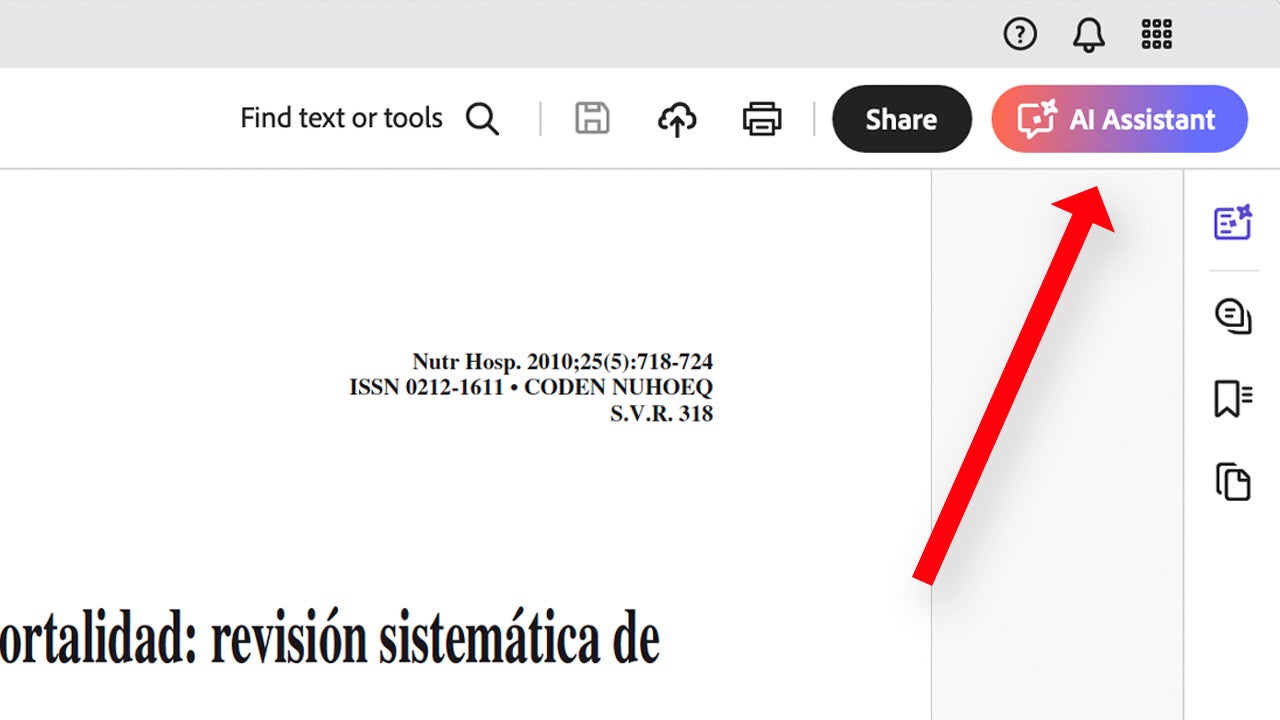
By clicking there, you will see several options, one of which is to “chat” with the assistant. From there, you can ask it specific questions. In addition to the application, you can also access Adobe Acrobat from any browser. Go online to Adobe Acrobat and upload your PDF there. From here, Acrobat offers you a series of free questions so you can try firsthand how AI Assistant works.
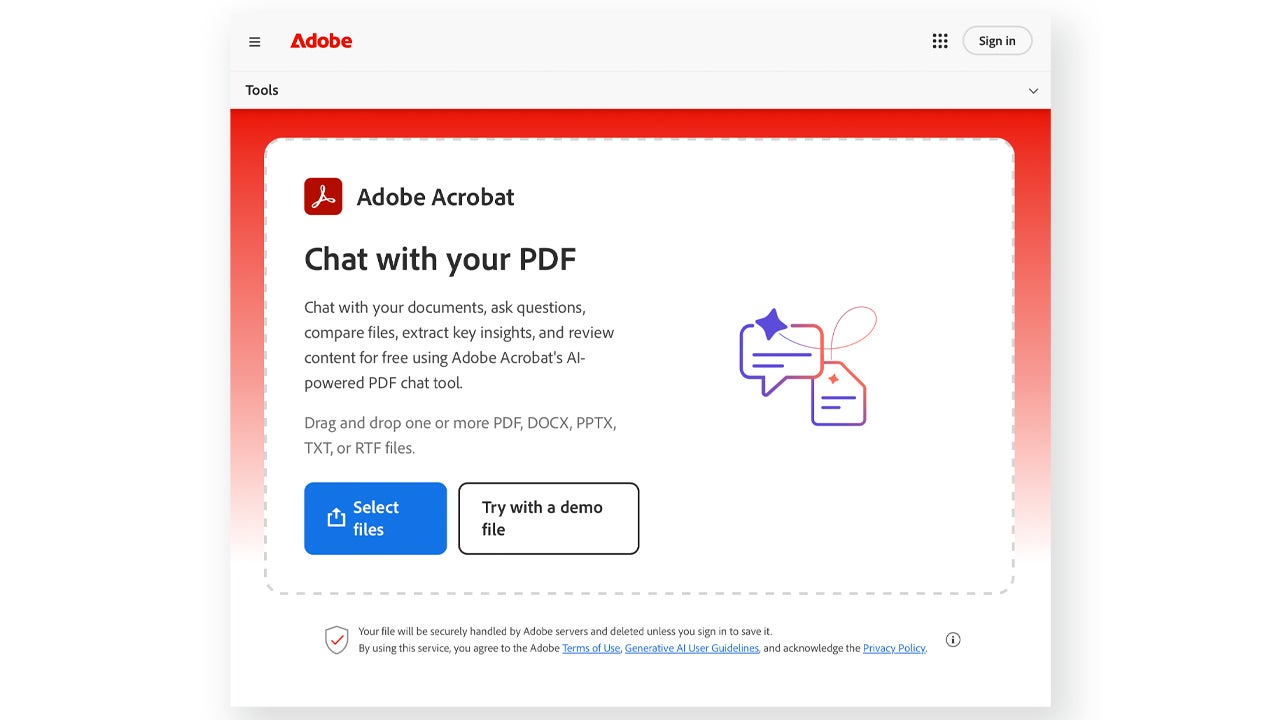
If you want to access more free questions, you would need to log in with an Adobe account or pay for a subscription, something we will discuss later.

What the Acrobat AI Assistant Allows

Don’t get it wrong, AI Assistant does not replace your brain to analyze information; it simply helps you get to that information faster. To do this, you can generate summaries (AI Summary) of longer or convoluted documents to save time.

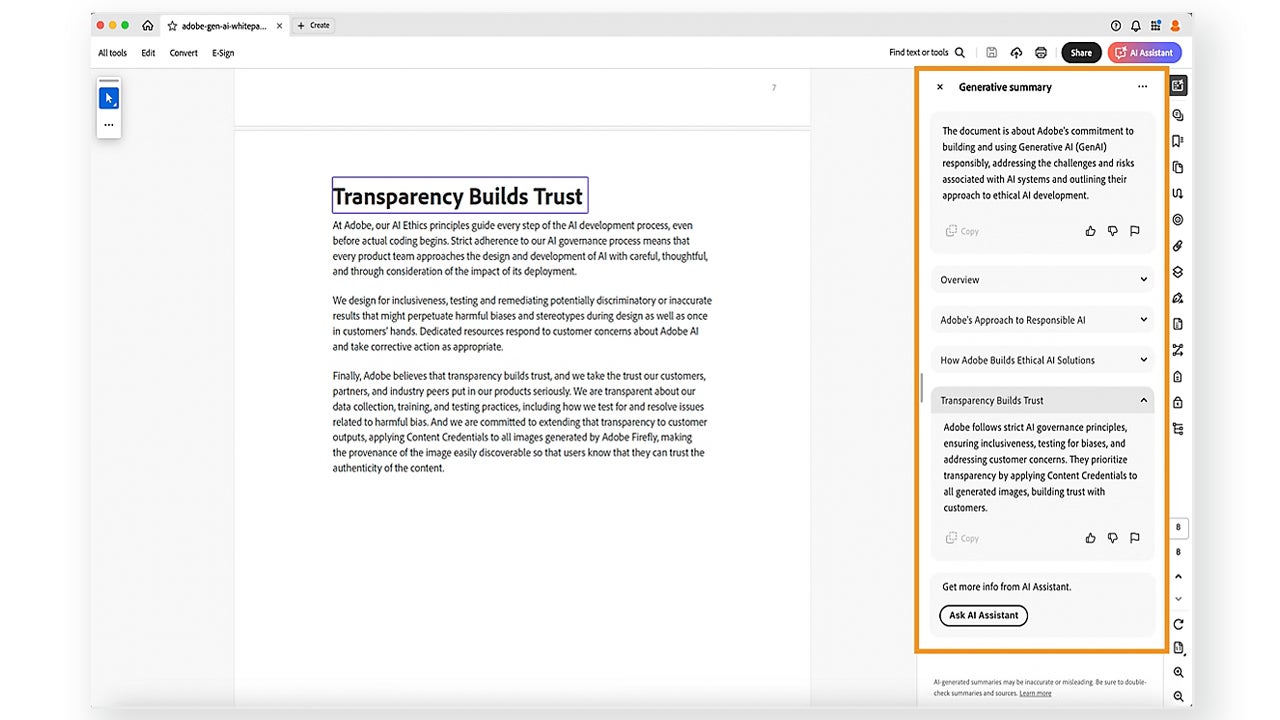
As before, you can access the AI Summary feature from the same AI Assistant button. Alternatively, you can also select All tools > Generative summary.

If prompted, select Get Started. Next, you will see how a summary with the key points of the document is generated in real time. From the summary itself, you can also access the parts of the document from which the information was extracted.
Use cases beyond editing

In any job, having a fast response time is essential. However, analyzing extensive requests or technical documentation can lead to significant delays. With AI Assistant, it is possible to identify the essentials and extract the relevant information more quickly.

Reduction of manual labor across all teams

PDF Spaces is a feature designed for teams that need to organize their documents. It is not just about storing files, but about creating a structured environment where documents are grouped by project or teams.

To get started, we will need to access Acrobat in its web version. Click on PDF Spaces, you will find it on the main page, in the Tools tab on the left.

Next, drag from your PC to Archives the files you want to be in your PDF Space. Now that you have created your PDF Space, you can share it with other users from the Share button.

From here, you can add the emails of the people you want to invite to edit or view your PDF Space. From Link access you can configure permissions for external users.

How Acrobat AI Fits into Comprehensive Workflows

Adobe Acrobat does not work in isolation; its usefulness increases when it is part of a broader ecosystem of creation and collaboration tools. The information from your PDFs can be turned into presentations or serve as material for other types of visual content, such as what you can create with Adobe Express.

Adobe AI Assistant
Adobe AI Assistant DOWNLOAD

Author: María López

{ "de-DE": "Künstler aus Berufung und Technikliebhaber. Seit ich denken kann, habe ich gerne an allen möglichen Gadgets herumgebastelt.", "en-US": "Artist by vocation and technology lover. I have liked to tinker with all kinds of gadgets for as long as I can remember.", "es-ES": "Artista de vocación y amante de la tecnología. Me ha gustado cacharrear con todo tipo de gadgets desde que tengo uso de razón.", "fr-FR": "Artiste de vocation et amateur de technologie. J'aime bricoler avec toutes sortes de gadgets depuis que j'ai l'usage de la raison.", "it-IT": "", "ja-JP": "", "nl-NL": "", "pl-PL": "", "pt-BR": "", "social": { "email": "", "facebook": "", "twitter": "", "linkedin": "" } } View all posts by María López

Author María LópezPosted on February 27, 2026February 27, 2026Categories News

Post navigation

Previous Previous post: Finding the Right Visual Faster: How Adobe Stock Improves Creative Decision-Making
Next Next post: Star Wars has its own Top Gun in space, but it seems that Disney has forgotten about it

Recent Posts

  • At Insomniac they say we can breathe easy: Wolverine isn’t going to turn into a GTA 6
  • OpenAI still hasn’t launched ChatGPT 5.6, and the reason is Donald Trump
  • Apple changes plans: it cancels the professional M6 chip lineup and launches itself toward AI with the M7. What does it mean for future releases?
  • Kingdom Come: Deliverance 2 passes 6 million sales: 60% off on Steam
  • GTA 6 could cause PS5 and Xbox shortages this holiday: retailers warn

Archives

  • June 2026
  • May 2026
  • April 2026
  • March 2026
  • February 2026
  • January 2026
  • December 2025
  • November 2025
  • October 2025
  • September 2025
  • August 2025
  • July 2025
  • June 2025
  • May 2025
  • April 2025
  • March 2025
  • February 2025
  • January 2025
  • December 2024
  • November 2024
  • October 2024
  • September 2024
  • August 2024
  • July 2024
  • June 2024
  • May 2024
  • April 2024
  • March 2024
  • February 2024
  • January 2024
  • December 2023
  • November 2023
  • October 2023
  • September 2023
  • August 2023
  • July 2023
  • June 2023
  • May 2023
  • April 2023
  • March 2023
  • February 2023
  • January 2023
  • December 2022
  • November 2022
  • October 2022
  • September 2022
  • August 2022
  • July 2022
  • June 2022
  • May 2022
  • April 2022
  • March 2022
  • February 2022
  • January 2022
  • December 2021
  • November 2021
  • October 2021
  • September 2021
  • August 2021
  • July 2021
  • June 2021
  • May 2021
  • April 2021
  • March 2021
  • February 2021
  • January 2021
  • December 2020
  • November 2020
  • October 2020
  • September 2020
  • August 2020
  • July 2020
  • June 2020
  • May 2020
  • April 2020
  • March 2020
  • February 2020
  • January 2020
  • December 2019
  • November 2019
  • October 2019
  • September 2019
  • August 2019
  • July 2019
  • June 2019
  • May 2019
  • April 2019
  • March 2019
  • February 2019
  • January 2019
  • December 2018
  • November 2018
  • October 2018
  • September 2018
  • August 2018
  • July 2018
  • June 2018
  • May 2018
  • April 2018
  • March 2018
  • February 2018
  • January 2018
  • December 2017
  • November 2017
  • October 2017
  • September 2017
  • August 2017
  • July 2017
  • June 2017
  • May 2017
  • April 2017
  • March 2017
  • February 2017
  • January 2017
  • December 2016
  • November 2016
  • October 2016
  • September 2016
  • August 2016
  • July 2016
  • June 2016
  • May 2016
  • April 2016
  • March 2016
  • February 2016
  • January 2016
  • December 2015
  • November 2015
  • October 2015
  • September 2015
  • August 2015
  • July 2015
  • June 2015
  • May 2015
  • April 2015
  • March 2015
  • February 2015
  • January 2015
  • December 2014
  • November 2014
  • October 2014
  • September 2014
  • August 2014
  • July 2014
  • June 2014
  • May 2014
  • April 2014
  • March 2014
  • February 2014
  • January 2014
  • December 2013
  • November 2013
  • October 2013
  • September 2013
  • August 2013
  • July 2013
  • June 2013
  • May 2013
  • April 2013
  • March 2013
  • February 2013
  • January 2013
  • December 2012
  • November 2012
  • October 2012
  • September 2012
  • August 2012
  • July 2012
  • June 2012
  • May 2012
  • April 2012
  • March 2012
  • February 2012
  • January 2012
  • December 2011
  • November 2011
  • October 2011
  • September 2011
  • August 2011
  • July 2011
  • June 2011
  • May 2011
  • April 2011
  • March 2011
  • February 2011
  • January 2011
  • December 2010
  • November 2010
  • October 2010
  • September 2010
  • August 2010
  • July 2010
  • June 2010
  • May 2010
  • April 2010
  • March 2010
  • February 2010
  • January 2010
  • December 2009
  • November 2009
  • October 2009
  • September 2009
  • August 2009
  • July 2009
  • June 2009
  • May 2009
  • April 2009
  • March 2009
  • February 2009
  • January 2009
  • December 2008
  • November 2008
  • October 2008
  • September 2008
  • August 2008
  • July 2008
  • June 2008
  • May 2008
  • April 2008
  • March 2008
  • February 2008
  • January 2008
  • December 2007
  • November 2007
  • October 2007
  • September 2007
  • August 2007
  • July 2007
  • June 2007
  • May 2007
  • April 2007
  • March 2007
  • February 2007
  • January 2007
  • December 2006
  • November 2006
  • September 2006
  • August 2006
  • June 2006
  • May 2006
  • July 2001
  • January 2001
  • November 2000
  • September 2000
  • August 2000
  • July 2000
  • April 2000
  • March 2000

Categories

  • Affiliate post
  • Expert Review
  • Gaming
  • Guides
  • How to
  • Legacy how To
  • News
  • Noticias
  • Software>Security
  • Sponsored
  • Trucos y Consejos
  • Uncategorized
  • Windows software

Meta

  • Log in
  • Entries feed
  • Comments feed
  • WordPress.org
Softonic English Proudly powered by WordPress