Skip to content

Softonic English

Just another Softonic Sites site

Why do images edited with AI still require human touch-ups

Have you ever generated images with AI? If the answer is yes, it is very likely that the results were good, but with unconvincing details. It is not uncommon to see faces with strange pupils, extra fingers on hands, or people in odd positions. Although AI-generated images and videos have taken over the Internet, these generations still have significant issues with realism and context. Despite the good results they may yield on many occasions, the human touch is still necessary to create quality content, as we will see next. The […]

Have you ever generated images using AI? If the answer is yes, it is very likely that the results were good but with unconvincing details. It is not uncommon to see faces with strange pupils, extra fingers on hands, or people in awkward positions.

Although AI-generated images and videos have conquered the Internet, these generations still face significant problems of realism and context. Despite the good results they may yield on many occasions, human hands are still needed to create quality content, as we will see below.

Adobe Photoshop
Adobe Photoshop DOWNLOAD

The biggest problem of AI: the lack of direction and intentionality

AI can be an excellent tool, as long as you know how to use it. The great potential of this technology can blind many people who use it. How? By sidelining the intentionality in favor of the first thing that AI can create that looks good. Mistake.

One of the major flaws of AI lies in how generic its results can be. If you pay attention to that type of content, you are likely to notice certain patterns that repeat continuously. It doesn’t matter whether they are images, texts, or videos; these patterns are present in all of them.

For many, AI has become an excellent tool to get by. If what you want is to stand out and enhance your projects, you can’t let AI do everything for you.

AI does not compensate for your technical shortcomings

On the other hand, it is very important to have basic technical knowledge to improve what AI can offer us. AI can help you generate the foundation of your project or materialize ideas that you have rolling around in your head.

You must keep in mind that this content will never exactly reflect what you have in your head. Therefore, having certain knowledge will help you refine what the AI can offer you. Knowing how to use Photoshop, for example, will help you fine-tune the generated content and bring it closer to your own vision.

Get Started with Adobe Firefly

As we mentioned before, we must have clear ideas. Ask yourself what the objective of your project is, what format it will have, and for what (or whom) it is intended. Adobe Firefly, Adobe’s platform, will help us create the image we need.

For those who don’t know, Adobe Firefly is Adobe’s artificial intelligence platform, primarily focused on audiovisual creation. It also encompasses a set of models and tools integrated into applications like Adobe Photoshop, Illustrator, and more.

You can access the Adobe Firefly platform through any web browser or from the official app on iOS or Android. In both cases, the operation is very similar. Upon entering, the first thing we will see is a large sign with the phrase “What would you like to generate” along with a text box below. This is where we will need to describe what we want to generate. This description is what is known as a prompt.
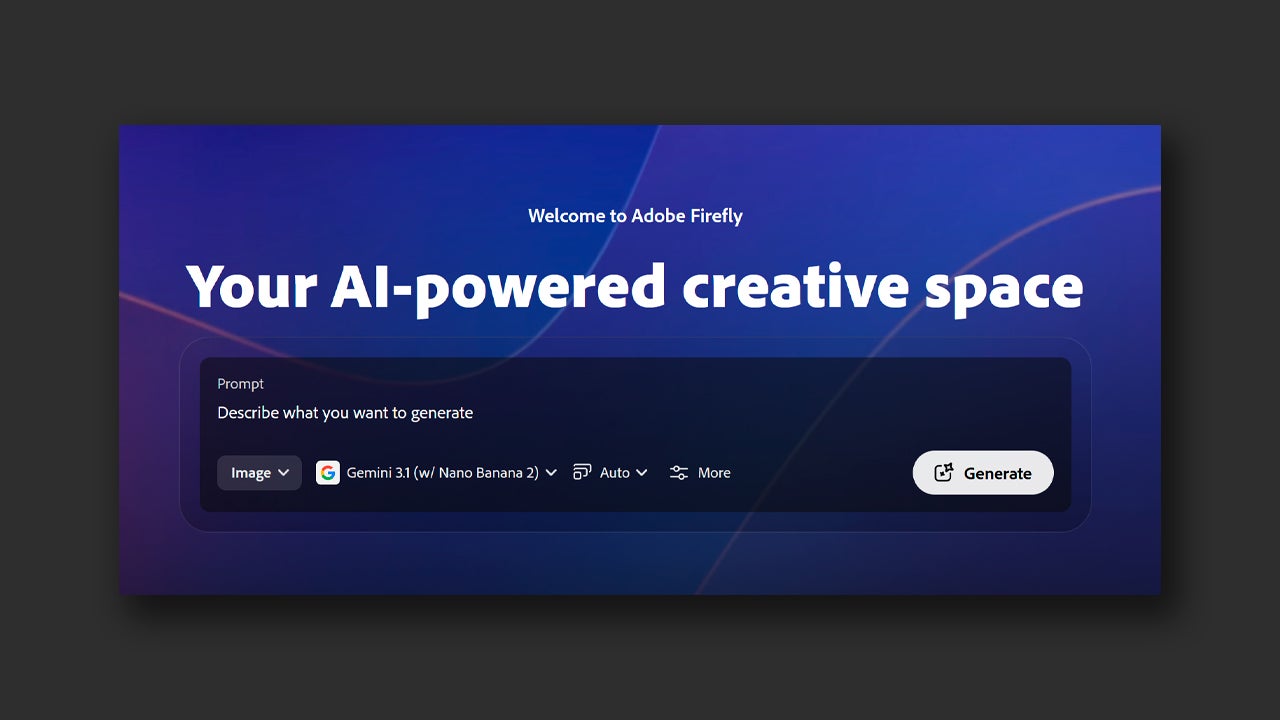
There you can also choose between Image and Video, depending on what you want to create. Keep in mind that each generation you make will consume generative credits. These vary depending on the type of generation (videos consume more than images) and the model used. You can choose between Adobe models (Firefly and its different versions) or other well-known third-party models (Gemini, GPT Image, etc).

If you already have your description clear, the chosen model, and the type of content, click on Generate and wait to see your results. Don’t obsess over perfection, use these generations as a foundation to work on and iterate. Make sure there are elements like good composition, important elements, and so on. Then we will take it to Photoshop.

The project in Adobe Photoshop continues

In Photoshop, you can take the results of Firefly and make more complex adjustments in addition to using other AI functions, such as Generative Fill or Generative Expand.

Generative Fill will help you to remove certain elements from the image or to include new ones. To use it, you just need to click on any selection tool (lasso, magic wand, marquee, etc.) and then select the area of the image you want to retouch, whether to remove an object or add one.
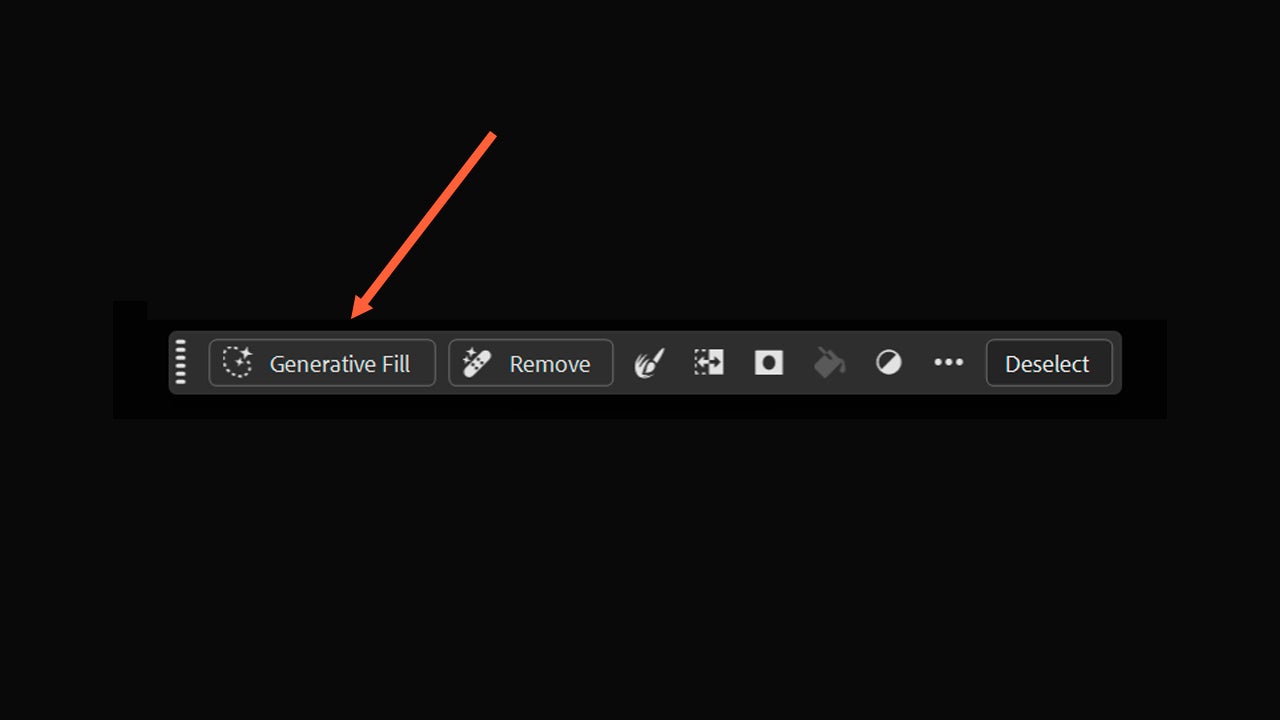
Right below your selection, a floating toolbar will appear with the Generative Fill option. If that toolbar does not appear, you will need to go to View > Contextual Task Bar to make it appear. You also have another option; after making the selection, you can go to Edit > Generative Fill.

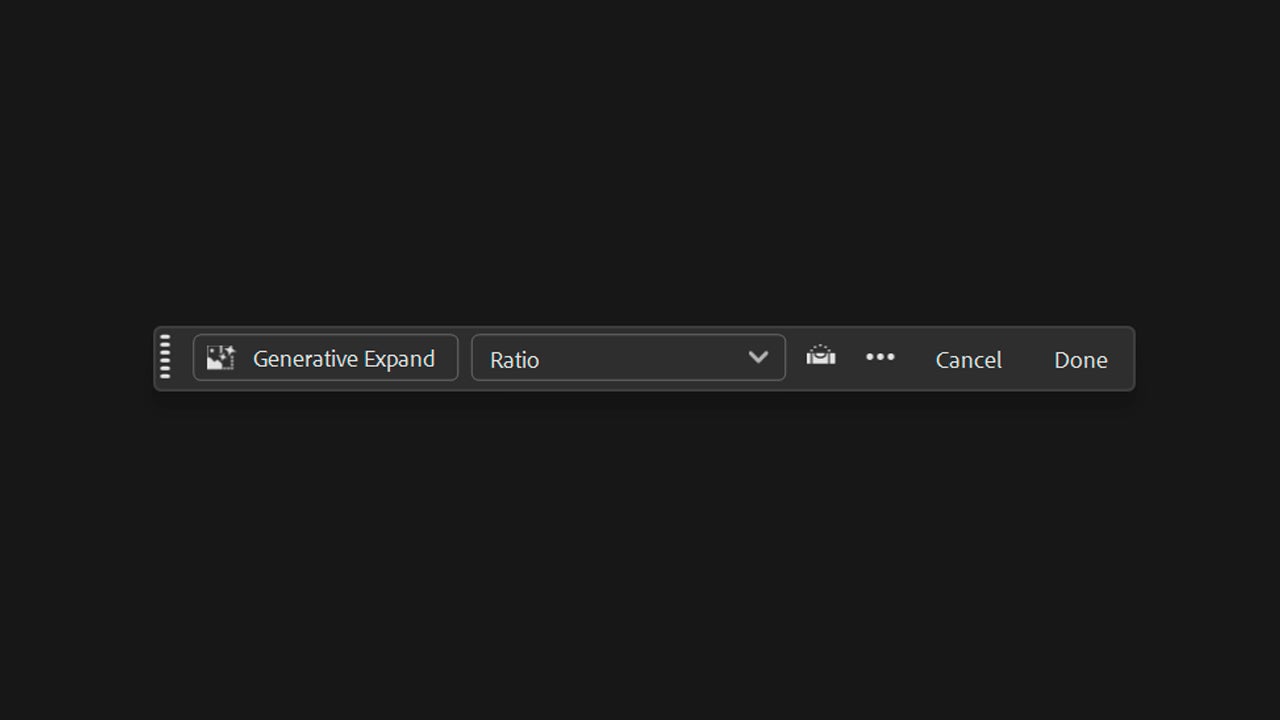
Generative Expand, on the other hand, will help you expand the margins of your canvas while the AI “fills in” the gaps. Select the Crop Tool to access this option. Again, a contextual bar will appear with the Generative Expand option. Drag the edge of the canvas outside the limits and leave it in the position you want.
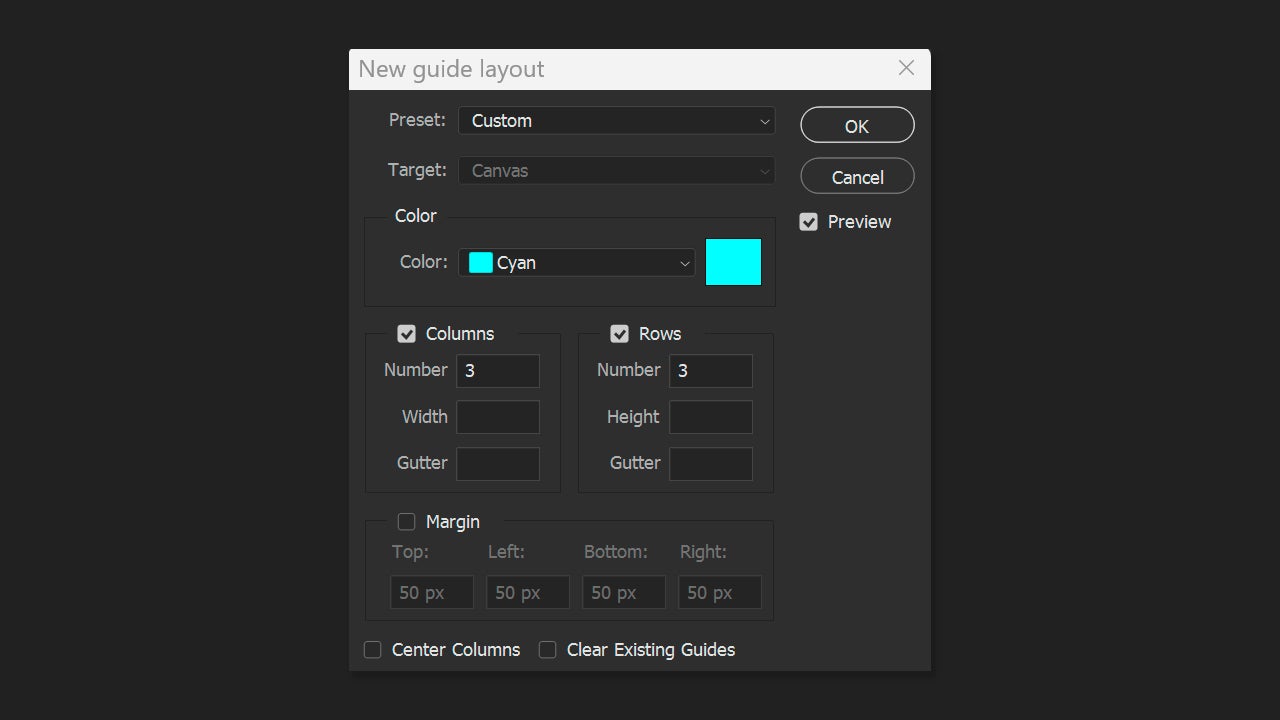
Within Photoshop, you have the tools to make all kinds of retouches. A simple yet very effective adjustment can be framing adjustment. Good compositions are the foundation of a good image. Rearrange elements if necessary; the results will be better.

You can do this by activating the composition guides. The guides appear as floating lines that can be moved or deleted as needed. To activate the guides, go to View > Guides > New Guide. A new window will appear where you will need to designate the orientation of the guide line (horizontal or vertical), the position, and the color. To create more complex guides, you will need to go to View > Guides > New Guide Layout.
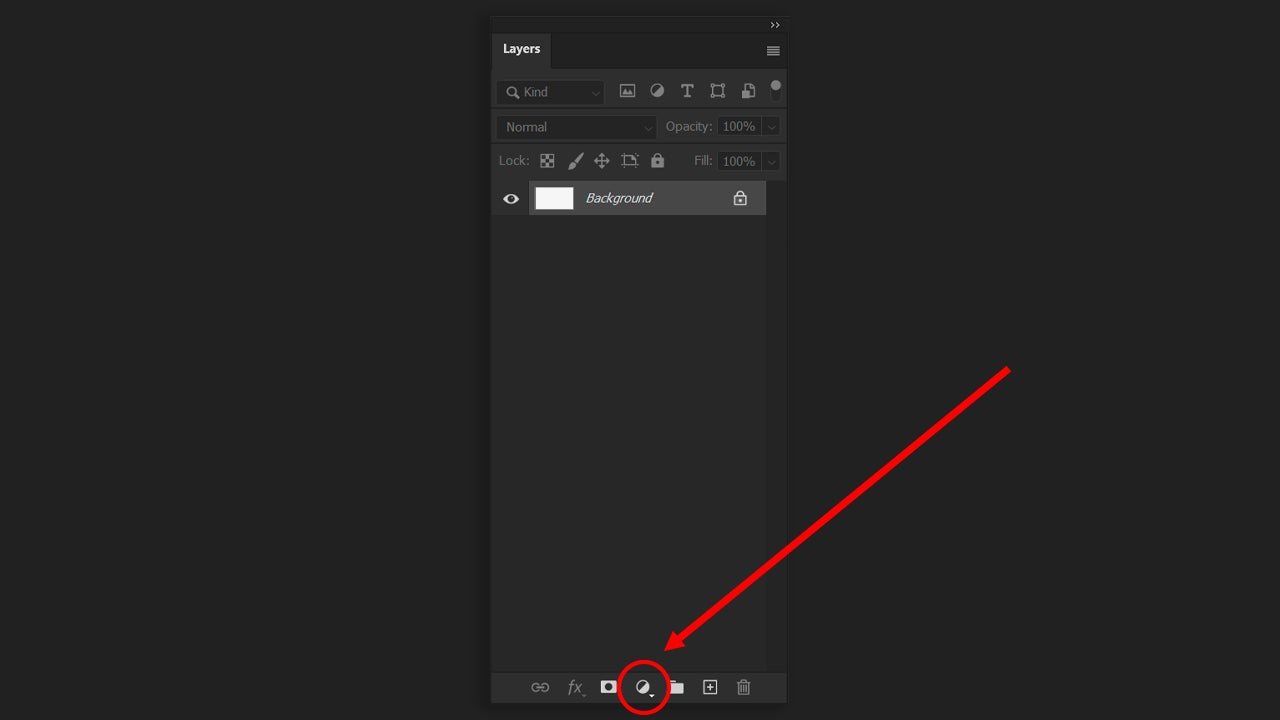
Once you have everything in place, it’s time to focus on color. Within Photoshop, we can alter curves, change color temperature, adjust brightness… In the end, the goal is to make everything have the same visual tone and atmosphere. If you scroll down from the Layers panel itself, you will see the option to create Adjustments Layers. From there, you can create specific layers that adjust everything related to color.

Adobe Firefly
Adobe Firefly DOWNLOAD

Author: María López

{ "de-DE": "Künstler aus Berufung und Technikliebhaber. Seit ich denken kann, habe ich gerne an allen möglichen Gadgets herumgebastelt.", "en-US": "Artist by vocation and technology lover. I have liked to tinker with all kinds of gadgets for as long as I can remember.", "es-ES": "Artista de vocación y amante de la tecnología. Me ha gustado cacharrear con todo tipo de gadgets desde que tengo uso de razón.", "fr-FR": "Artiste de vocation et amateur de technologie. J'aime bricoler avec toutes sortes de gadgets depuis que j'ai l'usage de la raison.", "it-IT": "", "ja-JP": "", "nl-NL": "", "pl-PL": "", "pt-BR": "", "social": { "email": "", "facebook": "", "twitter": "", "linkedin": "" } } View all posts by María López

Author María LópezPosted on April 28, 2026April 28, 2026Categories News

Post navigation

Previous Previous post: How 'The Devil Wears Prada 2' is everywhere, from soft drinks to makeup
Next Next post: The most iconic character of Quentin Tarantino will return to the big screen in an incredibly unexpected crossover

Recent Posts

  • Subnautica 2 leaves behind the drama and announces release date and new trailer
  • Amazon's 007 reboot is complicated by a lack of direction
  • Project Helix is getting closer and in a few days we will be able to learn much more about it
  • A group of cybercriminals stole thousands of 'Roblox' accounts. Fortunately, they were caught in time
  • This game has a lot of positive reviews on Steam, but it hasn't achieved them in the cleanest way

Archives

  • May 2026
  • April 2026
  • March 2026
  • February 2026
  • January 2026
  • December 2025
  • November 2025
  • October 2025
  • September 2025
  • August 2025
  • July 2025
  • June 2025
  • May 2025
  • April 2025
  • March 2025
  • February 2025
  • January 2025
  • December 2024
  • November 2024
  • October 2024
  • September 2024
  • August 2024
  • July 2024
  • June 2024
  • May 2024
  • April 2024
  • March 2024
  • February 2024
  • January 2024
  • December 2023
  • November 2023
  • October 2023
  • September 2023
  • August 2023
  • July 2023
  • June 2023
  • May 2023
  • April 2023
  • March 2023
  • February 2023
  • January 2023
  • December 2022
  • November 2022
  • October 2022
  • September 2022
  • August 2022
  • July 2022
  • June 2022
  • May 2022
  • April 2022
  • March 2022
  • February 2022
  • January 2022
  • December 2021
  • November 2021
  • October 2021
  • September 2021
  • August 2021
  • July 2021
  • June 2021
  • May 2021
  • April 2021
  • March 2021
  • February 2021
  • January 2021
  • December 2020
  • November 2020
  • October 2020
  • September 2020
  • August 2020
  • July 2020
  • June 2020
  • May 2020
  • April 2020
  • March 2020
  • February 2020
  • January 2020
  • December 2019
  • November 2019
  • October 2019
  • September 2019
  • August 2019
  • July 2019
  • June 2019
  • May 2019
  • April 2019
  • March 2019
  • February 2019
  • January 2019
  • December 2018
  • November 2018
  • October 2018
  • September 2018
  • August 2018
  • July 2018
  • June 2018
  • May 2018
  • April 2018
  • March 2018
  • February 2018
  • January 2018
  • December 2017
  • November 2017
  • October 2017
  • September 2017
  • August 2017
  • July 2017
  • June 2017
  • May 2017
  • April 2017
  • March 2017
  • February 2017
  • January 2017
  • December 2016
  • November 2016
  • October 2016
  • September 2016
  • August 2016
  • July 2016
  • June 2016
  • May 2016
  • April 2016
  • March 2016
  • February 2016
  • January 2016
  • December 2015
  • November 2015
  • October 2015
  • September 2015
  • August 2015
  • July 2015
  • June 2015
  • May 2015
  • April 2015
  • March 2015
  • February 2015
  • January 2015
  • December 2014
  • November 2014
  • October 2014
  • September 2014
  • August 2014
  • July 2014
  • June 2014
  • May 2014
  • April 2014
  • March 2014
  • February 2014
  • January 2014
  • December 2013
  • November 2013
  • October 2013
  • September 2013
  • August 2013
  • July 2013
  • June 2013
  • May 2013
  • April 2013
  • March 2013
  • February 2013
  • January 2013
  • December 2012
  • November 2012
  • October 2012
  • September 2012
  • August 2012
  • July 2012
  • June 2012
  • May 2012
  • April 2012
  • March 2012
  • February 2012
  • January 2012
  • December 2011
  • November 2011
  • October 2011
  • September 2011
  • August 2011
  • July 2011
  • June 2011
  • May 2011
  • April 2011
  • March 2011
  • February 2011
  • January 2011
  • December 2010
  • November 2010
  • October 2010
  • September 2010
  • August 2010
  • July 2010
  • June 2010
  • May 2010
  • April 2010
  • March 2010
  • February 2010
  • January 2010
  • December 2009
  • November 2009
  • October 2009
  • September 2009
  • August 2009
  • July 2009
  • June 2009
  • May 2009
  • April 2009
  • March 2009
  • February 2009
  • January 2009
  • December 2008
  • November 2008
  • October 2008
  • September 2008
  • August 2008
  • July 2008
  • June 2008
  • May 2008
  • April 2008
  • March 2008
  • February 2008
  • January 2008
  • December 2007
  • November 2007
  • October 2007
  • September 2007
  • August 2007
  • July 2007
  • June 2007
  • May 2007
  • April 2007
  • March 2007
  • February 2007
  • January 2007
  • December 2006
  • November 2006
  • September 2006
  • August 2006
  • June 2006
  • May 2006
  • July 2001
  • January 2001
  • November 2000
  • September 2000
  • August 2000
  • July 2000
  • April 2000
  • March 2000

Categories

  • Affiliate post
  • Expert Review
  • Gaming
  • Guides
  • How to
  • Legacy how To
  • News
  • Noticias
  • Software>Security
  • Sponsored
  • Trucos y Consejos
  • Uncategorized
  • Windows software

Meta

  • Log in
  • Entries feed
  • Comments feed
  • WordPress.org
Softonic English Proudly powered by WordPress