Secret should let us choose location settings

This week we looked into location tracking in two different app categories: Suzie looked at activity trackers and Chris turned his attention to anonymous confessions. All four of the apps we looked at ask for your location data, but the rewards you receive for this valuable data vary. Activity trackers like Moves and Human really need your location to work properly. Like Suzie, I’m a fan of Moves and I’m very relaxed about letting it store data about my location. It’s interesting and in theory helps me get in shape.

Anonymous confession apps like Secret and Whisper have a more tenuous need for your location data. Whisper uses your location to connect you with other users. Secret gathers location data too. But as Chris points out, it needs to explain more clearly why it wants this information.

The question about all these apps is whether it’s really safe to share your personal location data with them. As Stuart Dredge pointed out a few weeks ago, there’s no really good reason to trust brand-new startups in this regard. It might be that they’re really successful and hackers start to target their app, he says, or “…they’re not successful but they have clever technology, [so] they might get bought by Google, or Facebook, or Yahoo. And if they simply shut down, how much do you know about what data they’re storing and how they’ll dispose of it”.

In the post-Snowden world, where more of us are conscious of the choices we make when sharing our information, app developers should empower us and let us choose what we want to share with them. Of the four apps we looked at this week, Moves, Human and Whisper all let users turn location services off. Secret doesn’t and I can’t think of a good enough reason for that. A more thoughtful software company would offer that option.

Read our articles on activity tracking in mobile apps:

Twitter beyond government control thanks to SMS and VPNs

Turkish Twitter users have once again illustrated the futility of governmental bans on the service, by using tools like SMS and VPNs to dodge official controls. In a tweet from Twitter’s Policy account, the social network offered users a way to send updates via SMS. In fact, since the ban was introduced, 2.5 million tweets have been posted from Turkey.

Twitter has a history of assisting users in countries where authorities have banned access to its service. It has previously made similar information available to citizens in Egypt and Tunisia.

Another popular way around bans of this type is using VPNs. VPNs (short for Virtual Private Networks) work by rerouting a smartphone or PC user’s internet traffic through another set of servers. Using a VPN makes it very difficult for government filters to see exactly which web pages or services a user is accessing. It’s very difficult, but not impossible.

By far the most popular VPN service on Softonic is Hotspot Shield, currently available on Windows, iPhone and iPad, and Android devices. Anchorfree, the company behind Hotspot Shield has reported that VPN use increases in areas of ‘civil strife’. It’s important to remember, however, that no technical solution is 100% reliable when it comes to privacy and security.

Related articles:

Play your favorite winter Olympics sports on your PC, Mac or phone

The Sochi 2014 Winter Olympics are here, and what better way to get into the spirit than to play games reminiscent of some of the most popular winter sports featured in the games? With free browser games for Mac and PC, as well as some mobile games, you can be a part of the winter games without leaving the comfort of your centrally heated home, and without the risk of frostbite or major trauma.

Ice Hockey

Best Hockey Game may not exactly be the best hockey game around, but this flash game is free, runs in your browser and it’s pretty fun too. Or it would be if I’d managed to score a single goal.

Use the cursor keys or the W-A-S-D keys to direct a virtual hockey player around the ice. The player fights for the puck, deflects its trajectory using the mouse, and fires it skillfully towards the opponent’s goal. Great sound effects round out this entertaining game.

If you want to play on your mobile, Finger Ice Hockey is the equivalent game to play while on the go.

Snowboarding
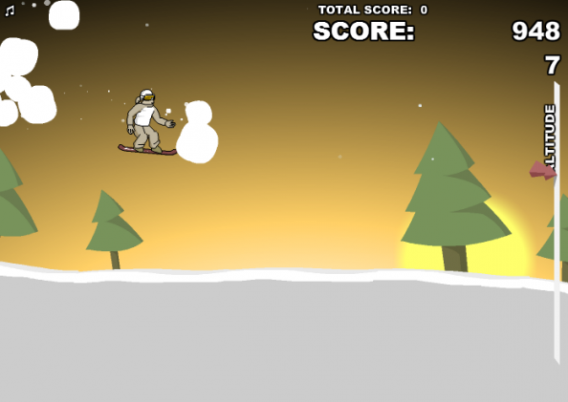
Snowboarding has only been included in the Winter Olympic Games since 1998, but it’s massively popular on mountains around the world. Downhill Snowboard 3 is a free flash game that sees you riding down a series of mountains, performing jumps and tricks to boost your score. It’s quite easy to play and even includes sickening crunching sound effects when you fail to land that forward flip.

If you want to play on your mobile, you can try Crazy Snowboard, where you can perform wild jumps on various slopes with different levels of difficulty. The beauty of snowboarding using flash games and apps? They’re a safer option than being out on the snow, although maybe not quite as much fun.

Ski Jumping

But there’s more than one way to get down a mountain. Fans of the Winter Games will know that one of the classic events to watch is ski jumping, during which possibly-insane competitors line up, ski down a hill at crazy speeds, and then jump hundreds of feet in the air.

In Ski Jump 2, you use the arrow keys to position yourself for the perfect landing; if you lean too far forward or back in flight, you’ll lose control and crash. My best distance was 127 meters, which means I may have some work to do if I want to be ready for the 2018 games in Pyeongchang. Out of all the games on this list, though, it was probably my favorite: it looks nice and it’s really difficult.

Mobile phone users who want a ski jumping experience can try Ski Jumping 12, bringing a ‘true ski jump simulator’ to Android phones.

Downhill and Slalom Skiing
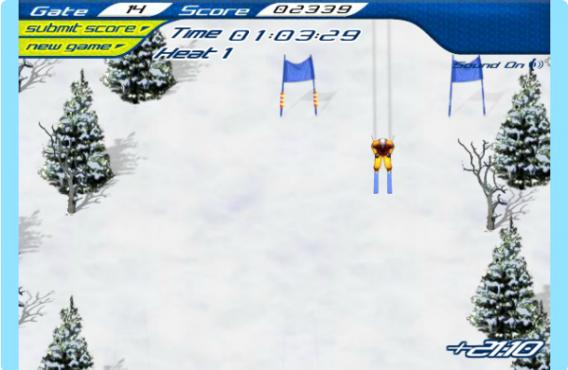
This is really where I should have started doing well; I love downhill skiing and I’ve done a few slalom races in my time. Candystand’s Downhill Skiing includes traditional downhill and slalom events in one flash game. You use your mouse to control where the skier is pointing, and click to jump the occasional obstacle. I found it difficult to get within 10 seconds of the best time, however, so unforunately, no medal for me.

The events are pretty much identical except for a shorter, more obstacle-strewn course for the slalom. There’s no Super-G course available yet, either.

Biathlon and Curling
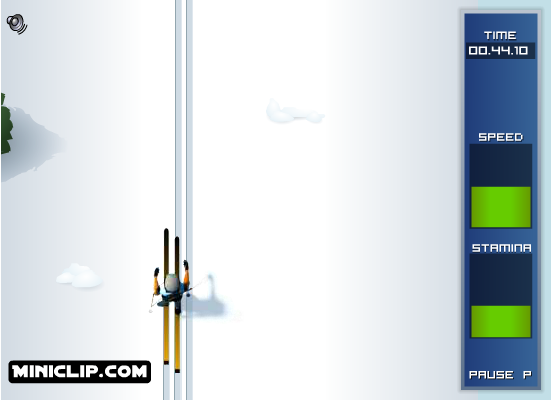
Nordic Chill is a 3-in-1 mouse-controlled flash game which includes Biathlon (Nordic skiing and shooting), Ski-jumping and Curling.

Controlled with only the mouse, Nordic Chill is easy to start but tough to master. It lacks some of the finesse found in other games, but makes up for that with its multi-discipline challenge. I got a combined score of over 11,000 points on my first try, placing me in the high 500s globally. Does that mean I can get a sponsorship deal?

Skeleton
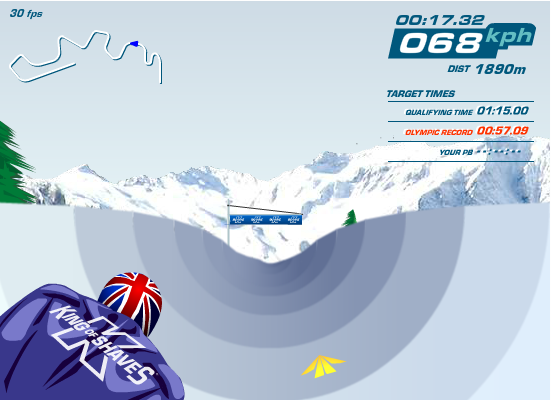
For the uninitiated, Skeleton is the one-person version of Bobsleigh, and the idea is much the same. You have to pilot an extremely fast sled down an icy track, trying to maintain control at high speeds with forces of up to 5G. King of Skeleton, free to play in your browser, puts you in the spotlight, honing your skills while you try not to fly off the track to your certain doom.

Use the arrow keys to keep the pilots on course, or in case you need to duck your head. You can collect packs along the way that’ll make your sled even faster. Of course, with great speed comes great responsibility: this game will take a while to master.

Curling

Where I come from, Curling returned to the national consciousness in 2002 when the British women’s team won gold. It all seems so gentile and relaxed, but naturally, there’s a lot of skill involved. These factors are all very well represented in the deceptively simple Virtual Curling browser game. Vying with the computer to see whose stone can end closest to the center circle is a lot more fun than it sounds, believe me.

Figure Skating

If, like me, you base your knowledge of figure skating on the film ‘Blades of Glory’, you may be in for a pleasant surprise. Figure Skating, which can be played in your browser on Mac or PC, has all the skill and none of the deadly potential for be-headings featured in that classic, terrifying documentary.

The game is played by trying to draw the shapes indicated in the ice with your mouse pointer. The figure skater will then perform, more or less, the artistic jumps and turns that you indicated. More or less. I made it to the Junior Championships and then realized that my heart wasn’t in it.

If you want to play on your mobile phone, there are similar apps available for Android and iPhone.

Is your favorite winter sport missing? Let us know and we’ll try to find it for you.

[Sport-Icons source: Sportsbettingspot]

Inspired by this article on Softonic DE by Jan-Hendrik Fleischer.

Grand Theft Auto V for PC in March 2014 – rumor

Gamers waiting to see GTA V released for PC may have been given an extra gift this holiday season. A new rumor, based on a live chat between a Reddit user and an Amazon.co.uk employee, has the record-breaking game appearing on PC in March 2014. The game was released on September 17 of this year, on xbox360 and PS3. Rockstar Games is yet to confirm that the game will even be released for PC.

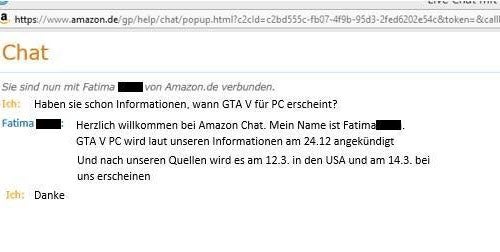
GTA V on PC - the German Amazon chat

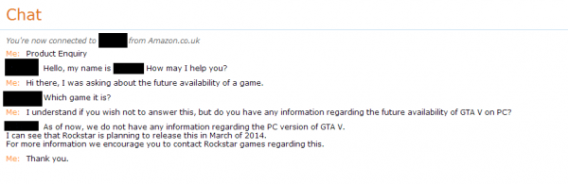
The latest rumor started with an Amazon.de user asking a support agent if they had any information about Grand Theft Auto V on PC. The agent replied that the game would be released on PC in the US on March 12 and in Europe on March 14, but that these dates are subject to change. Following up on this, a Redditor contacted Amazon UK and received ‘confirmation’ from another support agent that GTA V is expected on PC in March. The transcripts of these chats have not been verified by third parties.

GTA V on PC - the Amazon UK chat

As John Papadopoulos of DSOGaming comments, were this information accurate, it wouldn’t be the first time that Amazon has leaked release date information for major PC titles. Similar leaks happened for Mortal Kombat and Injustice on PC. However, the rumor also suggests an official announcement from Rockstar Games on December 24th – a date that has come and gone with no news. This could be less evidence of the rumor being false and more a simple marketing decision. December 24th isn’t the best day to make major product announcements, even for a title as keenly awaited as GTA V.

Playing the traditional numerology game that accompanies any news related to Grand Theft Auto titles, I see that GTA IV and San Andreas were both released for PC on Tuesdays in the US. March 12 2014 will be a Wednesday. So perhaps March 11 is a more likely release date. One thing’s for sure: the level of demand for this title to appear on PC.

[Source: Reddit]

How to delete comments or captions on Instagram

Instagram is the without doubt the go-to app on iPhone and Android for snapping, editing, and sharing pictures with on the web. If you have Instagram linked to various other social media sites like Facebook and Twitter, that means a lot of people will end up seeing your photos and their comments.

Instagram treats captions and comments in exactly the same way. In fact, the caption you add when you first publish an image on Instagram is actually just the first comment on that image. So deleting captions and deleting comments is exactly the same process. The only problem with deleting a caption is if there are any other comments on the image, you won’t be able to create a new caption and have it appear as the first comment. Bear that in mind before deleting!

Android

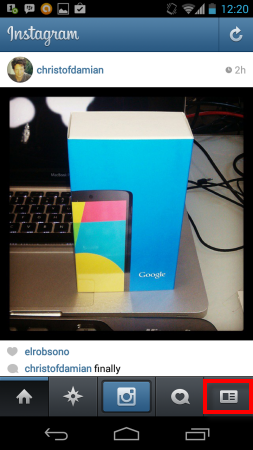
1. Log into your Instagram account. Click on the far right bottom button to open your profile.

Open Instagram on your phone

2. You’ll see a grid of all your images. Select one with a comment you want to delete.

Select the image with comment or caption you want to delete

3. Hit the comment button below the photo.

Hit the Comment button

4. Now the pencil button in the upper right.

Hit the pencil (edit) button

5. From there, just tap the red X on any comments you’d like to delete. If you happen to delete your caption, you can opt to type another one by filling in the comment box below and clicking “Send.”

Hit the red X to delete the comment

iPhone

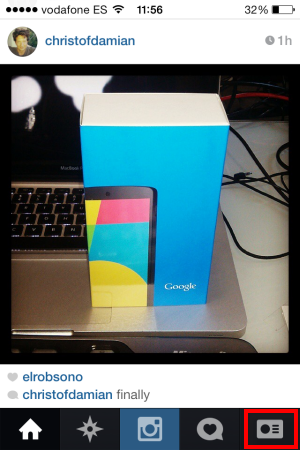
1. Log into your Instagram account. Click on the bottom right button to pull up your profile.

Open Instagram on your iPhone

2. You’ll see a grid of all your images. Tap an image to view its comments.

Select the image with a comment you want to delete

3. Hit the Comment button below the photo.

Hit the Comment button

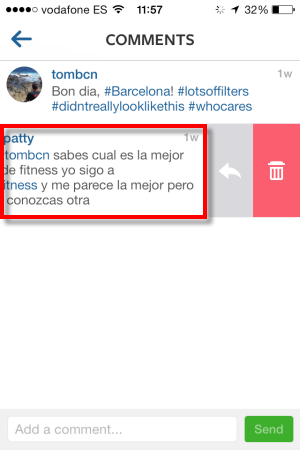
4. Tap the comment you want to delete. The comment will slide a little to the left, revealing comment controls.

Tap the comment you want to delete

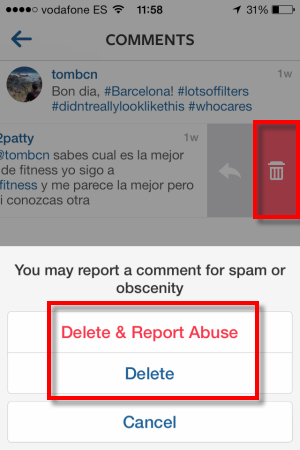
5. Hit the delete button and then choose whether you’d just like to delete the comment, or also report it to Instagram for obscenity or spam.

Choose to delete or report spam

Currently you can’t edit comments on Instagram. Deleting a comment is the next best thing, though.

[Article originally published in August 2012]

Mavericks out today for free

OS X Mavericks, the latest version of Apple’s desktop operating system, will be available to install today.

Speaking at a major press event in San Francisco, Apple Senior Vice President Craig Federighi today confirmed that the update will be available via AppStore update today for free. This is a first for Apple, as it previously charged $20 for Snow Leopard and Lion.

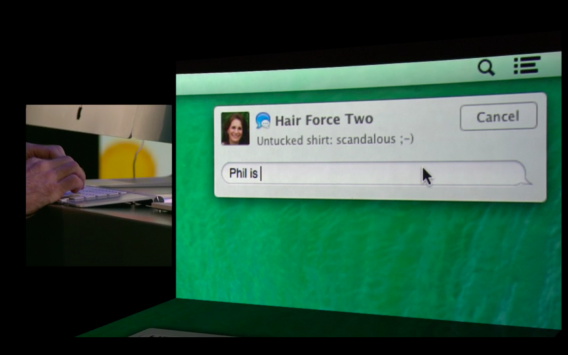
OS X Mavericks chat

Some of the new features in Mavericks include improved support for multiple displays, tabbed browsing in Finder, brand new Maps and iBooks applications, and a slew of improvements and enhancements to existing applications. The social network for professionals, LinkedIn, will now be integrated into the OS, allowing users to post updates directly to their profiles from within OS X applications. Other changes include stability and performance improvements, as well as a few additions from iOS like App Nap which allows apps to ‘pause’ when not in use, improving overall system performance.

Mavericks is the first version of OS X not to use a big cat name. It’s named after a popular surfing spot in northern California. Apple has said that future editions of OS X will also be named after inspiring locations around California.


RELATED STORIES


Google launches free Web Designer for PC and Mac

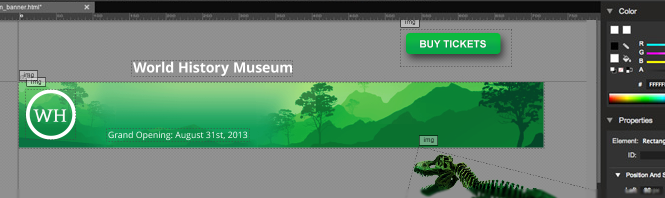
Google has launched a free web design tool for Windows and Mac users. Currently in beta, Web Designer lets users create HTML 5 designs (including animations) with a minimum of fuss.

The new tool, released two days ago, needs to be installed on your computer. But it seems to effectively run as a web app packaged in a customized Chrome window. The program comes with a couple of design options, but the only templates included are for Google Ads banners, which suggests that the main purpose of this software is the quick creation of animated HTML5 ads.

Google Web Designer

As John Gruber of Daring Fireball points out, Web Designer doesn’t have the best user interface design in the world. It features non-standard menu items and while it does have some online help pages (never guaranteed with Google products), the level of actual support for this free software is likely to be minimal. Other beta-ish elements persist, like the way the app opens in Spanish on my work PC, with no apparent option for changing the user interface language.

All the same, Web Designer is a pretty simple, easy to use app which users can use to create either impressive, clean website layouts or hideous 3D nightmares, depending on their design sensibilities and capabilities. Most importantly, it offers beginners a super simple way of creating ad banners for Google advertising services.

Download Google Web Designer for Windows

Orbit Downloader contains trojan – downloads blocked

In a major shock, popular Windows app Orbit Downloader has been identified as containing trojan-type software that allows users’ PCs to be used in ‘DDOS’ attacks online.

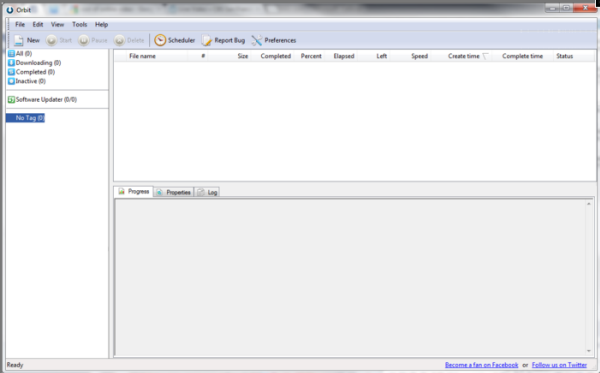
Security experts at ESET discovered the secret functionality built in to Orbit during a routine check. When run, Orbit Downloader silently connects to the internet and downloads config files. These files in turn instruct the computer to connect to web addresses. When such connections are attempted from millions of PCs simultaneously, they can cause a website’s servers to collapse and effectively shut that site down.

Orbit Downloader main window

The experts at ESET believe that Orbit might have contained this code for some time. It’s currently unclear if the program or the developer’s website have been hacked to trick Orbit into behaving in this way.

Softonic’s security analysis also detected the threat and we have deactivated the download options for Orbit Downloader until further notice. We recommend that if you have Orbit Downloader installed, you should stop using it for the moment, and consider uninstalling the program until a safer version is made available.

A worrying aspect of this story is how such a popular piece of software could have been operating in this way – apparently for a long time – and apparently none of the major PC security companies noticed it. Even now, only 1 out of 23 scans on Softonic identifies the threat (that’s Kaspersky). What does this say about the quality of the scanning and testing being done by the big names in computer security?

Sources: ESET, ZDNet & Softonic

Android users demand offensive Angry Birds parody ban

Android users are demanding that Google withdraw an Angry Birds clone from the Play app store due to religious offence caused by the game’s content.

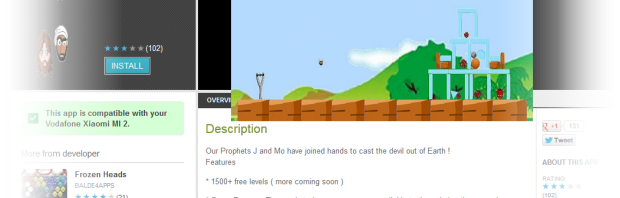
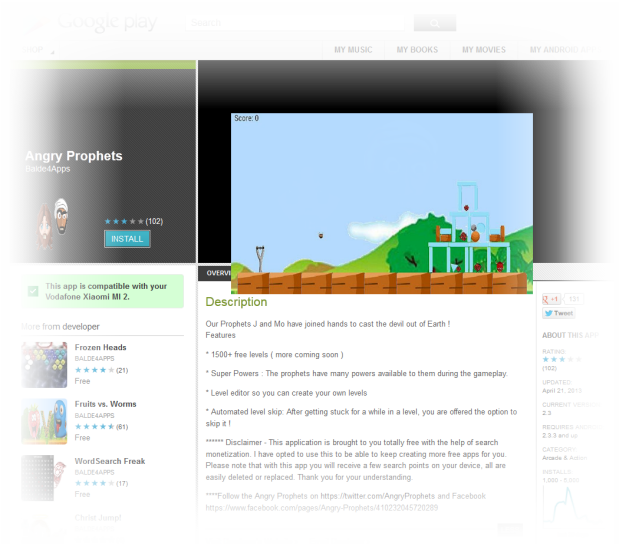
Angry Prophets has been available in Google Play since April 21. The game features two characters who bear a likeness to Jesus and the prophet Muhammad. Just like in Rovio’s popular game, players launch these characters heads to defeat their enemies, in this case devils.

At the time of writing, the game has an average rating of 2.9 in Google Play. “This game must be deleted”, comments one user in his short review of the game. “I hope Google will do something about this. It’s such a disgrace to our beloved Prophet Muhammad and seriously not funny”. Visually depicting Muhammad is forbidden in Islam.

The campaign to have the Angry Birds for Android parody removed began on Twitter a few hours ago. The steps to follow are simple: if you agree that the game should be banned, simply open the game’s Google Play page on any Android device. Scroll to the bottom of the page and select Flag as inappropriate.

What do Google’s Developer Program Policies say on the matter? Under the heading ‘Hate Speech‘, Google says “We don’t allow the promotion of hatred toward groups of people based on their race or ethnic origin, religion, disability, gender, age, veteran status, or sexual orientation/gender identity.”

Based on prior experience, everything suggests that Angry Prophets will be banned by  the Android store. Other examples of apps described as offensive, including Make Me Asian and Make Me Indian, were banned by Google following complaints by users that the apps were based on racial stereotypes.

I’ve contacted Google Play and the app’s developer for comment. I will update this story as and when I receive a response.