Create the world’s greatest emoticon

Happy birthday SmileyThe emoticon reaches the ripe old age of 25 this year. To celebrate this milestone Yahoo! is running a competition for people to submit their own expressions for inclusion in the next collection of Yahoo! Messenger emoticons.

While Yahoo! is suggesting entrants send photos of themselves pulling their favorite expressions, you might want to consider going the whole hog and using a specialist emoticon designer to make your own. Emote Maker provides a series of advanced tools for creating smilies, applying effects, rotating, flipping and even blending colours. It even supports animation, so you can ensure those losers in the competition will be laughing on the other side of their faces once you’ve finished your head-turning creation.
Google launch Picasa for mobiles

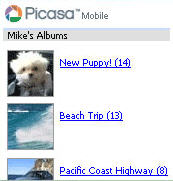
Picasa Mobile screenshotGood news for Picasa fans – Google have launched the first version of the photo software for mobile devices. Like the desktop version, it conveniently groups together all your images – including wallpapers – into easy to navigate groups. You can also click ‘My Favorites’ from the main screen to connect to the internet and see the latest photo albums that your contacts have posted to Picasa Web Albums and leave comments.
Google say there’s no messing around with resizing either – all images are automatically re-sized for your device’s screen so that they download quickly. There’s also a built-in search that lets you retrieve any photo you’ve posted online, find photos posted by your friends or simply just have fun exploring other people’s photos. Note that you’ll need a phone with a web browser and WAP plan to access the service.

Initial impressions seem very good and LetsGoDigital have an interesting review highlighting the convenient blogging function that allows those using Blogger to post photos directly from their phone. Google Blogoscoped meanwhile takes a more in-depth look at the mapping functions it offers allowing you to link photos to locations.

How to encrypt your hard drive

TrueCryptOne of the most secure way to ensure that no one snoops around your hard drive is to encrypt it. Although it might sound complicated, it’s actually very easy thanks to a program called TrueCrypt. A lot of programs charge serious money for the same job that TrueCrypt does but this is completely open source and does it pretty well, if a bit slowly.

The program can create a virtual encrypted disk within a file and mount it as a real disk or encrypt an entire hard disk partition (such as USB memory stick). Intruders will face two walls of password protection before they are able to access files.

One advantage of this is that you run all those P2P apps from an encrypted drive and not worry about getting attacked from the other end. Any intrusion is met with heavy encryption that only the most determined hacker would get through. Even with a firewall, your PC is particularly vulnerable when running such programs but encryption gives you an extra level of security.

The user guide takes you through the process very quickly which is no more complicated than defragging a drive although expect to wait at least a few hours for the process to complete. Note that it won’t slow down the performance of your hard drive afterwards. A great free tool to protect you at home or on the move with your USB drive.

Ten tips to organize holidays on your PC

Organize summer holidaysComputers are the daily working tool for many of us. They’re also found in banks, shops, airports, hospitals, just about anywhere. So why not use them to plan your holidays? It’s very easy and will probably save you time and money. Here are some tips that can help you organize the best summer holiday of your life.

  • Check dates for your trip. You can do it either in Windows standard calendar or using any of the calendar tools available on Softonic.
  • Make a to-do list with any simple to-do tool or even on an online application that you can check from anywhere.
  • Book plane tickets online. All major companies have developed websites where you can check prices and buy tickets, usually with special web fares.
  • Rent a car on the web. Many renting services also allow online booking now. You can choose your car and print out the renting contract right from your home.
  • Plan your route. If you’re travelling by car it’s always a good idea to arrange road routes. Two good tools to plan road routes are ViaMichelin and Mappy.
  • Email the embassy. Are you travelling abroad? Ask the embassy for information. They’re usually very kind and will send you a bunch of maps, guides and leaflets for free.
  • Find information about your destination. Apart from embassies, there are other tools like the Schmap guides which you can use to obtain useful tips about your destination.
  • See reviews about hotels. Trivop and TVtrip are two online services that include photos and video reviews from many hotels around the world.
  • Check weather conditions before leaving: you may have to include a raincoat in your suitcase! There are many weather apps available on Softonic.
  • When you’re back, don’t forget to share your pictures with everybody! Use the Flickr photo sharing service or create a web gallery with Picasa and its web albums.

FinanceToGo makes home accounting intuitive

FinanceToGoFinanceToGo is a double entry accounting application for home users. The program can create pie and bar charts of your expenses and quickly generate reports. It can also be used to manage your portfolio and will update shares and currencies online. First time users will appreciate the intuitive file assistant, that guides you in the creation of your financial reports.

Zoho launches Facebook office app

ZohoAs American research recently revealed, Facebook is the social networking site of the intellectual, or at least the university student with rich parents.

So perhaps it’s no surprise that Zoho, an office suite provider, has launched a new Facebook application allowing users to create documents, spreadsheets and presentations while networking with their fraternity. The app offers editing facilities (both personal and shared) from Zoho Writer, Sheet and Show.Facebook app

There are plenty of applications for Facebook including music add-ons, graffiti, ‘zombies’ that bite your friends, a ‘where I’ve been map’ and a whole load of other stuff that makes keeping in contact with people you don’t really like more fun.

All this comes as Nielsen/NetRatings warns that MySpace may have jumped the shark after May saw a slump in its UK traffic while Facebook and Bebo continued to reel-in more new users. With Facebook poised to overtake MySpace’s Alexa ranking, could it be time for a major facelift?

Remove vocals from music tracks

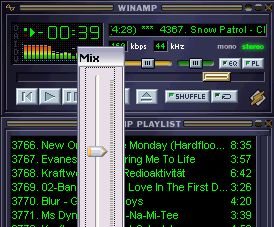
Cut singing with Vocal RemoverIf you want to host your own karaoke night or perform your own remixes, it’s useful to be able to remove the vocals from songs. This isn’t as difficult as you might imagine and there’s plenty of software around that will do the job for you without the need for any technical wizardry.

Power Video Karaoke provides a one-click solution for instantly turning down the vocal track of a song. Although it won’t remove the words completely, the ‘Vocal Remover’ command, accessed via the ‘Toolbox’ menu, does enough to mask the singing so you and your buddies can screech over them. Perhaps a more effective tool is Vocal Remover, a Winamp plug-in that virtually removes all vocals so you can work with instrumental versions of your favourite tracks. Once you’ve stripped your tracks down it’s just a case of running them through a mixing program to conjure up your own musical creations.

Secret Nokia game to play on PC and N-Gage

N-GageNokia has decided to expand beyond its N-Gage mobile platform and create a game that will also be playable on PCs. Currently known as “Project White Rock”, the game will be developed by Scott Foe, known for N-Gage hits like Pathway to Glory. According to PocketGamer.co.uk, this new title will use SNAP technology, which “connects games devices with PCs”. Because Scott Foe is known for his work with “connected gaming” on titles like Pocket Kingdom: Own the World, we have every reason to believe that “Project White Rock” will be some sort of online multiplayer game. One thing is already certain though, “the game’s resolution will remain the same on PC as on mobile”.

Nokia created a blog, Future Watch, in December 2006, where they are expected to release hints of new N-Gage releases and should hopefully have more details on “Project White Rock” soon.

Discover the Universe from your PC

The UniverseIt sometimes seems that we’re getting ever further away from discovering the mysteries of the Universe. Now, some scientists reckon that there was life before the Big Bang, throwing doubt on the theory that this explosion marked the beginning of time. One boffin in Pennsylvania has even devised a theory of how we might be able to see back in time to before this momentus event.
If you’re curious to discover more about how the Universe was formed, you don’t need to be sat in a multi-trillion dollar space station to do so. There are several freeware and shareware astronomy apps that will help you peer into far reaches of space without even looking out of the window. AstroGrav is particularly useful for studying how astronomical objects move and examining the effects of the forces of gravity. Meanwhile, NASA World Wind acts as a kind-of Google Earth for outer space, providing you with the ability to navigate the cosmos through a responsive viewer. Likewise, Celestia gives you the power to travel through the solar system to one of over 100,000 stars. Just let us know if you discover how it all began if you find out on your travels.

A better way to synchronise your machines

FolderShare screenshotWith people’s PC usage becoming increasingly mobile, one of the most useful things is to be able to synchronise across computers. For my bookmarks, I use Foxmarks but this doesn’t synchronise other things such as cookies, extensions, themes, and saved passwords.

I couldn’t seem to synchronise very successfully with Google Browser Sync so I was pleased to discover Microsoft’s FolderShare which basically allows you to create a private peer-to-peer network that will synchronize files across multiple devices or share files with colleagues and friends. This is great if you use several different profiles on two computers or even need to send large files via two machines.

The program goes beyond traditional syncing tools by also allowing you to grant other people access to your files – perfect if you are collaborating on a project. You can also access either of your machines from a remote computer which is an added bonus if you’ve left something behind when you’re on the move. After using this, you probably won’t want to return to any other syncing method.