 Are you tired of listening to the same MP3 playlist over and over again? Then this may be the perfect application for you. Nexus Radio enables you to listen to more than 6,000 online radio stations, featuring what is probably the widest music selection you can find on the Internet. All styles, from classical to metal, from disco to gospel, are made available for you through a nicely design, easy-to-use interface.
Month: August 2007
Top 10 translation apps
 Summer holidays in a foreign country, you’re stuck in the middle of nowhere and nobody seems to understand you… the horror. If you’ve brought your laptop or mobile device with you (and if you’re a real geek you probably have) why not make use of some software to get across to the locals? Here are a number of applications to help you translate from and into any language.
- Babylon Pro – The king of all translation apps, Babylon handles 50 languages and is presented in a neat little window which you can expose and hide quickly. It can give you spelling alternatives and quickly translate any piece of text.
- Lingoes – For free, this application will handle around 60 languages. You can translate words by pointing at them with your cursor and pressing a hotkey.
- TravelTalk – The perfect Windows Mobile tool for your summer vacation, TravelTalk can help you translate all those tricky travel situations like making a hotel reservation, ordering dinner or asking directions.
- MultiTranse – Translate in 13 different languages, available as little flag icons on the program interface.
- Google Translator – Use Google to translate words and web pages directly from your PC desktop.
- Translation Service – This Mac application is accessible from your menu bar and can replace text with its translated version in most major Mac programs.
- EasyTalk – A 2 way translator for Palm, EasyTalk can get you out of language misunderstandings. It automatically shows the equivalent to your word in the selected language. The program is divided into categories to make finding words easier.
- Speereo Voice Translator – This Pocket PC application will read aloud sentences in 11 different languages and all sorts of topics like health, entertainment or shopping. A great way to get a feel as to how a foreign language sounds.
- Hypercontext – Thinking of hiking up to the Tibet and having a chat with the Dalaï Lama? Hypercontext can automatically translate your words into Tibetan.
- English to Pirate translator – If your cruise ship gets assaulted by pirates, save the situation by negotiating with them in pirate talk, har har har!
New World of Warcraft expansion announced
 This has been quite a busy weekend at the Anaheim Convention Center, the location chosen by Blizzard to hold their annual conference. BlizzCon 2007 has come loaded with all kinds of activities and contests for Blizzard fans, besides developers’ keynotes, press conferences and important announcements. But the big news was undoubtedly the launch of a second expansion for World of Warcraft, entitled Wrath of the Lich King.
This new expansion has been announced just seven months after the first one, The Burning Crusade. As its predecessor, it will include a new map (Northrend), new quests and new items, besides raising the top character level up to 80. Players will also be able to customize more aspects of their characters, as well as create a new hero class called Death Knight.
Blizzcon attendees had the privilege to take a sneak peek at the upcoming expansion thanks to the hands-on demo provided by Blizzard. However, according to WoWinsider, this was quite a limited demo that didn’t properly show any of the new game features. So until we can play an actual demo or simply while waiting to buy the expansion, let’s watch the official trailer as a really tasty appetizer.
[youtube]o8n0yVNeN0M[/youtube]
Unlock PDFs on a Mac
 Protected PDFs provide a good way of preventing unauthorized users from editing, copying or printing documents. However, it can be oh-so tedious when you forget the password and are locked out of doing anything. PDFKey helps you out by allowing you to easily recover from lost editing and printing PDF passwords when working on your Mac.
A great photo editor that fits in your pocket
 Photofiltre is an amazing free photo editor that enables you to tweak and optimize your digital images in a variety of ways. It features a vast collection of filters and special effects, but at the same time it’s so easy to use that even beginners will master it. Plus, being a portable edition, you’ll be able to carry it anywhere with you in your USB memory device.
Something fishy for your PC
 I hate jellyfish, so imagine the shock I got when I discovered that some boffins in Germany have created one with 12 heads. I’d love to swim in the ocean with regular tropical fish but my fear of the squishy monsters puts me off taking the plunge. Instead I prefer to watch fishes sploshing around on my PC by installing virtual aquariums.
One of my personal favourites is the SereneScreen Marine Aquarium, a screensaver that features several colourful tropical fish in a tank. One of the good things about the program is that it includes a clock and a calendar that are subtly integrated into the scene on a crystal. You can even customise this rock with your own artwork.
Of course, dolphins are the most intelligent of all fish and if you’re a fan of these cheery critters then try out Dolphin Aqua Life 3D Screensaver. You’ll get to experience the tranquility of life under the ocean with some soothing sounds and plenty of rocks, plants and small fish. Perhaps the most realistic desktop aquarium is the Goldfish Aquarium, which features an extremely lifelike little fish doing his thing in a bowl. He even has a little house. Awww.
Pigeon fanciers, look away now
 As a devout pigeon-hater I thought it my job to bring you this retro-shooting game for the Palm. Yes, it’s a bit of Friday fun, but really any day is good for pigeon shooting. Bang! Bang! looks and sounds like the kind of game I was playing about twenty years ago, when I was just a child pigeon-hater.
Get your shotgun and aim at as many flying rats flapping over the back of your garden as possible. There are also cats strolling past for cat-haters and bottles and tins for those of you who hate rubbish. Shoot everything, including bullets to increase your ammo. As soon as that runs out it’s game over. If you remember enjoying games like Duck Hunt on the Nintendo then this one’s for you. If you hate pigeons you’re going to have a great weekend.
Amazing photos with HDR imaging
 Summer holiday is a great moment to take photos, not only to have future memories of trips, parties and other summer activities, but also to enjoy photography as a hobby. Digital cameras and a large amount of image editing software tools make photo manipulation more and more popular these days, as many people find it an artistic way to express their feelings.
A well-known method to obtain breathtaking results is the so-called HDR, which stands for High Dynamic Range. This photo technique consists on taking several pictures of the same spot, but with different exposure values, and then blending them together so that all areas in the image are perfectly exposed. The resultant image usually shows great luminosity and eye-catching colors, although this obviously depends on the photographer’s skill.
There are many websites to learn more about HDR. Take a look for example at this tutorial on how to merge HDR images in Photoshop. Apart from Adobe’s big shot, There are other imaging apps devoted to HDR, such as Artizen, Photomatix (here’s another tutorial for this particular tool) or Qtpfsgui.
Bear in mind that HDR takes time and lots of experimentation to produce good results, but if you need some encouragement, take a look at what you would be able to create.
Xtra secure backups
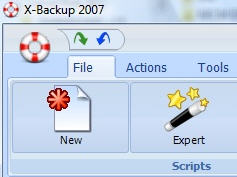 If you’re tired of manually backing up your files, why not schedule and synchronise them instead? As it’s name suggests, X-Backup is designed for if the worst happens and you lose all your data on your PC. X-Backup will basically save any number of files and archive them in a Zip file or for really big backups, create a disk partition image. The interface has been based on Microsoft Office so if you think it looks familiar, you’re right. This doesn’t exactly make it look attractive but it’s functional and clear. Most importantly, it features an instant overview of your backup history and status.
The most useful features you’ll find though are the scheduled and synchronized backups. You can use the X-Backup wizard and time-line to schedule exactly when you want it to kick-in and start backing-up your machine. However, make sure this is not when you are working as it’s rather annoying whilst it takes over your entire system (albeit with prompts first). With synchronized backups, the program will detect any changes on your PC and backup new files automatically. To protect your precious backups, X-Backup will also encrypt backed-up files with a 256 bit AES encryption key.
Ride a Light Cycle in Flash Tron
 Tron remains a landmark in science-fiction cinema, as one of the first movies to make an extensive use of computer-based special effects. The film also gave rise to a series of Tron-inspired videogames, and some of them, like Flash Tron, are still madly addictive.
This Flash online game recreates the Light Cycles races displayed on the original film, where you had to race over an empty dark area leaving a trace of colored light behind you and avoiding that of your opponent. The game supports single and two-player modes and features a bunch of levels for you to beat.