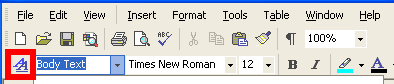
 Everybody knows and uses Microsoft Word but how many people actually master all of its features? Most of us use Microsoft’s Office app to simply type up and edit documents, without daring to dig into the different tools and options. I came upon a good post on General Disarray, which outlines in detail 10 advanced features: styles, header styles and table of contents, table styles, character styles, line and page breaks, captions and cross references, turning off auto-formatting, character-based formatting, continue previous list, and keyboard shortcuts.
Now this last one doesn’t list all of the keyboard shortcuts, for which I recommend going directly to the Microsoft website. On the whole though, all the advanced features listed here are fairly easy to learn, and should really improve your workflow in Word. I’m not saying you should learn them all, but check out the ones that you might need in your everyday word processing. Styles, for one, is fairly important to know well, so your text is always well formatted. Page breaks can be annoying when writing long papers, so you’ll also need to master them. I’d also suggest the tip on table of contents for those of you writing up essays.
 If you run a business where you need to have a group of agents on call for customer enquiries, then you’ll need some way to organise and manage the calls.
  Pandora is one of the best online music services you’ll come across and, thanks to PandoraJam, you’ll be able to enjoy it straight from your desktop. The application is fitted with a nice interface which displays a list of your stations, the basic playback buttons and a handy search bar. You can adjust it to work with your Airport Express and record tracks to play directly on your iPod or iPhone.
 If you’re a serious business person or you’re trying to spread the word about a new company, then a business card is essential. Nowadays, with printer technology as it is and high quality printing paper available, you can produce some really professional business cards on your PC. What’s more, there’s plenty of programs out there to help you compose and create an impressive card.
 Open/save dialogs in Windows feature a series of handy shortcuts on the left side which you can use to access certain folders directly. But now you can make these shortcuts even more useful: use PlacesBarEditor to replace them with your most frequently used folders and you’ll be able to open and save files in your favorite locations with just one click.
 We all know Windows features its own utility to uninstall applications, which you can find in Control Panel > Add or Remove programs. But this doesn’t mean you have to stick with it. There are many alternative apps that do the same job, and sometimes even better than Windows itself. So don’t use the standard tool juts because it comes bundled with the system! Take a step forward and try any of these free uninstalling applications: one of them will probably become your favorite from now on.
 A Cambridge University researcher whose blog was being hacked apparently managed to
  If you regularly download torrents then you’ll know that it’s quite time consuming to keep going back to the torrent sites and scan through them to see if your favourite ones have been released yet. One tool that can make your life easier is
  Pool, or pocket billiards it was known a long time ago, is one of my favourite games. There’s something very soothing about smacking alabaster balls around a cloth with a big stick. Apparently, I’m in good company too. Other enthusiasts of the sport included Mozart, Louis XIV and Bob Hope. In their day however, pool involved venturing down to smoke filled pool halls where you’d probably either end up drunk as a skunk or with a pool cue through your head. If only technology had advanced enough at that time, they could have enjoyed these top 5 pool games from the safety of their PCs. Then again, if that had happened, The
  VR+ offers a simple and efficient interface to quickly record and send voicemail to your contacts. This may be of good use if you want to get your point over, and simply don’t want to waste time talking to your contact. VR+ has simple playback features that can be executed without needing to dig into the menu.