10 quick tips for KartRider

Take to the tracks with KartRiderKartRider is becoming something of a phenomenon among gamers looking to reinact those fast-living times of playing racers like Mario Kart or Gran Turismo. Thousands are now going online to burn rubber with other drivers from all over the World. If you’ve not tried KartRider yet then you can get it from here. It’s free to play and a whole lot of fun. There are some serious motorheads cruising those circuits mind you, so if you want to gain a bit of a competitive edge check out these useful tips:

  • Give yourself a speed boost off the the starting line by pressing Up just before ‘START’
  • If you get hit by a missile, hit Up when you land on the ground and you’ll get a boost
  • Bob your head while driving and you’ll accelerate quicker towards full speed
  • To fall quicker from water attacks, keep tapping the left and right buttons quickly
  • If you get stuck or end up facing backwards, hit ‘R’ to return to the middle
  • Press Shift and Up before the race for some decorative flares for your kart
  • After drifting let go of the accelarate button and then hold it down again really quickly
  • Press F11 to turn KartRider into a window
  • To raise a cheer while you’re on the podium simply press the Up button
  • An alternative way of drifting is to hold down the ‘Z’ key

For more cheats and hints on KartRider, check out the KartRiding forum or try Moofey’s guide to boosting.

Three ways to share large files online

Share large files onlineLarge files are always a pain to deal with. You need plenty of disk space to store them, big USB devices to carry them around… and what about sharing them online? This is when things can really get difficult, as there’s no easy way to share an oversized file by email or instant messaging. Despite having better Internet connections and empowered mailboxes, it’s still hard to share a file that takes up a few hundred megabytes.

Fortunately a few software authors have also thought about this issue and got down to working in the development of tools to share large files online in an easier way. And after doing some research on the topic, I’ve found three of these tools that can help you share big-sized files effortlessly. Take a look and help yourself:

  • Pando – A popular tool to share files of up to 1 GB in size by email, using a P2P network based on the concept of BitTorrent.
  • AllPeers – A Firefox extension that enables you to share large files from within your favorite browser. The latest version supports BitTorrent downloads as well.
  • PowerFolder –share any folder on a local network or the Internet, with permanent synchronization and no need to have a hosting server

illanceConnecting your mobile to your webcam

webcamIf you want to monitor your PC when you’re on the move or if you want to keep an eye on your house whilst you are away, one way is to connect your mobile to your webcam. Some webcam software allow you to view your webcam’s point of view directly to your mobile or can send regular snapshots and images to your device depending on your needs and bandwidth.

If it’s just a few photos of yourself or your home you want to send to someone, then Photo sMs enables you to send photos taken by your webcam directly to a mobile phone. Ever forgotten to send a birthday or greetings card? You can always make one yourself by taking a picture with your webcam and sending the finished card to the person’s mobile phone with Webcam Greetings Studio. Or, an even nicer treat is to make them a video message with your webcam and send it to their mobile device with Video SMS.

Of course, probably the most useful thing you’d want to connect your mobile with your webcam for is security. In which case, the only solution is LiveStream Broadcaster which gives you full control over your webcam from your mobile. This is great if you need to pan around your house or a room whilst you are away to check for intruders. The downside however is that it is subject to frequent crashes in full stream mode, in which case it’s better just to use it in snapshot mode.

How to: Create a retro animated GIF

Step one

Yes they’re tacky, yes they’re ugly, but still, there’s something oddly nostalgic about animated GIFs. Watching these crude animations used to make my blood boil but now it warms my heart, as I think back to the days when the Web was young and innocent. Although they’ve been virtually left out in the cold since the Internet became all clean and shiny and serious, I still believe there’s a place for animated GIFs. If you’re running a retro gaming site, or want to create an homage to the Web of the late Nineties, then a program such as Microsoft GIF Animator makes for a great way of recreating gruesome graphics of yore.

Step two

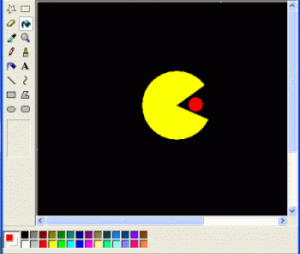
I’m going to show you how to make a Pacman animation that will really draw your visitors’ attention. Or maybe they’ll just puke. Anyway, kick off by drawing

out each of your frames using an editing tool. Paint works fine for basic animations, though it’s a good idea to storyboard the animation on a piece of paper beforehand, so you can get a rough idea of the positioning.

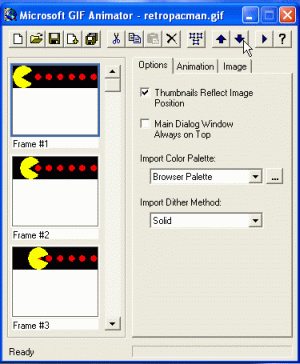
Aim for around 3-6 frames for a simple animation. Be sure to save each drawing out as a GIF. Once you’ve finished, launch MS GIF Animator and drag and

drop each file you’ve created onto the program interface. The frames will be displayed in a viewer on the right and you can shuffle the order of them using the Up and Down buttons if you want.

Now click on the ‘Animation’ tab. Here you can set the height and width of your animated abbhoration in the boxes provided. Be sure to check the ‘Looping’ button if you want your little Pacman to keep going. It’s also a good idea to switch on the ‘Repeat Forever’ option because people will never tire of watching it move. [Caution: animated GIF over the fold!]
Continue reading “How to: Create a retro animated GIF”

Mozilla issue warning on Firefox data loss bug

NoScript logoMozilla have issued an official warning about a script vulnerability that could lead to hackers taking over their machine. The bug is only triggered when certain types of extensions are installed i.e. those that are “flat” which means that they don’t package their files in a JAR archive. Examples include Download Status Bar and Greasemonkey.

However, Mozilla have only labelled the security priority risk as normal but they do recommend installing the No Script extension in the meantime. No Script basically prevents unauthorised scripts running in Firefox without your consent. A script is basically a command that executes in your browser and can potentially take over your PC. Normally they are harmless but they can be triggered by Trojans or third parties through “holes” in your browser to gain control of your machine or insert a virus.

NoScript is not the only solution out there though although it’s the only one specifically designed to protect Firefox. You can also use AnalogX Script Defender as an extra security measure. This program intercepts any request to execute the most common scripting attacks such as Visual Basic Scripting (.VBS) and JavaScript (.JS). It’s designed as a catch all solution to protect your browser, e-mail client and any other application which connects to the net.

For more details on using NoScript with Firefox, check this tutorial:

[youtube]BKW5SMvMKtY[/youtube]

Download Adobe plug-ins for free

Adobe ExchangeAdobe Exchange beta is the closest to paradise Adobe software junkies can find. It’s a free online exchange service that enables you to download hundreds of plug-ins, extensions, code bits and other time-saving tools for the most important Adobe applications, including big shots such as Photoshop, Dreamweaver, ColdFusion, Flash or Illustrator.

You can search the website using Adobe product filters or check their top lists, including the newest items and also the most downloaded and highest rated ones. Each plug-in is presented in a dedicated page with extended information about its functionality and other technical data like license, language and platform compatibility, among other details. What’s more, you can check other users’ comments about the plug-in, something that may help you make up your mind when trying to choose between a few of them.

The website requires a free user account in order to download anything, which you can sign up for on the spot. Be aware that not all available plug-ins are freeware – some of them are published under a commercial license. However you can find gorgeous effects for free, like this awesome Photoshop action I downloaded while testing the website and with which I produced the accompanying picture in just a few seconds.

How legal is P2P file sharing?

P2P NetworkOver Christmas, I introduced someone to the wonders of Peer-to-Peer (P2P) TV. He couldn’t believe that he could watch channels from around the world, in real time for free. His immediate reaction was, “Is it legal? Am I going to go to jail for this? Please switch it off and let’s watch BBC1. Get out of my house.”

For anyone like him, especially those of the older generation, it’s an understandable reaction. You don’t get anything for free in this life right? But P2P software allows you to do many things for free – make phone calls, share films, music and software, watch TV channels etc – all you need is an internet connection. It’s increasingly used by research, medical, business and military institutions to improve data flow exchanges although for the purposes of this post, I’m only looking at the things that the average home user uses them for. Much of the the suspicion and fear surrounding P2P has also been generated by the furore in the media that’s surrounded the “illegal” downloading of music and movies via P2P networks such as eMule and LimeWire. In a few cases, such downloading has been penalised with massive fines and even imprisonment under copyright laws so people are right to be concerned.

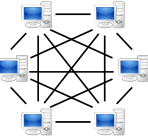
To understand the legality issue surrounding P2P, it’s first of all useful to understand exactly how it works. It’s really not that complicated. Peer-to-Peer means exactly that – P2P software enables your PC or Mac to link with other computers and share both bandwidth and the contents of your hard drive. A pure P2P system is incredibly democratic because since it’s entirely interlinked and there is no gatekeeper such as a vendor or middleman. Nowadays, not all P2P systems are pure – they vary from centralised, such as Napster which effectively do feature a main server or gatekeeper, to completely decentralised such as Gnutella. But the principle – a user generated system of file sharing – remains. The result is that
you suddenly have access to music, movies and virtually any other file that you never dreamed possible, or at least, would normally have to pay a small fortune to obtain. And the most amazing thing of all is that it’s absolutely free. The beauty of this is that the more people that use it, the bigger, stronger and faster it gets.

The legality issue basically affects those P2P networks that are decentralised. Centralised systems such as Napster are subscription only. In other words, for a monthly or annual subscription, you can download to your heart’s content without worrying about legal consequences. In these cases, multimedia corporations happily provide music and movies for download in the knowledge that they are making money from it. Meanwhile applications such as eMule, which are based on the Gnutella P2P network and its variants, are completely decentralised and so there’s no gatekeeper to collect revenue. This is obviously a commercial broadcaster’s worst nightmare.

Continue reading “How legal is P2P file sharing?”

The stupidest names in software

The GIMP: Great program. Stupid nameI don’t know about you, but I think there are way too many ridiculous brand and product names in today’s tech world. I’ve just taken this quiz that illustrates the similarity between nonsensical Web 2.0 names and some the equally ridiculous pharmaceutical brands out there. Testing software all the time, I regularly come across applications that are so awfully-named you’d think they’d be dreamed up by a drunk child.

For me, the key to a good product name is clarity and memorability. This is one of the reasons why brands such as iTunes, Windows Media Player and Photoshop have succeeded. A program name must go some way to giving a clue about what the program does. Many don’t though, and suffer for that as a result. Here are some of the biggest culprits, but feel free to join my campaign against badly-named software and suggest your own.

  • The GIMP – As far as I know the only graphics app named after a sex slave
  • Monkey’s Audio – I’m sure a chimp must’ve dreamed up this stupid name
  • MobyDock – An awful pun for this desktop utility
  • Deckadance – Another highly unoriginal play-on-words
  • Floppy Office – Unsurprisingly, this limply-titled USB app flopped
  • OphCrack – I think the developer of this app was on crack at the time
  • Bloodshed Dev – Good name for a war game. Bad name for a C++ compiler
  • Floola – Sounds like something a baby would gurgle after a heavy meal
  • Tvkoo vivi-player – More nonsensical rubbish that tells me nothing
  • Zattoo – What is it with software authors and their love of ‘oo’s?

Software for setting up your own VPN

VPN secure logoVirtual Private Networks (VPNs) are essential if you need to ensure that your company or organisation is working within a closed, secure network. This is particularly important for employees who are working outside of the the office or if you want to setup an exclusive network within the office.

If you’re new to VPNs, don’t worry – they don’t have to be difficult to setup. There are plenty of programs out there that do much of the hard work for you. One of the best is WallCooler because of its ease of use. WallCooler allows you to access remote LAN and local area networks at the same time without the annoying need to switch. The problem with this program however is that because it’s pretty basic, the security settings aren’t particularly advanced. If you are using the VPN for highly confidential information, then iPIG Secure Access VPN Server is especially designed for ensuring that those using wireless routers and WiFi hotspots can connect securely. Instant Messaging clients used over VPNs are one of the most vulnerable points of attack and Wippien uses the highly secure XMPP protocol to connect to any Jabber client. If you’re looking beyond the Jabber network, then ZIM is a more flexible option as an IM client.

If it’s simplicity and security you’re after than OpenVPN is very straightforward but not very advanced although it does support SSL connections. One word of note – something worth looking for in any VPN client is whether it supports auto connecting when a connection is dropped. This is one of the most annoying aspects of working on a VPN as it often requires manual reconnection and re-entering of your username and password.

Tips to manage your time

Clock logoBenjamin Franklin once said “Time is money”. The KLF once asked, “What Time Is Love?”. What could they possibly both have in common? Well, one is that they could both have benefited from a slice of time management whether it was to earn money or find love.

Time management is one of the hardest things to master with so many things vying for our time. It’s easy to get absorbed by one task and forget about the next. The internet is one of the biggest culprits in stealing valuable time which is why it’s worth trying RescueTime – the genius of which is that it tracks the way you spend your time on your PC and for how long. You can then review this data to see which activities are eating the most time. If you want to track the amount of time you’re spending on a specific project or working task, then you’d be better to try Complete Time Tracking Software. This program is particularly useful for managers who need to track how long a task takes to complete for a team member.

If you’re a freelancer or contractor then time management is particularly important since time really is money. If you have to combine worksheets and time keeping with invoicing, then TimeCore is a versatile tracking tool which reduces the amount of work you have to do when it comes to invoicing for your work. If you’re managing a small business, then Advanced Time Reports Web Primer does exactly the same thing but is designed with a team or several members involved. For contractors, Easy Time Tracking is an excellent time-billing solution but it relies on both yourself and your clients installing it to work seamlessly.