How to catalogue your music collection

The World’s biggest music collectionI love music, but not as much as this guy, who’s put his collection of 3 million records and 300,000 CDs up for sale on eBay. If you’re thinking of bidding then make sure you’ve got at least $3 million in your account because that’s how much experts are predicting the collection will cost. If you do manage to win the bid then you’re going to need some way of cataloguing the records. In fact, even if you don’t bid, it’s worth keeping your tunes in some kind of order to aid your listening.

Start by grabbing a copy of Audiophiler, a software app that helps you to organise your collection of CDs, LPs, cassettes, Mini Discs, or any other medium you keep your music in. All you need to do is shove each CD into your computer and Audiophiler will pull off all the information about the album (even the sleeve art) from the online CDDB database.

It takes one-click so you needn’t worry about typing everything in yourself. Once you’ve catalogued everything you can do all manner of cool things such as printing reports and sorting and group by artist, genre, media format, year, along with all sorts of other fields. Heck, you can even record where and when items were bought and how much they cost. Now, where did I put that $3 million???
100 iPod resources to study better

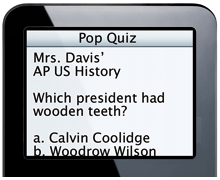
popquiz.pngAdmit it, if you’re at school and have an iPod, you’ve probably been caught watching a video, showing off your photos or just playing a tune instead of actually listening to a boring lecture.



Well, if you want to redeem yourself in the eyes of your parents and teachers, and show them that your iPod can actually contribute to your education, take a look at this list of 100 iPod education resources from The Online Education Database (OEDB). It includes study guides, podcasts, tutorials, applications, and more. Everything to become the brightest element of the class.

Let’s start with study guides and podcast lessons. To prepare for an exam anywhere, anytime, read up from guides like Spark Notes or Raybook and listen to the SAT Vocabulary Builder‘s hip hop session to learn tricky words. For foreign students, ESL Podcasts are a great way to learn the language of Shakespeare on the way to University. iPod Spanish to Go will teach you all the secrets of the Latin tongue. If you prefer listening to lively discussion between experts and professors, listen up on both NPR Science Friday and the Philosophy Talk.

iPod applications abound, but finding the ones only useful for studying can be a little difficult. Use CopyTrans to backup and sync all the guides, flash cards and notes you’ve crammed into your iPod back onto your computer. If you want to do just the opposite, iGadget is what you need. This program prepares everything into an iPod friendly format. Looking for a place to study which offers a WiFi connection? Use WiPod to find it.

Finally, those of you wanting to get a head start at college can start studying lessons and lectures from many universities, like Stanford, Berkeley, Northeastern or Queen’s University, which are among a few to offer their lectures in podcast format on iTunes ready to download.

Today’s downloads for Windows, Mac and Mobile

Download Need for Speed: ProStreet Porsche EditionBuckle up and get ready for an adrenalin shot with Need for Speed: ProStreet Porsche Edition, the latest title of the NFS series. This demo features two powerful sports cars with which you’ll fly over the Porsche Leipzing track. A highly realistic physics engine and a true speed sensation make the challenge even more attractive.

FileChuteSending large files via the web can be a real chore, so it’s a relief when you can work with an application like FileChute. This nifty little application allows you to store files in your .Mac account and then generates a link with which your friends can access it. Drag and drop your files, copy the url link to email, and your done!

Access your phone from your PCOne of the problems of using your mobile phone for day-to-day tasks has always been that the screen size is very small, and the fact is, that will always remain the case. MyPhoneExplorer provides you with a complete suite for controlling and managing your cellphone from your PC. Connection is established very quickly, and the package detects the device either via USB cable, Bluetooth or Infrared.

Get Digsby IM and social-networking Beta invites

Digsby reviewHave you ever stopped to think how many online accounts you have? Email addresses, IM accounts, social network profiles… keeping all of them alive and updated can certainly be difficult and time-consuming.
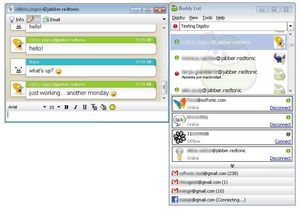
This is why Digsby is a good option for all of us who have registered for a dozen different online services and hardly find the time to catch up with them. Being defined by their developers as an all-in-one IM client, this program is certainly much more than just a cross-network chatting tool. Besides supporting the most popular IM protocols, it also allows you to check messages in different email services and follow updates in your Facebook and Myspace profiles.

Digsby reviewThe good thing about Digsby is that it gathers all the information you need under a single interface, so that you can get a preview of who’s online, how many messages you have and what’s up on your favorite social sites, all in a quick look. Plus, you can configure the program to show a small floating window every time you receive a new message on any of your accounts. I especially liked the possibility to read a small text snippet for each one of my emails, mark them as read or even delete them, all of this without even having to open a browser. Unfortunately you still have to use the traditional web interface if you want to send a reply.
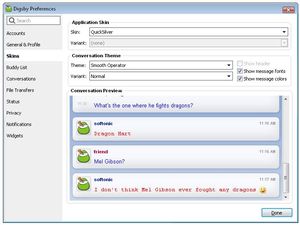
I also liked Digsby’s configuration menu. I appreciated having tons of settings to customize and Digsby did meet my expectations, both in appearance, security, performance and general behavior. The program is very easy to configure and manage, which means you can have it up and running in no time after the installation.

Digsby reviewDigsby’s overall impression is frankly good. That said, don’t forget the program is still in beta stage, which makes it a bit unstable. I had some problems when trying to enter the ICQ network and the Facebook connection didn’t work properly either. Also, I missed having support for some other popular social sites like Twitter, Digg or Flickr, to name a few. Still, I’ll keep my thumbs up for Digsby; it’s got a lot of potential and I’m sure it’ll improve a lot in future releases.

Digsby is currently in private beta. We contacted the developers and they’ve kindly provided us with 1,000 free invites for OnSoftware readers to test Digsby. Simply download the program and use “softonic” as your invite code during the installation process.

Oh, and don’t forget to let us know what you think of the app!

Power-up your PowerPoint presentations

PowerPoint logoDespite several attempts at emulating it, there are few programs that have come close to Microsoft PowerPoint in terms of usability and implementation across business environments across the world. Chances are, if you’re attending a presentation at work today, it will have been made in PowerPoint.

Sometimes it seems the presentation is more important than the message though with colleagues trying to out-do each other with increasingly flashy presentations. If you want to impress the boss with the professionalism of your presentation then it’s worth using a few tools to help you. One of the most popular downloads remains Microsoft Producer for PowerPoint which helps you capture, synchronise and publish audio, video and other images. It spices-up the most bland presentation with jazzy graphics and video. For quite literally complete control over your presentations, ShowDirector for PowerPoint allows you to connect your PDA or mobile device to PowerPoint so you can control it remotely – a sure fire way to impress your boss/irritate your co-workers – even if the presentation doesn’t.

One of the most ubiquitous areas for PowerPoint related software concerns that of enhancing it’s distribution. This usually involves converting the presentation into Flash which can reduce the size of the file by up to 90% and not only make it easier to send via e-mail but also enable those that don’t have PowerPoint to view it too. PowerPoint to Flash very simply allows you to drag and drop presentations into the program before converting it. Another solution, although mainly aimed at minimising the size of your file, is PPTminimizer which also converts your presentation to Flash but mainly focuses on compressing any images and multimedia in it which take up the majority of the file space. Alternatively, if it’s not file size but general distribution you are worried about, then PowerPoint Slide Show Converter allows anyone to view your presentation in a simple slideshow.

Don’t forget that if your sending a PowerPoint presentation to someone who doesn’t have the program installed, they can still view them for free with Microsoft PowerPoint Viewer.

Software to spy on your spouse

Magnifying Glass - an essential tool for any sleuthThe anonymity and growth of the internet have opened up a new avenue for those who are tempted to cheat on their spouses. There are literally thousands of dating sites and lonely hearts forums out there where your partner could seek solace when things are going badly. A while back Tom took a look at general surveillance software for all kinds of scenarios but online cheating has become something of a niche industry in itself.

It’s painful to suspect that something may be going on behind your back and it’s even harder without any concrete evidence. If your spouse is spending increasing amounts of time at the PC, or sneaking off to use it at any given chance, then you may suspect that something is going on. One excellent tool for discreetly tracking every aspect of their activity is PC James Bond 007. This all encompassing spying package tracks everything from keystrokes to Instant Messenger chats. It covers most of the major clients although it can’t record phonecalls but it does work completely discreetly with no trace anywhere in Add/Remove programs or in your system tray.

If it is messenger chats that you’re particularly concerned about and PC James Bond doesn’t cover yours, then try Messenger Detect which automatically detects and records any type of instant messenger chat made across your LAN. If this still doesn’t do the job, then Win-Spy Monitor is the most powerful solution as it records absolutely any keystroke made on your PC including messages typed into other applications.

E-mails meanwhile are much harder to spy on especially on webmail such as Hotmail or Gmail because of the encryption they use to prevent unauthorised access to accounts. One program that may be able to help however is Email Spy Pro which can capture both mail from POP3, SMTP and webmail based accounts. As regards webmail, it is frequently updated with plugins to support the latest webmail systems and encryptions although you may find the success rate very hit and miss.

Best database solutions for PCs

MySQLI admit it, databases aren’t the most thrilling topic to talk about, especially on a Monday morning. Yet if you work in a technical field and have to manage sets of data, creating a solid and logical database can really simplify things for your organization. We’ve got a list of 10 different applications which should greatly help you out when working with databases, mostly in MySQL. Take a close look at these to find the one that suits you most.

  • FileAmigo LE – No coding knowledge required here, thanks to a wide range of templates and records.
  • SQLyog – A compact and fast graphical tool for managing MySQL databases.
  • phpMyAdmin – Handle your MySQL database on the web via this tool written in PHP.
  • Navicat – Easily generate reports and import or export data in this effective MySQL database manager.
  • CASE Studio – Visually create and manage ER diagrams of numerous databases.
  • FileMaker – The ultimate database manager both for Oracle and MySQL.
  • Dataceptor – Create web access to your database without any programming knowledge.
  • EMS MySQL Manager for Windows – A powerful solution to manage your multiple MySQL databases.
  • OpenBase SQL – High speed access to structured data thanks to this server app.
  • Backup Watcher for MySQL – Schedule regular backups of your MySQL database.

Vista boot configuration made easy

Vista logoWindows Vista may not have been the success story that Microsoft hoped but it has given users more control over certain aspects of their operating system. One area where it still hasn’t plugged the gap however is the configuration of Vista’s boot sequence and loader.

In particular, if you’re running Windows Vista and want to install a second operating system or manage the boot configuration, it’s not easy if you’re not familiar with the BCDEdit File, hidden in the System32 folder. One of the best solutions to this problem is VistaBootPro which utilises a user friendly interface to do everything you can do with BCDEdit. This excellent program clearly presents the current settings, allows you to backup settings and of course edit the bootloader. All you need to do is check and uncheck the options you want included. If you need to access the bootloader to install another operating system, then you can’t do much better for free than EasyBCD which again, presents Vista’s boot data via an easy to use GUI which prepares your system for an alternative installation.

One of the most annoying things is when you lose your Vista installation key and need it to perform a new installation or reset your administrator login details. The key is hidden within Vista’s boot sequence but not easy to access. In which case, Windows Key is your best bet which runs via the Command tool and can instantly extract the key for any operating system installed on your machine. Finally, the best way to prevent boot problems at a later stage or require you to access the boot loader is to get it configured correctly in the first place. vLite is probably the most comprehensive program for giving you complete control over all aspects of a Vista installation. This is a program for customisation of the entire installation of Vista including removal of all those Microsoft add-ons that you don’t need but it also allows you to configure the boot loader through an attractive GUI.

For more information on configuring Vista’s boot loader plus links to Microsoft for warnings and guidance when doing so, check out the Wikipedia entry here.

Tips and tricks to manage your links

Link LogoHyperlinks have become one of the most important way of sharing information in the world whether it’s a link taking you to a business presentation or simply sharing photos with family and friends. Did you know though that there are tools and utilities that can help you use links more efficiently such as the ability to check for dead links before you click on them and manage them more effectively in your bookmarks folder and website?

One of the worst aspect of running a website or blog is that the links you post on it quite often go out of date. That’s why it’s a good idea to use Xenu’s Link Sleuth which trawls through them and checks them for validity. The same thing goes for your favourites folder with Link200 which goes through them one-by-one and works out which ones are dead. Unfortunately, it only works with the Internet Explorer browser at the moment though. If you’re looking for stats on your links, how many times you’ve clicked on them or want to organise them by category etc, then Link Ripper tracks several types of statistics related to them.

What do you do when want to read multiple links on the same page? Clicking on them one by one is a long drawn-out way of going about it so try using Snap Link which allows you to drag a box over the links you want to check and open them all at once. While on the web theme, do you know how search engine optimised the links for your website are? If not, LinkFreeze allows you to do so by substituting un-optimised characters in your links with something more search friendly and static. After you’ve used it, try Mozzle Link Popularity to see how effective it’s been.

Top 5 Jabber IM clients

Jabber logoIf you’re not sure what all this jibber-jabber is about Jabber then let me explain. In software terms, Jabber is known as the “Linux of instant messaging” due to its open and secure nature. It’s a highly effective and useful alternative to all those ad-bloated IM networks such as AIM, ICQ and MSN. Now for the science. At its heart, Jabber is basically a set of streaming XML protocols and technologies that allow two clients to communicate with each other. The advantages of Jabber are numerous including greater security, it’s completely open, it can be extended easily and it’s completely decentralised. After reading all this, you may be thinking “Sign me up! Where do I get started?”. Well, for starters, you can use any one of these excellent clients that support the Jabber protocol.

Pidgin – Previously known as Gaim and supports multiple protocols at the same time

Universal Messenger Plus – Very simple and lightweight IM client

Neos – Simple client offering voice and video over IP

Pandion – Highly secure and customisable client with plugins

Miranda – Requires no installation and very light on your CPU

After choosing one of the above you’re ready to go by just following the instructions on the Jabber Foundation homepage.