5 tools to get the most out of iCal

iCal logoI have to admit, I don’t use iCal as much as I should do. That’s partly because I’m not big on calendars and agendas but mainly because Google Calendar came along and trumped it. Since I spend half of my life online, using an online calendar is no big deal to me and I’m hardly bothered about a breach of privacy whereby someone could discover my grandma’s birthday. However, in recent times I’ve come to discover various plug-ins and add-ons for iCal that mean I can have the best of both worlds and more. Here are my 5 tips for getting the most out of iCal:

Calaboration logoCalaboration An essential for any Google Calendar user. Calaboration syncs iCal with Google Calendar so no matter which you use to organise your life, they’ll always be in sync. It simply requires your Google account username and password to get up and running and from then on, every entry you make is synced in real time.

YAI logoYAI (You Are Invited) If you work with Outlook like me then this is another essential. YAI allows you to translate and transfer appointment and meeting invites to iCal from Outlook, Google Calendar and Zimbra. This prevents you needing to use Outlook’s calendar and iCal at the same time. Invites appear in iCal’s invitation pane and you can also import pending invites that you’ve already received but want to add to iCal.

eBaytoiCal logoeBaytoiCal Why not use iCal to make money? If you’re a big eBay user and you’re forever missing auction deadlines, then this is the plugin for you. Quite simply, if you’re browsing an item on eBay, eBaytoiCal creates an event in iCal for the auction date. It sets a reminder 15 minutes before the end of the auction with the name of the event and the URL of the item you’re viewing. The downside? It only works with Safari at the moment.

ical-events logoiCal Events For all those dashboard addicts, iCal Events allows you to see what’s coming-up in your schedule without even opening iCal. You can only see events up to two weeks in advance but that’s enough not to give you any excuses! By hovering your mouse over the color of the calendar you want to view, you can also see more details about each event.

today-logoToday Designed to give a comprehensive overview of your daily events and tasks without having to open iCal all the time. Today allows you to keep track of what’s on your agenda for any given day and it syncs with iCal automatically. In this way, your agenda, events and tasks are available all in one tidy interface. It can however be prone to a few bugs now and then so use with care.


Today’s downloads for Windows, Mac and Mobile

Download Photo-BonnyWindows: If you’d like to play a joke on your friends with a fun photo collage, Photo-Bonny is the perfect tool. This app helps you create hilarious photo compositions with your own pictures and a varied collection of clipart graphics, frames and also a basic brush tool. Photo-Bonny is very easy to use and can save the results in several formats.

Metro guide on your phoneSymbian Series 60: Mobile phone users are – by definition – on the move and this explains the large number of applications geared towards helping travellers wherever they go. One of the most successful travel programs available for handheld computers is Metro, a free guide to the subway systems in over 300 cities worldwide.

Daisy Disk logoMac: Ever suspect your disk is being cluttered with big hidden files? Daisy Disk is a simple but elegant app to see what’s occupying your precious space. Daisy Disk scans a disk and displays its content as a sector diagram where the biggest files and folders are clear. If you want to inspect a folder more, you can just click on one of the segments to drill it down and see what’s occupying your space.

How to: Create a Da Vinci drawing in Photoshop

Last week I went on a short holiday trip to Rome. I enjoyed it a lot and I had the chance to see some of the most beautiful works of art in the world, such as the Sistine Chapel, Michelangelo’s Pietà or the School of Athens by Rafael . I guess some of that art must have inspired me to try to create something different this week, and not just the standard photo effect Photoshop tutorial. Luckily I found this original Da Vinci drawing effect, with which you can also become a Renaissance artist – even if you don’t know a brush from a chisel.

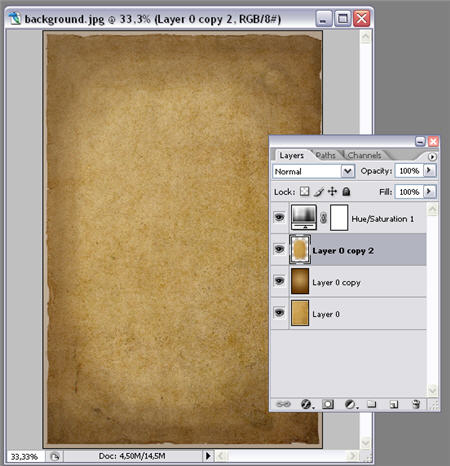
1. First of all we must create the right background for our Da Vinci effect. I downloaded this aged paper from Stock.xchng and then worked on it in the following way: create a new layer on top of the background, apply a radial gradient effect with two sepia tones and change this layer’s blending mode to Multiply at 50%. Then copy the background image onto a new layer and apply a Hue/Saturation effect at -25%. Finally, erase the margins of this layer so that we create a lightning effect in the center.

How to: create a Da Vinci drawing in Photoshop

2. Crop the subject of your drawing from its original photo and paste it on a new layer. Remove any background left from the original picture. Continue reading “How to: Create a Da Vinci drawing in Photoshop”

Advice for Facebook: save energy with Edison

Save energy with EdisonEnvironmental awareness is a trendy topic these days in almost every area of our daily lives. Cities reduce speed limits on behalf of contamination, home appliances are rated according to their energetic efficiency… even the software industry has recently started a series of green software apps, aimed mainly at helping companies and individuals reduce their carbon footprint.

But if there’s one business that really needs to improve its power management, that’s Facebook. Zuckerberg’s company was reported to spend about one million dollars a month only on electricity. Even if this massive power bill is justified by their 10,000 servers and the huge amount of user-generated contents those machines are forced to move everyday, it still seems too much for me.

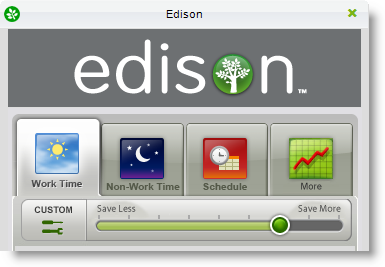
Oddly enough, today I also found a program that helps you save energy. Edison (fun name for a power saving tool, isn’t it?) tweaks Windows energy management settings and turns off several computer elements – namely monitor, hard drive and the whole system – after they haven’t been in use for a while. Of course, this is no real solution for Facebook’s power needs but I still find it a curious coincidence.

Edison lets you create different power two different saving profiles, one to be used during working hours and another one suitable for your leisure time, though I guess the best method to save energy when you’re not using your PC is to simply switch it off. The program includes a tiny counter that shows how much money you have saved so far.

Saving power is not only a way to save money (something Facebook should start considering straight away) but also to care about our planet and avoid the effects of global warming. In this sense, Edison is not the only software app that contributes to a more environmental-friendly behavior. If not, check out our lists of tools to fight climate change or track your carbon footprint. I just hope Mark takes note of this advice and starts saving power today; otherwise we may have to create a Facebook group about it… oh wait: there are already a bunch of them.

Today’s downloads for Windows, Mac and Mobile

evrithumb.png

Windows: Evri Toolbar brings the semantic web to your browser. What’s that? Well, you get much more intelligent search results, multimedia content, related terms and much more. It’s still only in beta, but it looks fantastic and makes a Google search seem very last year. It’s especially good at things like bands and names of people, although it’s a bit weak if you search for “table”!

Control iTunes remotelyiPhone: Ever wished you could tap into your iTunes library on your computer using your iPhone? Well, Remote allows you to do just that – and more! Remote gives you the power to control not only the music on your computer, but also on your Apple TV. This is all done using your iPhone or iPod Touch. The application is able to handle playlists and lets you browse your complete multimedia library.

Opacity logoMac: If you’re creative when it comes to icons, then try Opacity for size. Opacity covers three graphical areas for icons – applications, icons and the web. It offers the traditional pens, colors and zoom tools. You can use some of the templates to get working right away or start from scratch by selecting one of the different shapes and create your own interfaces, buttons and much more.

Friday timewaster: Don’t Look Back!

What a fantastic title for a game! Terry Cavanagh’s new indie game Don’t Look Back! is a hard and atmospheric platform shooter. the basic 8-bit graphics work really well, the colors and sound effect work together to create a great sense of foreboding about… something. You have unlimited lives, and you’ll need nearly enough patience alongside some lightening quick reactions, but it’s worth it. Sign in to the site and you can register your high scores too.

Internet kills the Radio?

radio

Over on Crunch Gear, Nicholas Deleon tried to make the case that no one finds new music using commercial radio anymore, as social networks, Last.fm and so on have superseded it. He specifically targets “commercial” radio for some reason, but it doesn’t really matter. I’m really not convinced any “muso” has ever used daytime commercial music stations to discover music. But at night, when they specialist DJs came out, that was when things got interesting.

I would probably agree with Nicholas about finding commercial music radio pretty horrible – but it was horrible before the internet! If you don’t want to hear classics, or the top ten on rotation: don’t listen to those show. There’s plenty of other good stuff on the radio.

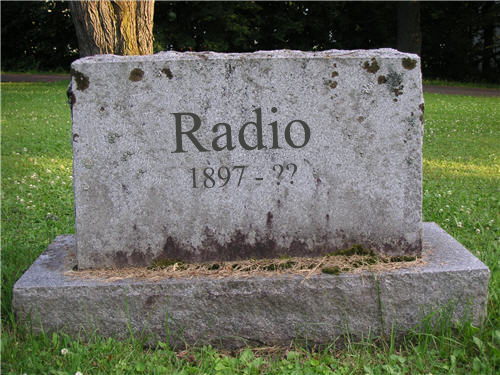
However, that’s not the point. The argument that the internet has killed radio is wrong. The sensible radio broadcasters are using the internet as their broadcast medium, so as an industry it should do just fine. BBC radio‘s listen again service is hugely popular, for example. It is true that you can use Myspace, Twitter, FaceBook, Spotify , Last.fm and so on to discover new music, but as radio stations, Last.fm and Pandora miss out the personal touch that you get with a DJ.

The best DJs can give you a constant stream of new and exciting music, often programmed so the tracks fit together well. For every shouty-trendy Portuguese act you find on the internet, listen to a good radio show and you’ll probably hear it there first.  Of course, chances are you’ll have been streaming your radio show over the internet, so I think it’s better to say that the Internet is saving the radio show. Much like MTV didn’t hail the death of radio in the 80s, it’s premature to write its obituary today.

How famous are you? Find out with a vanity feed

Create your own vanity feed with Yahoo! PipesIn the last ten years or so, it’s become much easier for us normal folk to become famous. In the good old days it took talent, contacts and a good deal of luck to get your name known around the world. In the age of reality TV, MySpace, and blogs, almost anyone can be famous. Of course, us bloggers will tell you that we’re not in it for the fame and just use the medium as an outlet for our expression. And this, of course, is complete nonsense. The truth is that anyone who writes a post on the web hopes that it will get picked up by someone then sent around the World so everyone can see how big and clever they are.
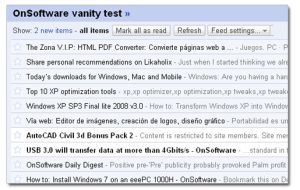
If you want to see just how famous you are, then what you need is a ‘vanity feed’. Simply put, this is an RSS feed composed of several other RSS feeds of a particular search term (in this case, you, or your site). As a result, it allows you to keep track of every time you are mentioned anywhere in the blogosphere. The simplest way I’ve found of creating a vanity feed is to use Yahoo! Pipes. It’s actually pretty straightforward – just follow the steps outlined below.

Continue reading “How famous are you? Find out with a vanity feed”

Sumo Paint, an amazing online editor

I’m particularly fond of image editors and I’ve tested many of them, including all those online editors that have become so trendy in the last few months. But I must admit I’ve never seen such an incredible online image editor as Sumo Paint.

Sumo Paint

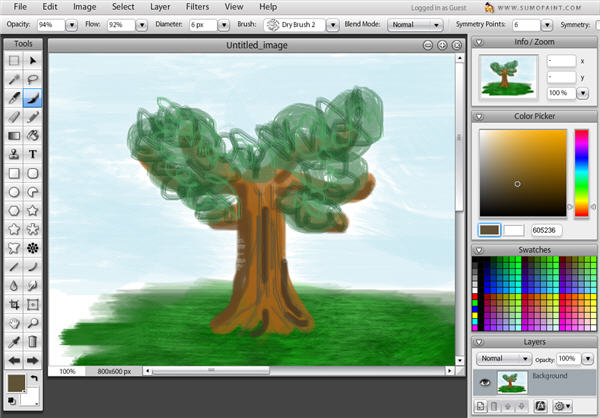
This amazing tool opens up in your web browser and displays a complete Flash interface that will look amazingly similar to Photoshop. This reduces the learning curve to almost zero to all those who are already familiar with Photoshop, but if this is not your case, don’t worry: you’ll get the knack of it in almost no time.

Sumo Paint includes a full featured tool menu with pretty much anything you need to start painting from scratch. Brushes and pencils are designed to draw just like the actual tool, trying to be as realistic as possible. You can customize colors, fiddle with opacity and flow percentages and of course, work in different layers.

Sumo Paint

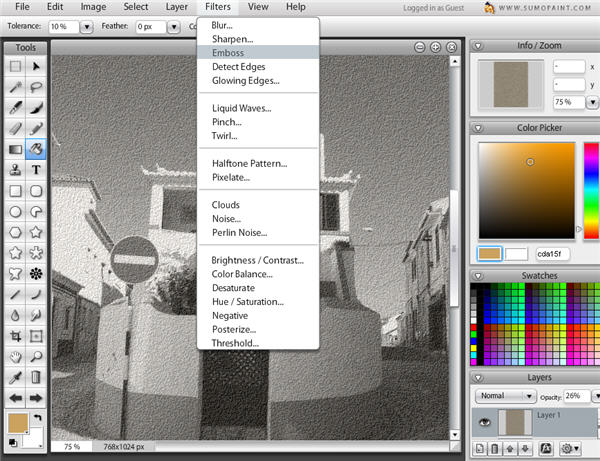
 When it’s time for photo editing, Sumo Paint doesn’t fall short of expectations either. The program lets you load images from your local drive, an Internet URL or your Sumo account and apply a dozen filters and effects or adjust color and brightness values to it in a couple of clicks. Should something go wrong, simply press Ctrl+Z and it’ll be undone – just like any desktop tool!

Sumo Paint

Regarding those Sumo accounts I just mentioned, don’t get me wrong here: you don’t need to register or sign up for anything to use Sumo Paint. It’s totally free. The Sumo account is only a way to enter the Sumo community, a group of Sumo Paint users that have gathered around this great online editor and share their photos and drawings online. Having a Sumo account therefore lets you upload your own creations to the Sumo site and also comment on what other people have uploaded.

I could only find one drawback to Sumo Paint: the program doesn’t include a proper Help section yet. Photoshop users don’t need it, but other people would find it quite handy. In all, Sumo Paint is an excellent online photo editor that’s really worth a try.

3 free ways to paint on your Mac

There’s nothing better than a good doodle sometimes and there are some great free Mac paint apps that for all ages. If you’ve got kids, paint applications are a cleaner alternative to having them get their hands dirty without stifling their creativity. Plus you can use far more tools and brushes than you’d normally have available in real life. Here are three of the best free paint applications I’ve used on the Mac:

Scribbles logoScribbles My personal favourite because it’s so easy to use yet allows you to be really creative. Scribbles is so easy that anyone can use it, especially young kids. On startup, you’re presented with a blank canvas and a round dot which is your paintbrush. You can spray in a variety of different styles such as a simple spraycan, an elegant calligraphy font or messy “goo”.

Paintbrush logoPaintbrush One of Softonic’s top Mac downloads, Paintbrush is a clone of MSPaint and is suitable for all those that need a little bit more control and features than Scribbles. Again, Paintbrush is extremely simple. You have a floating toolbox which allows you to change your painting tool, erase sketches, change color and more. Paintbrush is aimed at those that want to sketch something more serious than dodgy smiley faces and houses.

Helios Paint logoHelios Paint A cross platform Java based paint app which is probably the most complex of the three but also allows you to create the most technical images. It’s aimed more at those that want accurately measure out lines, plot axis and generally produce more exacting images. The fact that it’s based on Java though means that it can run rather sluggishly at times.