
Top 10 online services to discover new music

Top 10 online services to discover new musicNow that Last.fm will start charging for its online radio service – except for the United States, United Kingdom and Germany – maybe it’s time to move on to other alternative online services that can also help you discover new bands and new music styles. To be honest, I think the €3 monthly fee is reasonable if you compare it to what you obtain in exchange: your favorite music anytime, anywhere. But I can also understand people being upset about having to pay for something that has always been free.

Whether you plan to keep on using Last.fm or not, here’s a list of 10 online services you can use to listen to music and discover new bands and styles. I’m not sure that any of them have all the powerful social features and the widely varied music catalog you can find on Last.fm, but in any case, it’s always nice to have a few different choices when it comes to listen to some good tunes while browsing the web.

  • Grooveshark  – Beautifully designed website that lets you search for and listen to your favorite artists and songs. You can also build playlists, meet other people with the same musical taste and even upload music from your PC.
  • Pandora – An excellent service, similar to Last.fm: listen to music based on your own tastes and let the system recommend new bands and styles based on those tastes and your feedback. Sadly, it’s only available in the US.
  • RadioBlogClub – A website with clean, simple design that lets you create custom playlists and stream them on your personal website or blog with an embeddable player. Playlists can also be shared on popular social sites.
  • Live365 – A simple yet functional website that offers you access to more than 6,000 radio stations, created and run by its own users and covering pretty much all the music genres you can think of. The player is a bit too ad-ridden though.
  • Slacker – This service lets you create custom music stations starting with either any of Slacker’s presets or a personal list of artists. These stations are continuously evolving based on your feedback. Like Pandora, it’s only available in the US.
  • Deezer – This website is mostly dedicated to radio hits: you can listen to radio top charts from France, United Kingdom and the US, besides creating your own playlists or choosing any of the Deezer theme radios and artist-based smart radios.
  • RadioBeta – A very original online service that lets you discover new music based on genre or geographic location. This last option can help you discover great music styles you never heard of, from countries like Senegal, South Korea or Brazil.
  • Musicovery – Another original music service: pick some genres you like, select the decade and then click on the appropriate mood to obtain a selection of suitable songs. Too bad you can’t even skip songs if you’re not a Premium member.
  • Jango -This website lets you create personal stations with your favorite artists and similar bands. Other than that, it doesn’t really offer any value-added services, and it’s constantly showing nagging windows to encourage you to register.
  • Spotify – Though not really a web service, Spotify couldn’t be left out of this list. A sleek, lightweight desktop player that connects you to a huge online database and lets you listen to music and create playlists.
Create a custom search engine powered by Google

Google is an excellent search engine. There’s no doubt about that. But what if you could tailor it to create a custom search engine with the same capabilities as the standard Google?

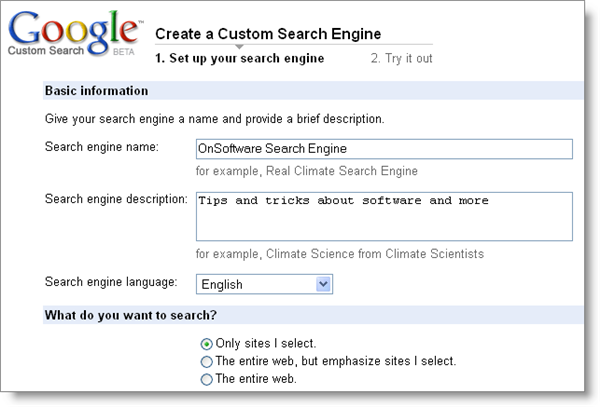
Google Custom Search Engine in the answer. This powerful tool lets you build a completely customized search engine based on Google. You can give it a name, add a description, set its language and specify which sites you want to search. In this way you can create custom search engines for a group of websites about a certain topic, your most frequently used resources for Photoshop tricks or a given blog network, to name a few examples. In this case, I’m creating a search engine for all the blogs in the OnSoftware network:

googlecustomsearchengine01.png

As you can see, creating a customized version of Google is just a question of filling in a simple web form and hardly takes a couple of minutes. Custom Search Engine is a free, ad-based service, but if you’d prefer not to see ads on results you can upgrade to a Business account starting at $100 per year. The ads are quite unobtrusive though. Continue reading “Create a custom search engine powered by Google”

How to: Apply a tilt-shift effect to your photos

Apply a tilt-shift effect to your photos

Tilt-shift is the name of a visual effect for both videos and photos that has recently become quite popular. The tilt-shift effect uses blurring and color saturation to make a real life scene look like a miniature model diorama. While creating tilt-shift videos like this one can take a while, applying this same effect to your pictures is much easier. Simply open up Photoshop and follow these simple steps:

1. Open the image you’re going to work with. Note that not all photos are suitable for the tilt-shift effect. You’ll obtain the best results with top perspective images: the street seen from a skyscraper, a landscape taken from an elevated viewpoint, etc. In my tutorial, I’ll use this shot from Stock.xchng. Continue reading “How to: Apply a tilt-shift effect to your photos”

The economic crisis – good news for PC games?

The Sims BoxThere are few tales of boom-time in these days of economic doom-and-gloom apart from junk-food and erm… lingerie. However, according to the PC Gaming Alliance (PCGA), sales for PC game sales are showing a healthy rise, outstripping those of both the Xbox and Playstation. The PCGA are currently attending The Game Developers Conference (GDC) in San Francisco where it announced PC Games made around $11 billion last year putting it ahead of the major consoles. According to the GDC, the biggest growth areas were in digital distribution i.e. those games that can be bought online or pay-to-play online such as World of Warcraft. Does this mean that over-the counter purchases and shops such as GameStop could suffer even further then?

President Randy Stuge told the BBC at the Conference:

The biggest story in PC games is the expansion beyond retail. PC games have successfully pioneered online subscription and distribution models that have resulted in a global boom that shows no signs of slowing.

Meanwhile, GDC event director Meggan Scavio says that many game developers are still hiring:

We have a career pavilion here with 50 booths. There are studios that are hiring, companies are hiring. People like Nintendo and Blizzard are still thriving and people are forming their own independent studios and are looking to take people on.

Maybe it should be no surprise that PC gaming is doing well. The PCGA estimates that there are around 1 billion PC owners worldwide many of which are looking for cheap forms of entertainment in these times of crisis. Rather than splash-out on a console, they’re looking towards their PC as the answer. As one gamer told the BBC at the conference: Continue reading “The economic crisis – good news for PC games?”

New features in Gmail Labs

Gmail LabsThe Gmail Labs family keeps on growing healthily and steadily. In case you don’t know what I’m talking about, Gmail Labs is a special area in your Gmail account (you should find it under Settings > Labs) which Google developers use as a sandbox to test new features and get feedback from Gmail users. The Labs feature is disabled by default, but you can enable it at any moment and choose which specific features you want to have added to your account. Some of them are quite handy and like I said, the list keeps on growing all the time.


The two latest additions to the Labs family are Multimedia Preview and Undo. The first one enables you to have media file previews right in the message body of your email messages. These previews include Youtube videos, Picasa photos, Flickr photos and Yelp reviews, and can save you a few clicks when browsing attached files.

As for the Undo function, it helps you avoid sending wrong email messages – and by wrong I mean those messages where you forget to attach a file, include an inappropriate recipient in the copy field or spot a typo in the last second. In these cases, just hit the “Undo” button that appears on top of the page to get the message back and fix it. You only have 5 seconds though, so you’d better be quick.

Some other interesting features in Gmail Labs are the the Tasks list, the improved Star system for managing email messages, a canned responses tool, support for multiple inboxes and last but not least, a hidden Snake game.

Video: First look at Internet Explorer 8

Internet Explorer 8 has finally hit the shelves today, without many differences in comparison with the release candidate launched two months ago. Accelerators, Web Slices, InPrivate browsing and the so called SmartScreen filter are some of its most outstanding new features. But since a picture is worth a thousand words, we though you might get a better idea if you see Internet Explorer 8 in action. Here’s a video we just recorded with the newly launched browser: an overall review that covers its main tools and explains all the new stuff.

//

New version of Nimbuzz hits the iPhone

The new version of Nimbuzz has hit the iPhone App store, which is great news if you’ve been looking to cut down your phone bill, but bad news if you’re the operator of a mobile phone network. We’re big fans of Nimbuzz and the way it lets send instant messages and chat for over Wi-Fi from your iPhone. And it seems the program just keeps getting better, and there are a number of interesting new features in the latest version, Nimbuzz 1.1.0.

Make free iPhone calls

For starters, there’s now a full dial pad for making free calls over WiFi. If you’re hooked up to a wireless network you’ll also be able to use Nimbuzz to make VoIP calls to landlines and mobiles using Skype Out, or another of the support VoIP networks. Even if you’re not in a WiFi zone, you can now make calls to your Nimbuzz buddies using the new dial-up VoIP service. This means that no matter where they are in the World, you’ll only pay the cost of a domestic call.

There’s good news for iPod touch users too, because the new version of Nimbuzz lets you transform your device into an iPhone. You’ll be able to make calls over WiFi using Skype Out, or your VoIP provider (providing you have a headset, of course).

The addition of a slick new landscape chat mode completes the impressive set of changes to Nimbuzz, an app which is starting to become something of a phenomenon.

Internet Explorer 8 out: still fails Acid3 test

ie8-acid3-sm.png

Yes, Microsoft have just dropped Internet Explorer 8 final. It still fails the Acid3 test, though, meaning not much has changed since the release candidate. Which isn’t much of a surprise.

Stay tuned for our video tour of the new browser. In the meantime, download it from Microsoft here.

Ask OnSoftware: Remote access made easy

Ask OnSoftware: Remote access made easyIf you’re a lawyer, your friends will probably ask you about legal issues. If you’re a doctor, they’ll require your advice about certain symptoms. And what if you’re a computer expert? Yes: you’ll automatically become some kind of personal computer technician, available 24/7 to fix your friends’ problems with software, hardware, viruses and other elements. This is precisely what one of our readers was complaining about when he sent us this email to ask@onsoftware.com:

Hi OnSoftware,

I’m a student of Computer Science and I’m constantly being disturbed by “friends” who need assistance with the simplest computer issues. I’d like you to write a post about software to remotely access and repair computers, but with two conditions:
1. The client application must be easy to install  (some people are hopeless at this)
2. It should work without having to open ports on the customer’s side.

Thanks OnSoftware, keep up the good work!

A few years ago computer remote access sounded more like a hacker crime, but nowadays it’s a fairly common method to solve basic computer issues in real time. It helps technical support teams to provide a better service, while customers don’t run the risk of ruining their systems by trying to resolve the issue on their own. Continue reading “Ask OnSoftware: Remote access made easy”