
 Twitter clients for the Mac are currently exploding onto the market at an increasing rate as developers big and small try to come up with the best client. Two offerings that I recently tried are Pwitter and Bluebird. Both are free and don’t require Adobe Air like many older twitter clients so they’re super lightweight and quick.
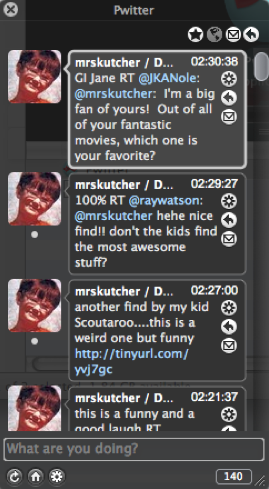
Firstly, Pwitter only runs in Leopard at the moment so older OS X users will have to wait for
a while. Pwitter is built on Cocoa which means the developers have been able to give it a very sleek interface. While the look and feel of it is excellent (utilising Core Animation technology) you are stuck with a black GUI. The best thing about Pwitter however is its simplicity. On installation, you’re prompted for your twitter username and password. Once you’ve entered them, you instantly start receiving tweets and can start publishing them. There’s no messing around configuring sounds, skins or window views. Even someone who’s never used twitter before, will be up and running with Pwitter within seconds.
Pwitter also supports Growl alerts so you’ll never miss a tweet. On the minus side, there is no way to configure the tweet alert sounds. While the default one isn’t bad, it would have been nice to have included some way to change this sound.
Bluebird meanwhile leaves no stone unturned in the customisation department. Setting it up is not quite as straightforward as Pwitter though. For example, there’s no auto-prompt to enter your twitter username and password when you install it – you have to work out how to add a new account yourself which isn’t difficult but may confuse newcomers to twitter.
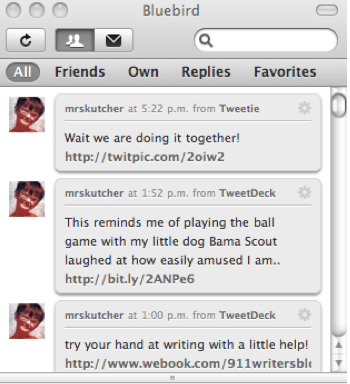 Although Twitter clients rarely get “complicated”, Bluebird is ideal for the power user who wants maximum control over how their client looks and fees. It is built on a combination of a XHTML, CSS and Javascript base so it doesn’t benefit from the Cocoa that makes Pwitter so sleek. However, what it lacks in gloss it certainly makes up for in features including the ability to filter tweets, search them and change the theme in a click. There are 3 themes to choose from (including an iChat look) which is a bit limited but better than nothing. If you’ve got a bit of HTML and CSS knowledge however, you can create your own themes which means Bluebird can at least look anyway you want it to. Changing the default themes simply requires going into preferences and using the Themes selector tab.
What I liked most about Bluebird though is the sound editor. You can define separate sounds for incoming and outgoing tweets and direct messages. There are around 10 0r 15 sounds to choose from although unfortunately, you can’t preview them so you have to wait for a tweet to arrive to see what they sound like. Nevertheless, I rely on sounds more than Growl alerts (which Bluebird also supports) and this was a real winner for me. Perhaps one of the few drawbacks of Bluebird compared to Pwitter is that you can’t hide it from the dock as yet.
The more comfortable I get with twitter, the more I’m inclined towards Bluebird. I do prefer the slickness of Pwitter though overall. Now my only problem is to work out whether Demi Moore really is twittering or employing someone to do it for her.


 A year ago, “cloud computing” and “Web 2.0” were buzzwords that were flying around a lot but didn’t really have a