Is RepRap the future for downloading?

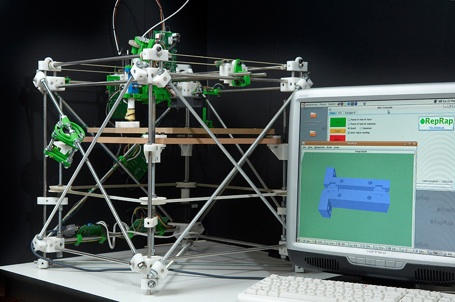
RepRap logoImagine if rather than downloading software, you could download products. I’m talking real objects like furniture, tools, and even electrical goods. In other words, a multitude of man made objects which would usually be produced in a factory somewhere in China. Well, it might sound crazy, but that’s exactly what the developers of the “self-replicating rapid prototyper” or “RepRap” are dreaming of.

The first obvious question is, how the hell is this supposed to work? In short, a specially adapted 3D printer will be able to “print-out” the blueprints of the objects that you download. RepRap’s motto is “Wealth without money” and that’s the exciting aim of the project. It embodies the essence of freeware because after all, that’s exactly what all the freeware we download everyday is – free products that add value to your life. The developers point out that, through printers we already have the power to start our own printing press. The RepRap project simply aims to take that concept a step further.

RepRap Printer Continue reading “Is RepRap the future for downloading?”

In defense of Apple

Apple has been getting a lot of flak recently, from us as well as elsewhere. People aren’t happy the the iPhone App Store isn’t allowing Google Voice, or in general about the policy of not allowing any app that does something already available from Apple.

Apple is scared of competition, stifling innovation and generally annoying people by not doing whatever it is people want. I’m not sure things should have got so bad, despite my earlier claim they might be losing their cool.

It is certainly true that if Microsoft was seen as being this controlling today, it would get roasted by the press (as it has done in the past). But I think Microsoft are in a very different position, as they have a massive market lead over the rest, and unless you can pay more for an Apple,  or are brave enough for the uber-tech-nerd world of Linux, you will use Microsoft. So they’d better listen to people, as people mostly aren’t using them by choice.

But you choose to use a Mac, or to buy an iPhone. Apple products are beautifully designed, incredibly user friendly, and generally don’t crash. People loved the iPhone when it came out, but now it’s being demonized for not being able to do something it has never been able to do. Maybe the iPhone would be improved with Google Voice –  but it’s no worse without it. It seems a great deal of this is that users feel they are being denied a free service, but you can’t blame companies for wanting to maintain revenue.

To me, people are wrongly assuming that because they own a product, they have a say in its development. They don’t. Apple, like Nintendo, make incredible products by not listening to people, and being secretive. There may be odd things that other companies do better, but none of them get the whole package as right as the iPod and Mario creators. When lowly users are allowed to get involved, you get a big mess as the Simpsons showed us years ago with “The Homer” automobile.

As for exploding iPods: that just sounds cool!

Customize Google Chrome with themes

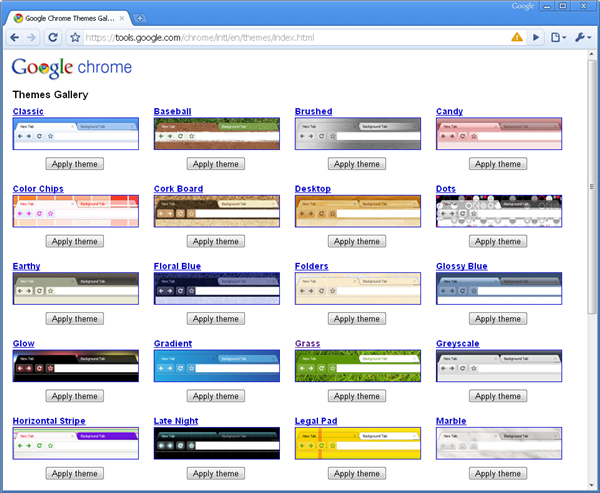
If you’re beginning to get tired of Chrome’s minimalist design, here’s some good news for you: Google has finally launched a theme gallery for Chrome with which you can spice things up a bit in a couple of clicks.

Customize Google Chrome with themes

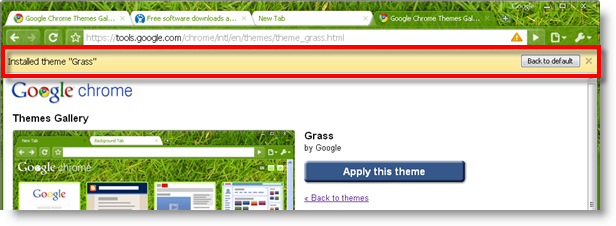
The gallery currently offers 29 different themes for your browser – if you count the default as well. They’re all dead easy to use. All you have to do is make sure you’re running Chrome 3 beta, head to the gallery, choose the theme you like most and hit the ‘Apply theme’ button. Chrome will start downloading the corresponding file and apply it to the interface right away. If you like the result, keep it; if not, simply choose another theme, or restore the default design from the top bar that appears after installing each theme.

Customize Google Chrome with themes

As for the selection of themes in itself, I have conflicting feelings: on the one hand, it’s great that Google has finally managed  to produce some skins with which to customize its browser; on the other hand, I’ve had a hard time choosing one. They’re definitely not the most beautiful themes I’ve seen – not to say most are frankly ugly – and some of them even make the browser harder to use, due to a strange combination of colors or a weird background design.

In any case, I think you might want to have a look at some of the themes included in the gallery after the jump and decide by yourself.

Continue reading “Customize Google Chrome with themes”

Find places of interest with Google Maps

The one thing that I’ve missed on Google Maps has been the ability to see points and places of interest. Fortunately, the team have finally introduced this feature allowing you to get more out of the places you live-in and visit and even plan your holidays. Even better, you can click on a monument or building and get a popup window with more info a little bit like the way photos of points of interest can be added to Google Earth.

Now for example, you can plan a visit to New York’s never ending places of interest without even picking-up a guide book.

screen-capture-6.png Continue reading “Find places of interest with Google Maps”

How to: optimize photos taken with a mobile phone

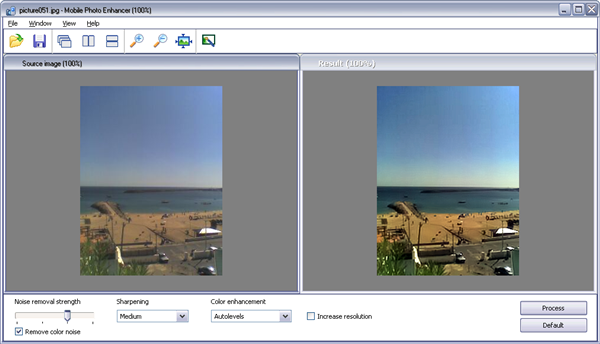
Summer is traditionally the time of the year when most people go on holiday, traveling around the world and taking photos of everything they see. With high-end digital cameras becoming increasingly more affordable, you have no excuse not to take a snapshot of all the beautiful places you visit this summer. But if your budget is still too low, you can always use the built-in camera on your phone – even if it’s not very good – and then process the images with Mobile Photo Enhancer.

How to: optimize photos taken with a mobile phone

This simple application lets you easily improve the quality of the pictures you take with your mobile phone by reducing noise, applying some sharpening and enhancing color. Of course, we’re talking about small improvements here: Mobile Photo Enhancer won’t turn your mobile photo into an impressive Pulitzer deserving shot, but at least you’ll be able to make it look better than the original picture.

Mobile Photo Enhancer includes two different executable files: one to work with one single photo and another one to process multiple images simultaneously. Unless all of your photos are quite similar and you’re sure they all require the same adjustments, I’d advise to use the single-photo version, because you may have to try a few times with different adjustments before obtaining a satisfying result.

How to: Split MP3 files

When you download an album, it usually comes as a bundle of short audio files, one for each track. But sometimes you may get a single, long MP3 file with all the tracks included in it. In those cases, and unless you want to listen to the whole album from beginning to end every time you play it, the only solution is splitting it up into smaller parts.

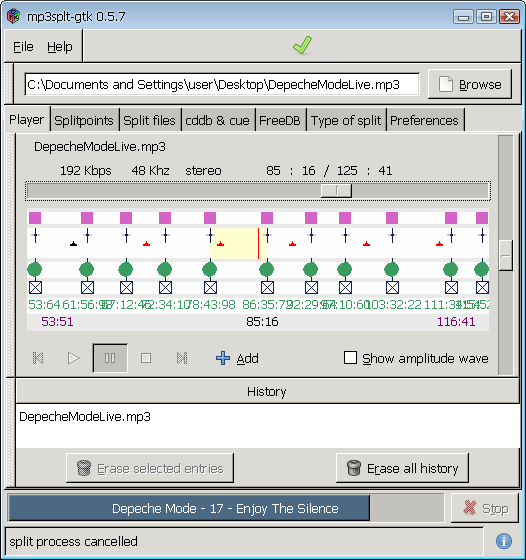
I had this problem with a couple of music albums and I spent some time looking for the right app to deal with it. The problem was that one of the albums was recorded in the studio, while the other was recorded live; this means I needed a program that could split MP3 files not only based on silence between tracks, but also on some other kind of technology that enabled me to split a concert – where there’s never a moment of silence. Luckily I think I found just the perfect app: mp3splt.

How to: split MP3 files

mp3splt is an open-source tool that analyzes the selected MP3 or OGG file and lets you choose between different ways to cut it into smaller bits: set the ‘splitpoints’ manually, use a cue file, detect silent breaks between tracks or query online CD databases for information about the album, so that the program knows where to cut. Continue reading “How to: Split MP3 files”

Apple v The World: The battle intensifies

Apple LogoWriter and philosopher Albert Camus once said “The slave begins by demanding justice and ends by wanting to wear a crown.” Ok, this quote might not be entirely appropriate to Apple’s growth into a software giant but the spirit behind it is. Big business can be a dirty game – I’ve got no qualms about that. But Apple have always promoted themselves as innovators par excellence and it irks me somewhat that their attitude towards innovation based on their own products is becoming increasingly anti-competitive.

Of course, it’s unrealistic to expect a major corporation to welcome applications that could rival their own with open arms. But Apple’s recent decision to reject the Google Voice iPhone app displays an ugly tendency by Apple to block anything that threatens its position. The poor excuse used by Apple was it already offers functionality available on the iPhone. This particular decision now hangs a big question mark over whether Spotify will be accepted by the Apple iPhone store as I questioned last week. A decision to reject that too would symbolize yet another unacceptable blow by Apple to a superbly innovative application that could provide the blueprint for music distribution in the digital age.

To be fair to Apple, the acceptance or rejection of Spotify for iPhone will be a much greater indicator of its true attitude towards innovation than the Google Voice iPhone app. The FCC in America have stepped-in to investigate that particular case because it’s been suggested that it may actually be mobile network AT&T (who distribute iPhones in the USA) that put pressure on Apple to reject it, based on the fact that they obviously don’t want people using their iPhones to make calls and send texts for free. Spotify on the other hand is a direct competitor to Apple’s own iTunes and the decision to reject or accept it will be Apple’s alone.

However, as Jon pointed out earlier this year, censorship of applications is nothing new to Apple. He highlighted the increasing lack of credibility they suffered when they initially rejected an app which linked to “offensive” song lyrics and an e-book reader that, shock-horror, would allow you to read a version of the Karmasutra translated from the 1800’s. Albeit, these were widely interpreted as a knee-jerk reaction to Apple’s decision to withdraw the tasteless Baby Shaker application.

Meanwhile an indication of Apple’s “bullying” business tactics when it comes to hardware were illustrated by its recent decision to silence exploding iPod victims with gag orders. One particular British iPod owner, who heard a hissing sound from his daughter’s increasingly hot iPod, threw it into the garden to see it explode 10 feet into the air. Although he only requested a refund, he was demanded to sign a gagging order that would allow Apple to take legal action against him if he or his family ever revealed the terms of the settlement being offered.

The bigger question here is what gives Apple the right to dictate what can and can’t be installed on an a piece of hardware once someone has shelled-out the cash for it? Not even Microsoft – the embodiment of the monopolistic business practices in software – would even go so far as to dictate what can and can’t be installed on a Windows Mobile device for example. The evidence is mounting – Apple has it’s eye on the crown and it won’t let the spirit of innovation that has brought it so far stand in its way.

Today’s downloads for Windows, Mac and Mobile

Windows: SmarterFox is a neat little add-on for Firefox that can really speed up your browsing. It adds functions to your right-click context menu, allowing you to easily search Wikipedia, Google in a click. You can also download all links or images from the page your viewing without hassle. For such a little program, SmarterFox is pretty impressive.

Flock logoMac: If Firefox ever does go down the wrong road or starts to decline, then Flock could be one of the main contenders to take its place. It’s based on the same engine, only with a greater focus on social networking integration. Flock 2 is the second major release of this excellent browser, with most of the improvements relating to enhanced security and performance.

How much charge have you got leftiPhone: The default battery life indicator on the iPhone looks nice, but isn’t the most precise way of telling how much time you have left before your next charge. Step forward BatteryStatus, a free application that gives you a more accurate guide to what you can do on your remaining charge. It assess how much longer you will be able to talk, use the Internet, leave idle, etc.

Top tips for healthy eyes

If you spend a lot of time working on a computer, you’ll probably have noticed that your eyes often get tired, itch or sting. If they green-eye.jpgdo, STOP! Your eyes are much more important than whatever you are working on, and anyway, there are plenty of things you can do to prevent suffering in the first place.

Reduce Glare

If the computer screen is blinding you, you’ll find that your eyes get tired very quickly. Minimize reflection by thinking carefully about where to locate your screen (no windows or mirrors shining in, please!), making sure contrast and brightness are correct, and, finally, ensuring that your monitor is up-to-date. You may think your old-fashioned brick is just fine, but you will be really surprised at the difference between it and a sleek new flat-screen.

Pick an eye-friendly font
alpha.jpgAs far as I can see (boom boom!), there is no one font recommended by experts as easy on the eye. There is some consensus, however, that sans-serif scripts are easiest to read on screen. Bearing this in mind, think about using a font such as Verdana or Trebuchet MS in Microsoft Office or OpenOffice and don’t forget to choose a larger size for ease of reading, for example 11 or 12.

Change background color

It’s funny how quickly we get used to the normal look and feel of our screens, but changing the default background in Windows, especially for Word and other programs with a lot of ‘white’, can make a huge difference. Word 2003 gives you the option of white text on a blue background. It is easy to enable: Tools > Options > General, then ‘Blue background, white text’. There are three problems with this, however – I think it’s ugly, it only applies to Word documents and it’s not available in Office 2007. One alternative is to change the default color of all of the active backgrounds in Windows. Go to Control Panel > Display > Appearance > Advanced. You’ll see a window with smaller windows inside. Click on the phrase ‘Window text’. Below this, click on ‘Color 1’ and then ‘Other’. Choose whatever shade you think will be most comfortable – personally I use a very light gray. The change will take effect immediately and throughout the computer, so windows, search forms and menus will all be affected.

Rest your peepers sleeping_man.jpg

No matter what you are looking at, nothing will help if you don’t take regular breaks from the screen. It can be easy to forget if you get wrapped up in your work, though, so why not enlist some help? A little program like Eyes Relax will remember for you, reminding you to take the breaks that both you and your eyes need.