You will no longer be able to know when there is a speed control with Google Maps (at least not as clearly)

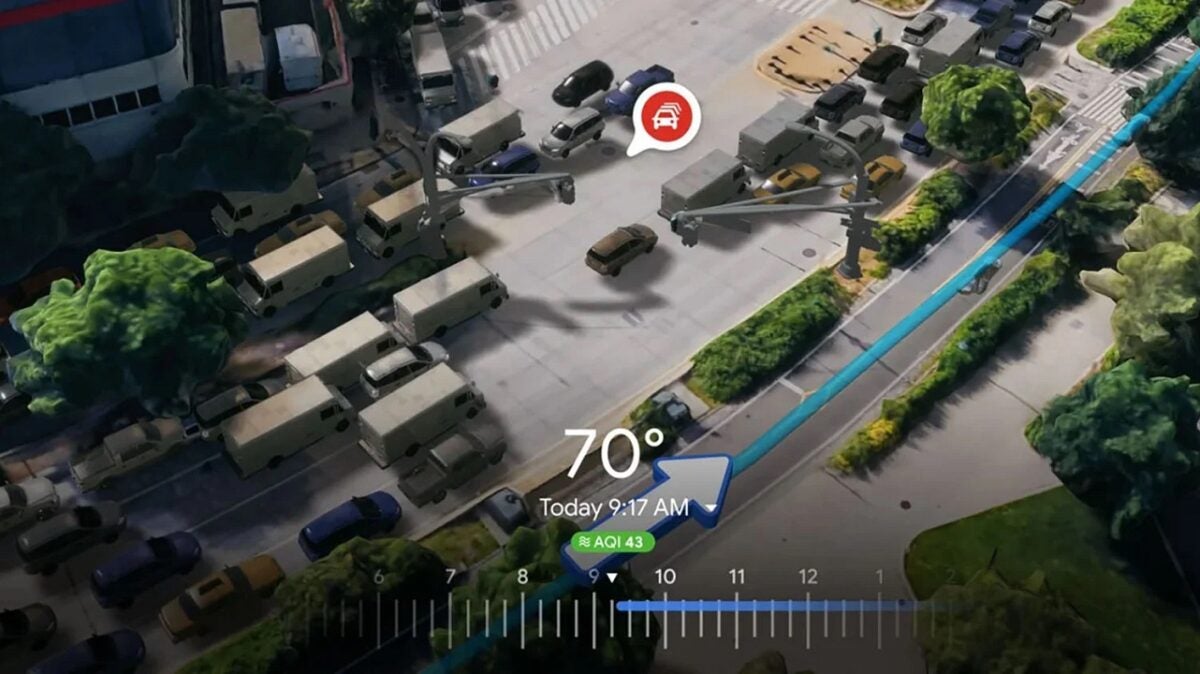
In its day, Google Maps decided to integrate the incident reporting system from Waze, another navigation app that also belongs to Google. With this feature, users can create incidents that will appear on the map for other users to see, including roadworks or accidents, among others. Now, the company has introduced a change that affects how police checks are reported, removing what was probably the favorite feature of many drivers: mobile speed cameras. Instead of reporting speed cameras, Google has introduced a more generic label to mark police presence. […]

In its day, Google Maps decided to integrate the incident reporting system from Waze, another navigation app that also belongs to Google. With this feature, users can create incidents that will appear on the map for other users to see, including roadworks or accidents, among others. Now, the company has introduced a change that affects how police checks are reported, removing what was probably the favorite feature of many drivers: mobile speed cameras.

Google Maps DOWNLOAD

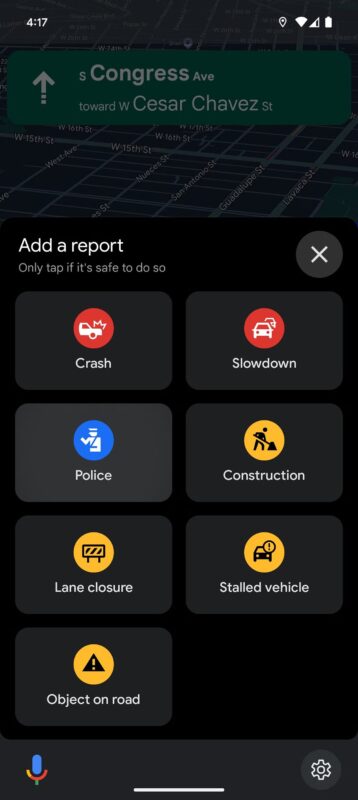
Instead of reporting speed cameras, Google has introduced a more generic label to mark police presence. With this change, Google Maps would cover different situations where police officers are on the road, such as directing traffic or responding to emergencies, situations that did not fit the old speed camera system. Although this might disappoint those who used this option, the new feature still allows reporting areas where there are speed checks, albeit in a less specific way.

According to Android Police, the “police” label now appears prominently in the list of incidents that drivers can report. The new functionality will be available in all versions of the app, including Android, iOS, Android Auto, and CarPlay, although its availability may vary by region.
Although many drivers may not like it, the change could be very beneficial for road safety. The uncertainty about the purpose of the police presence could motivate drivers to be more cautious, reducing speed in designated areas, regardless of whether it is a radar or officers in another type of intervention.

The new change is included in version 24.47.04.699095382 of Google Maps. If you still don’t see the police label, it is likely still being rolled out in your region and may take a few days or even weeks to become available.
Google Maps DOWNLOAD

Google Maps has just added a key feature that was missing in CarPlay

Finally, you can use Google Maps to report something on the road (an accident, a speed control, roadworks) through Apple CarPlay, although for some reason the feature is still missing on Google’s Android Auto platform.

Google Maps DOWNLOAD

According to 9to5Google, CarPlay users have started to see this functionality in their vehicles, although it doesn’t seem to be available for everyone yet. If it is available, you should see a triangular danger symbol to the right of the map.

This has taken a long time to arrive: the reporting feature has been available on Google Maps on Android and iOS since 2019, so it’s a mystery why it disappears as soon as you connect your phone to a car dashboard.

An update for Android Auto may be imminent as well, although we haven’t seen any signs of it yet and Google Maps doesn’t always maintain feature parity in terms of what it offers on CarPlay and what it offers on its own Android Auto.

Keeping drivers informed

User reports are a useful way to keep drivers informed about the conditions of their journey: you can send reports on Apple Maps and Waze (now owned by Google), as well as on Google Maps.

However, Apple Maps and Waze have been allowing users to submit these reports through the car dashboard and phone screen for some time now. Considering how many people are now using Apple CarPlay and Android Auto, it seems like an obvious option to add.

Google Maps DOWNLOAD

Maybe we should be grateful that Google is finally updating the Google Maps interface on Apple CarPlay; let’s hope a similar update for drivers connecting to Android Auto is not too far away.

The more people can report accidents, slowdowns, lane closures, speed traps, etc., the better for drivers who have to adapt their routes. With Android 15 about to be released, we may see more improvements for Google Maps at the same time.

Google Maps incorporates two useful novelties in its latest update

This will be a big week for Google, as on Tuesday, May 14th, the Google I/O 2024 software developer event will take place.

Google usually doesn’t skimp on updates to Google Maps, and users are discovering two new settings that have been quietly introduced in the Android app, covering electric vehicle navigation and the identification of specific roads.

Google Maps DOWNLOAD

Firstly, there is the electric vehicle charging, as discovered by SmartDroid (via 9to5Google): in the Android app you can see nearby charging stations with a tap on the corresponding filter button located below the main search bar, at the top of the screen.

However, you need to have your car set up as electric to see it, which you can do from the Your vehicle option in Google Maps Settings. The default option is the gasoline vehicle type, in which case you will see a quick link to gas stations.

A similar update was applied to Android Auto last year, so now it seems to have also arrived to the Android app. Last month, Google announced some new features based on artificial intelligence to facilitate access to an electric vehicle charging point.

The second adjustment of Google Maps will show you the entire length of a road highlighted in blue when you search for it. Previously, you only had a pin stuck in the middle of the road to help you find your way.

This gives you a better idea of the extent of the road you are looking for, in terms of where it starts and ends, and how much space it occupies on the map. Of course, you can continue navigating to any specific point on the road if necessary.

Google Maps DOWNLOAD

These are two minor adjustments, but both should make Google Maps easier and more convenient to use. It is still unknown if iOS will receive the same updates, but we assume so.

This will be a great week for Google, as on Tuesday, May 14, the Google I/O 2024 software developer event will take place. It is very possible that we will then know more about the updates to Google Maps, and you will be able to watch it live from wherever you are.

This is how Barcelona has solved a serious problem with tourists using Google Maps

The City Council of Barcelona has requested Google to remove one of its most popular bus routes, the 116 line to Park Güell, from search results.

We all who live in a big city know how uncomfortable it is to have to share it with millions of tourists who are only here for a weekend and if I’ve seen you, I don’t remember you.

Google Maps DOWNLOAD

In Barcelona, one of the most touristy cities in the world, they have come up with a brilliant way to eliminate the saturation of public transportation (intended for the mobility of citizens) by tourists.

The city council of the condal city has asked Google to remove one of its most popular bus routes from searches, the 116, which connects the surroundings of Park Güell with the city center. This service worked very well, until the tourists arrived, who colonized Gaudí’s park and the buses.

For those who don’t know, the 116 is an urban line equipped with vehicles called minibuses, which are slightly larger than a delivery van and can transport about 20 passengers.

Request from the neighbors, execution by the City Council and Google Maps

After the reports from the neighborhood associations, the Councilor for Security and Coexistence, Albert Batlle, proposed the possibility of removing the bus route from Google Maps. After a couple of months of work, the proposal has been implemented.

Google Maps, the biggest source of knowledge for tourists to get around when sightseeing, has managed to make tourists stop using it as a means of transportation.

Google Maps DOWNLOAD

And it has gone from being extremely crowded to having several empty seats per trip. The question is: will more cities copy this clever technique? We will see if more municipalities take Barcelona’s idea to free public transportation from uncomfortable tourism.

Create your perfect vacation with AI? Google will make it possible

Google has announced a series of updates that will allow users to better plan their summer vacations, providing them with much more information about purchasing intent in the travel sector.

Google Maps DOWNLOAD

Firstly, Google is rolling out an update to its Search Generative Experience (SGE) that will allow users to create itineraries and travel ideas using artificial intelligence, as announced by the company on Wednesday.

The new feature is currently only available in English in the United States for users enrolled in Search Labs, the program that allows users to test experimental versions of Google search and provide feedback. This feature would be based on ideas from websites all over the web, along with opinions, photos, and other data that users have submitted to Google about places around the world.

When users request something like “plan a three-day trip to Philadelphia that is related to history”, they will receive a sample itinerary that includes attractions and restaurants, as well as a summary of flight and hotel options, divided by hours of the day.

New Google Maps design

Google has also announced that it is making it easier to discover recommendation lists on Google Maps in certain cities in the United States and Canada. If you search for a city on Google Maps, you will now see lists of recommendations for places to go created by editors like The Infatuation, as well as other users. You will also see lists of the best restaurants, the ones that are trendy, and the ones that hide some hidden gem in over 40 cities in the United States.

Finally, Google is adding new tools to help you customize the lists you create, so you can better organize your travel plans or share your favorite places with your friends and family. You can choose the order in which places appear in a list to organize them by top favorites or chronologically like an itinerary. Additionally, you can link to content from your social channels.

Google Maps DOWNLOAD

Apple cars will visit Barcelona, Madrid, and the rest of Spain starting tomorrow: the continuous evolution of Apple Maps

It is sometimes easy to forget the enormous dedication required to keep the information on the maps we rely on every day updated. Streets change direction, parks or squares may be under construction or have just undergone a renovation, and having that information available on our maps is a titanic task.

With the continuous goal of improving the accuracy and detail of Apple Maps, starting tomorrow, March 19th, Spain will become the stage for a remarkable mapping operation by Apple. An initiative that will see not only specialized vehicles touring the streets of the country until June 25th, but also individuals equipped with image capture technology strolling through Barcelona and Madrid from March 28th to May 29th.

Apple Maps Download

Updated data for complete accuracy

The purpose behind this operation is to capture images and detailed data from areas that vehicles cannot access. This means that if we walk around Barcelona or Madrid soon, we will be able to observe people equipped with curious portable Apple backpacks, designed to collect both images and LiDAR data to build 3D models of the environment.

These backpacks, a more compact version of the systems used in vehicles, allow for the collection of detailed information on pedestrian-only streets, parks, squares, and even public transportation stations. The collected information will contribute to even greater accuracy in the Maps app on our iPhone, iPad, or Mac.

Since its first release, Apple has progressively evolved the quality of its maps. The latest update of Apple Maps now includes the United States, United Kingdom, Spain, France, Italy, Germany, and several others, highlighting the company’s commitment to continuous improvement of its services. In fact, on the Apple website is where we can check the scheduled days for image collection and, at the same time, get an idea of the scale of the project needed to keep our maps up to date.

Obviously, image capture will always maintain our privacy. Just like when Apple first started developing its own maps, all the images that become part of the Panoramic View feature will go through a process of blurring faces and license plates.

Apple Maps Download

It is sometimes easy to forget the enormous dedication required to keep the information on the maps we rely on every day updated. Streets change direction, parks or squares may be under construction or have just undergone a renovation, and having that information available on our maps is a titanic task. Proof of this is that, as early as tomorrow, we will be able to see the collection of information as it happens and soon see it reflected in the Maps app on our iPhone.

The SUPER Google Maps powered by AI to be the best GPS navigator

Google states that with this initial integration, they will take a small first step, working in collaboration with the contributor community…

We all knew that Google was going to introduce its artificial intelligence in all its products, just like Microsoft or Apple do. Research in new technologies would be meaningless otherwise.

Google Maps DOWNLOAD

In this way we have been able to learn that Google is going to introduce AI into Google Maps with the promise of helping users find interesting places through the use of large language models (LLM).

The function will respond to queries about restaurant or store recommendations, for example, using its LLMs to “analyze detailed information from Maps about over 250 million places and reliable reviews from our community of over 300 million contributors to make quick suggestions on where to go”.

According to Google, this feature will be available first in the United States, with no date for arrival in other countries.

Google Maps getting to know Bard: Google’s plan

If we have to imagine a place where Google can show off its technology, the navigation app Maps is the most logical, since it is used by millions of users every day, regardless of whether they have an Android or an iPhone.

Using their experience in generative AI to accelerate that transition seems like the next logical step. The examples that Google provides of their generative AI search feature are very Google:

“Let’s say you’re visiting San Francisco and you want to plan a few hours of searching for unique vintage items. Just ask Maps what you’re looking for, like “places with a vintage vibe in SF”. Our artificial intelligence models will analyze the abundant information from Maps about businesses and nearby locations, along with photos, ratings, and reviews from the Maps community, to offer you reliable suggestions.”

Google states that with this first integration they will take a small first step, working in collaboration with the company’s Local Guides community to ensure that generative AI is used with care.

This means that, initially, only these collaborators will have access to the generative AI feature in Google Maps. Later on, the company will make it available to other users.

The local guides, which have existed since at least 2019, are described as “a global community of explorers who write reviews, share photos, answer questions, add or edit places, and verify facts on Google Maps”.

Google Maps DOWNLOAD

However, it is not clear how different this will be from simply searching for “vintage store” in the regular Google Maps search bar. I suppose the response will be more conversational, like a chatbot.

Goodbye to Google’s driving mode? That seems to be the case

The driving mode of Google Maps is one of the most practical features of the application. Whether you’re driving yourself or…

Millions of people use this mode daily to go to work, to university or to the beach. It doesn’t matter where you go, what matters is knowing how to get there and Google always knows how to take us to places.

Google Maps DOWNLOAD

Google Maps driving mode is one of the most practical features of the application. Whether you are driving yourself or with someone else, it can always be useful, as it allows for a much more comfortable navigation, with a simpler interface and voice commands.

However, if the latest information is accurate, we could say goodbye to it in the future. 9to5Google has discovered two strings in the Google app, and they believe that Google Maps driving mode could disappear soon.

A secret discovered by engineers

The first mentions an unspecified “view” function that will cease to exist in February 2024.

Regarding the second string, it reads: “to make calls, send messages or play multimedia content while browsing, tap the microphone to use Assistant”, looking at the code, it seems that Google is willing to get rid of the driving mode in Google Maps, and instead, wants users to use Assistant while navigating and driving.

This makes sense, as having audio interactions can be useful while driving, but in terms of functionality, especially when it comes to proper navigation, it only degrades the overall experience.

As someone who regularly uses driving mode in Google Maps most of the time, I believe it is one of the best features of the application as it makes navigation very easy and simple.

However, without this feature, many drivers could find themselves in a bind because they would have to look at the screen from time to time, especially if they are navigating through an unfamiliar area.

Google Maps location history will no longer rely on the cloud

Google Maps has launched this week a series of updates focused on giving users more control over their location. The navigation app now allows deleting specific location-related activity, saving location history locally, and makes accessing location controls easier from the app’s blue dot.

Google Maps DOWNLOAD

The company states that Google Maps users will soon be able to view their recent activity related to specific places, making it easy to delete their searches, addresses, visits, and actions with just a few taps.

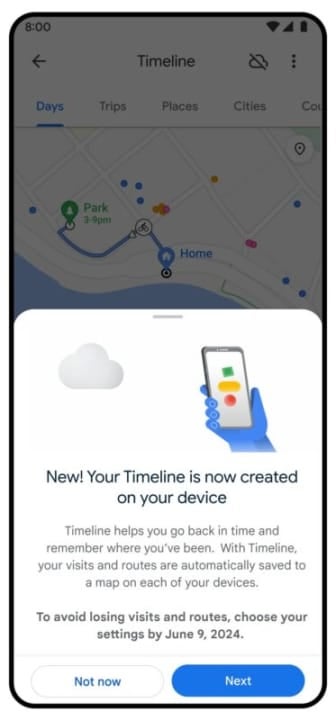
Regarding the blue dot that shows your location on Google Maps, soon you’ll be able to use it to access location controls. Tapping on it will allow you to see if location history or timeline settings are activated, a feature in Google Maps that helps you recall the places you’ve visited, and whether you’ve granted Google Maps access to your device’s location.

The ability to delete location-related activity in Google Maps and the new controls for the blue dot will begin rolling out on Android and iOS in the coming weeks, according to Google. Additionally, the company has also announced that if you’ve chosen to enable location history, soon it will be saved directly on your device, locally.

In a post, Marlo McGriff, the product director of Google Maps, wrote, ‘Just like before, you can delete all or part of your information at any time or turn off the settings completely. If you’re getting a new phone or concerned about losing your current one, you can always back up your data to the cloud so it doesn’t get lost. We’ll automatically encrypt the backup data so no one can read it, including Google.’

“Moreover, now when you first enable location history, the automatic deletion control will be set to three months by default. Previously, this option was set at 18 months. According to Google, these changes will be gradually introduced over the next year on Android and iOS. Users will receive a notification when this update reaches their accounts.”

Google Maps DOWNLOAD

The best review in the history of Google Maps is a micro-story about soccer and adultery

I traveled from Morón to arrive and they told me that the court was not available, that the sign this that the sign that, a lot of biribiri.

It is one of the most enjoyable exercises in the world: looking at the Google Maps reviews of random places and realizing that there are people wasting their talent for humor by dispensing justice on the Internet for free. From ‘If you want to die, you have to go to this kebab place, and in half an hour, you’ll be in the hospital’ to ‘The continental breakfast was continental because it came from another continent, lost somewhere in the Atlantic,’ laughter is guaranteed. But what we bring you today surpasses all expectations.

Google Maps DOWNLOAD

On Sundays, you abandon me for soccer

The story begins on Twitter, where Alejo, a user of the social network, was looking for a place to play soccer in Argentina, near Buenos Aires, specifically in the town of Morón. There he came across Mathias Alaniz’s review, who gave the field one star. Rightly so: ‘I traveled from Morón to get there, and they tell me the field was not available, that the down payment this, the down payment that, a lot of hocus-pocus.‘ A lot of hocus-pocus. Remember that, because indeed, there was a lot of hocus-pocus.

So far, so good. A valid complaint from a user who just wanted to play the Sport of Kings. The problem is that then it enters his private life: ‘Consequence: I arrive home earlier to find my wife fooling around with the neighbor.‘ And all, of course, because of the soccer field. It’s like one thing leads to another and…

Finally, Mathias ends with a laconic ‘Never again,’ which doesn’t make it clear whether he’s referring to his wife, soccer, or just life in general. That’s the hocus-pocus for you. It’s unknown if, at least, they gave him a couple of free days from the field for the inconvenience. In any case, you could say that, in the end, they scored a goal on him, right? Job well done.

Google Maps DOWNLOAD