So another decade is coming to a close and I think it’s safe to say it’s been the most exciting one ever for downloads. A top ten list of the past decade reads like a “Who’s Who” list of the download scene today. Almost all of the most downloaded apps on Softonic today were released within the past 10 years. During that time, I’ve converted from a frustrated Windows user to a dedicated Mac fan so here is my selection of apps for both platforms that I think should grace any 2009 Christmas stocking:
 Firefox Released 2004: Surely the undisputed number one application of the decade. Ever since I ditched Internet Explorer for Firefox, I’ve never looked back. The sheer amount of customization possible with Firefox is staggering. From integrated FTP clients to the best bookmarking system out there, Firefox remains an indispensable tool to me.
 Skype Released 2003: Before Skype came along talking with friends and family abroad was always costly involving annoying pre-paid calling cards or ludicrously expensive phone bills. Skype came along and changed all of that allowing users to talk for free and eventually, amazingly cheap calls to landlines and nowadays, webcam chats.
 VLCPlayer Released 2001: Playing video files always has been, and still is, a pain sometimes due to the huge number of different codecs out there. Gone are the days when you needed several different players to play different types of media thanks to VLCPlayer. If there’s a video format out there, chances are VLCPlayer can play it.
 uTorrent Released 2004: Before uTorrent, I used eMule for my P2P file sharing needs. But in the search for something faster and more lightweight I discovered uTorrent and have never looked back. Now finally available for Macs too, uTorrent is everything a P2P file sharing client should be and more.
 Picasa Released 2000: My photos used to be as organized as a jumbled mess of thumbnails stored in crudely labeled chronological folders. Then Picasa came along (although not until 2009 on Mac) and made browsing through my collection as absolute pleasure. Not only that, it eventually enabled me to instantly upload and share them with friends and family.
 Adium Released 2001: There was a time when I had to have different Instant Messenger clients installed in order to chat to different contacts. Adium changed all that by allowing me to bring all of my IM client needs under one lightweight and easy to use application. It’s just a shame Windows users can’t enjoy it too.
 Spotify Released 2008: A relative new kid on the block but what an app this is. I test a lot of applications but the first time I tried Spotify, it was obvious that this was something special. Spotify instantly struck me with its ease of use, the huge range of music available and potential as the future of music distribution.
 TVUPlayer Released 2005: While many of the first P2P TV apps consisted of difficult to understand Chinese interfaces and instructions, California based TVUPlayer distinguished itself by not only being easier to use, but filled with hundreds of channels around the world. Now finally available on Mac, it remains my most used P2P TV app.
 Google Talk Released 2005: I was an enthusiastic early convert Gmail and so it was no surprise when Google Talk turned out to be just as good. Using a clean interface, tabbed conversations, and crystal clear voice calling, I’ve used it many times when audio quality on Skype was bad. Just a shame there’s no standalone version for Mac yet.
 Google Earth Released 2005: Although I don’t use it much nowadays, I won’t forget the first time I used Google Earth. Suddenly it felt like sophisticated satellite mapping technology was available to anyone, anywhere at the touch of a button. Exploring cities, towns and landscapes around the world was never so much fun and it keeps getting better.
Some of you will no doubt argue there are a few major omissions here such as iTunes, Windows Live Messenger and LimeWire but for me personally, the decade didn’t get any better than any of the above.
 If you’ve got yourself a spanking new Magic Mouse for your Mac, you may be more than just a little bit disappointed with some of its functionality.Fortunately, a mini-cottage industry of Magic Mouse software is already developing to fill the gap left by Apple. There still isn’t much out there at the moment but here are a few essential software downloads to get the best out of your Magic Mouse. Note that all of these work for Trackpads too: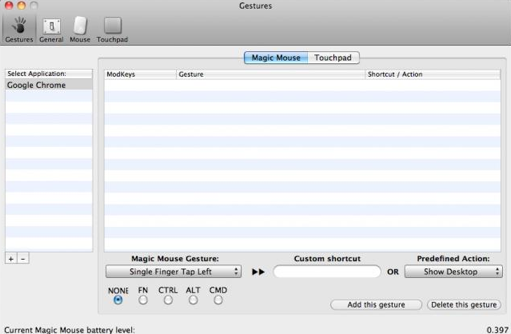



 Noel Edmonds Cosmic Ordering
 Robbie Williams Racing
 I am T-Pain
 Push Shaq In terms of absolute complete uselessness, this app surely takes the biscuit. To be fair to Shaq, it nothing to do with him. It was an unofficial iPhone app developed by one of the guys at
  Hammer Time