Choosing the best 10 applications of the past decade is certainly a hard task – especially if you work as a software editor and test hundreds of them every month! But this experience is precisely what helps us identify outstanding programs right on the spot: programs that are more than just simple lines of code compiled into functional software; they’re tools that can improve our lives. Tom and Nick have already selected their Top 10 apps of the decade, so now it’s my turn. I’ve introduced a small variation though: I’ve included two paid apps (both games) in my list. Being a hopeless gamer, I simply couldn’t resist it!
 Firefox – Released 2004. Firefox is always the first app I install on any computer. I adopted it as web browser when it was still version 1.5, and never thought about using Internet Explorer again. Though it can be a resource hogger sometimes, the incredible amount of add-ons and themes you can use to customize it makes up for it.
 Spotify – Released 2008. It has only been on the market for a year, but Spotify has already changed the way we listen to music. The first time I tried it I was shocked by its ease of use, its quick response – streaming music as if it was on your hard drive! – and above all, its amazing collection of music. Spotify will surely create lots of buzz in the months to come.
 Twitter – Launched 2006. I must confess I didn’t like Twitter at first, but after using it for some time and making the first Twitter contacts, I quickly saw all the potential in this simple yet great online app. 140-character messages have proved to be enough for social interaction, blog promotion, latest news and event streaming. Impressive!
 VLC Media Player – Released 2001. An easy media player with support for ALL those formats (including DVD), subtitles, audio and video effects, all for free? It does look like a dream, doesn’t it? Well, it’s not: it’s VLC Media Player, the best media player out there – especially for video. It’s fast, flexible, super-light and very stable. You couldn’t ask for more.
 Google Maps – Launched 2005. If I had been told ten years ago that one day I’d be able to fly around the whole world, or walk the streets of many important cities as if I was right there, I wouldn’t have believed it. But this – and more – is what Google Maps lets you do, with your own computer, on your standard web browser. Think about it. Ain’t that amazing?
 Skype – Released 2003. The first time I heard about the possibility to make free phone calls from your PC I was simply amazed. Skype made the dream of thousands of people come true: a great app to keep in touch with your loved ones, no matter how far they are, in a cheap, easy way. Support for video chats in its latest versions have made it even better!
 iTunes – Released 2001. I’m not a big fan of iTunes as music player, but I do think it’s the best music manager you can find, especially if you own an iPod. Plus the iTunes Store has shown the industry that legal music downloads are possible, and that if you offer good music at a competitive price, people will pay for it – even if they can also get it for free.
 World of Warcraft – Released 2004. The release of WoW set a turning point in the history of MMORPGs. This epic adventure has captivated more than 10 million players worldwide in just five years. WoW has not only become an incredible source of revenue for Blizzard, but also a true phenomenon that has gone beyond the limits of videogaming. ‘It’s not a game, it’s a world!’
 The Sims – Released 2000. Almost ten years after its release, The Sims is still the best-selling PC game in history: a never-ending story created by the developer of SimCity, and a source of endless expansion packs. The Sims is one of those games you either love or hate, but it deserves to be acknowledged as one of the greatest hits in the gaming industry.
 Shazam – Released 2002. The first time I saw this app in action I was truly awestruck: I could finally find out the title and artist of all those unknown songs playing in the radio! I always had Shazam on my iPhone, and I have it now on my Android as well. It’s a small great app for a very specific purpose, but I personally think it’s simply awesome.







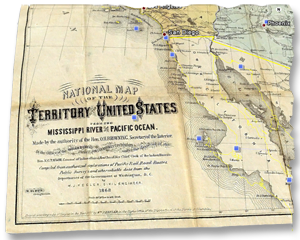 Google Earth lets you travel around the world not only in present time, but also in the past, thanks to archived satellite imagery. However these images only go back about 8 years, so if you’re looking for something older than that you probably need to use layers.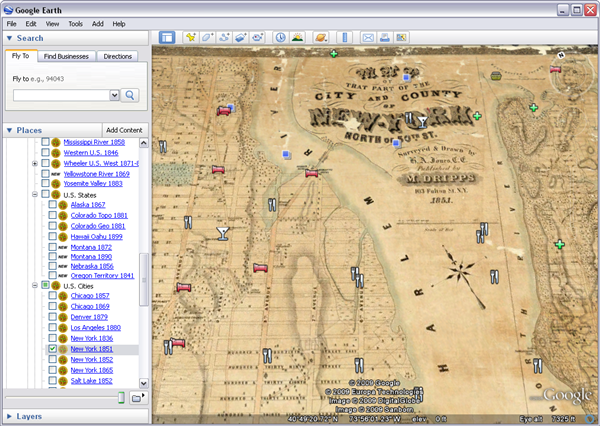
 Firefox
 Gmail
Gmail Last.fm
 Twitter
 Google Maps Navigation for Android
 iTunes
 WordPress
 Transmission
 SimGolf