All you need to know about QR codes

All you need to know about QR codesHave you ever wondered what these strange black and white squared graphics mean? You’ve probably seen them around a lot lately, but do you really know what they’re used for, or how can you read them? No worries: OnSoftware comes to the rescue! In this post I’ll try to explain everything you need to know about QR codes.

Yes, these strange symbols are called QR codes (Quick Response codes). They’re an evolution of the classic barcode, a standard sign that enables you to represent more than 4,000 alphanumeric characters in a bi-dimensional graphic (don’t worry about that!).

QR codes were initially used in the automotive industry to keep track of stocks, but nowadays their usage has spread everywhere as a handy way to share information: IT companies, software developers, advertising agencies and media, they’ve all used QR codes at some point.

In order to read QR codes, you need a camera-equipped device and a compatible reader. These requisites were a real handicap a few years ago, but now that most of us have a smartphone with camera in our pocket, we’re now ready to scan QR codes anywhere. This is precisely why their popularity has grown so much in the last few months.

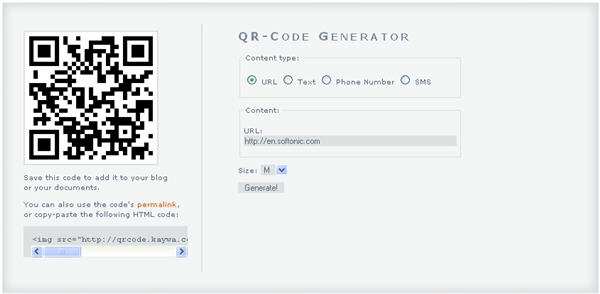
Creating QR codes is really simple. All you need is a QR code generator, which you can get as a desktop utility (such as iCandy, for Windows and Mac). But the easiest thing to do is probably using an online app, like Kaywa . Just select the type of data you’re going to encode, enter it into the form and press Generate.
All you need to know about QR codes

Now that you’ve learned how to create QR codes, it’s time to learn how to read them. There are literally dozens of QR code readers available today, depending on your device’s operating system. Let’s take a look at the most popular ones for Android, iPhone, Symbian, Blackberry and Windows Mobile.

  • Barcode Scanner (Android) – Works not only with QR codes, but also with other barcode formats . It also searches the web with the data found in the scanned code.
  • i-nigma (iPhone) – This handy app and your iPhone’s camera will enable you to unveil all the secrets behind any QR code. It also supports other code formats like DataMatrix.
  • Barcode Reader (Symbian) – Reads QR, BIDI and DataMatrix codes. The app’s options let you save read codes, and send them via SMS , e-mail or Bluetooth.
  • Beetagg (Blackberry) – Have a Blackberry? This is the perfect code reader for you! It’s not only compatible with QR codes, but also with DataMatrix and BeeTagg.
  • i-nigma (Windows Mobile) – Besides iPhone, i-nigma works also on the Windows Mobile platform . It’s very easy to use and lets you share codes with other users.

So, now that you’ve learnt what a QR code is, how to create them and how to read them, it’s time for some action. Check out these three sample codes and discover all the possibilities behind this new technology to share information.

All you need to know about QR codes

(Via OnSoftware ES)

Customize the Windows 7 start button

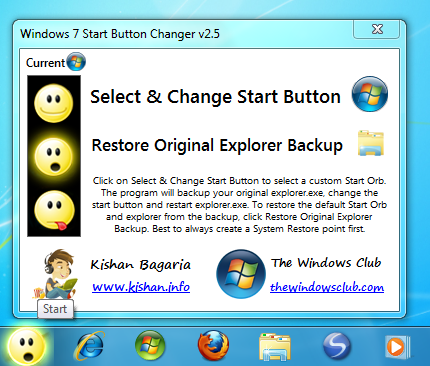
Windows 7’s start button is something you’ll use all the time, but what if you get bored of it? Windows 7 Start Button Changer, unsurprisingly, lets you change it!

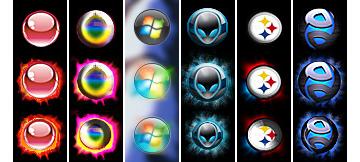
You can download the application here, and it comes with 10 sets of sample ‘orbs’ to get you started. If you don’t like them, there are lots more to be found on DeviantArt.com. Alternatively, you can create a BMP image (54 x 162 pixels) made up of three 54 x 54 pixel images.

To use Windows 7 Start Button Changer, extract the RAR file – IZArc is a great app for this – and move the folder (it will be called W7SBC) to Program Files.

Next, run the program as an administrator by right clicking the .EXE file in the W7SBC folder, and choosing Run as. Windows 7 Start Button Changer will automatically back up your current start button, and by clicking on the Select and Change Start Button icon, you can pick the BMP image of your choice.

The results are not always perfect, but it’s pretty good overall. If you’re not happy, just click Restore Original Explorer Backup and everything will be put back to normal.

How to: Check your Internet speed

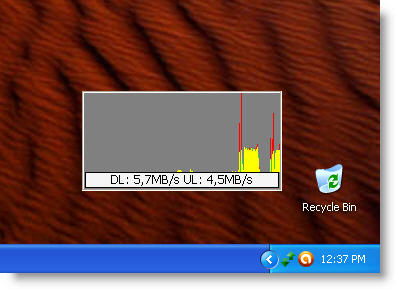
The speed of your internet connection is very important today. With so much stuff to do online – download game demos, watch videos, browser media-rich websites, having a proper broadband connection is a must. But, how can you be sure that you’re getting the megabytes you’re paying for from your Internet provider? Easy: you have two ways to measure the speed of your connection. One is installing a special tool like Jc Net Meter, which monitors your Internet connection and keeps track of both your download and upload speed rates.

How to: Check your Internet speed

Jc Net Meter is a very simple app that measures Internet speed without interrupting your work. It generates real time graphics, has a few customization options and keeps a record of maximum speed rates and transferred data – which may come in handy if you have a limited data plan.

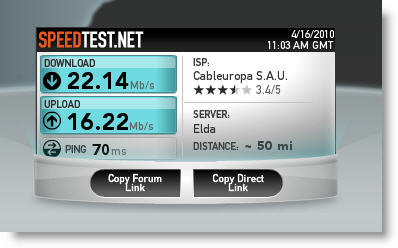
The second way to measure the speed of your Internet connection is using one of the many available online speed monitors. A popular one is speedtest.net, where you can run a quick test to measure the speed of your connection.

How to: Check your Internet speed

Speedtest and other similar websites are not feature-rich as specific monitoring apps; they don’t keep track of data and usually don’t have any configuration options. On the other hand, they’re perfect for s quick speed test and don’t require you to install extra software.

Ready to check your Internet speed now? Share your results in comments!

How to remove Alureon rootkit on XP

xp logo.pngIf you’re a Windows XP user and have been having trouble installing the latest Microsoft security update, then it’s probably because you’re infected with the Alureon rootkit. As a result, Microsoft have stopped issuing the update to XP users infected with the rootkit because trying to apply it results in endless crashes for the user according to the BBC.

However, it’s very important that XP users install the security updates because the latest ones, released on 16 April, address some major security issues in the core kernal of Windows. That’s not to mention the fact that the Alureon rootkit steals private information such as user names, passwords and credit card numbers.

If you’re using an anti-virus package then you should be OK but if you’re unsure, or would rather be safe than sorry, then the good thing it’s easy to remove by performing a boot-scan using Avast! or by scanning your system using Microsoft’s Malicious Software Removal Tool.

If you’re one of the unlucky users who has experienced the security update trying to install and the rootkit is preventing your PC starting properly, then the best thing to do is perform a System Restore. To do this you’ll need to start in Safe Mode with Command Prompt and perform a System Restore which will roll-back your system to an earlier state which worked properly.

To do this:

1. Press the F8 key as Windows starts

2. Select Safe Mode with Command Prompt the arrow keys

3. At the command prompt type: %systemroot%\System32\restore\rstrui.exe

4. System Restore will now open and you can choose a restore point

Note that any files, folders or programs installed after the date of this restore point will be removed. When the restore is complete, you should then perform a boot scan with Avast! or run the Microsoft Malicious Software Removal Tool as mentioned earlier.

If the security update doesn’t apply automatically for any reason, you can find it here at the Microsoft Download Center.

Find people on Twitter with Follow Finder

logo1.pngUnless you’ve been hiding under a rock for the past 6 months, you’ll know that Softonic – along with what seems like half the world – are dedicated tweeters. That’s why I was interested to see that Google Labs has announced another feather in its Twitter cap – Follow Finder.
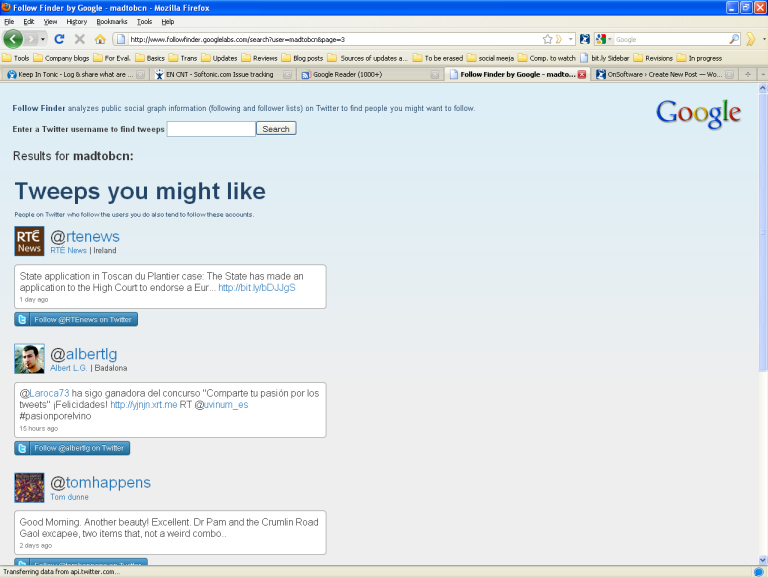
This web app isn’t complicated – you just enter your Twitter username and press Search. You’ll get a list of Tweeps you might like and, if you’re lucky, Tweeps with similar followers. Google Labs do this by “analyzing” your followers. It’s not totally obvious how it works (for example, my personal Twitter account got way more suggestions than Softonic_EN, even though I have only a fraction of the followers). Even so, it’s pretty simple stuff, so if you have 30 seconds to spare, give it a go. Who knows, you might find some fascinating new Tweeps!

ff.png

Football Manager for iPhone: RIP your life

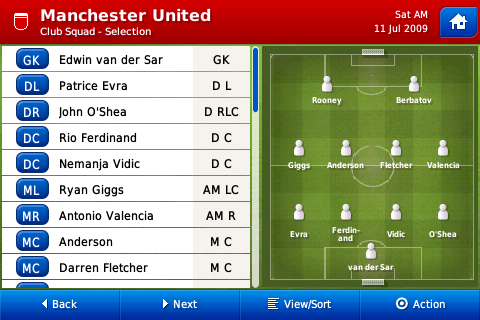
I’ve always thought of Football Manager more like a crippling social disease than a computer game. The long-running soccer management series of games has proved so infectious that its players have lost countless hours of life that they’ll never get back. The bad news today for wives, girlfriends, and bosses is that Football Manager has been released for iPhone, meaning that victims of the game will now never be able to escape it’s clutches.

Sega and Sports Interactive have done such a good job on Football Manager 2010 Handheld that anyone who downloads it will be doomed to spending every waking minute looking for cheap young center forwards, mastering the sweeper system, and figuring out a way to stop Lionel Messi scoring a hat-trick every game.

The iPhone version of Football Manager is incredibly in-depth for a mobile soccer management sim. You can choose to run a team from one of 34 leagues across 11 countries. There’s a database of more than 20,000 real life players, each with their own attributes, statistics and a potted history of their career. Football Manager 2010 Handheld features a transfer market with powerful filtering options and the ability to assign scouts to deliver reports on players.

Football Manager

The gaming experience is every bit as delightful as the desktop version of Football Manager 2010. You can glide through all the dizzying array of game screens very easily thanks to the swipeable user interface, and make changes to your team simply by dragging and dropping the player names. Football Manager 2010 Handheld is also very fast, making it in many ways more playable than the PC or Mac versions, which can hang a lot while results are being processed.

Check out my full review of the game here. But please, before you head for the App Store to buy this incredible game, remember the turmoil that Football Manager will cause in your life.

Red Dead Redemption: Gunslingers

I’m yet to be convinced by Facebook gaming – it mostly reminds me of football manager games from the 80s: Lots of numbers, awful graphics and no action! Still, millions of players disagree with me…

Rockstar’s Read Dead Redemption isn’t released until May 21st, but if you need some mean dueling to keep you going until then, try the Red Dead Redemption: Gunslingers Facebook game.

It works like most Facebook games in that it’s not skill based, but rather based on statistics and chance. You challenge users to duels and gain experience, which makes you a better gunslinger and more likely to win the next fight. Each duel is illustrated with a video, showing you how the stand-off played out. Its pretty bloody, and not for kids!

Choose to be a powerful Outlaw, speedy Fast Hands or accurate Sharpshooter, name yourself and write your own bio. It’s not as in-depth as something like Mafia Wars, but it’s much more professional, with video and sound… and much less annoying!

You can share Red Dead Redemption: Gunslingers with your friends, but it’s not necessary in order to progress. Mafia Wars, however, requires you to bug your friend community if you want to succeed. Obviously, the Rockstar creation is promotional material, unlike Zynga‘s, but it’s still a great example of how to make a Facebook game that doesn’t annoy people!

I think Red Dead Redemption: Gunslingers is a cool distraction, but it’s still nothing that will drag me away from ‘real’ games. The majority of Facebook gaming is based around just clicking and waiting – where’s the fun in that? There are still no games on Facebook that should give any of my consoles cause for concern!

Play Red Dead Redemption: Gunslingers here – obviously you need a Facebook account to get started!

How to: Create custom screensavers

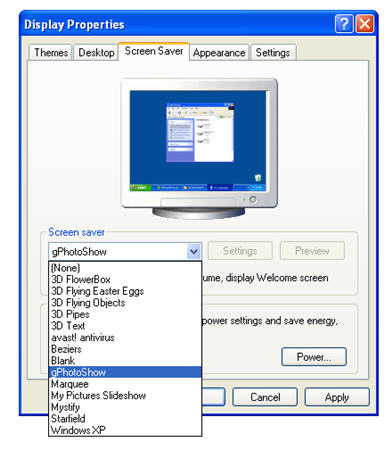
Finding the perfect screensaver is difficult – I’d say it’s almost impossible. This is why I decided to create mine, and started looking for a tool to create screensavers instead. gPhotoShow Screen Saver seems like a good choice, so let’s take a look at how to create custom screensavers with this little handy tool.

When you install the program, you’ll see you don’t launch it the usual way. Instead of double clicking the desktop icon and opening its main window, you need to right click anywhere on the Desktop and on the Display Properties window, go to the Screen Saver tab and select gPhotoShow in the drop-down menu.

Create custom screensavers

Continue reading “How to: Create custom screensavers”

Changing your password – is it really worth the effort?

thumb.jpgAs someone who is nerdily proud of her ability to remember dozens of passwords, I was interested to read a Microsoft study which says that changing your password frequently – something that people in offices and other organizations often find themselves obliged to do – might not actually be necessary.
So, how did the researchers come to this daring conclusion? Well, they maintain that computer users in general have a bad reputation for security. They use crappy passwords, forget to change them and ignore security certificate warnings. So, can we conclude that most people are stupid? Not so say the Microsoft researchers – people don’t care because the relative advantage is so small. In other words, it’s just not worth the effort:

We argue that users’ rejection of the security advice they receive is entirely rational from an economic perspective. The advice offers to shield them from the direct costs of attacks, but burdens them with far greater indirect costs in the form of effort. Looking at various examples of security advice we find that the advice is complex and growing, but the benefit is largely speculative or moot. For example, much of the advice concerning passwords is outdated and does little to address actual threats, and fully 100% of certificate error warnings appear to be false positives. Further, if users spent even a minute a day reading URLs to avoid phishing, the cost (in terms of user time) would be two orders of magnitude greater than all phishing losses.

It would be hard to claim that good security practice wasn’t a pain in the neck at times, especially in situations where you use multiple passwords or have to change them frequently. Checking all those security certificates and examining unknown emails for signs of phishing can be boring – not to mention making you feel a little paranoid. So, does that mean that we should abandon them?

Absolutely not! As I read in one blog post comment, most people don’t get into car wrecks, but the vast majority of us wear seatbelts. Ok, so the precise dangers of riding in a car are well documented – and the dangers faced by computer users unfortunately aren’t – but basic, low-level computer security isn’t a chore at all. A password manager here, a glance over website security information there and you’re done.

Sure, Windows’ incessant “would you like to change your password?” messages are irritating, but that’s your employee’s prerogative, not yours. Sorry for being a party pooper, but if your company gets hacked or a disgruntled employee accesses sensitive information, you can be fairly sure the money it takes to repair the damage isn’t coming out of your payslip. Until it is, I’m afraid you’re just going to have to change your password when Vista tells you to!

How to burn subtitles to a movie on a Mac

Have you ever been in a situation where you have a DVD but it doesn’t have the subtitles that you need? This can be a particular problem if the DVD was released in a certain region of the world as they usually only include subtitles for that region. However, what you can do is backup the DVD to your hard drive and then burn the subtitles for the language of your choice onto it. Here is how in three easy steps:

1. Rip the DVD to your hard drive

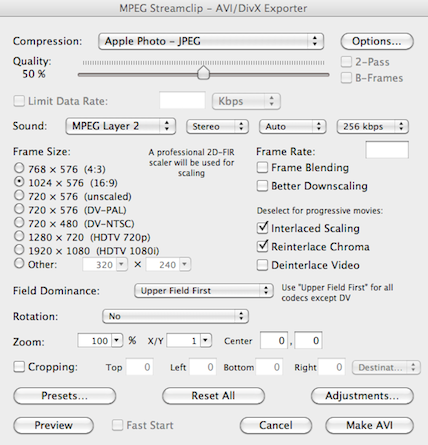
I recommend MPEG Streamclip for this task. It’s free, easy to use and converts to a huge number of formats although I always choose to convert to AVI for this kind of task.

mpeg-streamclip.png

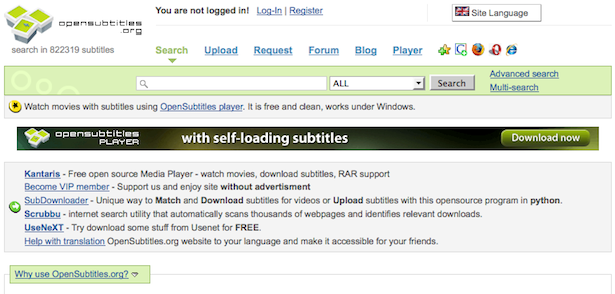
2. Find the subtitles you want at OpenSubtitles.org

OpenSubtitles is one of the biggest databases of subtitles on the net and all can be downloaded for free. You don’t have to register, the range of languages is huge and they even have HD subtitles.

opensubs.png

3. Download and install ffmpegx

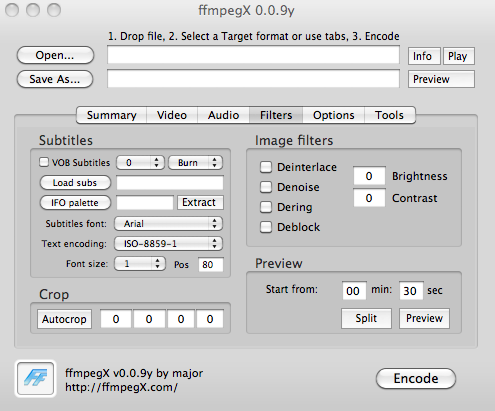
This neat free tool allows you to perform all kinds of encoding tasks. It may look a bit intimidating at first but adding subtitles is simple. First you need to browse the the AVI file you ripped to your hard drive by clicking Open at the top of the interface. Go to the Filters tab and check the box VOB Subtitles. Click Load Subs and browse to the subtitle file you downloaded. To preview how the subtitles look, click Play in the top right of the interface. Don’t worry if the subtitles flicker on the screen – this is just due to the preview rendering and it looks fine when they are burned. If you don’t like the position of the subtitles, change the Pos value in the subtitles box – the higher the number, the lower the subtitles are on the screen.

ffmpegx.png

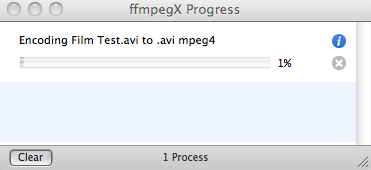
When you’re ready, click Encode in the bottom right corner. You’ll notice an encoding process dialog tell you how long it will take.

ffmpegx.png

It should take around 10-15 minutes for a standard AVI film file. When you’re done, you should see your subtitles burned onto the film when you open it in any media player.

subtitles.png