Spotify is updated with new social features

When Spotify was launched back in October 2008 everyone was amazed with it. Having such a huge music catalog at your fingertips anytime, anywhere was simply awesome. It’s true that some people can’t find their favorite artists (any Pink Floyd fans here?), and that at some point you can get tired of ads, but Spotify is still an amazing application for all music lovers.

New social features on Spotify

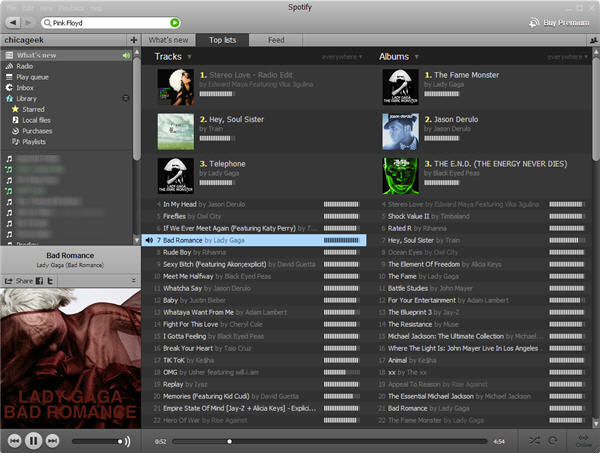
The one big drawback to Spofity, however, was its lack of social features. Being used to other audio streaming services like Last.fm, I found it weird not to have a contact list, or having to copy and paste song links in quite a rudimentary way in order to share them. Fortunately the all new Spotify 0.4.3, updated just today, comes with a bunch of interesting features, including a promising social side.

Continue reading “Spotify is updated with new social features”

New Steam client out now

If you’re into PC gaming, Valve Software’s Steam client is an almost essential application. Managing game purchases and libraries, while offering game community services, it’s an excellent program that has come a long way since its release almost seven years ago.

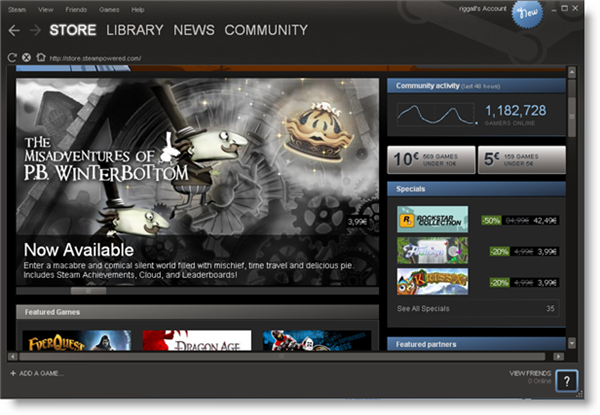
Now out of beta testing, we have a new version of Steam, 009 – and it’s much improved. The interface is cleaner, bolder and much nicer to navigate. There’s a new wishlist, so you can keep track of games you want, and your friends are shown more prominently too. Now you can see which games your friends play, and what’s on their wish list too. The community element of Steam is integral to why people use it, and this new version makes it a much more central feature.

There’s a more powerful library in the new Steam, allowing you to create your own categories and the search is now real time, making big game libraries much faster to navigate. Overall, it’s a great update, though I hope Valve can reduce the number of client updates they release for this one, as I find them pretty intrusive. Check out our review here.

How to watch live World Cup matches for free

Want to watch every game from the 2010 World Cup for free? Here’s a guide to some of the best resources for watching the tournament on your computer. There’s only six weeks to go now until the big kick-off, so it’s worth getting acquainted with these apps and web services now. Then you’ll be all set for when the first game, South Africa v Mexico, comes around on June 11.

P2P

TVU PlayerPeer-to-peer (P2P) streaming services are probably the most popular way to watch live football matches for free. The World Cup will be streamed via apps such as Sopcast, TV Ants, and TVU Player. You can find links to the live streams from a range of listings sites, including football4less.com, Roja Directa, and LiveFooty. For more details, have a look at the post I wrote on how to watch live matches over P2P.

Justin.tv

Justin.tvWatching the World Cup on Justin.tv should be a less fiddly option than using a P2P client. Just hit the Live Channels button and then choose Sports. You’ll find a Soccer section in here where you’ll be able to access live World Cup games for free. The quality is generally pretty good, although you might encounter some buffering problems during the big matches. Justin.tv even has an iPhone app, which allows you to view matches on the go via 3G or Wi-Fi.

BBC

BBC OnlineThe BBC has made an audacious decision to stream all of its World Cup games live and for free on the Internet. The corporation doesn’t have the rights to show every match but at least for the ones it does broadcast you should be assured of a high quality live streaming experience. The only problem is that this service is only available to people living in the UK. If you’re outside of Great Britain, you could try connecting using a proxy server such as DaveProxy. However, a more reliable way to access the BBC’s live World Cup coverage outside of the UK would be to connect via a VPN service. VPNUK offers services that start from around $6.50 per month.

ESPN360

ESPNIf you’re living in the US, you may be able to watch live games on ESPN360. This too is free, although it’s only available to subscribers of certain high speed internet service providers, such as Adelphia, Bend Broadband, Charter, Mediacom, Mid-Hudson Cablevision, Susquehanna, US Cable, and Verizon. If you’ve got an iPhone, iPad or iPod touch then be sure to get the ESPN 2010 World Cup app. Although it doesn’t offer live video streaming, the application does provide live audio streams, as well as live scores, gamecasts, and scoring alerts.

Twitter

TwitterTwitter has opened up a whole new way of accessing live football. Not only can you use it to follow people who post live text commentary but the Twitter search tool is great for finding free video feeds. It’s not the most reliable option, and it can be a haven for spammers, but it’s worth pursuing if all other options fail you.

FIFA.com

FIFA.comOK, so FIFA.com isn’t going to stream all the World Cup matches live, but it’s worth visiting if you just want to catch up on the highlights of the latest games. The official site will post up extended video highlights of each match one hour after the game has finished. Of course, it’s also the best place to go for competition schedules, results and stats.
How to stop Adium spam

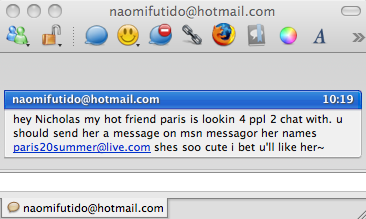
After many years of relatively problem free Adium use, in recent months I’ve been plagued by random contact requests and messages. It seems barely a day goes by now when a new spam contact requests permission to be added to my list when I open Adium or a spam conversation dialog suddenly opens.

Adium spam

Fortunately, the solution to this problem is very simple although you might need to go beyond Adium to fix it.

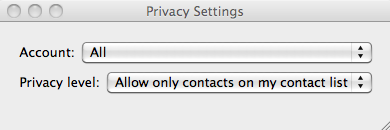
Firstly, check your Adium privacy settings by going to Adium then Privacy Settings in your top menu bar. Make sure that All Accounts is selected along with Allow only contacts on my contact list.

screen-capture.png

This should stop the majority of spam messages but if you’re finding that they’re still getting through, you’ll need to access the privacy settings in Microsoft Messenger for Mac and block all other users and deselect alerts from other senders. Continue reading “How to stop Adium spam”

Friday Timewaster: Poto & Cabenga

Poto & Cabenga is a crazy browser game, which, like the excellent One Button Bob needs only one button to play. That’s the Space bar – but Poto & Cabenga proves that simple controls don’t make for simple games.

Holding space makes you dash, letting go makes you jump, and doing nothing moves you slowly. That’s all fine, but when Poto & Cabenga get tragically split up by a hungry dragon, the space bar then controls them both, but the controls for each are the opposite of the other. When Poto dashes, Cabenga doesn’t, pressing space makes one jump, while letting go makes the other. Very confusing!

Following both characters at the same time, and getting the hang of the weird controls is a challenge! The game has great art, and the sound suits it all perfectly. You’ll need Flash installed, your browser open and one finger at the ready!

Personas: Customize Firefox with themes

Last night, after installing Firefox on my new MacBook, I was welcomed by a start page with an advert about Personas, the new themes you can use to customize your browser. Actually, Personas has been around for a while, but it wasn’t until yesterday that I really spent some time browsing the gallery and testing them on Firefox.

Personas for Firefox: customize your browser with themes

Personas is the easiest way to customize the browser’s appearance. The only requirement is to have at least Firefox 3.6 installed on your system. You can browse the entire collection of themes by category (featuring Abstract, Fashion, Film and TV, Music, Nature, Sports and more) or use the top lists for the most downloaded or the recently added.

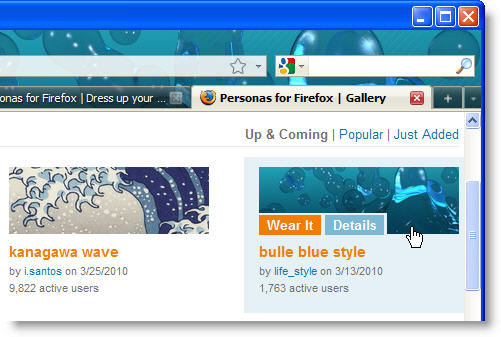
The best thing about the Personas gallery is that you can try the themes on without downloading or installing them. Simply hover your mouse over the theme thumbnail and Firefox will automatically display the theme on its interface, in real time. If you like it, click on the Wear it button and you’re done.

Personas for Firefox: customize your browser with themes

The themes you choose to ‘wear’ are stored in the Theme manager in Tools > Add-ons > Themes.  You can check all the themes you’ve downloaded so far, switch from one to another or uninstall those you don’t want to use anymore.

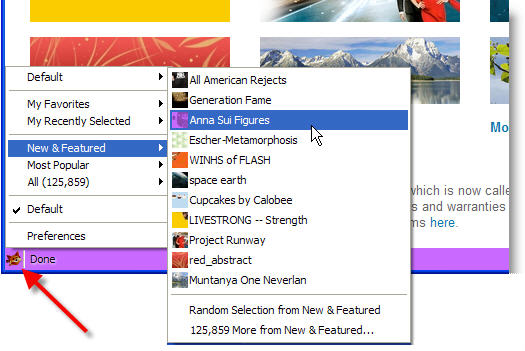
Another way to make use of Personas is the Personas Plus extension, which you can download from the Personas website. Personas plus puts a small fox icon in the bottom left corner of your browser window, from where you have direct access to the Personas Gallery with over 35,000 designs. Personas Plus is not required to use Personas, but makes theme selection and management faster and even easier.

Personas for Firefox: customize your browser with themes

Last day to get free Lonely Planet iPhone guides

Lonley PlanetAttention all travelers: today is your last chance to get free Lonely Planet guides for iPhone and iPod Touch. There are thirteen different guides up for grabs, which would normally cost between five and ten dollars. But hurry, because the offer ends today!
The guides can offer you an invaluable insight into what to see and do in the Europe’s best-loved cities (most of which are now accessible now the ash has finally lifted). The destinations included in the deal are: Amsterdam, Barcelona, Berlin, Budapest, Istanbul, Copenhagen, London, Moscow, Munich, Paris, Rome, Stockholm, and Vienna.  For some reason, the Vancouver guide is also included in the deal. Perhaps Vancouver is now regarded as an honorary European city now?!

For each of these destinations, the iPhone Lonely Planet guide offers a wealth of useful information about its culture and its people. Each guide has its own bumper database of information about local attractions, bars, restaurants and points of interest. It would be a shame to miss out on this awesome deal!

Thanks to our colleagues at OnSoftware France for the tip-off. See you in Paris, guys!

Export emails from desktop clients into Gmail

So you’ve made up your mind: you’re finally ditching that old email desktop client and switching to Gmail. Congratulations! But first of all, you still need to solve a major issue: how to move all your old emails from the desktop client to Gmail. Fortunately the guys over at Google also thought about that, and came up with a smart solution: Google Email Uploader, a handy app that extracts email messages and contacts from popular desktop clients and imports them into Gmail.

Export emails from desktop clients into Gmail

Google Email Uploader works with Microsoft Outlook, Outlook Express and Thunderbird. It has also one main requirement: a Google Apps account – meaning it won’t work with regular Gmail accounts, but only with those email accounts that belong to another domain name but are managed via Google Mail.

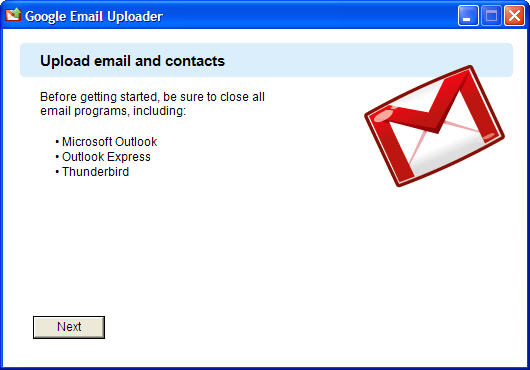
If you meet both conditions, you’re ready for the move. Close your email client, launch Google Email Uploader and follow the step by step instructions. You’ll be able to choose between importing all the items in your old desktop client or selecting specific folders.

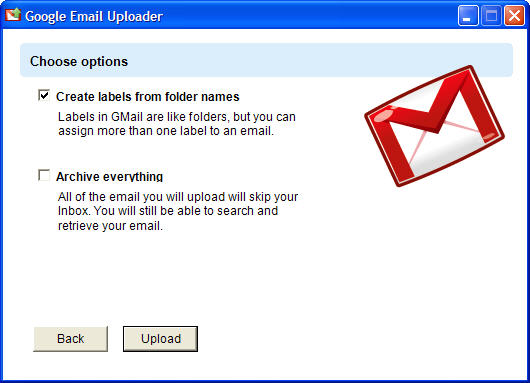
Google Email Uploader includes also a couple of handy configuration options. One is the ability to create Gmail labels according to the name of the folders you’re importing, and the other lets you send all the imported messages right to Gmail’s archive; they won’t appear in your inbox, but will still be searchable.

Export emails from desktop clients into Gmail

Google Email Uploader works like a breeze and is available for both Windows and Mac. It’s the perfect solution to switch to Gmail without losing data on the way.

iPhone essentials: best apps for babies

Babies these days aren’t content with the plastic toy phones like we had in my day. Today’s tech savvy toddlers demand the real thing. The great thing is, Apple’s mobile devices are so easy to use that even a two year-old can enjoy them, as you can see from the wonderful video below. Plunder the App Store and you’ll find a whole world of iPhone and iPad programs designed specifically for under fives. Besides educational games and fun virtual toys, you can find a number of useful apps to help you in the merciless task of caring for a new baby. Here’s a selection of the best iPhone and iPad apps for babies and young children.

[youtube]pT4EbM7dCMs[/youtube]


Learning animals and spelling with FirstWords: Animals

First WordsThe first app that the little girl plays with in the video is FirstWords: Animals. It teaches tots how to recognize and match letters and put them together to make words. All children love animals, and the fun drawings and animal noises keep their attention. You can adjust the difficulty level as your kid grows and before you know it they be writing hippopotamus without using a spell check, which is more than I can say for me! $1.99

More animal adventures with Fisher-Price: Say ‘n Say

See and SayWhen your child is ready to learn more about animals, introduce them to Fisher-Price: See ‘n Say. Based on the popular toy of the same name, the app teaches animal noises and fun facts. With sounds and real movies of 12 different animals, your toddler will be able to grasp the key differences between creatures. Fisher-Price: See ‘n Say is really easy and picking an animal is done just by spinning the wheel. $1.99

Continue reading “iPhone essentials: best apps for babies”

The best free video editing software

clapper21.pngIf you’re looking for some great video editing software that also happens to be free, look no further. Before you start, however, I have a word of warning. The disappointing thing about free video editors is that there aren’t really any equivalents of Photoscape or Audacity. There is definitely awesome video editing software out there, but unfortunately you’ll have to pay for it. If you are going to edit on a regular basis, think about buying a program – check out the trial versions of Adobe Premiere, Sony Vegas or Movavi Video Suite. Who knows, you might be impressed enough to decide it’s worth the cost.

If you’re sticking to free programs for the moment, however, read on. This is my list of the best editing software around, easiest first.

Total beginner? Start simple with Microsoft Live Movie Maker. Some of the apps out there are really complicated but this Vista-only version of Windows Movie Maker will start you off gently. Now, before you go rolling your eyes, actually take a look at this app. Simple, definitely, but also very effective and for basic video/image mash-ups, it’s a great option. It’s incredibly easy to use and if this is your fist time creating videos, you’d be mad to ignore it.videopad.png

Got a little bit of experience? Try VideoPad Video Editor. Whereas Microsoft Live Movie Maker is the best bet for total beginners, those of you with some experience, or maybe users who are technically able, but new to video editing, should give Videopad a try. It’s got a good selection of export options, great help and makes the perfect first app.

Need an app for slightly more complex tasks? Avidemux is the one. This open source tools is perfect for tasks like cutting and encoding and it supports plenty of formats. Best of all, it has lots of information available on its wiki and forum, so even if you do run into problems or want to ask for help from more experienced users, you’ll have no problem finding people to help.

Are you a user who knows what you want? VirtualDub, or sister application VirtualDubMod, are perfect. Even the developers admit that it’s not the snazziest app on the block, but for fast linear clean-ups of video that will be sent to other programs for editing, you can’t beat it. It’s not the ideal application to make a nice video of family celebrations, but if efficiency and speed are of importance, it’s fantastic.videolan.png

Like to keep up with the latest software? Videolan Movie Creator is the newest of the new. VLC video player has legions of fans, but the developers have recently brought out a video editor that looks really promising. We say ‘looks’ because it’s so early a version it’s not even a beta release – it’s pre-alpha – but when we reviewed it, we were sure it was destined for great things. Check it out!