Stay away from Internet Explorer for Mac

It’s clear to us at Softonic that a huge number of people, after switching from Windows to Mac, still want to use Internet Explorer. Well the bad news for Mac newbies is that Internet Explorer for Mac is absolutely atrocious so you’ll have to say goodbye to it now. In fact, it’s so bad it’s virtually unusable nowadays because websites simply won’t render in it properly anymore.

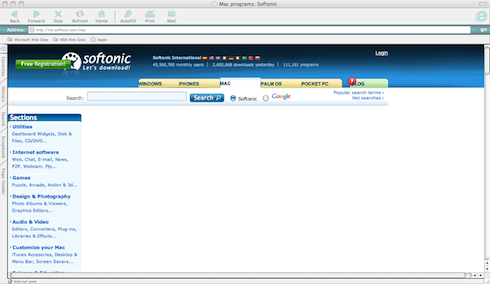
This is what I got when I tried to visit Softonic’s Mac site with it:
mac-ie.png

Not only does it fail to load most of the page but the elements it did load were badly aligned. Anything other than Google’s homepage seemed to crash Internet Explorer for Mac immediately. Added to the fact that it doesn’t even support Flash, tabbed browsing, modern JavaScript engines, extensions or even ad-pop-up blocking, you’d have to be absolutely masochistic to use it.

Part of the problem, apart from that it’s not even a decent browser on Windows, is that Microsoft abandoned support and development of Internet Explorer for Mac in 2005. Since the browser is subsequently no longer designed to handle the requirements of most modern web pages, we strongly advise you to try Firefox, Chrome, Safari or Opera instead.

Alternatively, just check out all of the other browsers available for Mac. You have been warned!

Update Foxit Reader now!

foxit.pngWe’re big fans of alternatives to Adobe Reader here at Softonic, partially because we like to champion software alternatives, and partially because Adobe has a long history of security scares that we’d prefer to avoid. Foxit Reader is one alternative PDF reader that has always come out on top, but sure enough, a security vulnerability seems to have hit this application too.

Foxit discovered the problem in March 2010 – older versions of the program were allowing executable programs embedded in PDFs to be run without permission from the user.  3.2.0.0303 fixed this and version 3.3, the very newest release, backs Foxit Reader up with another layer of protection: it now gives the user the option to disable all external commands – the Trust Manager.

Foxit Reader found a problem and solved it, and credit has to be given for that. But it just goes to show that just because you dump your big name for a promising underdog, you can’t guarantee that you’ll be leaving all your problems behind. Make sure you have the latest version – download Foxit Reader here!

What’s wrong with cookies?

Keeping your computer running smoothly can be hard work, but there are lots of programs designed to clean up your PC, as well as protecting it from malicious attacks.

No one likes viruses, and I like being able to easily find duplicate files and make sure I haven’t picked up any spyware from anywhere. What I don’t understand is why most of the programs I use to do this highlight cookies as ‘threats’, even when they’re not.

Cookies can be malicious, but the majority are fine and actually make using the web a faster and more comfortable experience. Deleting all of your cookies will mean any sites you left preferences on will have forgotten them next time you visit, so why would you want to do it?

Presented with a long list of cookies, most people will have no idea which are good or not, and I have never used a program that helps. Claiming that all cookies are potentially risky is disingenuous at best, and makes people feel needlessly panicked.

So if you perform a security scan on your PC and all it finds are some ‘potentially risky’ cookies, don’t worry: unless you’ve visited some dangerous websites, your cookies will be fine, working to make your online life better!

Get 5 free Digital Chocolate games for your Symbian phone

Attention Nokia gamers: head over to Digital Chocolate’s page on the Ovi Store and you can get five of the developer’s top games free of charge. Like many titles from this publisher, these games are pretty off-the wall but they’re great fun to play.

Penguin party

The line-up of free games in the promotion, for Symbian S60 3rd 5th Edition devices, includes the wacky Crazy Penguin Party, where your mission is to get your penguin to the finish line by flying in jetpacks, bouncing him off sleeping polar bears, free falling and collecting stars to win extra points.

Tower Bloxx

The massively popular Tower Bloxx: New York is also included in the promotion. Here you need to drop blocks to make a towering apartment building without it toppling over. The game includes five Manhattan districts in an all-new Board Game mode. Other game modes include Time Attack and Challenge.

Rollercoaster Revolution

Rollercoaster Revolution is now available for free, too. The game lets you build your own rollercoaster rides. You can add all kinds of hair-raising elements, such as jumps, loops, drops, water splashes and cave tunnels, to create white-knuckle experiences for your passengers. There are 99 different tracks and a multiplayer mode, so it’ll be a long time before you get bored.

Dictator Defense

If you like Tower Defense-style games then make sure you download Dictator Defense for free. This strategy game sees you try to defend your homeland from and invasion of evil dictators, across 40 levels. There are nine different kinds of enemy to ward off, but thankfully you’ve got a bumper arsenal of fun weapons at your disposal.

Nightclub Fever

The final free game in the promotion is Nightclub Fever. This one charges you with the task of building your own disco empire.  You get to set up and manage clubs in a range of party cities, including London, LA and Tokyo. The game gives you control over everything from the layout of the club to the kind of music that’s played there.

I suggest you snap these games up as quickly as you can because they’re only free for a limited time!

Zoner Photo Studio, a great photo viewer and editor

With so many photo managers available today, it’s hard to find one that stands out of the crowd. But Zoner Photo Studio Free has done it, thanks to its great selection of tools and above all, an unbeatable price.

Zoner Photo Studio Free

Zoner Photo Studio Free is the light, freeware version of Zoner Photo Studio Professional. It doesn’t have as many options and features as its big brother, but it works perfectly fine as photo importer, manager, editor and organizer. The program can assist you in the whole photo process, from the moment you extract them from your digital camera to the moment you decide to share them online.

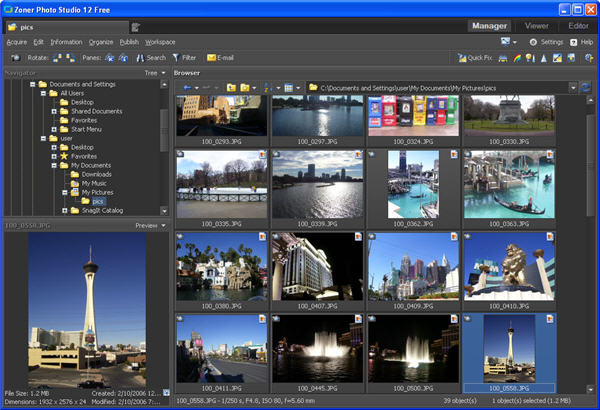
The program features a handy interface with several different areas, identified by tabs on the top right corner: Manager is a kind of file explorer for your photos, which lets you browse your collection with ease; Viewer displays any selected image in glorious full screen, and can also play a complete folder as a slideshow; and finally the Editor includes all the tools you need to fix and spice up images. The editing tools in Zoner Photo Studio go from the basics – like adjusting colors and brightness – to the most complex ones, including aligning the horizon, fixing the dreadful red-eye effect and using a clone stamp to replicate certain elements on your image. Continue reading “Zoner Photo Studio, a great photo viewer and editor”