
How to record your calls: Skype, Hangouts and WhatsApp

Here is our guide for recording audio and video calls on Skype, Hangouts, and WhatsApp

How to record video calls skype whatsapp hangouts

Recording conversations that take place over voice or video calls is no longer the reserve of spy movies and dodgy cops. Now, anybody can do it and it is easier than ever. Think about it, pretty much all types of long-distance conversation are easier than ever so it makes sense that recording them would be too. Just think, thanks to Skype, WhatsApp, Google Hangouts, and other programs too, you can now video call friends, family, and colleagues all over the world for free.

Now there could be many reasons why you want to record your calls. You could be interviewing somebody for a podcast or need a record of certain important information. As we always say here at Softonic, we’re not concerned about the why. We’re here to help you with the how. Without further ado then, let’s get started on how to record video calls on WhatsApp on Apple and Android devices, and Hangouts and Skype on a Windows PC or Mac.

How to record video calls on Skype

Skype has a call recording function built into the app as standard. This means that recording your Skype calls is as simple as pressing a couple of buttons. There is no need to install any third-party apps.

 

The Skype video call function only works for Skype-to-Skype calls. The other thing you need to consider is that, in the interests of privacy, all participants in a call will be notified that somebody is recording the call, as soon as they hit record. The recording will then be posted in the call chat box once the call ends or the recording function is switched off. You can record Skype calls for up to 24 hours, with longer calls being broken up into multiple files, and all recordings will be saved to the cloud meaning you don’t need to worry about local storage space on your device. Once the call has been posted to the calls chat box, you’ll have 30 days to download the recording.

This is how to record audio and video calls on Skype

1 – During your Skype call hit the ellipsis (three vertical dots) menu icon to open the Options menu.

2 – On Skype for desktop you’ll see a button labelled Start recording. Hit this to begin recording your call. If you’re using Skype on a mobile device, look for the button with a circular record icon next to the words Start recording. Pressing this will begin the recording.

How to record video calls on Google Hangouts
google hangouts calling

Google Hangouts also has a built-in call recording function, which means you won’t need to install any third-party apps or programs to record calls. The problem, however, is that the function is only available for certain types of G Suite subscriptions. This means it is only available for G Suite Enterprise and G Suite Education users. If this applies to you, follow our instructions below. If it doesn’t, scroll down to the instructions we’ll give on recording WhatsApp calls and calls from other video call apps where we’ll tell you how to record calls using a third-party screen recording app.

Hangouts Download now
6

This is how to record calls on Google Hangouts

1 – Start or join a video call either by clicking the meeting link or going to Hangouts and hitting the VIDEO CALL option.

2 – Once all members of the meeting have joined the call, click the ellipsis menu icon in the bottom-right corner of the screen to open the options menu.

3 – Hit the Record meeting option at the top of the menu and wait for your recording to start. To finish the recording hit the ellipsis menu icon again and then press Stop recording.

NB – Like with Skype, all members of the call will receive a notification telling them the call is being recorded. The call will then be saved on the Google Drive of the meeting admin in a folder called Meet Recordings. The admin will also receive an email containing a download link.

How to record WhatsApp video calls

Whatsapp group video calls 4 people

To record a video call on WhatsApp you’re going to need to download a third-party video call recorder app that will record everything happening on your device’s screen. If you have an iPhone running iOS 11 then your phone already has a screen recording feature. If not, then you need to download a screen recording app and we recommend Go Record: Screen Recorder as an excellent option. If you are using WhatsApp on an Android phone, we recommend you download and install ADV Screen Recorder.

It is worth noting that once you have either of the apps we’ve listed or are using an iPhone running iOS 11 or above, you can follow the instructions below to record calls on any video call apps you have on your mobile device.

WhatsApp Messenger Download Now ►
8
Go Record: Screen Recorder for iPhone Download now
7
ADV Screen Recorder for Android Download now
8

This is how to record calls on WhatsApp

1 – Open your screen recorder app or feature.

2 – Minimize the app and then open WhatsApp too.

3 – Start your video call with your selected contact/contacts.

4 – Open up your screen recording app and hit the record button.

5 – Go back to your call and have your conversation as you normally would. You can end the recording any time by going back to your app and terminating the record function.

NB – This method for recording calls is a little more discreet than the two official methods outlined above for Skype and Hangouts. There are no automatic notifications sent here so it could be a good idea to let everybody who is involved in the call know that you’re recording the conversation. The other thing to consider with this method is that your recording will be saved in among all the other recordings you make with your screen recording app. This means it would be a good idea to immediately rename your call recording so that it doesn’t get lost in all the other video files.


Skype contractors have been listening to some of your calls

Contractors working for Microsoft are allowed to listen to some Skype calls that use Skype’s translation feature

skype on a mobile connected to headphones

Privacy! What ever happened to that age old tradition of being able to reasonably expect all of your personal affairs to stay private? Ever since that first birthday reminder Facebook sent you, you’ve been fighting a losing battle to keep yourself to yourself. As well as social media, website cookies, app permissions, and small print that would literally take weeks to read, we’ve recently found out that human beings working at companies like Google, Amazon, and Apple have been listening to recordings we previously thought were only being analyzed by machines.

Yep, three out of the big four tech companies have been lying to us about who listens to the voice recordings we share with them. As is always the case, however, with privacy invasion stories in the modern ad-tech era, it gets worse. Humans at Microsoft, the fourth of the big four tech companies have also been playing our private conversations.

Contractors working for Microsoft are allowed to listen to some Skype calls that use Skype’s translation feature

A report by Motherboard claims that contractors working on Skype’s translation service have had access to personal conversations taking place across the app. Citing a “cache of internal documents, screenshots, and audio recordings,” the report says that the contractors had access to intimate conversations between lovers, fraught conversations discussing relationship issues and problems, and recordings of people talking about sensitive and personal issues like weight loss.

Voice commands given to Microsoft’s virtual assistant, Cortana were also accessible to the contractors according to the report, though these won’t have included such intimate information like that being shared in Skype conversations.

Skype speaking different languages

It has to be said that Skype’s translation service, which the Microsoft-owned company launched in 2015 is impressive. It offers almost real-time translation on voice and video calls, as well as text conversations, between a number of different languages. The service is supposed to be run using AI and machine learning algorithms, but according to Motherboard’s insider much of the leg work is also being done by human contractors. These human contractors carry out the same job as the AI to help the machine learn how to do the job better itself.

This is how a lot of AI systems work. Humans teach algorithms to do a job until the algorithm can do it well enough itself and then even go on to teach itself how to improve efficiency. Not all AI training needs access to sensitive private information, however, like with the Skype translation service.

Whereas it could be expected that a translation algorithm would need human training, Microsoft hasn’t been very clear in making it clear to Skype users. Skype’s website does mention that audio clips taken from Skype calls will be analyzed but doesn’t say that some of the analysis will be done by humans. This is likely because, people would be a lot less likely to use a communications service, if they believed people were listening in.

The only good news to come out of this is that the contractors don’t have access to identifiable information about the user’s involved in the conversations they’re analyzing. In the grand scheme of things, however, that is a very small mercy. They might not know who you are, but they are still able to listen in on your most intimate conversations were you’re detailing some of your most private insecurities. Pretty creepy stuff.

Skype screen sharing now available for iOS, Android

Screen sharing for Skype is here!

Skype

Skype has officially released screen sharing for mobile devices.

Skype offered screen sharing for beta testers for a while, but now it is available for all users across iOS and Android.

Screen sharing is very useful for video calling. For example, let’s say you are on a Skype call with your boss, and they need to show you a chart or graph, but they aren’t near a computer. They can share their screen with you so you can see it for yourself, while you continue your work discussion with them.

Or, let’s say you are on the phone with your significant other, and they need to talk you through a recipe. They can share their screen with you to show you the recipe, while they help explain it to you over the phone. Better yet, it can help you explain to your non-tech savvy parents how to work their smartphone.

Regardless of how you use it, we are glad screen sharing is here.

Skype has another new feature in beta for mobile users: the ability to hide call controls. Tap your phone once to hide call controls, and double tap the screen to hide everything except the call itself.

Skype lets you mute the people trying to talk to you

Skype will soon let you mute the other person’s microphone when you’re making a call.

Muting your microphone has been a common feature on voice and video calls since forever. This small element of control is invaluable at times. Whether you’re in the middle of a long call but somebody is trying to grab your attention or you suddenly get caught in a gust of wind or a loud car flies past. You can make the call flow smoother if you just hit mute and stop your microphone picking up all of the sonic interference going on around you.

The mute button allows you to control the call on your end, but what if the other side of the conversation is the loud one? What if that car is flying past the person you’re chatting to or what if that person is just chatting on and on and you’re not really listening? We’ve all pulled our phones away from our ears at some point.

Skype will soon let you mute the other person’s microphone when you’re making a call

Skype mute private calls

A brand-new Skype preview has been spotted, and it includes an interesting new feature. Skype is giving you the ability to cut off the other person’s microphone, so you don’t have to listen to what they’re saying.

This feature is already available in group calls, where it makes a lot more sense. If you’re talking to a few people at once and they’re all trying to get a word in at the same time, silencing the racket is a sensible move. For one-on-one calls though, it isn’t as clear why you would need to cut off the other person’s microphone. There is a chance the microphone could be picking up high-pitched interference, which could irritate your ears, but the most likely use is to save yourself the irritation of having to listen to something you don’t want or can’t be bothered to hear.

In the post announcing the new feature, Skype offered no explanation as to why it was introducing this new feature. The post simply said, “…we’re making it easier for you to control your calls! While you may have already noticed that you can mute people in a group call, we’ve brought that to your one-to-one calls as well.”

The post did mention another new feature coming to Skype, however: a “View profile” feature. As the name suggests, this will enable you to look at the profile of whoever is on the line.

Skype version 8.42.76.54

These two new features are both available now in Skype Preview versions 8.42.76.55 and 14.42.54.0 on desktop and Windows Store. There is still no news, however, about when they’ll roll-out to all versions of Skype on Android, iOS, Mac, and Windows.

This followed an earlier announcement this week from Microsoft, that introduced image preview on Skype, similar to that found on WhatsApp. Now, whenever you send an image on Skype you’ll be able to preview it before it is sent.

Skype has a brand-new web app, but there’s a catch

The new Skype for Web has arrived, but only on Chrome and Safari.

Skype has been around for years now. Unlimited free voice and video calls to anybody around the world is quite the draw and Skype has spawned a multitude of copycats and competitors since it first burst onto the scene. Even Skype’s regular phone call function, which enables you to pay cash to call landlines and mobiles has grown popular over time and again spawned competitors like Google Voice.

To use Skype though, you’ve always needed to download an app. On your phone, that’s fine, but on desktop, it is annoying. With powerful web browsers like Chrome able to do pretty much anything these days, most web services are available via web page, just like WhatsApp Web for example. Not Skype though, for Skype you’ve always needed to download an app, and an annoying app at that. That is, until now.

The new Skype for Web has arrived, but only on Chrome and Safari

At long last, Skype has finally released a web version of Skype. As long as you’re using Windows 10 or Mac OSX10.12 or higher and you browse the internet using the latest version of Google Chrome or Microsoft Edge, you can now use Skype on the internet by going to web.skype.com. Once there, all you have to do is log in with your Microsoft account and you’re ready to make Skype calls, send messages, and more. This news of course, also means that you can’t use Skype for Web on other browsers like Firefox, Safari, or Opera.

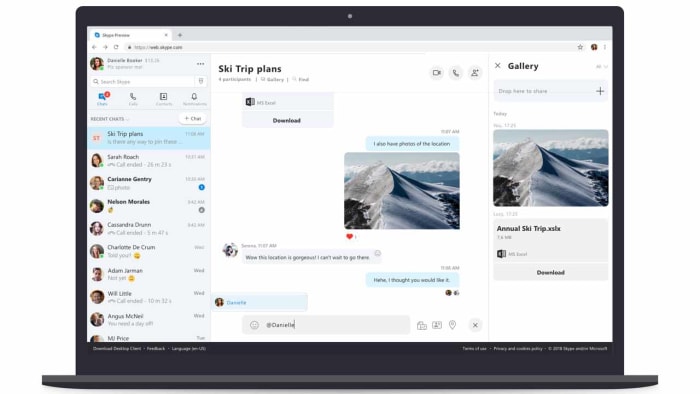
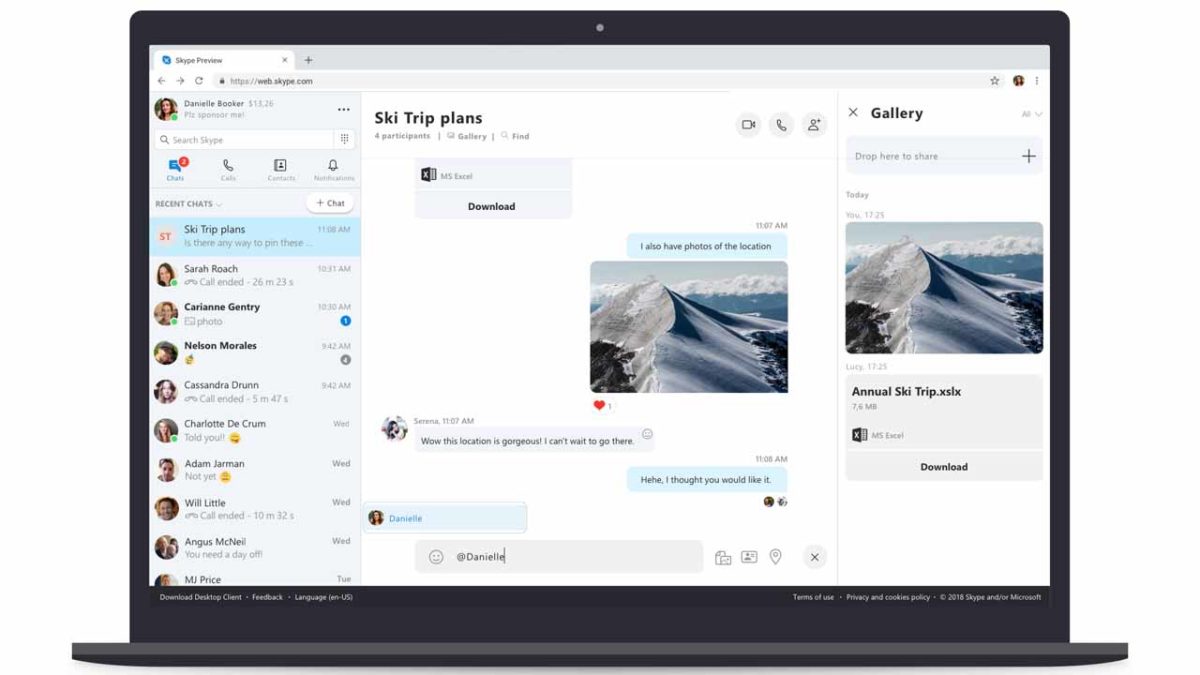
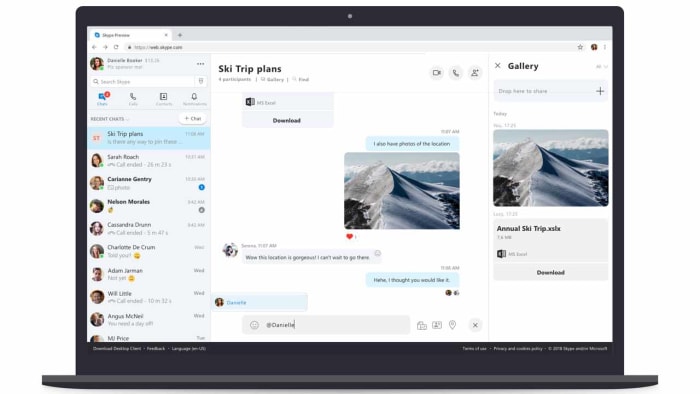
A screenshot of the new Skype for Web
Image via: Microsoft

Skype for Web has an impressive set of features if you have the right browser. In the blog post announcing Skype for Web, Microsoft laid out the following features:

  • HD video calling — Experience HD in one-to-one or group video calling, now with call reactions.
  • Call recording — Capture special moments in a Skype call with your loved ones or record important meetings with colleagues.
  • Notifications panel — Grab a cup of coffee and catch up on what you’ve missed in your notifications panel. Click the bell icon to see reactions to your messages, @mentions in group conversations, or if someone quoted you — all in one central place. Just click a message in the notifications panel to jump into the conversation.
  • Find within conversations — You can now easily find messages in the current conversation by typing the word or phrase you want to find in the search box.
  • Chat Media Gallery — Looking for the link or photo sent a few weeks ago? The Chat Media Gallery makes it easy to find files, links, and photos shared in a conversation, whether it was yesterday or last month. No more scrolling through your chat history—just click Gallery under the chat name to see all the files, links, and photos in the conversation.

Microsoft has also compiled a list of expected FAQs about Skype for Web, which you can find here. Unfortunately, there is nothing in the there about when Skype for Web might be coming to other browsers. If you’ve been waiting to get rid of the Skype app for a while now but you don’t use Chrome or Edge, you can download one of the Skype for Web compatible browsers using the links below.

7
6

This Skype vulnerability can open up your Android phone to hackers

Hackers can use Skype calls to break into Android phones.

skype

If you ever use Skype, you’ll know that it has revolutionized how we talk to our friends and family from far away. Video calls and messages have spread to other messaging platforms now, but Skype was the first, which means you’ll probably have the app downloaded on your phone. There is also a good chance that every now and then, you’ll receive a message from one of your Skype contacts that is clearly spam. Yes, Skype is vulnerable to cyber-attack just like any other program, and an independent developer has discovered a frightening new bug in Skype for Android.

Hackers can use Skype calls to break into Android phones

The trick was found by Florian Kunushevci, a 19-year-old bug researcher from Kosovo, and it allows hackers to bypass a user’s lock screen. Kunushevci discovered that the hackers can answer a Skype call without having to unlock the phone. Then, they can access the data held on the phone by clicking on links sent via a Skype message. In this way, the hacker will be able to send messages, open the browser, view photos, and even look up contacts. You can see how the hack works below:

Speaking to The Register about how he discovered the vulnerability, Kunushevci said, “One day I got a feeling while using the app that there should be a need to check a part which seems to give me other options than it should… Then I had to change the way of thinking as a regular user into something that I can use for exploitation… the specific bug that I have found on Skype, it is more of a bad design and also a bug in coding.” The bug allows users to access various features on the device without first checking if the user has been authenticated.

The bad news is that the bug affects Skype on all versions of Android, which means you’ll be vulnerable even if you’re running the latest version of Android. The problem is in the Skype app, rather than the mobile operating system.

The good news, however, is that before Kunushevci published his findings on YouTube, he reported them to Microsoft. This means you won’t have to delete Skype from your phone to protect yourself from this vulnerability. Microsoft released a patch in the December 23 Skype update. If your Android phone is set to automatically update apps, your version of Skype will already have the patch. If you don’t have auto-update on, then you can either download the latest version of Skype or head to the Google Play Store and update it there.

Here’s how others can spy on you if you type while talking on Skype or WhatsApp

It’s possible to spy on users who type while they make voice or video calls using apps like Skype, WhatsApp, Hangouts or Viber. At least that’s what a group of researchers told us at Black Hat USA 2017, an event that is dedicated to security and hacking.

“Many of us talk on Skype, Hangouts, WhatsApp, or Viber while using the computer for something else,” explained Kaspersky during their conference summary. “You already know it’s not very polite, but it can be dangerous as well. Click, click, click…the sound of typing on a physical computer keyboard is rather recognizable. Your conversation partner knows you may be chatting or doing something else while conversing.”

skype-and-type-featured-1-1024x673

It turns out that machine-learning software can gradually recognize the specific keys you’re pressing. Almost every keyboard has a specific sound for each key, which means that if somebody records you typing, over time he/she can find out what you’ve pressed and consequently know what you’ve written.

“At the Black Hat hacking conference in Las Vegas, we saw a presentation on how to make it happen. According to the researchers, even after the sound has undergone conversions during online transmission, the recordings of key clicks retain sufficient information to feed to a machine-learning system and get back the five most probable key presses.”

Machine-learning software can fine tune this even further if it knows the keyboard layout and the language the victim has used.

“The experts claim that this technology might be used even to steal passwords, although that sounds a bit far-fetched,” says Kaspersky. “Passwords are too short and do not consist of real words most of the time. At least, we hope they don’t.”

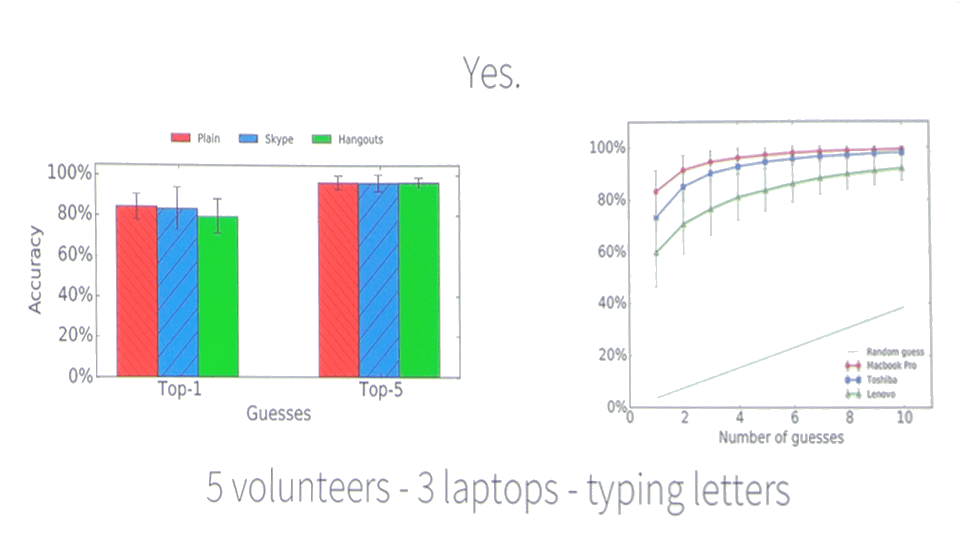
During the investigation, researchers took five volunteers and had them type on 3 different laptops. They recorded their typing with the audio (under three variations: plain recording, Skype recording and Hangouts recording) and then tried to figure out what they had written.

The software researchers used for the test correctly determined the five possible keys the volunteer had pressed at each moment 90% of the time, across all three methods of recording. It correctly determined the exact key that had been pressed between 70-80% of the time, depending on the type of recording.

skype-and-type-2add

In this way, researchers concluded that we should be careful when typing while on a call. If somebody manages to intercept our conversation, record our typing and use the right software, our privacy could be ruined.

Of course, this situation isn’t exactly commonplace. At the presentation, researchers used scaremongering to get the public’s attention. That’s why I’m sticking to Kaspersky’s more moderate conclusions:

“The threat of ‘input interception’ over Skype does not look too serious, but it’s worth knowing about, especially if you sometimes deal with confidential information.

Here Kaspersky says that it’s possible that this type of thing could occur with people who work with private information; they could be spied on with the method of recording their typing and later figuring out the keys they pressed.

“And let’s face it, typing during conversations is not very courteous; hence, avoiding that kind of multitasking will both protect your privacy and show respect for your conversation partner. However, if you find yourself in a middle of an especially long and tiresome conference call, observe the golden rule: Anyone who is not speaking should mute his or her microphone until it’s time to talk.

Source: Kaspersky’s blog

New Google Apps to Take On Skype, Facetime and Whatsapp

Google’s solution for free mobile calls and messaging was introduced to us earlier this week and is positioned to take on the likes of Apple’s Facetime, Microsoft’s Skype and Whatsapp.

Google Duo

The first of the two apps is Google Duo, a video-calling application that, unlike Facetime, is available on both Android and iOS. This means that you’ll now be able to make free calls to all your friends and family, regardless if they’re using an Android or iOS device.

The one feature that Google hopes will get you very excited about is Knock Knock. Not found on rival apps, Knock Knock lets you preview who’s on the other end of the call, and lets you decide if it’s worth getting out of that meeting to pick up.


Google Allo

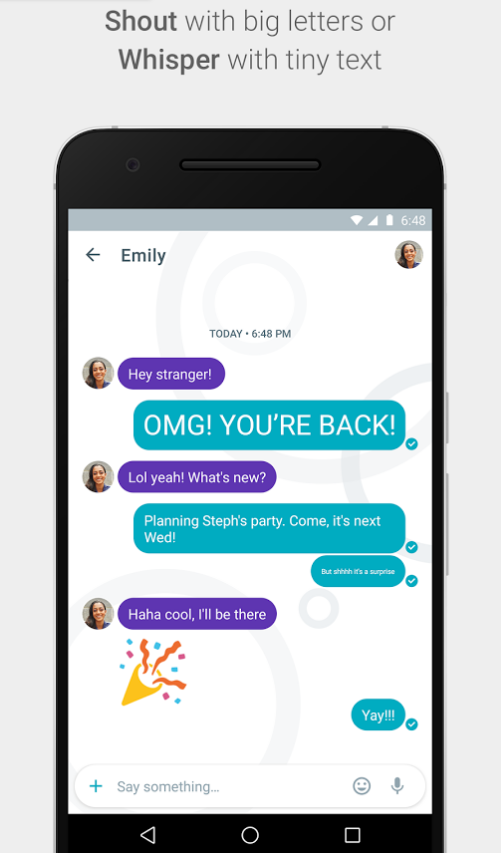
The second app is called Google Allo – a smarter, more feature-packed version of Whatsapp. With Allo, you get to make Google searches directly within the messaging app, get predictive reply suggestions, write in bigger or smaller font to simulate shouting or whispering to the other person, and many other features.

Allo Shout

Allo assistant


So when can you get your hands on these apps?


If you’re in the US, you’re in luck! Google Duo is already available on Google Play and the App Store, and for the rest of you, Google says that they will be available worldwide “in the next few days”.


There is no word yet on Google Allo’s launch date.


However, you can now pre-register for both Google Duo and Allo on Google Play, so that you get (presumably) a notification when these apps are available in your region. iOS users, you’ll just have to watch this space.


Let us know what you think about these two apps in the comments below!

Facebook Messenger launches a feature that Skype won’t be happy about

Facebook Messenger just launched one of its most-desired features: group calls. Do you want to start using this function right now? Simply update the app on either your Android or iPhone device, and you’re pretty much ready to go!

The group calls from Facebook Messenger allows you to talk to up to 50 people at any one time. To start a group call, simply create a group chat (as you normally would), and click the new red call button. The other members of the group will have the option to either accept or reject the call.

With this new option, Facebook Messenger is now able to compete with the likes of Google Hangouts, or Skype. Of course, this feature is a little late to be introduced, but you can’t say that it won’t make your life easier! Enjoy!

5 Skype Tips and Tricks You Need to Know

Skype’s popularity has skyrocketed with over 74 million users worldwide, and it’s even more useful when you know some simple tips and tricks. Here are a few of the extra features in Skype you probably aren’t aware of (yet):

1. Transfer Your Skype Contacts to Another Skype Account

If you decide to add or swap Skype accounts, you don’t have to lose all your contacts in the process. You can backup the contacts or transfer all of your contacts from one account to another. Go to the main Skype screen and click on “Contacts”. Then select “Advanced” and click the option to “Backup Contacts to File”. This action generates a file (in the .vcf format) that can be saved directly to your computer. If you would like to transfer these contacts into another Skype account, just select “Contacts” and choose the option called “Advanced”. Click the option “Restore Contacts From File”. That will let you load your contacts into a different Skype account.

2. Make Calls Using the List of Contacts

You can make calls directly to any of the contacts in your Skype list. Go to the main Skype page and choose the option “Tools”. From there, select “Options”. Here, click on “General Settings” and then put a checkmark in the box next to “When I double-click on a contact start a call”. Double-click on any of the contacts in the list and it will make the call immediately.

3. Edit a Message You Already Sent

Sometimes, you type in a message and accidentally typed something wrong. You can edit this message and resend it. Press the up arrow on the computer keyboard. This will bring up the last message that you sent. Make the changes directly from there and then resend the edited message.

4. Get Access to More Than 25 Additional (Secret!) Emoticons

Most users are unaware that there is a whole set of hidden smiley faces and emoticons that you can’t even see from the regular emoticons in Skype. You can access these using their shortcodes. Here are just a few of the shortcodes you can use to insert one of the hidden emoticons:

• (talk)

• (headbang)

• (bug)

• (u) — this is a broken heart

• (e) (m) — this is a mail icon

• (skype) — the Skype logo

You can get a complete listing of the hidden Skype emoticons and their shortcodes here.

5. Set Your Chat History to Automatically Delete

If you want to clear out your chat history, you can set Skype to automatically dispose of all chat messages and sessions as often as you like. Go to the main Skype screen and select “Tools”. Then click on “Options”. Now select “IM & SMS” and choose the selection called “IM Settings”. From there, choose “Show Advanced Options”. Next, click on “Clear History”. This will clear out all of your current chat histories. If you want to tell Skype to regularly cleanse your chat histories, proceed to “Show Advanced Options”. There, you can choose how long you want Skype to keep your chat history using the drop down menu.

If you love Skype, check out Line for even more online chatting options!